
























MiniMost is a lightweight, self-hosted chat platform built for private networks. It runs entirely on Python and SQLite — no external database, no root access, no infrastructure required. Just Flask and a browser.
Quick start
pip install minimost   # 1. install (only needs Python 3.6+ and Flask)
minimost               # 2. run → https://127.0.0.1:5000
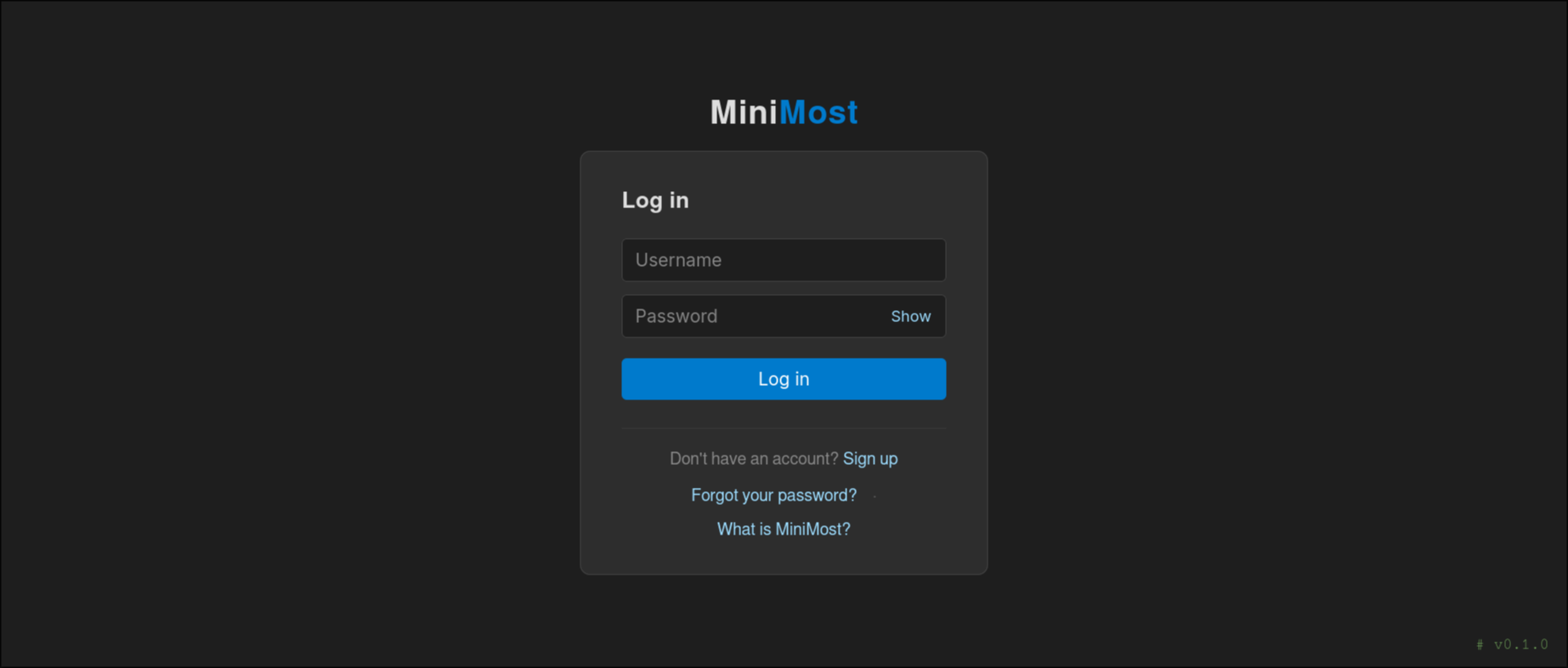
Open the URL, sign up with any username and password, and start chatting. To let others on your network join:
minimost --host 0.0.0.0 # listen on all interfaces
Then point a browser at https://<server-ip>:5000, accept the self-signed certificate warning once, and you're done — no database to provision, no accounts to pre-create, no internet required.
On Red Hat / Fedora? Skip pip and install the packaged systemd service straight from COPR — see On Red Hat / Fedora (COPR).
Screenshots
Features
- ⚡ Sign up in seconds — pick a username and password and you're in; no email verification, no waiting. Changed your mind? Accounts can be deleted just as quickly.
- 🔒 Your password stays secret — passwords are hashed and salted (PBKDF2) with enforced complexity, so not even the server admin can see what you typed.
- 📁 Messages are read-protected — the message database is locked down on disk, so your conversations aren't sitting around for anyone to open.
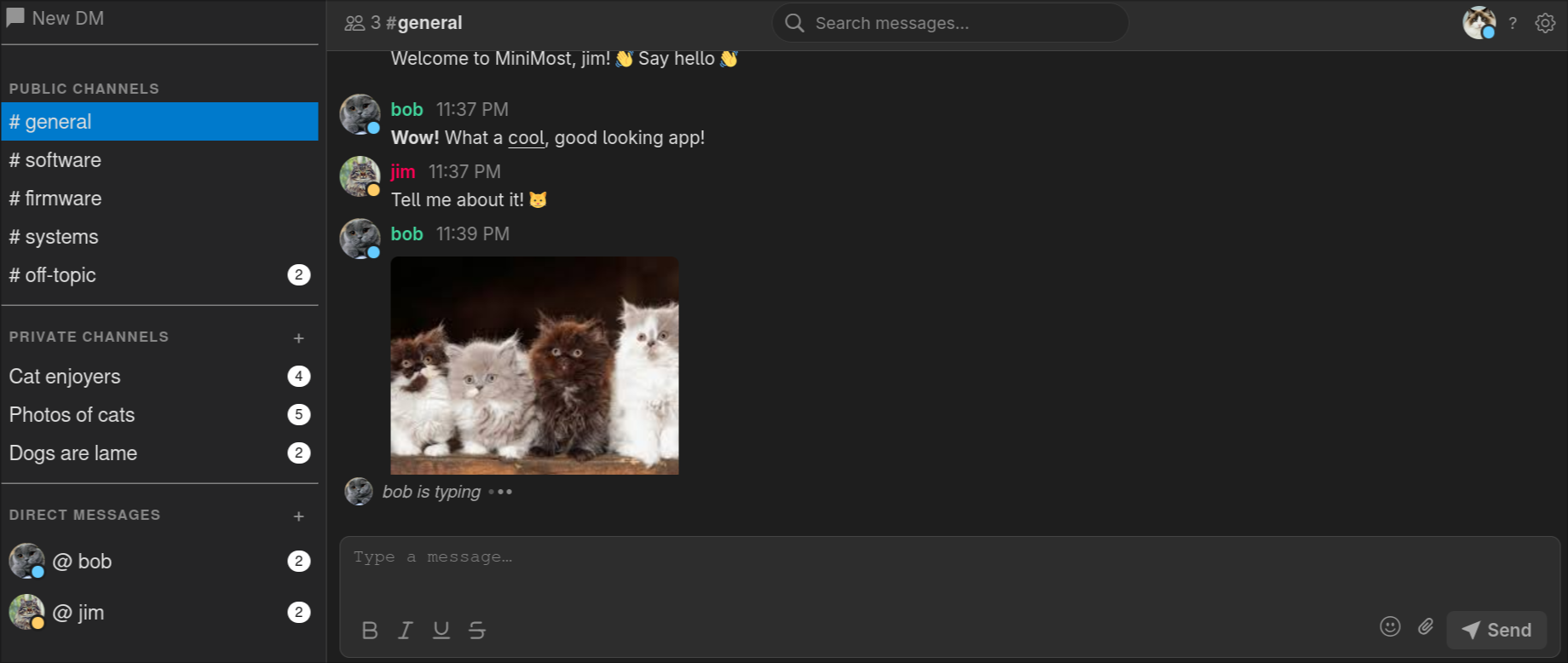
- 💬 Channels & direct messages — public channels (configurable), invite-only private channels you can rename and manage, and one-on-one or group DMs that keep going so anyone can catch up on what they missed.
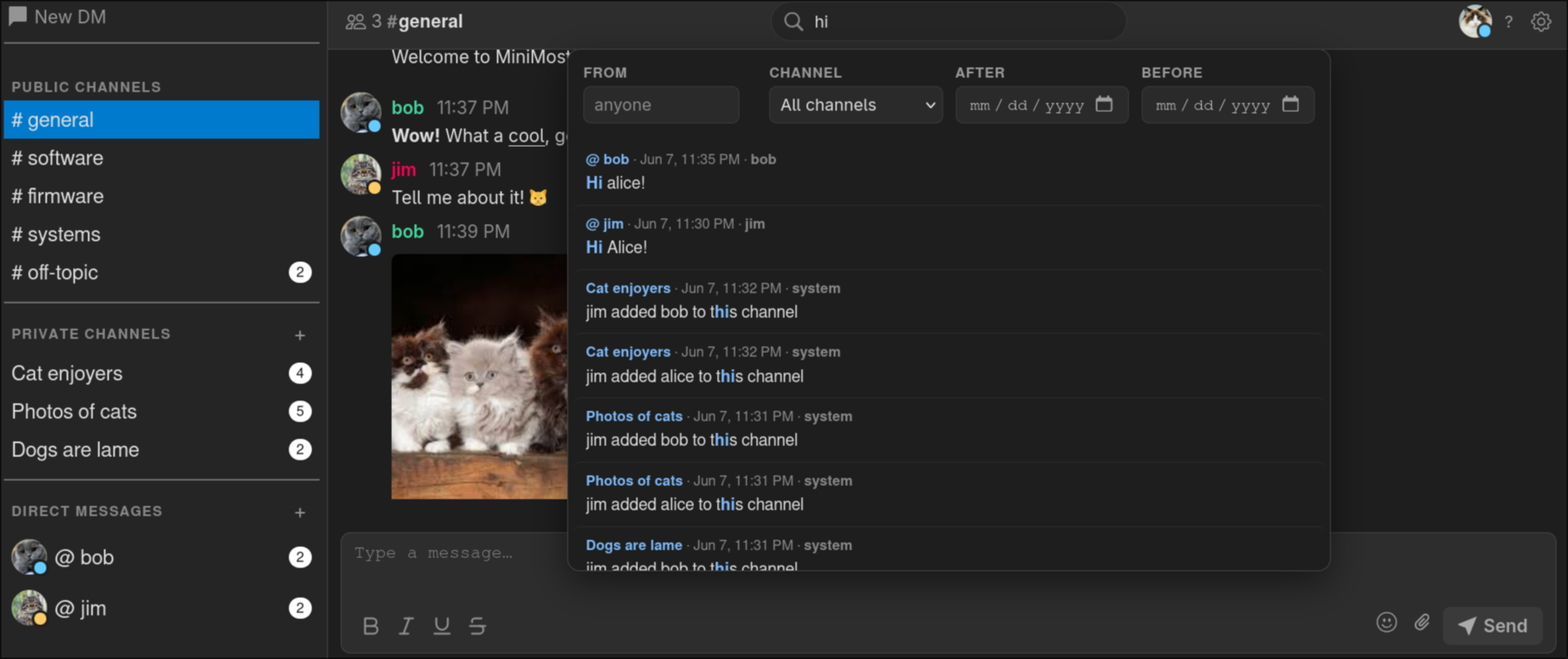
- 🔍 Every message is saved & searchable — nothing disappears, and full-text search finds any message in an instant. New users see the history from day one.
- 📷 Images show up inline — paste, drag-and-drop, or use the paperclip button to attach any file. Images embed right in the conversation; everything else becomes a download link.
- ✏️ Replies, edits & reactions — quote any message to reply in context, edit or delete your own messages, and react with emoji. Every change syncs to everyone in real time.
- 👀 Presence, typing & @mentions — see who's online, watch the typing dots, and ping the right person with an @mention (or
@everyone). Mentions alert you with a sound and desktop notification even while the tab is focused, and read receipts show who's seen your messages. - 📞 Voice, video & screen sharing — jump on a call or share your screen right from the chat in any DM or private channel. Calls grow into group calls with the in-call "Add person" button, and participant tiles reflow automatically with live speaking indicators.
- 🛡️ LAN-first, peer-to-peer media — call and screen-share media is sent directly between participants over WebRTC and never touches the server. A small bundled STUN server means there's nothing external to configure — it even works on fully air-gapped LANs.
- 🎨 Make it yours — upload a profile avatar (or use the default initials), pick a display-name colour, and hide DM threads you're done with (they reappear if a new message arrives).
- 🔔 Notifications, your way — desktop and sound alerts are configurable per session and mutable with one click.
- 🖥️ Works everywhere — runs right in your browser on Linux and Windows, with a touch-friendly, mobile-responsive layout, a drawer sidebar, and pinch-to-zoom font sizing.
- 🌙 Dark theme — easy on the eyes.
- 🧹 Tidies up after itself — a background thread automatically removes old messages and attachments past a configurable age (default: 770 days for messages, 30 for files) and trims the oldest content once the database or uploads grow past a size cap. Runs every 24 hours, no cron job required.
- 🗑️ Account self-deletion — delete your own account from Settings. A soft delete re-attributes your messages to "Deleted User" while preserving chat history; a hard delete removes every message you ever sent. Both require password confirmation.
- 🔑 Admin password reset — generate a one-time, time-limited reset URL from the CLI; the user gets an in-app notification when a reset is requested.
Free, MIT licensed, and fully auditable
MiniMost is released under the MIT License — free to use, free to modify, and free to redistribute, with no strings attached.
- 💯 Truly free — there's no license to set up, no activation key, no seat count to track, and no paid tier hiding features behind a paywall.
- 👥 No user limit — invite your whole team, your whole company, or your whole LAN. The software never counts heads or asks you to upgrade.
- 🔍 Every line is open to inspect & audit — all of the code is right here in this repository. Unlike "open core" products that ship a stripped-down public version while keeping the real functionality closed, there is no hidden enterprise edition and nothing held back. What you read is exactly what you run.
How MiniMost compares
MiniMost trades breadth of features for something most chat platforms can't offer: it's fully open, runs on your own private network with no external services, and installs in one command. Here's how it lines up against common alternatives.
| MiniMost | Mattermost | Cisco Jabber | Microsoft Teams | Slack | Skype¹ | |
|---|---|---|---|---|---|---|
| License | MIT | Open core (source-available + paid EE) | Proprietary | Proprietary | Proprietary | Proprietary |
| Source open & auditable | ✅ Fully — every line public | ⚠️ Core only; enterprise features closed | ❌ | ❌ | ❌ | ❌ |
| Cost | Free, forever | Free core; paid tiers | Paid (Cisco licensing) | Paid (Microsoft 365 plans) | Freemium; paid per-seat tiers | Was free |
| User / seat limit | Unlimited | Free Team Ed. capped (≤250 users) | Per-license | Per-license | Free tier limited; paid per-seat | n/a |
| Self-host on private LAN | ✅ | ✅ | ⚠️ On-prem, needs Cisco UC infra | ❌ Cloud (SaaS) | ❌ Cloud (SaaS) | ⚠️ Consumer cloud; SfB Server is on-prem |
| Works fully air-gapped | ✅ | ⚠️ Possible, with effort | ⚠️ | ❌ | ❌ | ❌ |
| Database | SQLite (bundled, file-based) | PostgreSQL (external, you run it) | Cisco UC backend | Microsoft cloud | Slack cloud | Microsoft cloud |
| Runtime dependencies | Python + Flask | Go binary + DB + reverse proxy | CUCM / IM&P servers | Microsoft 365 tenant | Internet account | Internet account |
| Ease of setup | One pip/dnf command |
Moderate (DB, config, proxy) | Heavy (enterprise infrastructure) | Account signup | Account signup | n/a |
| Voice / video / screen | ✅ P2P WebRTC over LAN | ⚠️ Via calls plugin / integrations | ✅ | ✅ | ✅ | ✅ |
¹ Consumer Skype retired May 2025; Skype for Business Server is on-prem (end of support Oct 2025).
This isn't a feature-count contest — the big platforms have far more functionality (see the FAQ). MiniMost wins only where it's designed to: zero infrastructure, full auditability, and running on a network with no internet at all.
Requirements
- Python 3.6+
- Flask (
pip install flask)
That's it!
Installation
From PyPI (recommended)
pip install minimost
From source
git clone https://github.com/SamuelDonovan/minimost.git
cd minimost
pip install -e .
On Red Hat / Fedora (COPR)
MiniMost is packaged for Fedora, RHEL, and their rebuilds (Rocky, Alma, CentOS Stream) via COPR. This installs MiniMost as a proper RPM with a hardened systemd service — no pip, no virtualenv.
# Enable the COPR repository (one-time). On RHEL/EL, first install the plugin:
#   sudo dnf install -y dnf-plugins-core
sudo dnf copr enable samuel-donovan-fas/Minimost

# Install the package
sudo dnf install minimost

# Start it now and on every boot
sudo systemctl enable --now minimost
The RPM ships a locked-down systemd unit that runs MiniMost under a transient DynamicUser, keeping all state (databases, uploads, TLS material) under /var/lib/minimost. The service listens on HTTPS port 6767 by default:
systemctl status minimost          # check it's running
sudo systemctl restart minimost    # apply settings.json changes
journalctl -u minimost -f          # follow the logs
Browse to https://<server-ip>:6767. Clients can fetch the CA certificate to trust at https://<server-ip>:6767/ca.pem. Remember to open the port (and UDP 3478 for calls) in firewalld:
sudo firewall-cmd --permanent --add-port=6767/tcp
sudo firewall-cmd --permanent --add-port=3478/udp
sudo firewall-cmd --reload
From wheel (latest dev build)
Download the latest .whl from the releases page, then:
pip install minimost-*.whl
Dependencies only (no internet access)
Download the Flask wheel and its dependencies, then:
pip install --user *.whl
Running
minimost
Or without installing:
python3 -m minimost
On first run MiniMost automatically generates a self-signed TLS certificate (cert.pem / key.pem) in pure Python (no openssl binary required) and serves over HTTPS. The server starts at https://127.0.0.1:5000 by default. Use --host and --port to change the bind address:
# Listen on all interfaces (accessible from other machines on the network)
minimost --host 0.0.0.0

# Listen on a specific IP and port
minimost --host 192.168.1.10 --port 8080
To reach the server from another machine, navigate to https://<server-ip>:<port> in a browser. The generated certificate is self-signed, so your browser will show a security warning — add a permanent exception to dismiss it.
Note: HTTPS is required for voice and video calling (browsers only allow camera/microphone and WebRTC access in secure contexts). The certificate is generated in pure Python (standard library only — no
opensslbinary required), so this works the same on Linux, macOS, and Windows.
Note: Calls and screen shares connect peers directly over WebRTC. For this to work, peers must be on the same LAN/subnet and able to reach each other (and the bundled STUN server on UDP
3478, configurable viastun_portinsettings.json) over UDP. No public STUN/TURN server is used, so calls work on air-gapped networks, but they will not traverse the public internet or connect peers on different subnets.
Ports & firewall
| Port | Protocol | Open on | Required for | Notes |
|---|---|---|---|---|
6767 (Gunicorn) / 5000 (dev) |
TCP | Server (inbound) | Everything — web UI, chat, file uploads, call signaling | The only port needed for text chat. Set via --port or gunicorn.conf.py. |
3478 |
UDP | Server (inbound) | Voice/video calls & screen sharing | Bundled STUN server. Set via stun_port in settings.json. |
Ephemeral UDP (Linux 32768–60999) |
UDP | Between clients | WebRTC media (audio/video/screen) | Peer-to-peer, browser-chosen; only matters if clients run host firewalls or sit on segmented LANs. |
No outbound internet access is required (no external database, no public STUN/TURN) — MiniMost runs fully air-gapped. There is no TURN relay, so peers must be on the same LAN/subnet, and SQLite is file-based so there is no database port. See the deployment docs for an administrator setup checklist plus firewalld / ufw examples.
Production deployment
The built-in Flask server is suitable for development and small private networks. For a more robust deployment, run MiniMost behind a WSGI server such as Gunicorn:
pip install gunicorn

# From an installed package (wheel or `pip install -e .`) — uses the config
# module shipped inside the package, so no source checkout is required:
gunicorn "minimost:create_app()" -c python:minimost.gunicorn_conf

# From a source checkout — equivalent thin shim that re-exports the same config:
gunicorn "minimost:create_app()" --config gunicorn.conf.py
Both forms handle automatic TLS certificate generation before Gunicorn starts. The bundled gunicorn.conf.py is a thin shim around the packaged minimost.gunicorn_conf module, so the two are interchangeable.
Configuration
Edit settings.json (bundled with the package at src/minimost/settings.json) to configure MiniMost. All keys are optional and fall back to sensible defaults if omitted:
{
  "channels": ["general", "software", "firmware", "systems", "off-topic"],
  "image_retention_days": 30,
  "file_retention_days": 30,
  "message_retention_days": 770,
  "max_message_db_size_mb": 1024,
  "max_upload_dir_size_mb": 2048,
  "max_upload_size_mb": 25,
  "max_avatar_size_mb": 5,
  "stun_port": 3478,
  "max_login_attempts": 5,
  "lockout_duration_minutes": 15,
  "rate_limit_enabled": true,
  "max_event_streams_per_user": 12,
  "rate_limits": {
    "login": [60, 60],
    "signup": [20, 3600],
    "password_reset": [30, 3600],
    "send": [240, 60],
    "avatar": [60, 3600],
    "create_channel": [60, 3600]
  }
}
MiniMost bounds disk usage two complementary ways: age-based retention deletes content once it gets old enough, and size-based caps delete content once a store grows past a limit (whichever triggers first). Size-cap eviction is fair — the account consuming the most space is trimmed first — so one user flooding messages or uploads cannot delete everyone else's data. Note the difference between the two upload settings: max_upload_size_mb is a per-file ceiling enforced at upload time, while max_upload_dir_size_mb caps the total size of all stored attachments.
MiniMost also includes built-in denial-of-service throttles (no external dependency): per-IP/per-user rate limits on abuse-prone routes (login, signup, message send, uploads) and a cap on concurrent live-update streams per user. They are generous enough that normal use never trips them; tune or disable them with the rate_limit_enabled, max_event_streams_per_user, and rate_limits keys below.
| Key | Default | Description |
|---|---|---|
channels |
["general"] |
Public channel names shown in the sidebar. Restart required. |
image_retention_days |
30 |
Days before image attachments are auto-deleted. No restart needed. |
file_retention_days |
30 |
Days before non-image attachments are auto-deleted. No restart needed. |
message_retention_days |
770 |
Days before messages are permanently deleted from the database. No restart needed. |
max_message_db_size_mb |
1024 |
Total size cap (MB) for the message database users/messages.db; the heaviest sender's oldest messages are deleted when exceeded. 0 disables. No restart needed. |
max_upload_dir_size_mb |
2048 |
Total size cap (MB) for the uploads/ attachment directory; the heaviest uploader's oldest files are deleted when exceeded. 0 disables. No restart needed. |
max_upload_size_mb |
25 |
Maximum size in MB for a single file attachment, rejected at upload time. Restart required. |
max_avatar_size_mb |
5 |
Maximum size in MB for a profile avatar upload. Restart required. |
stun_port |
3478 |
UDP port for the bundled STUN server used by WebRTC calls/screen share. Must be 1–65535. Restart required. |
max_login_attempts |
5 |
Consecutive failed logins before an account is locked. Set to 0 to disable lockout. No restart needed. |
lockout_duration_minutes |
15 |
How long an account stays locked after too many failed logins. No restart needed. |
rate_limit_enabled |
true |
Master switch for the built-in DoS throttles (request rate limits + SSE stream cap). Restart required. |
max_event_streams_per_user |
12 |
Max concurrent live-update (/events) streams a single user may hold open. Excess connections get 429. No restart needed. |
rate_limits |
(see above) | Per-route request limits as {action: [max, window_seconds]}. Omitted actions keep their default. Returns 429 when exceeded. No restart needed. |
Keyboard Shortcuts
Messaging
| Key | Action |
|---|---|
Enter |
Send message |
Shift + Enter |
New line |
@ |
Open the mention dropdown (↑/↓ navigate, Enter/Tab accept) |
Esc |
Unfocus input / close menus |
Navigation
| Key | Action |
|---|---|
i |
Focus message input |
o |
Start a new DM |
/ or f |
Search messages |
j / k |
Scroll down / up |
d / u |
Scroll down / up (2×) |
G |
Jump to bottom |
g |
Jump to top |
Ctrl + J / Ctrl + K |
Next / previous channel |
? |
Open help menu |
Visual Mode
Press v in normal mode (input unfocused) to enter visual mode, which highlights a single message for direct keyboard actions. The topbar shows -- visual -- while active.
| Key | Action |
|---|---|
v |
Enter visual mode (selects most recent message) |
j / ↓ |
Move selection to next (newer) message |
k / ↑ |
Move selection to previous (older) message |
d |
Delete highlighted message |
c |
Edit highlighted message |
o |
Reply to highlighted message |
y |
Copy highlighted message text to clipboard |
e |
React to highlighted message with emoji |
Esc |
Exit visual mode |
Text Formatting
| Key | Action |
|---|---|
Ctrl + B |
Bold |
Ctrl + I |
Italic |
Ctrl + U |
Underline |
Ctrl + S |
All formatting uses Markdown syntax (underline uses __text__). Shortcuts work on selected text or toggle the format on/off while typing.
Media & Display
- Attach files — paste from clipboard, drag onto the message box, or use the paperclip button; any file type is accepted
- Images are displayed inline; all other file types appear as a download link showing the original filename
- File size limit — configurable per-upload maximum (default 25 MB); the browser warns before attempting an oversized upload
- Font size — pinch (mobile) or
Ctrl + Scroll(desktop); preference is saved across sessions
Security
- Passwords are salted and hashed with PBKDF2 via Werkzeug — no plaintext or bare SHA-256 storage
- Password complexity is enforced on both frontend and backend (8+ characters, uppercase, number, special character)
- All database queries use parameterized statements — no SQL injection surface
- Messages live in a single shared SQLite database; every read enforces channel access control (public channels, private-channel membership, and DM participation)
- SAST scanning via Bandit, Semgrep, CodeQL, and SonarCloud in CI
- Dependency vulnerabilities audited on every push with pip-audit
- Flask debug mode is disabled in production
FAQ
Are messages encrypted?
Messages are not end-to-end encrypted. All data lives in SQLite files on the server filesystem. These files are not world-readable, but an administrator with filesystem access can read/audit them. Treat this as an internal LAN tool, not a secure messenger.
What if a user forgets their password?
An administrator can generate a one-time reset link from the command line:
minimost reset-password <username>
This prints a URL valid for 60 minutes (configurable with --expires) and sends the user an in-app notification via a system DM. Share the URL with the user through another channel (email, phone, etc.). When they open it, they can set a new password. The link expires after use or when the timer runs out — whichever comes first. Run minimost reset-password --help for all options.
Does it have feature X from Slack/Discord/Mattermost?
Probably not. Those products have hundreds of engineers and years of development. MiniMost is intentionally minimal — the goal is something that runs anywhere with zero infrastructure overhead.
Where do the notification and call sounds come from?
Nowhere — they are synthesised from scratch by tools/gen_sounds.py, which is committed alongside the audio it produces. Nothing was taken from a sample library, so the six MP3s are original work with no third-party licence and no attribution requirement: MiniMost can be redistributed and used commercially without tracking terms for a handful of UI blips. To retune one, edit its recipe in that script and re-run it (needs numpy and ffmpeg; neither is a runtime dependency). See the Sound Design docs for the full set and how they are built.
1 maintainer

Release files for minimost 0.0.4
For a detailed explanation of source distributions (sdists) and built distributions (wheels), please see the package formats documentation.
Built distribution (wheel)
| File | Interpreter | ABI | Platform | Reset |
|---|---|---|---|---|
| minimost-0.0.4-py3-none-any.whl | Python 3 | none | any | Details |
Release files / minimost-0.0.4-py3-none-any.whl
| Download URL | minimost-0.0.4-py3-none-any.whl |
|---|---|
| Size | 1.7 MB |
| Tags | Python 3 |
|
SHA-256 checksum How to use checksums |
fba116333dcdb049e5d46f47c136188cb736580934bce70f220aad988081ac72
|
|
BLAKE2b-256 checksum How to use checksums |
1d197997770a204812a9add4a21d31190c52be938fbb327d0d88d4133b979acf
|
| Upload date | |
|
Uploaded using Trusted Publishing? What is trusted publishing? |
No |
| Uploaded via |
twine/7.0.0 CPython/3.14.6
|














