
Mininterface — one dataclass becomes your CLI, your config file, and your GUI/TUI/web form


Write the program core; let a single configuration dataclass be your command-line parser, your YAML config, and — for free — a GUI/TUI/web dialog. Headless-safe by default: the same file runs unattended in cron and pops a form when a human runs it.
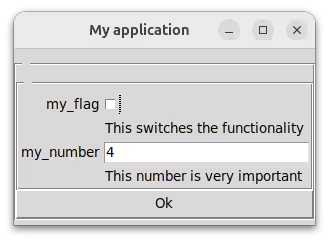
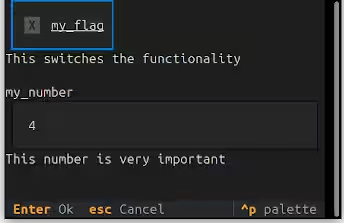
Check out the surprisingly short code that displays such a window – or its textual fallback.
from dataclasses import dataclass
from mininterface import run

@dataclass
class Env:
    """ This calculates something. """

    my_flag: bool = False
    """ This switches the functionality """

    my_number: int = 4
    """ This number is very important """

if __name__ == "__main__":
    m = run(Env, title="My application")
    m.form()
    # Attributes are suggested by the IDE
    # along with the hint text 'This number is very important'.
    print(m.env.my_number)
You grow into the UI; you don't pay for it up front. Start with a plain CLI tool. The day you want a settings dialog, a subcommand picker, or a web form, you rewrite nothing — the same dataclass that defined your
--flagsalready defines the form. argparse/click hand you a parser; mininterface hands you a parser that can become an interface the moment you need one.
Contents
- You got CLI
- Two ways to call
run() - You got config file management
- You got dialogs
- Background
- Installation
- Docs
- Gallery
- Examples
You got CLI
That was all the code you need. No lengthy blocks of code imposed by an external dependency. Besides the GUI/TUI/web, you receive powerful YAML-configurable CLI parsing.
$ ./program.py --help
usage: program.py [-h] [-v] [--my-flag | --no-my-flag] [--my-number INT]

This calculates something.

╭─ options ───────────────────────────────────────────────────────────────╮
│ -h, --help             show this help message and exit                  │
│ -v, --verbose          Verbosity level. Can be used twice to increase.  │
│ --my-flag, --no-my-flag                                                 │
│                        This switches the functionality (default: False) │
│ --my-number INT        This number is very important (default: 4)       │
╰─────────────────────────────────────────────────────────────────────────╯
Two ways to call run()
As config — pass a dataclass; read the parsed values off .env:
m = run(Config)
print(m.env.my_number)
As subcommands — pass a list of Command subclasses. run() parses the CLI, selects the
one subcommand, and calls its .run() for you; .env holds that chosen instance:
from dataclasses import dataclass
from mininterface import run
from mininterface.cli import Command

@dataclass
class Build(Command):
    target: str = "release"
    def run(self):
        print("building", self.target)

@dataclass
class Deploy(Command):
    host: str
    def run(self):
        print("deploying to", self.host)

run([Build, Deploy])        # ./app.py build --target debug  ->  Build.run()
Both modes are headless-safe by default (ask_on_empty_cli=False): a fully-defaulted
invocation runs straight through with no prompt, so one file serves cron and an interactive
user. Subcommands can share options by inheriting a common Command parent.
You got config file management
Loading a config file is a piece of cake. Alongside program.py, write some of its arguments into program.yaml. They are seamlessly taken as defaults.
my_number: 555
$ program.py --help
...
│ --my-number INT        This number is very important (default: 555)     │
You got dialogs
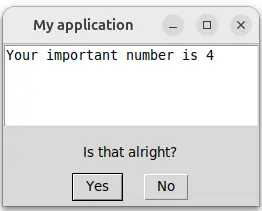
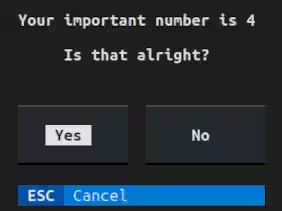
Check out several useful methods for handling user dialogs. Here we bind the interface to a with statement that redirects stdout directly to the window.
with run(Env) as m:
    print(f"Your important number is {m.env.my_number}")
    boolean = m.confirm("Is that alright?")
Background
Wrapper between various libraries that provide a user interface.
It allows you to focus on writing the program's core logic without worrying about input/output. It generates CLI arguments, parses the config file, and shows a UI. Depending on the environment, the dialogs automatically use either a GUI, a mouse-clickable TUI, a lightweight terminal text interface, or become available via HTTP — all while maintaining exactly the same functionality.
Writing a small and useful program might be a task that takes fifteen minutes. Adding a CLI to specify the parameters is not so much overhead. But building a simple GUI around it? HOURS! Hours spent on researching GUI libraries, wondering why the Python desktop app ecosystem lags so far behind the web world. All you need is a few input fields validated through a clickable window... You should not have to add hundreds of lines of code just to define a few editable fields. Mininterface is here to help.
The config variables needed by your program are kept in cozy dataclasses. Write less! The tyro syntax requires no overhead (unlike its argparse alternatives). You just annotate a class attribute, append a simple docstring, and get a fully functional application:
- Call it as
program.py --helpto display full help. - Use any flag in CLI:
program.py --my-flagcausesenv.my_flagto be set toTrue. - The main benefit: Launch it without parameters as
program.pyto get a fully working window with all the flags ready to be edited. - Running on a remote machine? It automatically falls back to the text interface.
- Or access your program via web browser.
Installation
Install with a single command from PyPi.
pip install "mininterface[all]<2" # GPLv3 and compatible
Bundles
There are various bundles. We mark the least permissive licence in the bundle.
| bundle | size | licence | description |
|---|---|---|---|
| mininterface | 1 MB | LGPL | minimal – only text dialogs |
| mininterface[basic] | 25 MB | LGPL | CLI, GUI, TUI |
| mininterface[web] | 40 MB | LGPL | including WebInterface |
| mininterface[img] | 40 MB | LGPL | image support (GUI and TUI) |
| mininterface[tui] | 40 MB | LGPL | TUI with image support |
| mininterface[gui] | 70 MB | GPL | images, combobox, calendar |
| mininterface[ui] | 90 MB | GPL | full installation |
| mininterface[all] | 90 MB | GPL | full installation, same as ui, reserved for future use (big dependencies, optional interfaces) |
Apart from the minimal bundle (which lacks CLI and dataclass support), they have the same functionality, differing only in the user experience.
!!! tip
For automated testing (e.g., in CI environments), the mininterface[basic] bundle is sufficient.
MacOS GUI
If the GUI does not work on MacOS, you might need to launch: brew install python-tk
Docs
See the docs overview at https://cz-nic.github.io/mininterface/.
Gallery
These projects have the code base reduced thanks to the mininterface:
- deduplidog – Find duplicates in a scattered directory structure
- touch-timestamp – A powerful dialog to change the files' timestamp
Examples
Hello world
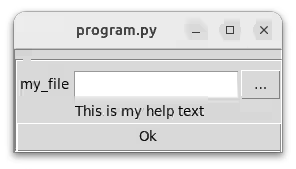
Take a look at the following example.
- We define an Env class.
- Then, we initialize mininterface with
run(Env)– the missing fields will be prompted for - Then, we use various dialog methods, like
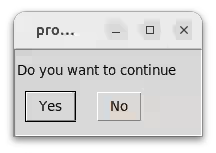
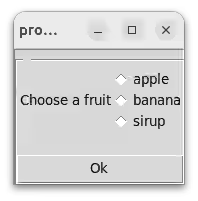
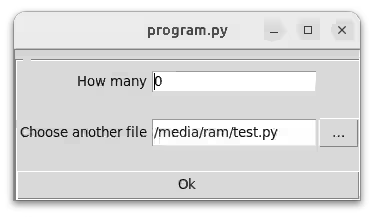
confirm,selectorform.
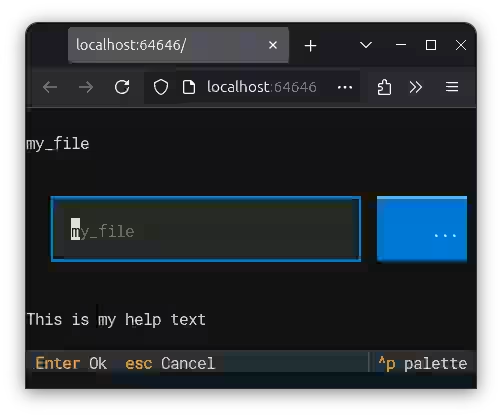
Below, you can find screenshots of how the program looks in various environments (graphic interface, web interface...).
from dataclasses import dataclass
from pathlib import Path
from mininterface import run

@dataclass
class Env:
  my_file: Path  # This is my help text
  my_flag: bool = False
  my_number: int = 4

if __name__ == "__main__":
    # Here, the user will be prompted
    # for missing parameters (`my_file`) automatically
    with run(Env) as m:

      # You can lean on the typing
      # Ex. directly read from the file object:
      print("The file contents:", m.env.my_file.read_text())

      # You can use various dialog methods,
      # like `confirm` for bool
      if m.confirm("Do you want to continue?"):

        # or `select` for choosing a value
        fruit = m.select(("apple", "banana", "sirup"), "Choose a fruit")

        if fruit == "apple":
          # or `form` for arbitrary values
          m.form({
            "How many": 0,
            "Choose another file": m.env.my_file
          })
Launch with ./program.py:
Or on a remote machine MININTERFACE_INTERFACE=tui ./program.py:
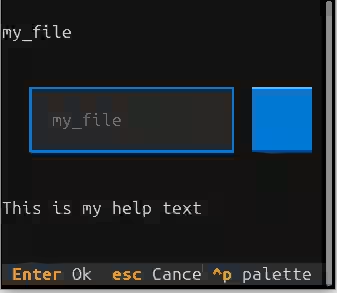
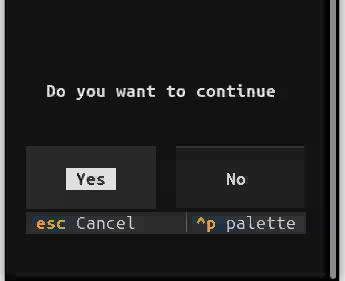
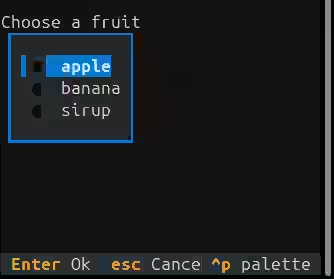
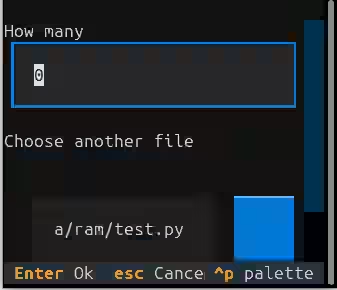
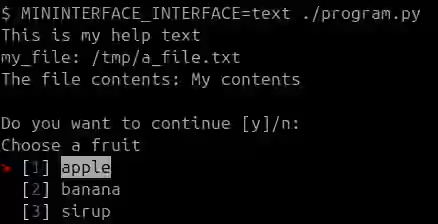
Or via the plain text MININTERFACE_INTERFACE=text ./program.py:
Or via web browser MININTERFACE_INTERFACE=web ./program.py:
You can always set the Env via the CLI or a config file:
$ ./program.py --help
usage: program.py [-h] [OPTIONS]

╭─ options ──────────────────────────────────────────────────────────────╮
│ -h, --help             show this help message and exit                 │
│ -v, --verbose          Verbosity level. Can be used twice to increase. │
│ --my-file PATH         This is my help text (required)                 │
│ --my-flag, --no-my-flag                                                │
│                        (default: False)                                │
│ --my-number INT        (default: 4)                                    │
╰────────────────────────────────────────────────────────────────────────╯
Goodbye argparse world
Do you want to try out Mininterface with your current ArgumentParser?
You're using positional arguments, subparsers, types in the ArgumentParser... Mininterface will give you an immediate benefit. Just wrap it in the run method.
#!/usr/bin/env python3
from argparse import ArgumentParser
from datetime import time
from pathlib import Path

from mininterface import run

parser = ArgumentParser()
subparsers = parser.add_subparsers(dest="command", required=True)
sub1 = subparsers.add_parser("build", help="Build something.")
sub1.add_argument("--optimize", action="store_true", help="Enable optimizations.")
parser.add_argument("input_file", type=Path, help="Path to the input file.")
parser.add_argument("--time", type=time, help="Given time")

# Old version
# env = parser.parse_args()
# env.input_file  # a Path object

# New version
m = run(parser)
m.env.input_file  # a Path object

# Live edit of the fields
m.form()
Now, the help text looks much better. Try it in the terminal to see the colours.
$ ./program.py --help
usage: program.py [-h] [OPTIONS] PATH

╭─ positional arguments ──────────────────────────────────────────────────╮
│ PATH                    Path to the input file. (required)              │
╰─────────────────────────────────────────────────────────────────────────╯
╭─ options ───────────────────────────────────────────────────────────────╮
│ -h, --help              show this help message and exit                 │
│ -v, --verbose           Verbosity level. Can be used twice to increase. │
│ --time HH:MM[:SS[…]]    Given time (default: 00:00:00)                  │
╰─────────────────────────────────────────────────────────────────────────╯
╭─ build options ─────────────────────────────────────────────────────────╮
│ --build.optimize, --build.no-optimize                                   │
│                         Enable optimizations. (default: False)          │
╰─────────────────────────────────────────────────────────────────────────╯
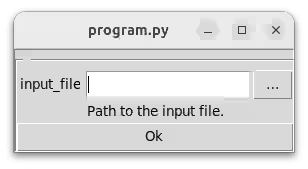
And what happens when you launch the program? First, Mininterface asks you to provide the missing required arguments. Note the button that opens a file picker dialog.
Then, a .form() call will create a dialog with all the fields.
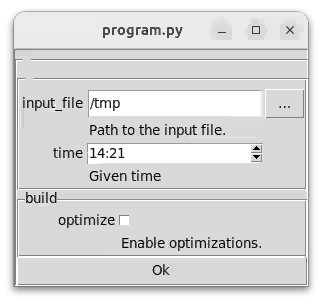
You then access the arguments through m.env:
print(m.env.time) # -> 14:21
Once you decide to adopt Mininterface, convert the argparse definition into a dataclass. Then, the IDE will auto-complete the hints as you type.
!!! warning The argparse support is meant mostly for evaluation, as there are some differences for advanced argparse CLI interfaces.
2 maintainers


Metadata
2 maintainers
Release files for mininterface 1.4.0
For a detailed explanation of source distributions (sdists) and built distributions (wheels), please see the package formats documentation.
Source distribution (sdist)
| File | Size | Uploaded | |
|---|---|---|---|
| mininterface-1.4.0.tar.gz | 145.7 kB | Details |
Built distribution (wheel)
| File | Interpreter | ABI | Platform | Reset |
|---|---|---|---|---|
| mininterface-1.4.0-py3-none-any.whl | Python 3 | none | any | Details |
Total release size: 325.6 kB
Release files / mininterface-1.4.0.tar.gz
| Download URL | mininterface-1.4.0.tar.gz |
|---|---|
| Size | 145.7 kB |
| Tags | Source |
|
SHA-256 checksum How to use checksums |
0ed57f57e45974211c8a4c82fe857e3fdc04152715ee5f7d42cb24f1e2fb3758
|
|
BLAKE2b-256 checksum How to use checksums |
041c3029eec3b8cb9cdaf378662d481710e6c8b96896cbd53788b8d79d2c95be
|
| Upload date | |
|
Uploaded using Trusted Publishing? What is trusted publishing? |
No |
| Uploaded via |
twine/6.1.0 CPython/3.13.12
|
Release files / mininterface-1.4.0-py3-none-any.whl
| Download URL | mininterface-1.4.0-py3-none-any.whl |
|---|---|
| Size | 179.9 kB |
| Tags | Python 3 |
|
SHA-256 checksum How to use checksums |
356fb01825f9659fc5a4f5b21b71156cfce0c691a45ae7ef5b8b42a4e65ee345
|
|
BLAKE2b-256 checksum How to use checksums |
95ecfd51716080f3574c098bf7bb2769aac8393bd9c98163ff8f772a5f7938b6
|
| Upload date | |
|
Uploaded using Trusted Publishing? What is trusted publishing? |
No |
| Uploaded via |
twine/6.1.0 CPython/3.13.12
|














