
Rationale
You wrote a program a.out with some parameters
You need to explore the space of parameters (or at least a large subset of it)
Minionize is a solution to spawn a legion of a.out in a massively parallel manner. By minionizing your program, your minions will take their inputs from various sources (e.g filesystem, pub/sub) and run it. Also inputs can be acked or redelivered to another minions.
You can also think about minionize as an equivalent to the “| xargs” shell construction but where:
the pipe | can transmit your data from many different sources (not only from the stdout of the previous process)
the xargs can transform the received data before sending them to your program.
That being said, Minionize is a good choice for your besteffort and idempotent computations on scientific testbeds (Igrida, Grid’5000) but also if you need a quick way to turn you binary into a micro-service (e.g for Kubernetes).
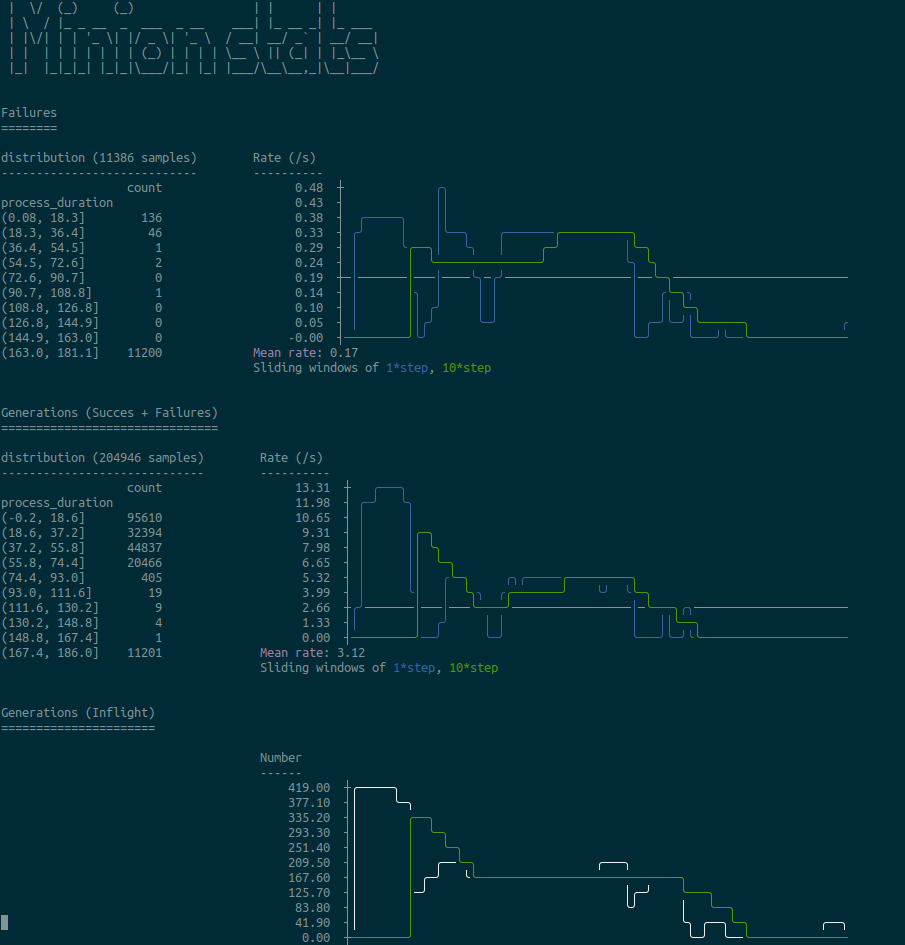
Minionize provides some observability features out-of-the box: it exposes an api to retrieve the stats and a basic cli to display some of them (to be honest, I dream of an mtop: htop for minions). But currently it looks more or less like this:
How does it work
A classical pattern to do the above is to apply the master/worker pattern where a master gives tasks to workers. Workers repeatedly fetch a new task from a queue , run it and report back to the master its status (e.g success, failure). Minionize applies somehow this pattern but is masterless out-of-the box. Indeed modern queue implementations expose APIs to acknowledge/requeue messages.
Currently we support:
- For the pipe | part:
execo based queue: the queue is stored in a shared file system in your cluster (no external process involved)
Google pub/sub based queue: the queue is hosted by Google
Apache pulsar, a pub/sub system you can self-host
file, take inputs from a regular file (e.g stdin)
- For the xargs part:
processes: launch you program isolated in a process upon reception.
functions: launch a python function upon reception.
docker : launch a docker container upon reception.
Some examples
Simplest use case
In this case the received params are appended to the minionized program. If you need more control on the params you’ll need to write your own Callback (see below).
with Execo engine:
# Install the execo minionizer pip install minionize[execo] # Create the queue of params # You'll have to run this prior to launching your minions (adapt to # your need / make a regular script) $) python -c "from execo_engine.sweep import ParamSweeper; ParamSweeper('sweeps', sweeps=range(10), save_sweeps=True)" # start your minions $) MINION_ENGINE=execo minionize echo hello hello 0 hello 1 hello 2 hello 3 hello 4 hello 5 hello 6 hello 7 hello 8 hello 9Record some stats: you need to setup a Reporter to report your stats.
# Install the execo minionizer
pip install minionize[execo]

# Create the queue of params
# You'll have to run this prior to launching your minions (adapt to
# your need / make a regular script)
$) python -c "from execo_engine.sweep import ParamSweeper; ParamSweeper('sweeps', sweeps=range(10), save_sweeps=True)"

# start your minions
MINION_ENGINE=execo MINION_REPORTER=json minionize sleep

# read the stats (while running or no)
MINION_REPORTER=json minion-status
On a OAR cluster (Igrida/Grid5000):
Generate the queue for example with Execo
python -c "from execo_engine.sweep import ParamSweeper; ParamSweeper('sweeps', sweeps=range(1000), save_sweeps=True)"Create your oar scan script:
#!/usr/bin/env bash

#OAR -n kpd
#OAR -l nodes=1,walltime=1:0:0
#OAR -t besteffort
#OAR -t idempotent

# oarsub --array 10 -S ./oar.sh

set -eux

pip install minionize

minionize echo "hello from $OAR_JOB_ID"
Start your minions
echo "MINION_ENGINE=execo" > .env oarsub --array 10 -S ./oar.shExample of output:
$) cat OAR.1287856.stdout
[...]
hello from 1287856 135
hello from 1287856 139
hello from 1287856 143
hello from 1287856 147
hello from 1287856 151
hello from 1287856 155
hello from 1287856 159
hello from 1287856 163
hello from 1287856 167
[...]
Custom Callbacks
The params sent to your program can be anything (e.g a python dict). In some cases (many actually), you’ll need to transform these params to something that you program can understand. So you’ll need to tell minionize how to minionize. This is achieved using specific callbacks.
The easiest way to write a custom callbacks is to inherit from ProcessCallback or FuncCallback. With these Callbacks you don’t have to worry about the acknowledgement logic.
#   a.out is invoked like this: a.out --arg1 varg1 varg2
#   but the queue holds json like object:
#   {"arg1": varg11, "arg2": varg21}, {"arg1": varg12, "arg2": varg22} ...
# we can write a custom ProcessCallback which overrides the to_cmd method

class MyProcessCallBack(ProcessCallback):
    def to_cmd(param: Param):
        return f"a.out --arg1 {param['arg1']} {param['arg2']}"

m = minionizer(MyProcessCallback())
m.run()
# you want to minionize a python function `my_function`
# but the queue holds json like object:
# {"arg1": varg11, "arg2": varg21}, {"arg1": varg12, "arg2": varg22} ...
# we can use the FuncCallback for this purpose
def myfunc(...)
# this is your function
def _myfunc(param: Param)
# this is the wrapper which invokes myfunc based on the params
return myfunc(param["arg1"], param["arg2"])
m = minionizer(FuncCallback(_myfunc))
m.run()Environment variables
Minionize is configured using environment variables. By default it reads a .env file in the current directory but doesn’t override existing system environment variables.
Default values
--------------------------------------------

# which engine (queue implementation) to use
MINION_ENGINE=execo # google, pulsar

# Execo
EXECO_PERSISTENCE_DIR=sweeps

# Google
GOOGLE_PROJECT_ID=/mandatory/
GOOGLE_TOPIC_ID=/mandatory/
GOOGLE_SUBSCRIPTIOn=/mandatory/
GOOGLE_APPLICATION_CREDENTIALS=/mandatory/
GOOGLE_DECODER=identity


# Pulsar
PULSAR_CONNECTION=pulsar://localhost:6650
PULSAR_TOPIC=/mandatory/
PULSAR_DECODER=identity

---------------------------------------------

# Stat reporter
MINION_REPORTER=null # json, stdout

# Json
REPORTER_JSON_DIRECTORY=minion-report
Roadmap
Easy integration as docker entrypoint
Minionize python function (e.g @minionize decorator)
Support new queues (Apache pulsar, Redis stream, RabbitMQ, Kakfa …)
Support new abstractions to run container based application (docker, singularity…)
Automatic encapsulation using a .minionize.yml
Minions statistics
Keep in touch (matthieu dot simonin at inria dot fr)
1 maintainer

Metadata
1 maintainer
Release files for minionize 0.3.4
For a detailed explanation of source distributions (sdists) and built distributions (wheels), please see the package formats documentation.
Source distribution (sdist)
| File | Size | Uploaded | |
|---|---|---|---|
| minionize-0.3.4.tar.gz | 22.7 kB | Details |
Built distribution (wheel)
| File | Interpreter | ABI | Platform | Reset |
|---|---|---|---|---|
| minionize-0.3.4-py3-none-any.whl | Python 3 | none | any | Details |
Total release size: 45.7 kB
Release files / minionize-0.3.4.tar.gz
| Download URL | minionize-0.3.4.tar.gz |
|---|---|
| Size | 22.7 kB |
| Tags | Source |
|
SHA-256 checksum How to use checksums |
2fe369674401353d1e0fbb01e951decdd9bc81ef239cfd9c5527c2f97cea9fa2
|
|
BLAKE2b-256 checksum How to use checksums |
37ed58365544c9128390f2f3bc40c937b9f450c8700fb30d762f8fefc2381ded
|
| Upload date | |
|
Uploaded using Trusted Publishing? What is trusted publishing? |
No |
| Uploaded via |
poetry/1.0.10 CPython/3.7.5 Linux/4.15.0-128-generic
|
Release files / minionize-0.3.4-py3-none-any.whl
| Download URL | minionize-0.3.4-py3-none-any.whl |
|---|---|
| Size | 23.0 kB |
| Tags | Python 3 |
|
SHA-256 checksum How to use checksums |
12187b515ef5177b6302e442f23fcb84cdf004f44e3730e4d90749e4b71b4021
|
|
BLAKE2b-256 checksum How to use checksums |
d399c17c40916766e1ea823d71db5c0a471d1c8c252207a49fe3301523a99dba
|
| Upload date | |
|
Uploaded using Trusted Publishing? What is trusted publishing? |
No |
| Uploaded via |
poetry/1.0.10 CPython/3.7.5 Linux/4.15.0-128-generic
|














