


Minipy
Minipy is a CLI tool that combines Python tools and games into one program. I created this program to become better in Python and to learn new things. I used some blogs and YouTube videos to make the base of some tools/games, then I customized them and experimented with them.
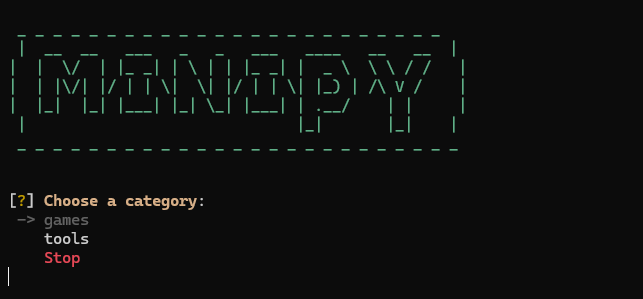
Table of content
Installation
Python 3.10 or higher is required. To install minipy run this command in your terminal:
pip install minipy-tools
On linux you need Tkinter for the GUI tool. Run this to install it:
sudo apt install python3-tk
Optional: Voice Recorder
To use the voice recorder you need to have pyaudio installed. Install it with this command:
pip install "minipy-tools[audio]"
On linux you als need PortAudio:
sudo apt install portaudio19-dev
Optional: Youtube Downloader
You need to have FFmpeg installed to have a correct video output. It is not installed by pip so run this command to install it:
windows:
winget install Gyan.FFmpeg
macOS:
brew install ffmpeg
linux:
sudo apt install ffmpeg
Restart your terminal afterwards so that FFmpeg is recognized.
Usage
To run the program run this command on your computer:
minipy
You can use the arrows on your keyboard to navigate through the menus, and Enter to select an option. Each app has a different way to use it but most of them are like all the other CLI tools. Everything is explained in the tools/games. Some tools/games have a GUI using Tkinter which is very intuitive to use.
Features
| tool/game | name | short description | tools used | setup? |
|---|---|---|---|---|
| game | hangman | A basic hangman game. | random | |
| game | number guessing | A simple number guessing game. | random | |
| game | rock paper scissors | You know the game. | random | |
| game | snake | A snake game with GUI. | random, Tkinter | |
| game | tic tac toe | A tic tac toe game where you can choose to play against another player or a computer. (With GUI) | random, Tkinter | |
| tool | auto clicker | An autoclicker. | time, threading, pynput | |
| tool | calculator | A calculator with GUI. | Tkinter | |
| tool | dice | A very simple dice rolling system. | random | |
| tool | image editor | An image editor to apply some filters (with GUI). | Tkinter, Pillow | |
| tool | ip locator | A tool to locate any public IP address. | requests, os, Pillow, io, Tkinter, dotenv, pathlib | yes, API key |
| tool | link shortener | A link shortener (works with Cutt.ly). | requests, os, dotenv, pathlib | yes, API key |
| tool | pdf merger | A PDF merger (To merge 2 PDFs). | pypdf, sys, os, shutil, pathlib | |
| tool | QR code generator | A simple QR code generator. | qrcode, pathlib, Tkinter, Pillow | |
| tool | random password generator | A random password generator to generate a password with some requirements and a specific length. | random, string | |
| tool | send email | A simple program to send emails with your Gmail. | os, click, smtplib, pathlib, email.message, dotenv | yes, Google app password |
| tool | voice recorder | A voice recorder program (with GUI). | os, wave, time, threading, Tkinter, pyaudio, pathlib | pyaudio: pip install minipy-tools[audio] |
| tool | weather | A weather app to get the current weather of any city in the world. | requests, pathlib, os, dotenv | yes, API key |
| tool | spotify downloader | An app to download any spotify track, playlist or album. | subprocess, pathlib, spotdl, sys | |
| tool | youtube downloader | A tool to download any video on youtube. | subprocess, pathlib, yt-dlp, sys | yes, FFmpeg install (see installation) |
| tool | age calculator | An app to calculate an age from a date. | datetime, dateutil | |
| tool | character and words counter | A tool to count characters, words or both from an inputted text. | click | |
| tool | clock | A digital clock with GUI. | tkinter, time | |
| tool | fun fact generator | An app that generates fun facts for you. | requests, json | |
| tool | spelling checker | A tool to check the spelling of a text (sometimes it makes errors). | requests, click | |
| tool | timer | A timer where you put a time in seconds and it will count down (with alarm). | time, playsound | |
| tool | unit converter | An app with GUI to convert units. | tkinter | |
| tool | screenshot taker | A simple program that takes a screenshot with a shortcut. | pyautogui, keyboard, os, pathlib, datetime |
File structure
This is the file structure of the package:
└── 📁minipy
    └── 📁assets
        ├── alarm.mp3
    └── 📁games
        ├── hangman.py
        ├── number_guessing.py
        ├── rock_paper_scissor.py
        ├── snake.py
        ├── tic_tac_toe.py
    └── 📁tools
        ├── age_calculator.py
        ├── auto_clicker.py
        ├── calculator.py
        ├── character_and_words_counter.py
        ├── clock.py
        ├── dice.py
        ├── fun_fact_generator.py
        ├── image_editor.py
        ├── ip_locator.py
        ├── link_shortner.py
        ├── pdf_merger.py
        ├── QR_code_generator.py
        ├── random_password_generator.py
        ├── screenshot_taker.py
        ├── send_email.py
        ├── spelling_checker.py
        ├── spotify_downloader.py
        ├── timer.py
        ├── unit_converter.py
        ├── voice_recorder.py
        ├── weather.py
        ├── youtube_downloader.py
    ├── __init__.py
    └── main.py
Configuration
For some tools/games you need some configuration. The configuration will redirect you to README for instructions. You can find those here:
Link shortener
You need to have a Cutt.ly API key to be able to shorten links. To create one follow these steps:
- Go to https://cutt.ly
- Create an account / login
- In your dashboard, go to API and then API key on the left menu
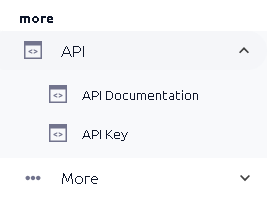
- You can find your API key on the right side of that page
- Copy it and paste it in the configuration when asked
Send email
You need to have a Google app password to be able to send an email. This is a second password to your Google account, we can use it in our app to send an email with Gmail. To create one follow these steps:
- Go to your Google account settings
- In the menu on the left click Security
- Click on 2-step verification and ensure it is turned ON, if not turn it on
- Scroll down until you see App passwords and click on it
- Type a name for your new app password (this can be anything, like Email sender)
- Click on make
- Copy or write down the 16 chars password you see (This is important, because you can't see it again later!)
- Enter it in the configuration when asked
Weather App
You need to have an OpenWeatherMap API key to be able to see the weather data. To find it follow these steps:
- Go to https://openweathermap.org/
- Click on the Get API key button
- Login or make an account
- Go to the API keys section
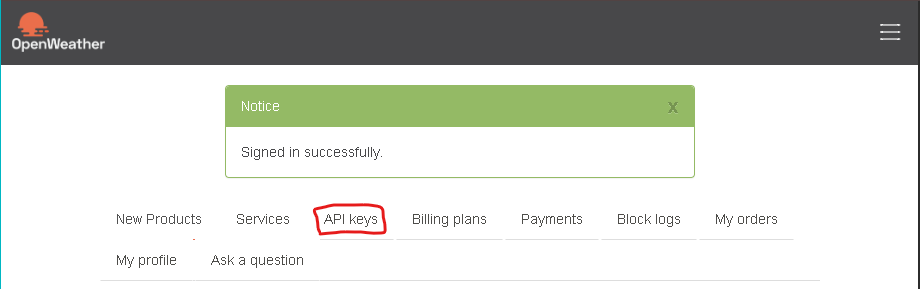
- Copy the default key or create a new one
- Enter it in the configuration when asked.
Support
For support you can make an Issue on the GitHub repo, thanks for helping with my project.
License
Status
Ongoing: I'm still working on this project and constantly adding new tools/games and features...
1 maintainer

Metadata
1 maintainer
Release files for minipy-tools 0.1.4
For a detailed explanation of source distributions (sdists) and built distributions (wheels), please see the package formats documentation.
Source distribution (sdist)
| File | Size | Uploaded | |
|---|---|---|---|
| minipy_tools-0.1.4.tar.gz | 268.7 kB | Details |
Built distribution (wheel)
| File | Interpreter | ABI | Platform | Reset |
|---|---|---|---|---|
| minipy_tools-0.1.4-py3-none-any.whl | Python 3 | none | any | Details |
Total release size: 540.4 kB
Release files / minipy_tools-0.1.4.tar.gz
| Download URL | minipy_tools-0.1.4.tar.gz |
|---|---|
| Size | 268.7 kB |
| Tags | Source |
|
SHA-256 checksum How to use checksums |
8365a92bd99d4bdecc55f1af23d549219dff1bd89aa5fb8609d54d8acd2126c6
|
|
BLAKE2b-256 checksum How to use checksums |
3b5d13b14e0a8ea16e0ad1d4c8b5b4f165833fba26a6f44aeeead876a5e4a14e
|
| Upload date | |
|
Uploaded using Trusted Publishing? What is trusted publishing? |
No |
| Uploaded via |
twine/7.0.0 CPython/3.13.1
|
Release files / minipy_tools-0.1.4-py3-none-any.whl
| Download URL | minipy_tools-0.1.4-py3-none-any.whl |
|---|---|
| Size | 271.6 kB |
| Tags | Python 3 |
|
SHA-256 checksum How to use checksums |
acb484bcff34b93f009dae2a30222bfccdf736292971d3834c124ee9d5da64ee
|
|
BLAKE2b-256 checksum How to use checksums |
d16ef289e90f866593d02595d9263c3a4211155636d7340168addf53bef06211
|
| Upload date | |
|
Uploaded using Trusted Publishing? What is trusted publishing? |
No |
| Uploaded via |
twine/7.0.0 CPython/3.13.1
|














