
A Discord bot for managing game server status embeds.
Verified details
These details have been verified by PyPIProject links
GitHub Statistics
Maintainers

Project description
ministatus





A Discord bot for managing game server status embeds.

Setup
This project requires Python 3.11 or newer. You can manually install this project into a virtual environment:
$ python3 -m venv
$ .venv/bin/activate
(.venv) $ pip install ministatus
(.venv) $ ministatus  # or python3 -m ministatus
Or use one of pipx or uv to manage the virtual environment for you:
$ pipx install ministatus
$ ministatus
# Or:
$ uv tool install ministatus
$ ministatus
# Or:
$ uvx ministatus
Usage
$ ministatus
Usage: ministatus [OPTIONS] COMMAND [ARGS]...

  A Discord bot for managing game server status embeds.

Options:
  -p, --password SECRET  The password to unlock the database, if any
  -v, --verbose          Increase logging verbosity.
  -V, --version          Show the version and exit.
  -h, --help             Show this message and exit.

Commands:
  appdirs  Show directories and important files used by this application.
  config   Get or set a configuration setting.
  db       Manage the application database.
  start    Start the Discord bot in the current process.
  status   Manage server statuses.
View where files are saved:
$ ministatus appdirs
user_data_path    = /home/thegamecracks/.local/share/ministatus
user_log_path     = /home/thegamecracks/.local/state/ministatus/log
DB_PATH           = /home/thegamecracks/.local/share/ministatus/ministatus.db
Enable database encryption (see notes below):
$ export MIST_PASSWORD=abc123
$ ministatus db encrypt
Successfully encrypted!
# Alteneratively use -p/--pasword:
$ ministatus -p abc123 db encrypt
Database is already encrypted 😴
# Or type the password interactively:
$ unset MIST_PASSWORD
$ ministatus config
Database Password:
There are no settings defined 🙁
[!NOTE] This requires SQLite3MultipleCiphers, SQLCipher, or an equivalent library with
PRAGMA keyandPRAGMA rekeysupport. This is only possible if you are able to replace the sqlite3.dll or .so shared library used by Python.In the case of uv-managed Python installations, they are statically built against SQLite and cannot be replaced with encryption extensions.
Start the bot and store your bot token:
$ ministatus start
2025-10-23 04:01:17 INFO     ministatus.db.migrations Migrating database to v1
2025-10-23 04:01:17 INFO     ministatus.db.migrations Migrating database to v2
No Discord bot token found in config.
Would you like to enter your token now?
You can change your token at any time using the 'config' command.
 [y/N]: y
Your Discord bot token should look something like this:
    MTI0NjgyNjg0MTIzMTMyNzI3NQ.GTIAZm.x2fbSNuYJgpAocvMM53ROlMC23NixWt-0NOjMc
Token:
2025-10-23 04:01:21 WARNING  discord.client PyNaCl is not installed, voice will NOT be supported
2025-10-23 04:01:21 INFO     discord.client logging in using static token
2025-10-23 04:01:21 INFO     ministatus.bot.bot Loading extension ministatus.bot.cogs.status
2025-10-23 04:01:21 INFO     ministatus.bot.bot Loaded jishaku extension (v2.6.3)
2025-10-23 04:01:21 INFO     ministatus.bot.cogs.status.cog Waiting 38.22s before starting query loop...
2025-10-23 04:01:22 INFO     discord.gateway Shard ID None has connected to Gateway (Session ID: 9bd2e577bbc4a21be5eed933900d076f).
View or change configuration settings:
$ ministatus config
Settings:
    token = ****

$ ministatus config token xyz
$ ministatus config token
xyz
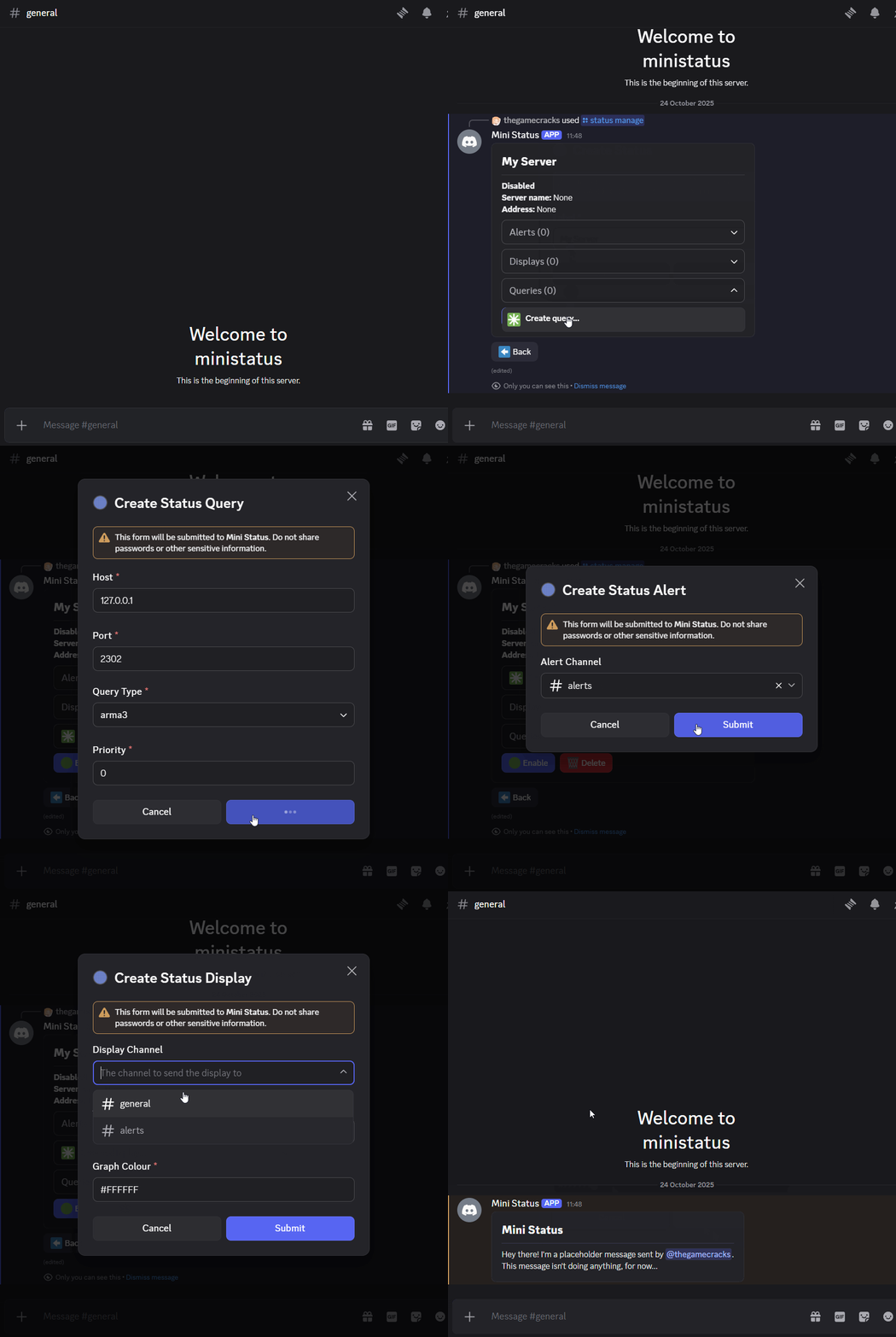
TODO: create server status
License
This project is written under the MIT License.
Project details
Verified details
These details have been verified by PyPIProject links
GitHub Statistics
Maintainers
Release history Release notifications | RSS feed


Download files
Download the file for your platform. If you're not sure which to choose, learn more about installing packages.
Source Distribution
Built Distribution
Filter files by name, interpreter, ABI, and platform.
If you're not sure about the file name format, learn more about wheel file names.
Copy a direct link to the current filters
File details
Details for the file ministatus-0.1.0.post1.tar.gz.
File metadata
- Download URL: ministatus-0.1.0.post1.tar.gz
- Upload date:
- Size: 33.5 kB
- Tags: Source
- Uploaded using Trusted Publishing? Yes
- Uploaded via: twine/6.1.0 CPython/3.13.7
File hashes
| Algorithm | Hash digest | |
|---|---|---|
| SHA256 |
387a5a1b35408fa200b2c724d79a7d0ad317e6422a42b26e4b6a72dab292ad67
|
|
| MD5 |
816a449f2c451d4dff281a1f4d9dc9dc
|
|
| BLAKE2b-256 |
d73fe6328f2eeb683e12a23f40e3b72e3d5d4effe6228990b06eb1b0aac0d8c4
|
Provenance
The following attestation bundles were made for ministatus-0.1.0.post1.tar.gz:
Publisher:
publish.yml on thegamecracks/ministatus
-
Statement:
-
Statement type:
https://in-toto.io/Statement/v1 -
Predicate type:
https://docs.pypi.org/attestations/publish/v1 -
Subject name:
ministatus-0.1.0.post1.tar.gz -
Subject digest:
387a5a1b35408fa200b2c724d79a7d0ad317e6422a42b26e4b6a72dab292ad67 - Sigstore transparency entry: 640937457
- Sigstore integration time:
-
Permalink:
thegamecracks/ministatus@4b51b0f084d44708bb348867ca736f7b45afd05a -
Branch / Tag:
refs/heads/main - Owner: https://github.com/thegamecracks
-
Access:
public
-
Token Issuer:
https://token.actions.githubusercontent.com -
Runner Environment:
github-hosted -
Publication workflow:
publish.yml@4b51b0f084d44708bb348867ca736f7b45afd05a -
Trigger Event:
workflow_dispatch
-
Statement type:
File details
Details for the file ministatus-0.1.0.post1-py3-none-any.whl.
File metadata
- Download URL: ministatus-0.1.0.post1-py3-none-any.whl
- Upload date:
- Size: 52.6 kB
- Tags: Python 3
- Uploaded using Trusted Publishing? Yes
- Uploaded via: twine/6.1.0 CPython/3.13.7
File hashes
| Algorithm | Hash digest | |
|---|---|---|
| SHA256 |
f5b6bc1bb646367862f3d371f35c3ad06fd48421b25d8ab9aba8b445bd718b6d
|
|
| MD5 |
dc0c9e26a86f3f5e7748ff99fd5f1290
|
|
| BLAKE2b-256 |
bed5a5a378b9465a7eafa6ef87ec03eb5c12d25be625aeb9d77457bf3719c2e5
|
Provenance
The following attestation bundles were made for ministatus-0.1.0.post1-py3-none-any.whl:
Publisher:
publish.yml on thegamecracks/ministatus
-
Statement:
-
Statement type:
https://in-toto.io/Statement/v1 -
Predicate type:
https://docs.pypi.org/attestations/publish/v1 -
Subject name:
ministatus-0.1.0.post1-py3-none-any.whl -
Subject digest:
f5b6bc1bb646367862f3d371f35c3ad06fd48421b25d8ab9aba8b445bd718b6d - Sigstore transparency entry: 640937469
- Sigstore integration time:
-
Permalink:
thegamecracks/ministatus@4b51b0f084d44708bb348867ca736f7b45afd05a -
Branch / Tag:
refs/heads/main - Owner: https://github.com/thegamecracks
-
Access:
public
-
Token Issuer:
https://token.actions.githubusercontent.com -
Runner Environment:
github-hosted -
Publication workflow:
publish.yml@4b51b0f084d44708bb348867ca736f7b45afd05a -
Trigger Event:
workflow_dispatch
-
Statement type:






