
A minimal word processor in Python

Project description
MiniWord
A minimal word processor in python. In development but already great.
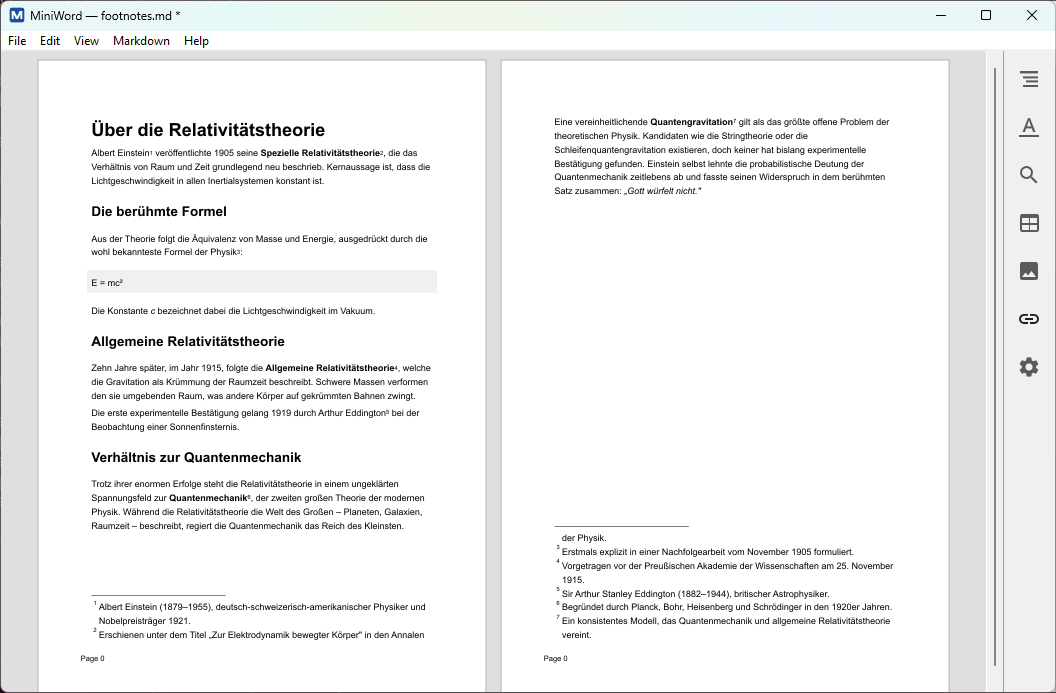
Key Aspects
- Real WYSIWYG editing (no HTML layer, no embedded browser)
- Lightweight and fast startup
- Clean, simple file format (human-readable, diff-friendly, git-friendly, AI-friendly)
- Good Markdown support
- Extensible via Python-plugins
Install from a pre-built package
Pre-built installers for Windows (.exe) and macOS (.dmg) are published on the Releases page for each tagged version, with all dependencies (including the optional extras) already bundled — nothing else to install. On Linux, install from source instead (see below); no separate installer is provided there.
Windows
Download the .exe from the Releases page and run it.
macOS
Download the .dmg from the Releases page, open it, and drag MiniWord.app into your Applications folder.
First launch: MiniWord isn't (yet) signed with a paid Apple Developer ID, so macOS blocks it the first time with "MiniWord can't be opened because Apple cannot check it for malicious software." To allow it, no Terminal needed:
- Double-click MiniWord in Applications once and dismiss the warning.
- Open System Settings → Privacy & Security, scroll down to the Security section.
- Click Open Anyway next to the MiniWord entry, then confirm with your password or Touch ID.
- Open MiniWord again and confirm Open in the dialog that appears.
This is a one-time step per installed version.
Install from source
Miniword is developed under Linux. In principle it should run under Windows and Mac as well.
You always need Python >= 3.9 and wxPython >= 4.0. Further required dependencies vary between platforms — see the per-platform instructions below.
Three optional packages add extra features and are all installed together via the full extra (pip install ".[full]"): uharfbuzz adds ligatures and non-Latin script support, fonttools is needed for non-Latin scripts specifically on Windows, and mistune enables richer Markdown import (without it, a built-in parser handles the common subset).
Running without installation
python miniword.py
Alternatively, double-click miniword.py in your file explorer.
Linux
Install system dependencies:
sudo apt install python3-wxgtk4.0 fontconfig
Then install miniword (this also pulls in cairocffi):
cd miniword
pip install .
For ligature support, non-Latin scripts, and richer Markdown import, install with the full extra instead:
pip install ".[full]"
If you want to register MiniWord to the desktop (you probably will):
cp miniword/icons/miniword.svg ~/.local/share/icons/
cp miniword.desktop ~/.local/share/applications/
Windows
No separate Cairo installation is needed — wxPython already bundles libcairo-2.dll, and pip install . pulls in cairocffi to bind to it.
cd miniword
pip install ".[full]"   # full installs uharfbuzz, fonttools, mistune: ligatures, non-Latin scripts, richer Markdown import
MiniWord stores its configuration and plugins in %APPDATA%\miniword\ (e.g. C:\Users\<you>\AppData\Roaming\miniword\).
Note that MiniWord is not yet optimised for Windows. While it mostly works, the GUI is less polished and startup takes a bit longer.
macOS
fontconfig must be installed via Homebrew:
brew install fontconfig
Then install miniword (this also pulls in cairocffi):
cd miniword
pip install ".[full]"   # full installs uharfbuzz, mistune: ligatures, non-Latin scripts, richer Markdown import
MiniWord stores its configuration and plugins in ~/Library/Application Support/miniword/.
Note that MiniWord is not yet optimised for macOS (tested on Apple Silicon; Intel Macs are untested). While it works, some GUI elements aren't as polished as on Linux.
Hacking
Run the full test suite:
python test_all.py
Run tests for a single module:
python runtests.py miniword/layout/pagegen.py
Run a specific test or demo:
python runtests.py miniword/ui/searchtool.py test_00
python runtests.py miniword/texteditor/textcanvas.py demo_00
Plugins
MiniWord is extensible via Python plugins. To install a plugin, copy the .py file into the plugins directory for your platform:
| Platform | Plugins directory |
|---|---|
| Linux | ~/.config/miniword/plugins/ |
| macOS | ~/Library/Application Support/miniword/plugins/ |
| Windows | %APPDATA%\miniword\plugins\ |
Example plugins are provided in the examples/ directory:
| File | Description |
|---|---|
wordcount.py |
Shows a live word count |
txtfilter.py |
Filter for importing plain text files |
To install all example plugins on Linux:
mkdir -p ~/.config/miniword/plugins
cp examples/*.py ~/.config/miniword/plugins
License
This project is licensed under the GNU General Public License v3.0 - see LICENSE for details. Contact me if you need something else.
Release history Release notifications | RSS feed


Download files
Download the file for your platform. If you're not sure which to choose, learn more about installing packages.
Source Distribution
Built Distribution
Filter files by name, interpreter, ABI, and platform.
If you're not sure about the file name format, learn more about wheel file names.
Copy a direct link to the current filters
File details
Details for the file miniword-0.1.7.tar.gz.
File metadata
- Download URL: miniword-0.1.7.tar.gz
- Upload date:
- Size: 209.4 kB
- Tags: Source
- Uploaded using Trusted Publishing? Yes
- Uploaded via: twine/6.1.0 CPython/3.13.12
File hashes
| Algorithm | Hash digest | |
|---|---|---|
| SHA256 |
e2588727659d7e5bbc01fdec7efcc0a5e538b2be0116bc2bef74e1d59436a543
|
|
| MD5 |
35b1c894c28dc3c15caf5fd9291a83a6
|
|
| BLAKE2b-256 |
3d9b41b19a9cfba906ffe5944dd2c96a5ab7ff17890d1ccb07f105d63d90bf4c
|
Provenance
The following attestation bundles were made for miniword-0.1.7.tar.gz:
Publisher:
release.yml on chrisecker/miniword
-
Statement:
-
Statement type:
https://in-toto.io/Statement/v1 -
Predicate type:
https://docs.pypi.org/attestations/publish/v1 -
Subject name:
miniword-0.1.7.tar.gz -
Subject digest:
e2588727659d7e5bbc01fdec7efcc0a5e538b2be0116bc2bef74e1d59436a543 - Sigstore transparency entry: 1926255384
- Sigstore integration time:
-
Permalink:
chrisecker/miniword@29af28924449a0ebd20c426670d238c436469e4f -
Branch / Tag:
refs/tags/v0.1.7 - Owner: https://github.com/chrisecker
-
Access:
public
-
Token Issuer:
https://token.actions.githubusercontent.com -
Runner Environment:
github-hosted -
Publication workflow:
release.yml@29af28924449a0ebd20c426670d238c436469e4f -
Trigger Event:
push
-
Statement type:
File details
Details for the file miniword-0.1.7-py3-none-any.whl.
File metadata
- Download URL: miniword-0.1.7-py3-none-any.whl
- Upload date:
- Size: 254.1 kB
- Tags: Python 3
- Uploaded using Trusted Publishing? Yes
- Uploaded via: twine/6.1.0 CPython/3.13.12
File hashes
| Algorithm | Hash digest | |
|---|---|---|
| SHA256 |
77d16431a8500ca4595ab1e0a73f1e3af4945856c9b4478dab5d951e489ab1d4
|
|
| MD5 |
27761eb160f92fe02c0db094a0f57eb7
|
|
| BLAKE2b-256 |
16c9852b564e77649817a0d7bd90a489074813b86950bc04886f8fa850f4ad95
|
Provenance
The following attestation bundles were made for miniword-0.1.7-py3-none-any.whl:
Publisher:
release.yml on chrisecker/miniword
-
Statement:
-
Statement type:
https://in-toto.io/Statement/v1 -
Predicate type:
https://docs.pypi.org/attestations/publish/v1 -
Subject name:
miniword-0.1.7-py3-none-any.whl -
Subject digest:
77d16431a8500ca4595ab1e0a73f1e3af4945856c9b4478dab5d951e489ab1d4 - Sigstore transparency entry: 1926255529
- Sigstore integration time:
-
Permalink:
chrisecker/miniword@29af28924449a0ebd20c426670d238c436469e4f -
Branch / Tag:
refs/tags/v0.1.7 - Owner: https://github.com/chrisecker
-
Access:
public
-
Token Issuer:
https://token.actions.githubusercontent.com -
Runner Environment:
github-hosted -
Publication workflow:
release.yml@29af28924449a0ebd20c426670d238c436469e4f -
Trigger Event:
push
-
Statement type:






