











Mirage is a Virtual Terminal for AI Agents. The virtual filesystem delivers broad data context, virtualized CLIs give an agent more flexibility on tool use, dynamic runtimes save underlying infrastructure cost and are more token efficient, and fine-grained control over an agent's actions and even over what it can see gives the best security. Together these parts form one virtualized terminal, giving the best agent performance, cost efficiency and security.
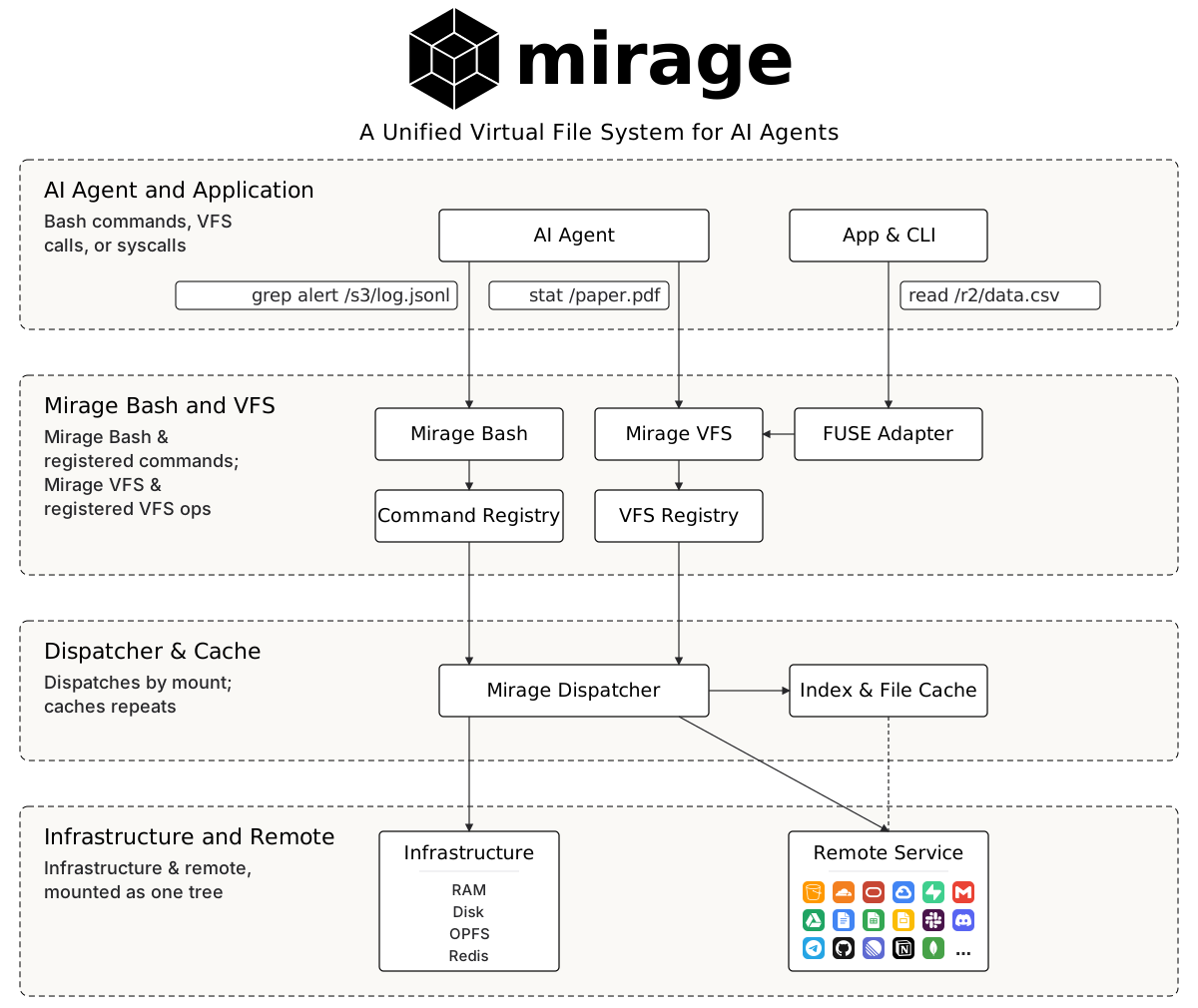
Here is an example of launching Mirage inside an application:
ws = Workspace(
    {
        "/tmp":   (RAMResource(), MountMode.EXEC),
        "/redis": (RedisResource(url=redis_url), MountMode.WRITE),
        "/slack": (SlackResource(SlackConfig(token=slack_bot_token)), MountMode.EXEC),
    },
    # monty captures python, so scripts run sandboxed inside the workspace
    runtimes=[MontyRuntime(captures=["python", "python3"]), "vfs"],
)

# one grep sweeps every source
await ws.execute("grep -rln session /redis /tmp")

# run a script that lives in Slack, file the report into Redis
await ws.execute("python3 /slack/channels/general_.../files/example__F....py > /redis/report.txt")

# install a typed CLI under a head word: dispatched by name, not by path,
# and discoverable through `man`, `type` and `which` like any other program
ws.register_cli("slack", SLACK, {"token": slack_bot_token})
await ws.execute('slack send-message --channel general --text "report is up"')
About
- Unified virtual terminal interface, not N SDKs and M MCPs. Every backend speaks the same filesystem semantics, so pipelines compose across services.
- A virtual filesystem over every source. S3, Google Drive, Slack, Gmail, Redis and the rest mount side by side under one root, so an agent reaches all of them through a unified interface with the unix tools it already knows, like
ls,grep,findandjq. - Virtual command line tools (CLIs).
git,slackandntnare answered by Mirage itself, so an agent drives the service with nothing installed, across different runtimes and machines, and one tool can be virtualized into two or more, each under its own name with its own credentials. - Routed, dynamic runtimes. Python, JavaScript and any other command can be sent to a configured runtime, in process, sandboxed or remote, which decouples computation from storage and lets either change without touching the other.
- The virtualized Mirage shell. It binds the filesystem, the CLIs and the runtimes into one command line, so pipes, redirection, variables, jobs and history work across all three.
- Profiles designed for agents.
allow,askanddenygovern commands and CLIs, whilehideandshowgovern files and folders, so a hidden path is not merely unreadable but absent from the filesystem the agent sees. - A scriptable policy engine. A policy script can prohibit any dangerous action before it runs, and the same stack gates every VFS op and session write, so neither a file nor an environment variable leaks.
- Notifications wired into the VFS and agents. External changes become an event stream on the mount, so a new Slack reply surfaces as a change to the chat file in the virtual filesystem, and the agent reacts to it instead of rescanning the tree.
Virtual Filesystem
Everything Mirage "mounts" as one unified virtual filesystem for AI agents. Each service sits side-by-side under a single root and answers the same POSIX semantics.
| Resources | |
|---|---|
| Object Storage |                  |
| Files and Documents |          |
| Messaging and Work |          |
| Databases and Data Platforms |          |
| Observability |   |
| Local and Remote |     |
Agents reach it through the Python and TypeScript SDKs, the mirage CLI, or a real
mountpoint over FUSE and FSKit, then work it with the unix tools they already know,
like ls, grep, find and jq.
Virtual Command Line Tool
These command line tools are virtualized: Mirage answers git, slack or ntn
itself, so an agent drives the service without that program being installed on the
machine. Each one mimics the real tool, so an agent that knows the CLI needs nothing
new. Because they are virtual, the same tool can be installed more than once under
different names, each with its own credentials, so every agent gets exactly the
accounts it is given.
| CLIs | |
|---|---|
| Code |  |
| Communication |  |
| Work and Data |  |
Virtual Runtime
Runtimes are virtualized the same way, and not only for coding languages. Any
command on the line can be redirected to a configured runtime, so Python might
run in-process with Monty while
another command, say kubectl, is sent to a remote machine over SSH. Which runtime
serves a given line can be decided by a
scripted runtime router.
| Runtimes | |
|---|---|
| Python |      |
| JavaScript |    |
| Sandboxes |     |
Security
A profile decides what a session may run and what it may see. Commands are governed
by customizable allow, ask and deny rules, and paths by hide and show, so a
hidden file is not merely unreadable but absent from the filesystem the agent sees.
For anything those rules cannot express, a profile can name a policy script that runs
at the gate on every command and answers allow, deny or ask itself, though like every
rule it can only restrict and never grant. Separately, a host can register its own
policies on the policy engine, an
ordered stack the workspace consults on every command, VFS op and session write. See
the permissions docs.
Authentication
Credentials and authentication integrate with the stores secrets already live in, including AWS Secrets Manager, 1Password, Auth0 and dotenv, so an environment variable in Mirage can resolve straight to a credential held in one of them.
| Sources | |
|---|---|
| Built in |    |
| Custom |   |
Installation
- Python ≥ 3.11 for the
mirage-aipackage and themirageCLI - Node.js ≥ 20 for the TypeScript SDK
Python
uv add mirage-ai # installs the `mirage` library and the `mirage` CLI binary
TypeScript
npm install @struktoai/mirage-node      # Node.js servers and CLIs
npm install @struktoai/mirage-browser   # browser / edge runtimes
npm install @struktoai/mirage-agents    # OpenAI / Vercel AI / LangChain / Mastra adapters
Both runtime packages pull in @struktoai/mirage-core automatically.
CLI
curl -fsSL https://strukto.ai/mirage/install.sh | sh
# or
npm install -g @struktoai/mirage-cli
# or
uvx mirage-ai
# or
npx @struktoai/mirage-cli
Quickstart
Python
from mirage import Workspace
from mirage.resource.ram import RAMResource
from mirage.resource.s3 import S3Config, S3Resource

ws = Workspace({
    "/data": RAMResource(),
    "/s3":   S3Resource(S3Config(bucket="my-bucket")),
})

await ws.execute("cp /s3/report.csv /data/report.csv")
await ws.execute("grep alert /s3/data/log.jsonl | wc -l")

await ws.snapshot("demo.tar")
TypeScript
import { Workspace, RAMResource, S3Resource } from '@struktoai/mirage-node'

const ws = new Workspace({
  '/data': new RAMResource(),
  '/s3':   new S3Resource({ bucket: 'my-bucket' }),
})

await ws.execute('cp /s3/report.csv /data/report.csv')
await ws.execute('grep alert /s3/data/log.jsonl | wc -l')

await ws.snapshot('demo.tar')
CLI
mirage workspace create ws.yaml --id demo
mirage execute   --workspace_id demo --command "cp /s3/report.csv /data/report.csv"
mirage provision --workspace_id demo --command "cat /s3/data/large.jsonl"
mirage workspace snapshot demo demo.tar
mirage workspace load demo.tar --id demo-restored
Contributors
Thanks to everyone who has contributed to Mirage.

1 maintainer

Release files for mirage-ai 0.0.6
For a detailed explanation of source distributions (sdists) and built distributions (wheels), please see the package formats documentation.
Source distribution (sdist)
| File | Size | Uploaded | |
|---|---|---|---|
| mirage_ai-0.0.6.tar.gz | 1.9 MB | Details |
Built distribution (wheel)
| File | Interpreter | ABI | Platform | Reset |
|---|---|---|---|---|
| mirage_ai-0.0.6-py3-none-any.whl | Python 3 | none | any | Details |
Total release size: 5.2 MB
Release files / mirage_ai-0.0.6.tar.gz
| Download URL | mirage_ai-0.0.6.tar.gz |
|---|---|
| Size | 1.9 MB |
| Tags | Source |
|
SHA-256 checksum How to use checksums |
693facf5b39093897bcc9307b08b844f3040e3b224472db9d952d6b8f4ac11ac
|
|
BLAKE2b-256 checksum How to use checksums |
2510f5135624da350ed12c868e9dd1117d965bd3d91379f8a2ea80d81ccb8eb6
|
| Upload date | |
|
Uploaded using Trusted Publishing? What is trusted publishing? |
No |
| Uploaded via |
uv/0.11.0 {"installer":{"name":"uv","version":"0.11.0","subcommand":["publish"]},"python":null,"implementation":{"name":null,"version":null},"distro":{"name":"macOS","version":null,"id":null,"libc":null},"system":{"name":null,"release":null},"cpu":null,"openssl_version":null,"setuptools_version":null,"rustc_version":null,"ci":null}
|
Release files / mirage_ai-0.0.6-py3-none-any.whl
| Download URL | mirage_ai-0.0.6-py3-none-any.whl |
|---|---|
| Size | 3.3 MB |
| Tags | Python 3 |
|
SHA-256 checksum How to use checksums |
f9f52b65e4d1f869c5698a62bae3f8716ae042e58dc5d5ba9f1debae5e6c9246
|
|
BLAKE2b-256 checksum How to use checksums |
8bef7f8324f3eb9ca097175bbcf0f732c2f3d4d10932438f535f3a5f9464d2aa
|
| Upload date | |
|
Uploaded using Trusted Publishing? What is trusted publishing? |
No |
| Uploaded via |
uv/0.11.0 {"installer":{"name":"uv","version":"0.11.0","subcommand":["publish"]},"python":null,"implementation":{"name":null,"version":null},"distro":{"name":"macOS","version":null,"id":null,"libc":null},"system":{"name":null,"release":null},"cpu":null,"openssl_version":null,"setuptools_version":null,"rustc_version":null,"ci":null}
|














