
miragea-audiobook
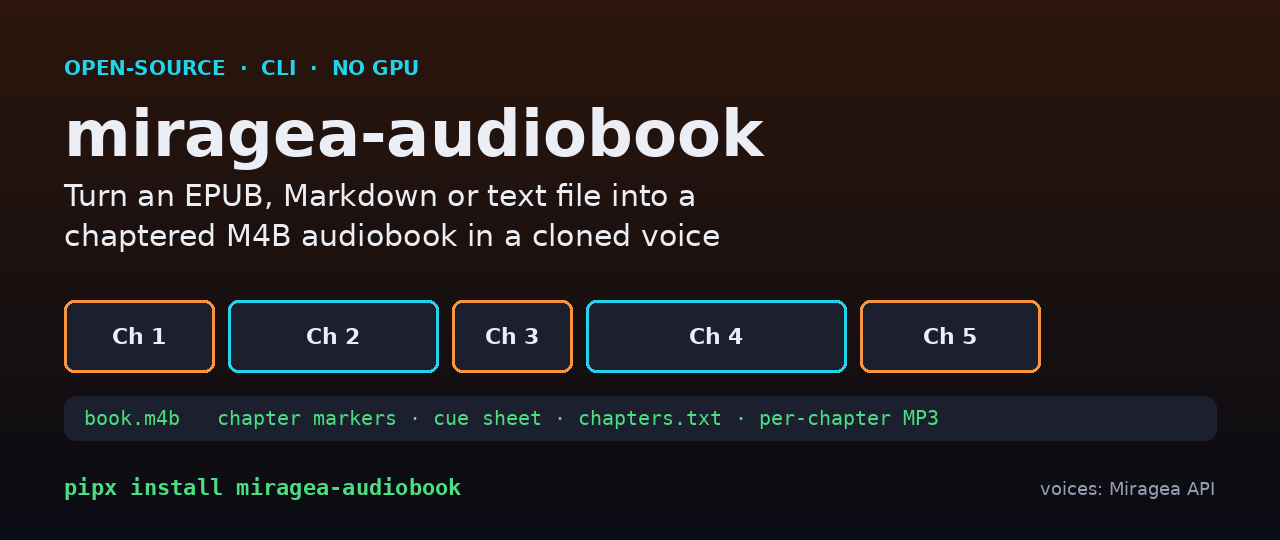
miragea-audiobook is an open-source command-line audiobook maker. It reads an EPUB, Markdown or plain-text book, splits it into chapters and sentence-safe chunks, narrates every chunk with a cloned or saved voice through the Miragea API, and assembles a single chaptered .m4b (with a cue sheet, a YouTube-style chapter list and optional per-chapter MP3s). No GPU, no PyTorch, no local TTS model to install: just Python, ffmpeg and an API key.
- 🎧 Real demo (2 chapters, 30 s, voice cloned from a 10-second CMU ARCTIC sample):
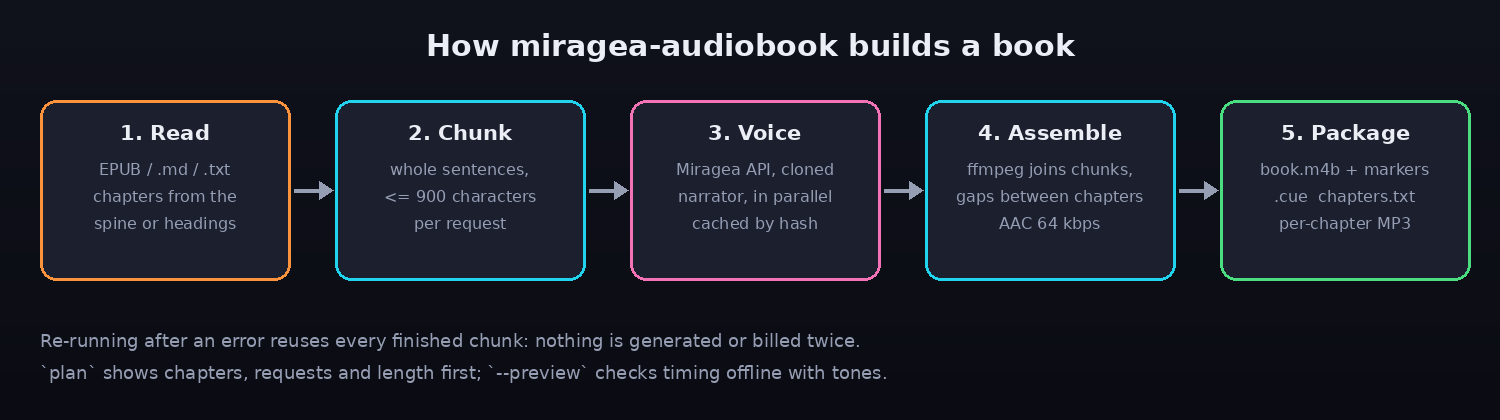
examples/demo/the-salt-road.m4b, plus the chapter MP3s. - Chapters from the EPUB spine and headings, Markdown
##headings, or "Chapter N" lines in text files. - Re-running after an error reuses every finished chunk (cached by request hash and sent with idempotency keys), so nothing is generated or billed twice.
planshows chapters, request count and an estimated length first;--previewchecks the whole pipeline offline with placeholder tones.
Quick start
pipx install miragea-audiobook          # or: pip install miragea-audiobook
# ffmpeg + ffprobe must be on PATH (brew install ffmpeg / apt install ffmpeg)

export MIRAGEA_API_KEY=...              # create a key at https://miragea.ai/workspace/api

miragea-audiobook chapters book.epub    # what did it find? (offline)
miragea-audiobook plan book.epub        # chapters, requests, estimated minutes
miragea-audiobook make book.epub \
  --voice 'https://example.com/my-voice.wav|Exact words spoken in that 5-30 second sample.' \
  --split
--voice actor:<id> uses a voice saved in your Miragea account instead. Output goes to ~/miragea-audiobook/<title>/ (change with --out).
Real output
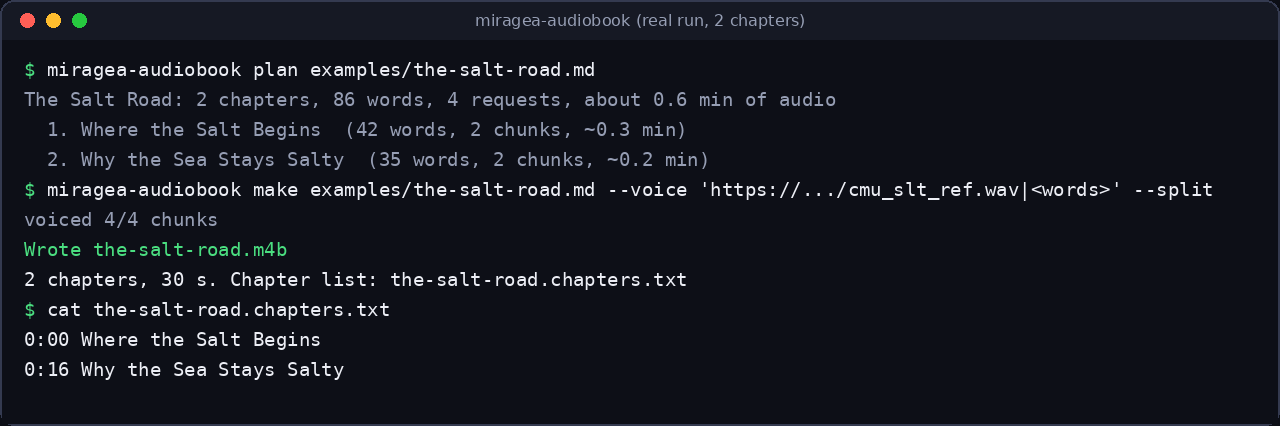
Everything below came from a real run of the command shown (the book is examples/the-salt-road.md).
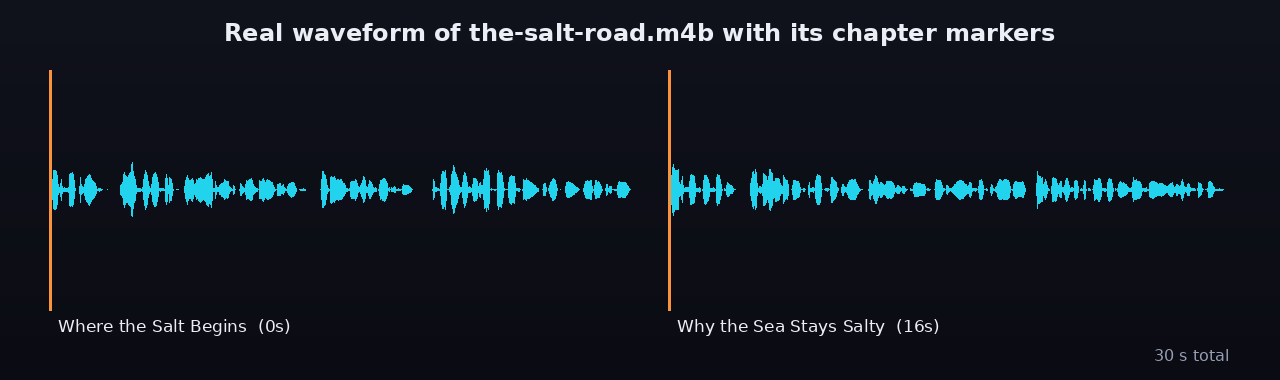
The chapter markers sit exactly at the chapter boundaries of the real audio:
I checked the narration by sending chapter 1 back through speech recognition: the transcript matched the book text word for word.
Options
| Flag | Meaning |
|---|---|
--chapters 1-3,5 |
only these chapters (1-based) |
--voice |
actor:<id> or https://sample.wav|exact reference text |
--speed 1.1 |
0.25 to 4.0 |
--format m4b|mp3 |
chaptered M4B (default) or one MP3 |
--split |
also write one tagged MP3 per chapter |
--gap 0.8 |
seconds of silence between chapters |
--no-announce |
do not read chapter titles aloud |
--max-chars 900 |
largest text per request (capped by the API limit) |
--preview |
offline timing check, no API calls |
--json |
machine-readable output for scripts and agents |
Files written: <title>.m4b, <title>.chapters.txt, <title>.cue, <title>.json (chapter times, task IDs) and optionally NN-<chapter>.mp3.
Play it
The M4B opens with chapter navigation in Apple Books, VLC, Audiobookshelf, Plex (with an audiobook library) and most podcast/audiobook players. Drop the folder into your Audiobookshelf library as-is.
How it compares
| miragea-audiobook | ebook2audiobook | audiblez | |
|---|---|---|---|
| Licence | MIT | Apache-2.0 | MIT |
| GitHub stars (2026-11-13 / 2026-11-08) | new | 20.5k | 8.9k |
| Runs TTS | hosted (Miragea API) | locally | locally (Kokoro) |
| GPU / large model download | none | recommended | optional |
| Voice cloning | yes, from a short sample | yes (local models) | no (fixed voices) |
| Chaptered M4B | yes | yes | yes |
| Offline | no (needs API) | yes | yes |
Pick the local tools if you must stay offline or want zero per-use cost. Pick this one if you want a small install, no model downloads and a cloned narrator on a laptop or a CI box. Licences and star counts were read from the GitHub API (ebook2audiobook) and the ecosyste.ms GitHub mirror (audiblez);
FAQ
How do I convert an EPUB to an M4B audiobook with AI? Install the package and ffmpeg, set MIRAGEA_API_KEY, then run miragea-audiobook make book.epub --voice .... You get a single .m4b with chapter markers.
Can I make an audiobook in my own voice? Yes. Give it a clean 5-30 second recording with the exact words said; the voice is cloned from that sample. Only clone voices you have the right to use.
Does it need a GPU? No. Synthesis runs on the Miragea API; the only local work is ffmpeg.
Can I turn a PDF into an audiobook? Not directly. Convert the PDF to Markdown or EPUB first (for example with Calibre or pandoc), then run it.
Why was a chapter missing? Spine items with fewer than 20 words (covers, copyright stubs) are skipped. Run miragea-audiobook chapters book.epub to see what was found.
What if it fails halfway through a long book? Run the same command again. Finished chunks are cached in .miragea-cache and are not requested again.
Can an AI agent run this? Yes, every command has --json. Install the Miragea skill with "Install https://miragea.ai/skills/miragea-audio/install.md" and let the agent call the CLI.
Troubleshooting
ffmpeg_missing: install ffmpeg and ffprobe.missing_api_key: setMIRAGEA_API_KEY(key page: https://miragea.ai/workspace/api). Base URL defaults tohttps://miragea.ai/v1.- Voice sounds off: use a cleaner, longer sample and the exact transcript of it.
- Out of credits (402/429): top up on miragea.ai, then re-run; cached chunks are free.
Development
pip install -e '.[dev]'
pytest      # offline, uses a mock API
ruff check .
python docs/make_images.py
Credits and licence
MIT. The demo voice sample is from CMU ARCTIC (see the voices README in miragea-voice-mcp for attribution). Related: miragea-podcast, miragea-dub, miragea-skills.
1 maintainer

Metadata
1 maintainer
Release files for miragea-audiobook 0.1.0
For a detailed explanation of source distributions (sdists) and built distributions (wheels), please see the package formats documentation.
Source distribution (sdist)
| File | Size | Uploaded | Provenance | Actions |
|---|---|---|---|---|
| miragea_audiobook-0.1.0.tar.gz | 623.1 kB | Without provenance | Details for miragea_audiobook-0.1.0.tar.gz |
Built distribution (wheel)
| File | Interpreter | ABI | Platform | Actions Reset |
|---|---|---|---|---|
| miragea_audiobook-0.1.0-py3-none-any.whl | Python 3 | none | any | Details for miragea_audiobook-0.1.0-py3-none-any.whl |
Total release size: 648.3 kB
Release files / miragea_audiobook-0.1.0.tar.gz
| Download URL | miragea_audiobook-0.1.0.tar.gz |
|---|---|
| Size | 623.1 kB |
| Tags | Source |
|
SHA-256 checksum How to use checksums |
522ca9c921674cfbe79cf38a67b36c7bb7fe81faa83cc5af9c92293b6b14d1d9
|
|
BLAKE2b-256 checksum How to use checksums |
a0597fc5ec5b311eacc28eb5fc52682236de8d21826f783d4775f7aba557f615
|
| Upload date | |
|
Uploaded using Trusted Publishing? What is trusted publishing? |
No |
| Uploaded via |
uv/0.13.1 {"installer":{"name":"uv","version":"0.13.1","subcommand":["publish"]},"python":null,"implementation":{"name":null,"version":null},"distro":{"name":"Debian GNU/Linux","version":"13","id":"trixie","libc":null},"system":{"name":null,"release":null},"cpu":null,"openssl_version":null,"setuptools_version":null,"rustc_version":null,"ci":null}
|
Release files / miragea_audiobook-0.1.0-py3-none-any.whl
| Download URL | miragea_audiobook-0.1.0-py3-none-any.whl |
|---|---|
| Size | 25.2 kB |
| Tags | Python 3 |
|
SHA-256 checksum How to use checksums |
f5cb10d8cfc0c2d0082a1750f09ee97bbb4231a905be41351b50bb28fa9c67b6
|
|
BLAKE2b-256 checksum How to use checksums |
878372630cd813dc20d8bf7735d6bab460935e2bb2dcf4eed6f7bc66d87c39d7
|
| Upload date | |
|
Uploaded using Trusted Publishing? What is trusted publishing? |
No |
| Uploaded via |
uv/0.13.1 {"installer":{"name":"uv","version":"0.13.1","subcommand":["publish"]},"python":null,"implementation":{"name":null,"version":null},"distro":{"name":"Debian GNU/Linux","version":"13","id":"trixie","libc":null},"system":{"name":null,"release":null},"cpu":null,"openssl_version":null,"setuptools_version":null,"rustc_version":null,"ci":null}
|
Security for miragea-audiobook 0.1.0
Provenance
Provenance describes where a file came from. On PyPI, provenance is shared via attestations, which provide a verifiable record of the build or publishing details. View details, limitations and caveats.
No provenance found
None of the files in this release were uploaded with provenance metadata.
A note on package security
PyPI is a repository for distributing packages, not a service for auditing them. While third-party security researchers and our staff do their best to detect and remove malicious packages, PyPI cannot guarantee the quality, security or suitability of any given package.
To learn more about protecting yourself from malicious actors, visit our package security documentation.













