
Miragea Voice MCP




Miragea Voice MCP is an open-source Model Context Protocol server that lets AI agents such as Claude Desktop, Claude Code, Cursor, VS Code and Windsurf create voiceovers and subtitles. Ask your agent to narrate a script, voice a multi-speaker dialogue, clone a voice from a short sample URL, or subtitle an existing video. The server saves real audio files (MP3, WAV, FLAC, Opus, AAC) and matching SRT/VTT subtitle files to disk and returns their paths. Speech is generated by the Miragea voice API. Setup is one uvx line and one API key.
You:    Narrate intro.md as a voiceover for my YouTube video, with subtitles.
Claude: Done. Saved ~/miragea-voice/intro.mp3, intro.srt and intro.vtt, and reported the duration and credits used.
Contents
- How it works
- Why this server
- Quick start
- Client setup: Claude Desktop · Claude Code · Cursor · VS Code · Windsurf
- Tools
- Configuration
- Writing multi-speaker scripts
- How subtitles are timed
- Credits and cost control
- Comparison with other TTS MCP servers
- FAQ
- Troubleshooting
- Development
How it works
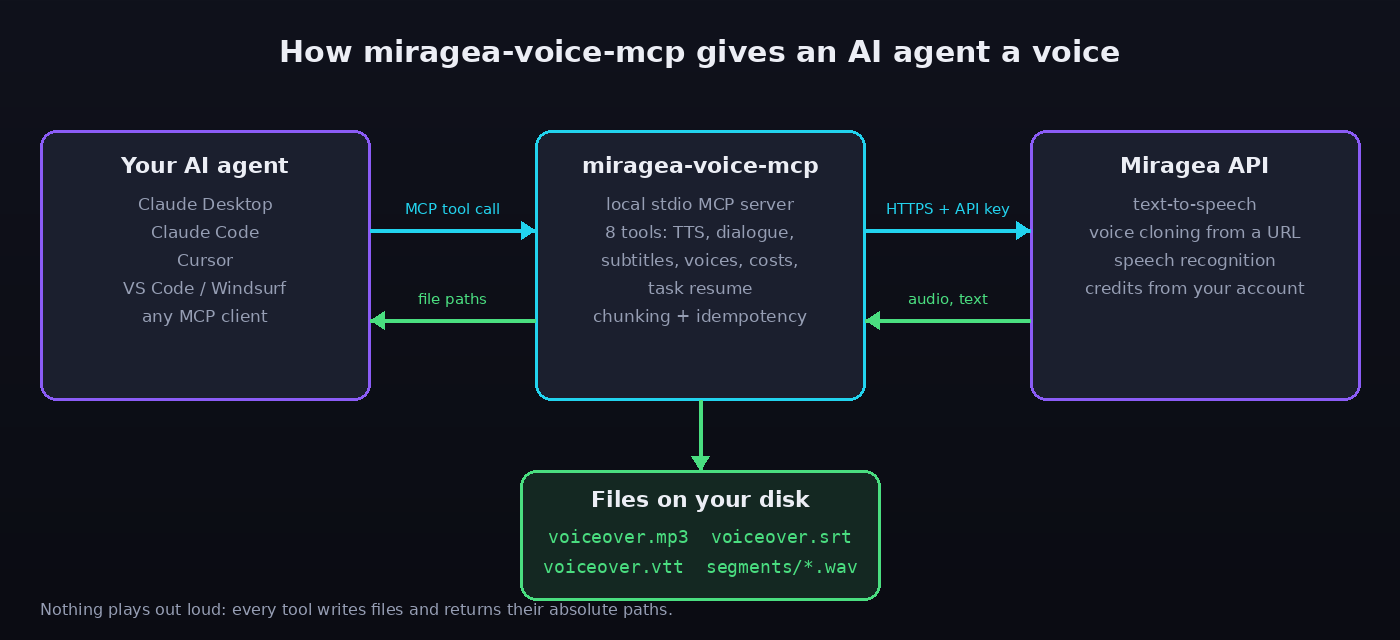
Your MCP client starts miragea-voice-mcp locally over stdio. When the agent calls a tool, the server sends the request to the Miragea API, waits for the result, writes the audio and subtitle files to disk, and returns their absolute paths to the agent.
Why this server
Most text-to-speech MCP servers just play a sound or return a link. Making video, podcast or course content needs more than that:
- Files, not just sounds. Every tool writes to disk and returns absolute paths, ready for your editor,
ffmpeg, or the next agent step. Existing files are never overwritten. - Subtitles included. Every voiceover comes with
.srtand.vtttimed to the actual audio. Existing media can be transcribed into subtitles as well. - Multi-speaker in one call. Give it a
Speaker: linescript and a voice for each speaker. You get one joined audio file, one WAV per line for editing, and subtitles with speaker labels. - Any length. Text over the per-request limit is split at sentence boundaries and joined back together.
- No double charges. Requests use deterministic idempotency keys, so a retry or a re-run returns the original task instead of paying again.
- Cost guard. Run
estimate_costfirst, and passmax_creditsto stop a job before it starts if it would cost more. - Errors your agent can act on. Each error has a stable code, a plain message and a
Fix:line (bad key, no API access, out of credits, unknown voice, file too large, and so on). - Light and cross-platform. Pure Python, no GPU, no model downloads. Works on macOS, Windows and Linux.
ffmpegis optional. - Long jobs are safe. Progress notifications keep the client informed. If a wait times out,
check_taskpicks the job up again. You never need to resubmit.
Quick start
- Get a Miragea API key at miragea.ai/workspace/api. Free accounts can call the API by default; usage comes from your account's credits.
- Install uv if you don't have it (
curl -LsSf https://astral.sh/uv/install.sh | sh, orwinget install astral-sh.uvon Windows). - Add the server to your client (Claude Desktop shown, others below):
{
  "mcpServers": {
    "miragea-voice": {
      "command": "uvx",
      "args": ["miragea-voice-mcp"],
      "env": { "MIRAGEA_API_KEY": "<your-miragea-api-key>" }
    }
  }
}
- Restart the client and try:
"List my Miragea voices, then read this paragraph in the warmest one and give me SRT subtitles."
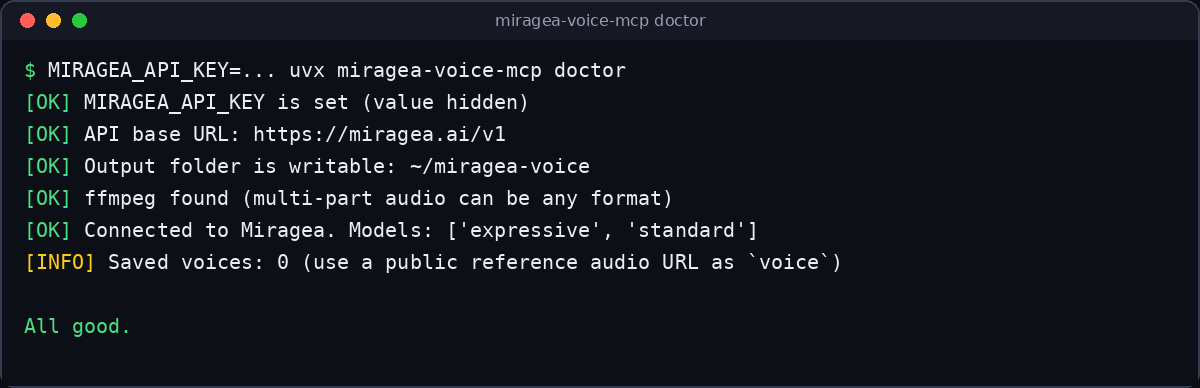
Check your setup without spending credits:
MIRAGEA_API_KEY=... uvx miragea-voice-mcp doctor
Client setup
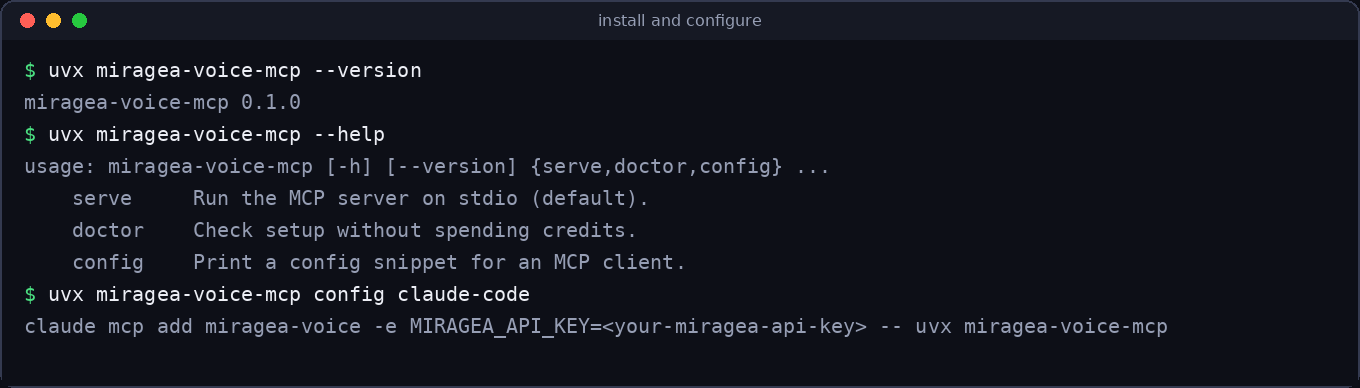
uvx miragea-voice-mcp config <client> prints a ready-to-paste snippet for claude-desktop, cursor, claude-code, vscode or windsurf.
Claude Desktop
Settings → Developer → Edit Config (claude_desktop_config.json), add the mcpServers block from Quick start, and restart Claude Desktop.
- macOS:
~/Library/Application Support/Claude/claude_desktop_config.json - Windows:
%APPDATA%\Claude\claude_desktop_config.json
Claude Code
claude mcp add miragea-voice -e MIRAGEA_API_KEY=<your-miragea-api-key> -- uvx miragea-voice-mcp
Voicing long scripts can take a few minutes. To raise Claude Code's tool timeout, start it with MCP_TOOL_TIMEOUT=600000 claude.
Cursor
Add this to ~/.cursor/mcp.json (global) or .cursor/mcp.json (project):
{
  "mcpServers": {
    "miragea-voice": {
      "command": "uvx",
      "args": ["miragea-voice-mcp"],
      "env": { "MIRAGEA_API_KEY": "<your-miragea-api-key>" }
    }
  }
}
VS Code (GitHub Copilot agent mode)
Add this to .vscode/mcp.json:
{
  "servers": {
    "miragea-voice": {
      "type": "stdio",
      "command": "uvx",
      "args": ["miragea-voice-mcp"],
      "env": { "MIRAGEA_API_KEY": "<your-miragea-api-key>" }
    }
  }
}
Windsurf and other MCP clients
Any client that can launch a stdio server works. Use command uvx, args ["miragea-voice-mcp"], and set MIRAGEA_API_KEY in the environment. If you'd rather not use uvx:
pip install miragea-voice-mcp
miragea-voice-mcp   # or: python -m miragea_voice_mcp
Tools
| Tool | What it does | Spends credits |
|---|---|---|
text_to_speech |
Text of any length → audio file + SRT/VTT subtitles | Yes |
generate_dialogue |
Speaker: line script → one joined audio file, per-line WAVs, speaker-labelled subtitles |
Yes |
transcribe_to_subtitles |
Local audio/video → SRT, VTT, TXT, JSON next to the media | Yes (per second) |
list_voices |
Voices saved in your Miragea account (name, actor_id, language) |
No |
get_capabilities |
Models, emotion/style tags, formats, speed range, limits, pricing | No |
estimate_cost |
Estimated credits for a text before you generate it | No |
check_task |
Resume a long task by task_id and save its result |
No |
list_recent_tasks |
Recent tasks with status and credits used | No |
text_to_speech
| Parameter | Default | Notes |
|---|---|---|
text |
(required) | Any length; split automatically past the per-request limit |
voice |
MIRAGEA_DEFAULT_VOICE |
Saved voice name or actor_id, or a public https:// URL of a clean 5–30 s speech sample (zero-shot cloning) |
model |
standard |
standard stays closest to the voice (×1). expressive is more emotive (×1 with reference_text, ×3 without when cloning from a URL) |
format |
mp3 |
mp3, wav, flac, opus, aac, pcm; also inferred from output_path |
speed |
1.0 |
0.25–4 |
tags |
none | Emotion/style labels from get_capabilities (not billed as text) |
reference_text |
none | Exact transcript of the URL sample. Better quality, and cheaper on expressive |
language |
none | Language hint for the reference sample |
output_path |
auto | Absolute, or relative to MIRAGEA_OUTPUT_DIR; never overwrites |
subtitles |
["srt","vtt"] |
Any of srt, vtt, txt, json; [] for none |
max_credits |
none | Refuse to run if the estimate is higher |
fresh |
false |
Force a new take of identical input |
Example result:
{
  "status": "succeeded",
  "audio_path": "/Users/you/miragea-voice/welcome-to-the-show-20261108-101500.mp3",
  "subtitle_paths": {
    "srt": "/Users/you/miragea-voice/welcome-to-the-show-20261108-101500.srt",
    "vtt": "/Users/you/miragea-voice/welcome-to-the-show-20261108-101500.vtt"
  },
  "duration_seconds": 6.84,
  "voice": "Ava",
  "model": "standard",
  "format": "mp3",
  "task_ids": ["3f2c..."],
  "credits_used": 14,
  "subtitle_timing": "estimated from measured audio duration (sentence-level)",
  "notes": []
}
generate_dialogue
| Parameter | Default | Notes |
|---|---|---|
script |
(required) | See script format |
voices |
(required unless a default voice is set) | {"Ava": "Ava", "Narrator": "https://.../narrator.wav"} (speaker names are case-insensitive) |
gap_seconds |
0.35 |
Silence between lines |
speaker_labels |
true |
Ava: … in SRT/TXT and <v Ava> voice spans in VTT |
model, format, speed, output_path, subtitles, max_credits, fresh |
Same as text_to_speech |
The result includes each line's exact start/end in the final file, the joined audio path, and a segments_dir with one WAV per line.
transcribe_to_subtitles
| Parameter | Default | Notes |
|---|---|---|
file_path |
(required) | Local audio or video (mp3, wav, m4a, mp4, mov, …) |
formats |
["srt","vtt"] |
Any of srt, vtt, txt, json |
output_dir |
next to the media | video.mp4 → video.srt, video.vtt |
max_credits |
none | Checked against the media duration before upload |
Configuration
All configuration is through environment variables in your client's env block. Only the API key is required.
| Variable | Default | Purpose |
|---|---|---|
MIRAGEA_API_KEY |
(required) | Your key from miragea.ai/workspace/api |
MIRAGEA_OUTPUT_DIR |
~/miragea-voice |
Where audio and subtitles are saved |
MIRAGEA_DEFAULT_VOICE |
none | Voice name, actor_id or sample URL used when the agent doesn't pick one |
MIRAGEA_DEFAULT_MODEL |
standard |
standard or expressive |
MIRAGEA_DEFAULT_FORMAT |
mp3 |
Default audio format |
MIRAGEA_WAIT_TIMEOUT |
600 |
Seconds to wait for a task before returning its task_id |
MIRAGEA_HTTP_TIMEOUT |
60 |
Per-request HTTP timeout |
MIRAGEA_BASE_URL |
https://miragea.ai/v1 |
API root, for private deployments |
Writing multi-speaker scripts
Narrator: Welcome to Two Minute Tech.
Ava: Today's idea: the Model Context Protocol.
Leo: Wait, is that the thing that lets Claude use tools?
[pause 600ms]
Ava: Exactly.
And this line has no speaker, so Ava keeps talking.
- One utterance per line:
Speaker: text. Lines with no speaker continue the previous speaker. Before the first speaker appears, they belong toNarrator. [pause 1.5s],[pause 800ms]or[pause 2]adds silence after the previous line.- See
examples/podcast-script.txt.
Lines are synthesized one by one as WAV and joined in pure Python, so no extra software is needed. If ffmpeg is installed, the joined file is converted to the format you asked for. Without it you get a WAV, and the result says so.
How subtitles are timed
Text-to-speech engines return audio without word timestamps. This server times subtitles in three ways:
- Generated speech, single text. The text is split into readable cues (sentences, then clauses, at most about two lines of 42 characters each, with tighter limits for CJK). The measured audio duration is shared out by character weight, with extra weight for punctuation pauses. This is accurate to a fraction of a second for normal narration.
- Dialogue and long text. Each line or chunk is its own audio segment, so its boundaries in the final file are exact. Only timing inside a line is estimated.
- Existing media (
transcribe_to_subtitles). Miragea's speech recognition gives timed segments. The punctuated transcript is then cut back into sentence cues and each cue is timed letter by letter from those segments, so no word is ever split across two cues.
Credits and cost control
Generation uses your Miragea account's credits. Live rates come from get_capabilities. At the time of writing:
- Speech, billed per word (per character for CJK).
standardcosts ×1.expressivecosts ×1 with a saved voice or withreference_text, and ×3 when cloning from a URL withoutreference_text. Emotion tags are free. - Subtitles from media, billed per second of media (currently 3 credits/second).
- Failed audio tasks are refunded automatically by Miragea.
The server's own safeguards:
estimate_costis free and runs locally.max_creditsrefuses a job before it starts if the estimate is higher.- Deterministic idempotency keys mean a retry, timeout or accidental re-run returns the original task instead of charging again. Use
fresh=truewhen you really want a new take.
Comparison with other TTS MCP servers
This comparison is based on each project's public README as of November 2026. "Not documented" means we couldn't find it, not that it's impossible. Corrections are welcome as PRs.
| Miragea Voice MCP | ElevenLabs MCP (local) | FreeTTS MCP | Local engines (Kokoro, mcp-tts, …) | |
|---|---|---|---|---|
| Status | Active | Deprecated in favor of ElevenLabs' hosted MCP | Active (remote server) | Varies |
| Install | uvx, one env var |
uvx, one env var |
Remote URL, nothing to install | Often model downloads, GPU or macOS-only |
| Output | Local files + paths | Local files, or MCP resources | MP3 link | Usually plays audio aloud |
| Subtitles for generated speech (SRT/VTT) | ✅ automatic | Not documented | Not documented | Not documented |
| Subtitles from your media files | ✅ SRT/VTT/TXT/JSON | Speech-to-text tool | Transcribe a public URL (paid plan) | ❌ |
| Multi-speaker script → one file | ✅ with per-line timings | Not documented | ✅ (paid plan) | Some (e.g. VOICEVOX) |
| Voice cloning | From a sample URL or saved voices | ✅ (voice cloning tools) | Not documented | Some local engines |
| Text longer than the API limit | ✅ auto split + join | Not documented | Not documented | Varies |
| Cost estimate / budget cap | ✅ estimate_cost, max_credits |
❌ | check_usage |
n/a (local) |
| Safe retries (idempotent) | ✅ | Not documented | Not documented | n/a |
| Voice engine | Miragea API (paid credits, free tier) | ElevenLabs API | FreeTTS | Local models |
Where others are stronger: ElevenLabs' tool set is much broader (sound effects, voice design, agents, music). Local engines are free and work offline. FreeTTS lists thousands of stock voices and needs no install. Pick Miragea Voice MCP when you want production files with subtitles, multi-speaker scripts and predictable cost, from any OS, without a GPU.
FAQ
How do I add text-to-speech to Claude Desktop?
Add the miragea-voice block from Quick start to claude_desktop_config.json with your Miragea API key and restart Claude. Then ask Claude to read any text aloud into a file.
How can Claude Code or Cursor generate a voiceover for my video? Install this server (see Client setup) and ask, for example: "Write a 30-second voiceover for this product demo, generate it with my 'Narrator' voice, and save it to ./assets/vo.mp3 with subtitles." The agent gets back the file paths and can drop them into your project.
How do I generate SRT subtitles from text with AI?
text_to_speech writes .srt and .vtt next to every voiceover by default, timed to the generated audio. For a video you already have, use transcribe_to_subtitles.
How do I make a multi-speaker podcast or dialogue with AI voices?
Write the script as Speaker: line and call generate_dialogue with one voice per speaker. You get a single audio file, a WAV per line and speaker-labelled subtitles.
Can I clone a voice with an MCP server?
Yes. Pass a public https:// link to a clean 5–30 second speech sample as voice. Adding its exact transcript as reference_text improves quality and lowers the cost on the expressive model. You can also save voices in your Miragea account and use them by name. Only clone voices you have the right to use.
Is Miragea Voice MCP free?
The server is free and MIT-licensed. Speech generation uses credits from your Miragea account. Free accounts can call the API by default, and estimate_cost tells you the price before you generate.
Where are the audio files saved?
In ~/miragea-voice by default. Change it with MIRAGEA_OUTPUT_DIR or pass output_path per call. Files are never overwritten: a -2, -3… suffix is added instead.
Does it work offline? No. Speech is generated by the Miragea API, so you need an internet connection.
What languages and emotions are supported?
Whatever your Miragea account offers. get_capabilities lists the live models and emotion/style tags, and list_voices shows each saved voice's language.
What if a long job times out in my client?
The task keeps running on Miragea. Call check_task with the returned task_id, or simply repeat the same request: the idempotency key returns the original task, so you aren't charged twice.
Troubleshooting
| Symptom | Fix |
|---|---|
spawn uvx ENOENT |
The client can't find uvx. Run which uvx (macOS/Linux) or where uvx (Windows) and use the absolute path as command. |
[missing_api_key] |
Add MIRAGEA_API_KEY to the server's env block and restart the client. |
[...] (HTTP 401) |
The key is wrong or revoked. Create a new one at miragea.ai/workspace/api. |
HTTP 403 |
The key works but the account has no API access. Check your plan's API access. |
HTTP 429 / insufficient_points |
Out of credits or rate limited. Top up or wait; don't loop retries. |
[blocked_by_cloudflare] |
A proxy or VPN is being challenged. Try another network, or set HTTPS_PROXY. |
[voice_not_found] / [no_voice] |
Run list_voices. If you have no saved voices, pass a public sample URL as voice. |
[synthesis_failed] with a sample URL |
Make sure the URL is a direct link to a WAV/MP3 that Miragea's servers can download (S3, R2 and similar work well). Failed tasks are refunded. |
[wait_timeout] |
Call check_task with the task_id, or raise MIRAGEA_WAIT_TIMEOUT. |
Dialogue saved as .wav instead of .mp3 |
Install ffmpeg (brew install ffmpeg, winget install ffmpeg, apt install ffmpeg). |
| Anything else | Run uvx miragea-voice-mcp doctor. Claude Desktop logs are in ~/Library/Logs/Claude/ (macOS) or %APPDATA%\Claude\logs\ (Windows). |
Development
git clone https://codeberg.org/miragea-voice/miragea-voice-mcp
cd miragea-voice-mcp
uv venv && uv pip install -e ".[dev]"
uv run pytest          # tests use a mocked API: no key, no network, no credits
uv run ruff check src tests
npx @modelcontextprotocol/inspector uv run miragea-voice-mcp   # poke at the tools
Project layout:
src/miragea_voice_mcp/
  server.py     MCP tools (works with mcp 1.x FastMCP and mcp 2.x MCPServer)
  service.py    tool logic: voices, chunking, dialogue, transcription, files
  client.py     Miragea HTTP client: auth, polling, idempotency, downloads
  subtitles.py  cue splitting, timing, SRT/VTT/TXT writers
  audio.py      duration probing, WAV joining, optional ffmpeg transcode
  script.py     multi-speaker script parser
  cli.py        `doctor` and `config` commands
Contributions are welcome: open an issue first for larger changes.
License
MIT. The voice engine is the Miragea API, which has its own terms of service.
1 maintainer

Metadata
1 maintainer
Release files for miragea-voice-mcp 0.1.0
For a detailed explanation of source distributions (sdists) and built distributions (wheels), please see the package formats documentation.
Source distribution (sdist)
| File | Size | Uploaded | Provenance | Actions |
|---|---|---|---|---|
| miragea_voice_mcp-0.1.0.tar.gz | 207.8 kB | Without provenance | Details for miragea_voice_mcp-0.1.0.tar.gz |
Built distribution (wheel)
| File | Interpreter | ABI | Platform | Actions Reset |
|---|---|---|---|---|
| miragea_voice_mcp-0.1.0-py3-none-any.whl | Python 3 | none | any | Details for miragea_voice_mcp-0.1.0-py3-none-any.whl |
Total release size: 246.9 kB
Release files / miragea_voice_mcp-0.1.0.tar.gz
| Download URL | miragea_voice_mcp-0.1.0.tar.gz |
|---|---|
| Size | 207.8 kB |
| Tags | Source |
|
SHA-256 checksum How to use checksums |
35a76c10eefe4a8025acaa8b658e1444be40e68a5f8a4bd81992fdca0c833019
|
|
BLAKE2b-256 checksum How to use checksums |
ffd03528bf87dd73ab4052d3402869223ed200b6765909c7dc64ae71e05492cb
|
| Upload date | |
|
Uploaded using Trusted Publishing? What is trusted publishing? |
No |
| Uploaded via |
twine/7.0.0 CPython/3.12.15
|
Release files / miragea_voice_mcp-0.1.0-py3-none-any.whl
| Download URL | miragea_voice_mcp-0.1.0-py3-none-any.whl |
|---|---|
| Size | 39.1 kB |
| Tags | Python 3 |
|
SHA-256 checksum How to use checksums |
9a80105fcacb37560800a9408423f418b50c6b99e1a368c7caf063eaea211bad
|
|
BLAKE2b-256 checksum How to use checksums |
6fbea9cbcbe9cba0c72f700794b477023123b2e35298bf4e02173bb3a7dfb202
|
| Upload date | |
|
Uploaded using Trusted Publishing? What is trusted publishing? |
No |
| Uploaded via |
twine/7.0.0 CPython/3.12.15
|
Security for miragea-voice-mcp 0.1.0
Provenance
Provenance describes where a file came from. On PyPI, provenance is shared via attestations, which provide a verifiable record of the build or publishing details. View details, limitations and caveats.
No provenance found
None of the files in this release were uploaded with provenance metadata.
A note on package security
PyPI is a repository for distributing packages, not a service for auditing them. While third-party security researchers and our staff do their best to detect and remove malicious packages, PyPI cannot guarantee the quality, security or suitability of any given package.
To learn more about protecting yourself from malicious actors, visit our package security documentation.













