

When you need to create complex Workflows and need to communicate different tools working together, maybe you need MIST.
What is MIST
MIST is a high level programming language for defining executions workflows easily.
MIST is interpreted. So, you can use their command line interpreter for running .mist programs. MIST interpreter will create the workflow graph, execute each tool, manage executions and synchronization fo you.
A quick example about how to run a MIST program:
> mist run my_program.mist
Installing
> pip install mist-lang
Quick Start
Requirements
Before start, we should install some command line tools used by catalog functions in the Demos:
dnsrecon (for searchDomains)
- Mac & Linux:
pip install git+https://github.com/cr0hn/dnsrecon
nmap (fir findOpenPorts)
- Mac:
brew install nmap - Ubuntu:
sudo apt install nmap
kafka-console-consumer & kafka-console-producer
- Mac:
brew install kafka - Ubuntu:
sudo apt install kafka
NOTE: For Demo 3 to 5 a Kafka server is expected to be running at localhost
festin
- Mac & Linux:
pip install festin
NOTE: Is also recommended to install tor in order to prevent being banned when using festin
aws (for S3Store)
- Mac:
brew install awscli - Ubuntu:
sudo apt install awscli
Demo 1 - The simplest scenario
Explanation
In this scenario we'll do:
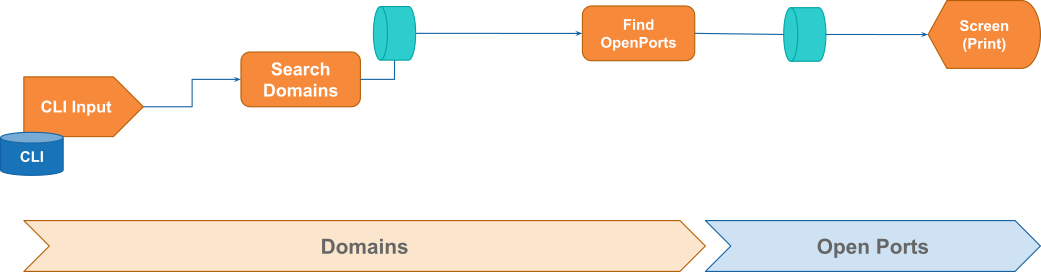
CLI Input- Read a domain as a parameter from CLI.Search Domains- Use MIST function for search related domains / sub-domains from a start domain.Fin OpenPorts- Search open port for each new domain / sub-domain found.Screen (Pring)- Displays the results into the screen (by using MIST 'print' function).
Use case diagram
MIST code (examples/demo/scenario-01.mist)
include "searchDomains" "findOpenPorts"

searchDomains(%domain) => findOpenPorts("80,443") => print()
Execute
> mist run examples/demo/scenario-01.mist domain=example.com
Demo 2 - Sending results to Kafka
Explanation
In this scenario we'll do:
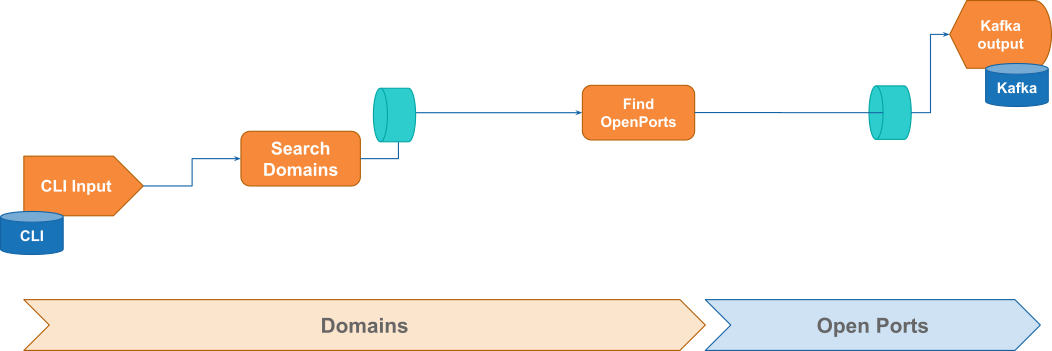
CLI Input- Read a domain as a parameter from CLI.Search Domains- Use MIST function for search related domains / sub-domains from a start domain.FindOpenPorts- Search open port for each new domain / sub-domain found.Kafka output- Send results to a Kafka topic.
Use case diagram
MIST code (examples/demo/scenario-02.mist)
include "searchDomains" "findOpenPorts" "kafkaProducer"

searchDomains(%domain) => findOpenPorts("80,443") =>
    kafkaProducer($KAFKA_SERVER, "domainsTopic")
Execute
> mist run examples/demo/scenario-02.mist domain=example.com
Demo 3 - Adding new tool and remove duplicate domains
Explanation
In this scenario we'll do:
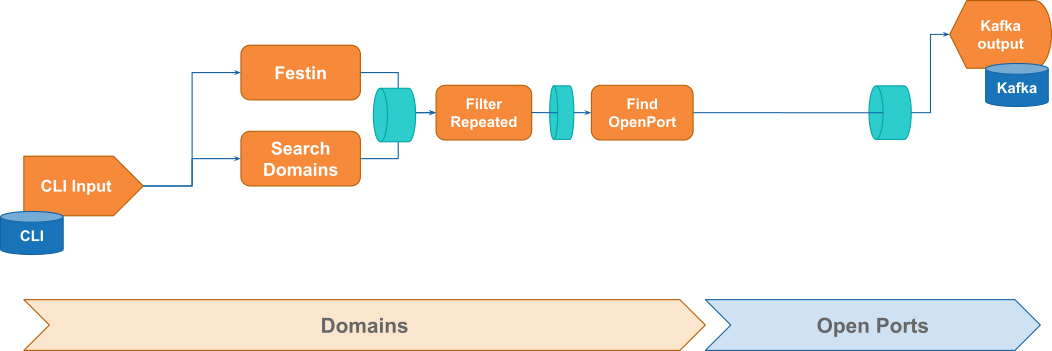
CLI Input- Read a domain as a parameter from CLI.- Search domains:
Search Domains- Use MIST function for search related domains / sub-domains from a start domain.Festin- Use MIST integration for Festin for search related domains / sub-domains from a start domain.
Filter Repeated- Use MIST function to detect and remove repeated found domains.Fin OpenPorts- Search open port for each new domain / sub-domain get fromFitler Repeated.Kafka output- Send results to a Kafka topic.
Use case diagram
MIST code (examples/demo/scenario-03.mist)
include "searchDomains" "festin" "findOpenPorts" "filterRepeated" "kafkaProducer"

searchDomains(%domain) => foundDomains
festin(%domain, $DNS_SERVER, True) => foundDomains

foundDomains => filterRepeated(False) =>
    findOpenPorts("80,443") => kafkaProducer($KAFKA_SERVER, "domainsTopic")
Execute
> mist run examples/demo/scenario-03.mist domain=example.com
Demo 4 - Send results to Kafka and S3 through a dispatcher
Explanation
In this scenario we'll do:
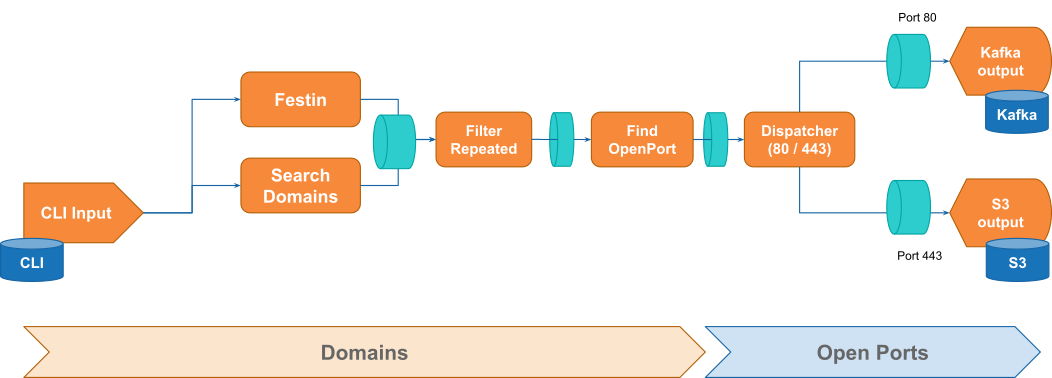
CLI Input- Read a domain as a parameter from CLI.- Search domains:
Search Domains- Use MIST function for search related domains / sub-domains from a start domain.Festin- Use MIST integration for Festin for search related domains / sub-domains from a start domain.
Filter Repeated- Use MIST function to detect and remove repeated found domains.Find OpenPorts- Search open port for each new domain / sub-domain get fromFitler Repeated.Dispatcher (80 / 443)- Split results and send each port to a different queue.- Send results:
Kafka output- Send found 80 ports to a Kafka topic.S3 output- Send found 443 ports to a AWS S3 bucket.
Use case diagram
MIST code (examples/demo/scenario-04.mist)
include "searchDomains" "festin" "findOpenPorts" "filterRepeated" "kafkaProducer" "S3Store"

function dispatcher(p) => kafka, S3 {
    if (isEqual(p.port, "80")) {
        p => kafka
    } else {
        p => S3
    }
}

searchDomains(%domain) => foundDomains
festin(%domain, $DNS_SERVER, True) => foundDomains

foundDomains => filterRepeated(False) =>
    findOpenPorts("80,443") => dispatcher() => kafkaOutput, S3Output

kafkaOutput => kafkaProducer($KAFKA_SERVER, "domainsTopic")
S3Output => S3Store($BUCKET_URI)
Execute
> mist run examples/demo/scenario-04.mist domain=example.com
Demo 5 - Read from Kafka and a File
Explanation
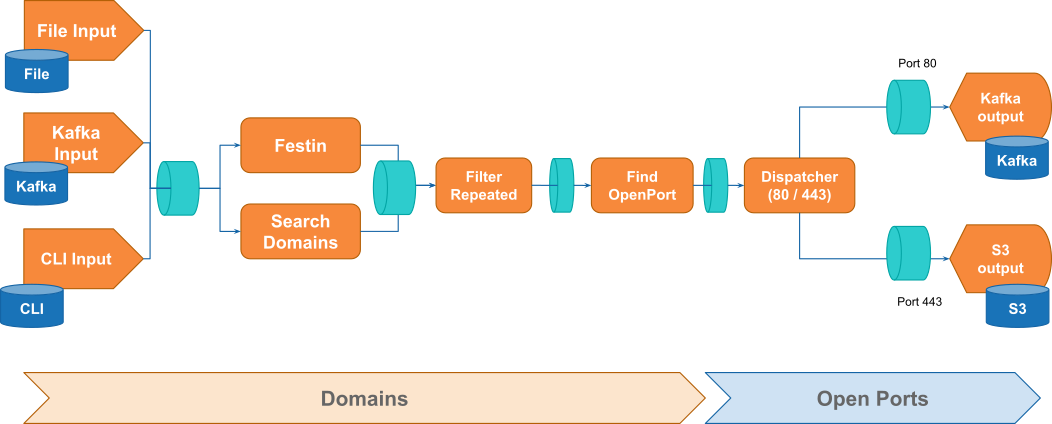
In this scenario we'll do:
1 Input from multiple sources:
File Input- Read domains from an external file.Kafka Input- Read domains from Kafka topics.CLI Input- Read domains from CLI.- Search domains:
Search Domains- Use MIST function for search related domains / sub-domains from a start domain.Festin- Use MIST integration for Festin for search related domains / sub-domains from a start domain.
Filter Repeated- Use MIST function to detect and remove repeated found domains.Find OpenPorts- Search open port for each new domain / sub-domain get fromFitler Repeated.Dispatcher (80 / 443)- Split results and send each port to a different queue.- Send results:
Kafka output- Send found 80 ports to a Kafka topic.S3 output- Send found 443 ports to a AWS S3 bucket.
Use case diagram
MIST code (examples/demo/scenario-05.mist)
include "searchDomains" "festin" "findOpenPorts" "filterRepeated" "kafkaProducer" "S3Store" "kafkaConsumer" "tail"

function dispatcher(p) => kafka, S3 {
    if (isEqual(p.port, "80")) {
        p => kafka
    } else {
        p => S3
    }
}

kafkaConsumer($KAFKA_SERVER, "inputTopic", "*END*", False) => inputDomains
tail("domains.txt", "*END*") => inputDomains
%domain => inputDomains

inputDomains => searchDomains() => foundDomains
inputDomains => festin($DNS_SERVER, True) => foundDomains

foundDomains => filterRepeated(False) => findOpenPorts("80,443") =>
    dispatcher() => kafkaOutput, S3Output

kafkaOutput => kafkaProducer($KAFKA_SERVER, "domainsTopic")
S3Output => S3Store($BUCKET_URI)
Execute
> mist run examples/demo/scenario-05.mist domain=example.com
Authors
MIST is being developed by BBVA-Labs Security team members.
Contributions
Contributions are of course welcome. See CONTRIBUTING or skim existing tickets to see where you could help out.
License
MIST is Open Source Software and available under the Apache 2 license
1 maintainer

Metadata
1 maintainer
Release files for mist-lang 0.3.9
For a detailed explanation of source distributions (sdists) and built distributions (wheels), please see the package formats documentation.
Source distribution (sdist)
| File | Size | Uploaded | |
|---|---|---|---|
| mist-lang-0.3.9.tar.gz | 49.9 kB | Details |
Built distribution (wheel)
| File | Interpreter | ABI | Platform | Reset |
|---|---|---|---|---|
| mist_lang-0.3.9-py3-none-any.whl | Python 3 | none | any | Details |
Total release size: 148.6 kB
Release files / mist-lang-0.3.9.tar.gz
| Download URL | mist-lang-0.3.9.tar.gz |
|---|---|
| Size | 49.9 kB |
| Tags | Source |
|
SHA-256 checksum How to use checksums |
ec7de08e0c0cfe8fa9a6530b794268922259d7ebe82e4e04c77404edf639272a
|
|
BLAKE2b-256 checksum How to use checksums |
7848d1bae34dd0e7d29b3935a722550728118a211048066af0e92f523db62dba
|
| Upload date | |
|
Uploaded using Trusted Publishing? What is trusted publishing? |
No |
| Uploaded via |
twine/3.4.1 importlib_metadata/4.4.0 pkginfo/1.7.0 requests/2.25.1 requests-toolbelt/0.9.1 tqdm/4.61.0 CPython/3.9.5
|
Release files / mist_lang-0.3.9-py3-none-any.whl
| Download URL | mist_lang-0.3.9-py3-none-any.whl |
|---|---|
| Size | 98.7 kB |
| Tags | Python 3 |
|
SHA-256 checksum How to use checksums |
e1c75e8777ccca82ea98d5a72767d4bc5094cd07a9f59c04b2be0ea353e4b9a5
|
|
BLAKE2b-256 checksum How to use checksums |
20204950ea04b85486140e2926a5f0d80a049f61c34339fdb59209af421fe0d9
|
| Upload date | |
|
Uploaded using Trusted Publishing? What is trusted publishing? |
No |
| Uploaded via |
twine/3.4.1 importlib_metadata/4.4.0 pkginfo/1.7.0 requests/2.25.1 requests-toolbelt/0.9.1 tqdm/4.61.0 CPython/3.9.5
|














