
mitoviz





Plot variants on the human mitochondrial genome.
Free software: MIT license
Documentation: https://mitoviz.readthedocs.io
GitHub repo: https://github.com/robertopreste/mitoviz
Features
mitoviz is a simple python package to plot human mitochondrial variants on a graphical representation of the human mitochondrial genome. It currently supports plotting variants stored in VCF and tabular files, as well as from general pandas dataframes when importing mitoviz in Python.
Variants are shown according to their heteroplasmic fraction (HF), plotting variants with HF = 1.0 on the outer border of the mitochondrial circle, those with HF = 0.0 on the inner border and all the others in between, according to their actual HF value.
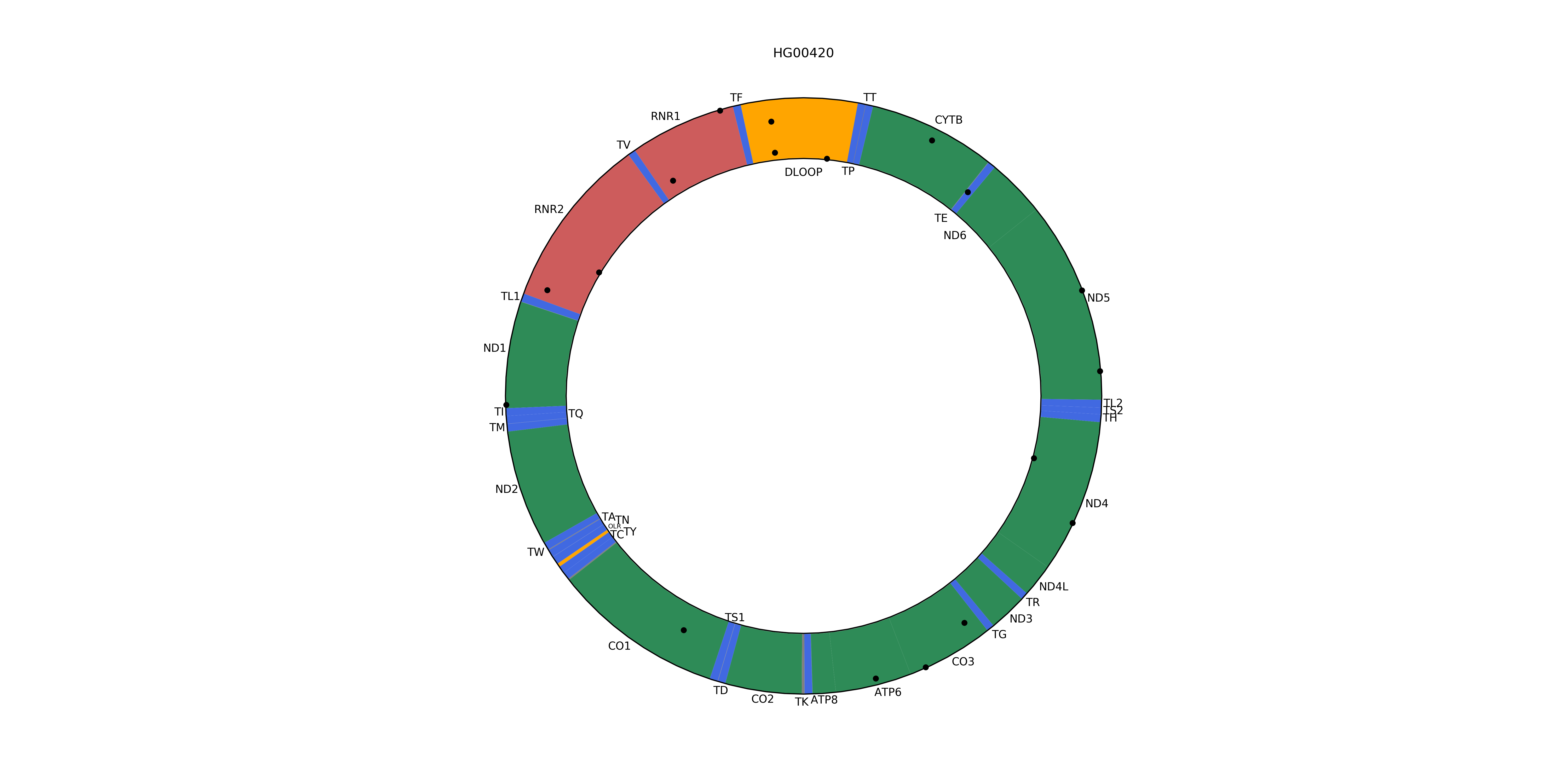
If the HF information is not available, variants will all be shown in the middle of the mitochondrial circle.
A linear representation of the mitochondrial genome can also be plotted; in this case, variants are shown using a lollipop plot style, with the height of the marker reflecting their HF.
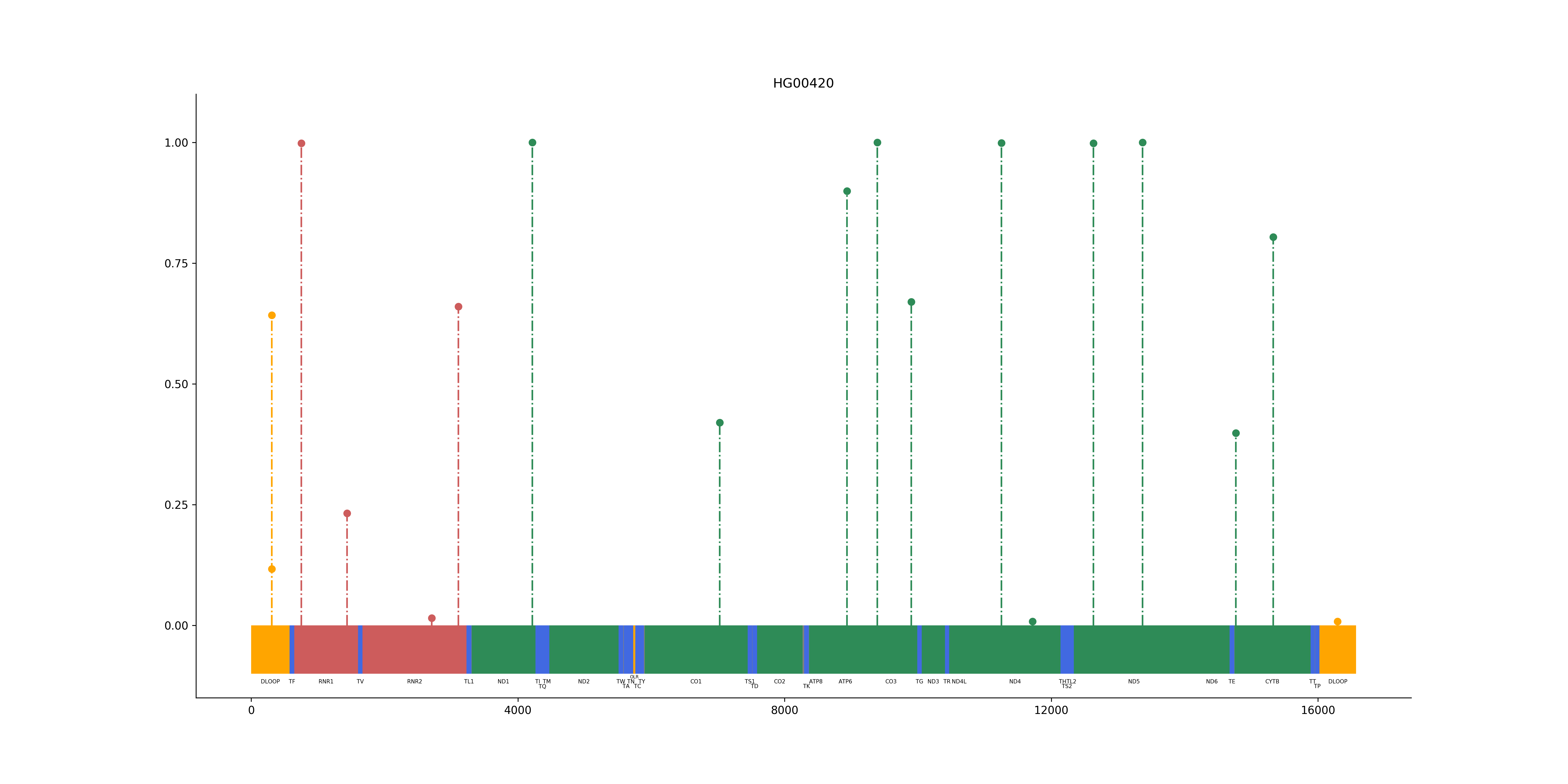
Variants with no HF information will be shown as if their HF was 0.5.
Usage
mitoviz can be used both from the command line and as a python module.
Command Line
Given a VCF file with human mitochondrial variants (sample.vcf), plotting them is fairly simple:
$ mitoviz sample.vcfAn image named mitoviz.png will be created in the current directory; if you want to provide a specific filename where the plot will be saved, just add the --output option with the desired path:
$ mitoviz sample.vcf --output my_mt_plot.pngLinear plots can be created using the --linear option:
$ mitoviz sample.vcf --linearPolar and linear interactive plots can also be created by adding the --interactive option, and will be saved to an HTML file:
$ mitoviz sample.vcf --interactiveIt is also possible to plot variants stored in a tabular file, such as CSV or TSV formats; mitoviz will automatically recognise them, treating the file as comma-separated by default. If a different separator is used (as in the case of TSV files), just specify it with the --sep option:
$ mitoviz sample.tsv --sep "\t"If you just need to create an empty mitochondrial plot, we’ve got you covered: use the mitoviz-base command and provide one or more options like --linear, --interactive, --legend, --split, --output, based on your needs.
Python Module
Import mitoviz and use its plot_vcf function to use it in your own script:
from mitoviz import plot_vcf

my_plot = plot_vcf("sample.vcf")
In this case, no plot will be shown until a call to plt.show() is made. It is possible to save the resulting plot using the save option and to provide a specific file where the plot will be saved using the output option:
plot_vcf("sample.vcf", save=True, output="my_mt_plot.png")By default, a polar plot is returned; linear plots are easily created using the linear option:
plot_vcf("sample.vcf", save=True, linear=True)Interactive plots can be created with the interactive option, and can be either saved to an HTML file or inspected in a Jupyter notebook:
# Show the interactive plot (works in a Jupyter notebook)
plot_vcf("sample.vcf", interactive=True)
# Save the interactive plot to an HTML file
plot_vcf("sample.vcf", interactive=True, save=True)
A similar function to plot variants contained in a pandas DataFrame is available as plot_df. Supposing you have a pandas DataFrame with human mitochondrial variants named variants_df, it is possible to plot them as follows:
from mitoviz import plot_df

plot_df(variants_df)
Variants stored in tabular files can be plotted using plot_table, which accepts the same options available for plot_vcf and plot_df, with the addition of sep, which is used to specify the column separator. By default, the comma is used as column delimiter:
from mitoviz import plot_table

# plotting a CSV file
plot_table("sample.csv")
# plotting a TSV (tab-separated) file
plot_table("sample.tsv", sep="\t")
plot_table also accept additional keyword options, which will be passed to pandas.read_table when processing the given input file:
plot_table("sample.tsv", sep="\t", comment="#", skiprows=0)If you just need to create an empty mitochondrial plot, the plot_base function allows to do so, and accepts the linear, interactive, legend, split, output and save arguments to further tweak its behaviour.
Please refer to the Usage section of the documentation for further information.
Installation
PLEASE NOTE: HmtNote only supports Python >= 3.6!
The preferred installation method for mitoviz is using pip:
$ pip install mitovizPlease refer to the Installation section of the documentation for further information.
Credits
This package was created with Cookiecutter and the cc-pypackage project template.
History
0.1.0 (2019-12-27)
First release.
0.2.0 (2019-12-29)
Add functionality to plot multiple samples.
0.2.1 (2020-01-06)
Add legend to plots and update colors.
0.2.2 (2020-01-08)
Add option to plot variant labels.
0.2.3 (2020-01-11)
Make legend plotting optional.
0.3.0 (2020-01-15)
Add plot_df function to plot variants from a pandas DataFrame.
0.4.0 (2020-01-26)
Add plot_table function to plot variants from tabular files;
add CLI functionality to plot variants from tabular files;
refactor code.
0.4.1 (2020-02-13)
Refactor to use abstract classes;
Rename internal classes to _PolarLocus and _PolarVariant.
0.4.2 (2020-02-14)
Fix bug with non coding loci not being shown in plots.
0.5.0 (2020-02-19)
Add split option to plot split strands on polar plots.
0.6.0 (2020-02-29)
_PolarVariant is deprecated and replaced by _Variant;
Add linear option to create linear plots.
0.6.1 (2020-03-02)
Refactor and clean code;
Add CI module for internal management.
0.6.2 (2020-03-03)
Fix borders on linear plots.
0.6.3 (2020-03-04)
Fix stemlines on split linear plots.
0.6.4 (2020-03-10)
Fix loci label positions on polar plots.
0.7.0 (2020-03-15)
Add --interactive option to create interactive plots using plot.ly;
Implement interactive basic polar plots;
Implement interactive split polar plots.
0.7.1 (2020-03-28)
Implement interactive basic linear plots;
Implement interactive split linear plots.
0.8.0 (2020-04-05)
Add mitoviz-base command to create base mitochondrial plots.
0.8.1 (2020-04-12)
Move test images to separate subrepo.
0.8.2 (2020-04-20)
Add --labels-hf (labels-hf=True in Python) options to include the HF value in plot labels.
0.9.0 (2020-06-11)
Refactor code to create plotting classes.
1 maintainer

Metadata
1 maintainer
Release files for mitoviz 0.9.0
For a detailed explanation of source distributions (sdists) and built distributions (wheels), please see the package formats documentation.
Source distribution (sdist)
| File | Size | Uploaded | Provenance | |
|---|---|---|---|---|
| mitoviz-0.9.0.tar.gz | 582.1 kB | Without provenance | Details |
Built distribution (wheel)
| File | Interpreter | ABI | Platform | Reset |
|---|---|---|---|---|
| mitoviz-0.9.0-py2.py3-none-any.whl | Python 2, Python 3 | none | any | Details |
Total release size: 600.2 kB
Release files / mitoviz-0.9.0.tar.gz
| Download URL | mitoviz-0.9.0.tar.gz |
|---|---|
| Size | 582.1 kB |
| Tags | Source |
|
SHA-256 checksum How to use checksums |
a842bf677e83be5d5b501aef11e071bfa86d081cdee1d1b5bb9464ea428df8cb
|
|
BLAKE2b-256 checksum How to use checksums |
98cf18ae7a8b4e03a3007ea23be44851977fc4274f671ad65e4461cd04dd47c7
|
| Upload date | |
|
Uploaded using Trusted Publishing? What is trusted publishing? |
No |
| Uploaded via |
twine/3.1.1 pkginfo/1.5.0.1 requests/2.22.0 setuptools/40.8.0 requests-toolbelt/0.9.1 tqdm/4.41.0 CPython/3.7.3
|
Release files / mitoviz-0.9.0-py2.py3-none-any.whl
| Download URL | mitoviz-0.9.0-py2.py3-none-any.whl |
|---|---|
| Size | 18.2 kB |
| Tags | Python 2 Python 3 |
|
SHA-256 checksum How to use checksums |
4626a71c0695202003ad5ac4c514ec0661508ea1ab8a5178a38bd6c33044249a
|
|
BLAKE2b-256 checksum How to use checksums |
c44ed4b00e626a9b9e3f0805b4e12f4ad00b9573cbbd24eca9d4c130c984009b
|
| Upload date | |
|
Uploaded using Trusted Publishing? What is trusted publishing? |
No |
| Uploaded via |
twine/3.1.1 pkginfo/1.5.0.1 requests/2.22.0 setuptools/40.8.0 requests-toolbelt/0.9.1 tqdm/4.41.0 CPython/3.7.3
|
Security for mitoviz 0.9.0
Provenance
Provenance describes where a file came from. On PyPI, provenance is shared via attestations, which provide a verifiable record of the build or publishing details. View details, limitations and caveats.
No provenance found
None of the files in this release were uploaded with provenance metadata.
A note on package security
PyPI is a repository for distributing packages, not a service for auditing them. While third-party security researchers and our staff do their best to detect and remove malicious packages, PyPI cannot guarantee the quality, security or suitability of any given package.














