


Links
Dependencies
- Python 3.8+
- mkdocs 1.4+
- BeautifulSoup 4+
Overview
About
The mkdocs-addresses is a plugin for mkdocs which offers:
-
Abstraction of the concrete tree hierarchy of pages and anchors within those when writing a link, utilizing unique identifiers:
Benefit from a strong separation between logic and content, avoiding all addresses rewrite steps when some files are modified, split, merged or moved.
-
Verification of numerous links and addresses to ensure the absence of dead links or images within the documentation (including verifications beyond mkdocs 1.5+ capabilities):
The tool warns you when something becomes wrong during development.
-
Convenient helpers to facilitate the usage of those identifiers within the docs pages. For users working with compatible IDEs, this translates to the availability of auto-completion features:
Don't lose time searching for the exact name of the anchor in the file that is... where is it again? Let the autocompletion tool find them for you.
Identifiers: separating structure from content
Relying on the attr_list markdown extension, use identifiers instead of actual paths to point to specific anchors in the documentation:
## Very important title with anchor and id {: #point-here }
In another file: navigate to [this very important title](--point-here).
The plugin automatically rebuilds the appropriate addresses, considering various factors such as the source file location, the target, the use_directory_urls option, ...
Reduce dependencies on the files hierarchy
Identifiers still work after:
- Changing header content
- Moving sections from one file to another
- Renaming files
- Moving files
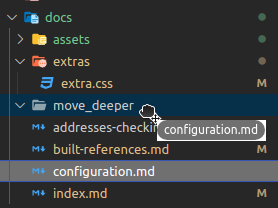
Provide autocompletion helpers (IDE dependent)
(Currently only available for VSC-like IDEs)
- All snippets are automatically kept up to date while working on the documentation.
- They provide various markdown snippets, to get a quick and easy access to all the references defined in the documentation, and use them within the markdown code they are usual used for.
| Kind | Suggestion completion | Inserted markdown |
|---|---|---|
| Doc identifier | --point-here |
--point-here |
| Doc links | Link.point-here |
[link to some place in the docs](--point-here) |
Images in assets/ (identifier) |
!!file_in_assets_jpg |
!!file_in_assets_jpg |
Images in assets/ |
Img.file_in_assets_jpg |
 |
| Other files links | ++file_path_in_docs_html |
++file_path_in_docs_html |
| Other files links | File.file_path_in_docs_html |
[link to a file](++file_path_in_docs_html) |
| External Links * | Ext.global_ref |
[global_ref][global_ref] |
| Code inclusions** | ::md that_file_md |
--<8-- "include/that_file.md" |
*: requires an external_links_file for global references is configured.
**: requires the use of inclusions directories.

Tracking dead links or addresses in the docs
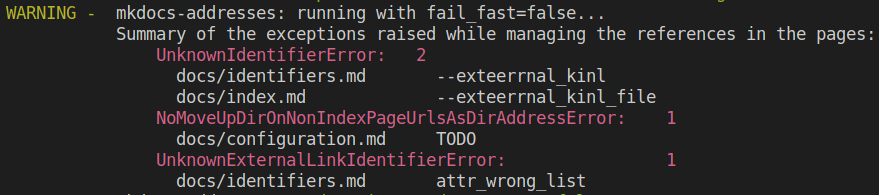
The plugin also explores the documentation and warns you if it finds invalid addresses or identifiers. This works for:
- Addresses in links
- Addresses of images
- Identifiers used by the plugin
User handed configuration
A lot of options are available for the user to fine tune the plugin's behavior.
Installation
Install the package on your machine (or in your project if you are using a virtual env):
pip install mkdocs-addresses
Register the plugin in the mkdocs.yml file:
plugins:
    - search            # To redeclare when plugins are added to mkdocs.yml
    - mkdocs-addresses
Configure the plugin (see below).
Recommended mkdocs.yml configuration
See the online documentation for more details.
Markdown extensions
markdown_extensions:
    - attr_list             # To define the identifiers in the markdown content
    - pymdownx.snippets:    # If you need inclusions code snippets
        check_paths: true
        auto_append: ["path_to_external_links_definition.md"]
        #               ^ see plugin's external_link_file configuration
Plugin configuration
plugins:
    - search
    - mkdocs-addresses:
        - external_links_file: path_to_links_definition_if_any.md
        - inclusions:
            - location1_if_any
            - location2...
Note that the default configuration also implies the following choices:
        - dump_snippets_file: .vscode/links.code-snippets
        - fail_fast: false
        - ignore_auto_headers: true
        - ide: vsc
So, if VSC isn't the utilized IDE, the ide option should at the very least be modified.
When using mkdocs 1.5+
Significant enhancements in address verification logic (which was notoriously lacking in earlier versions...) have been added in mkdocs 1.5+. But the plugin does more work, and the identifiers it is utilizing are generating warnings in the console.
Hence, deactivate the default verification logic for mkdocs 1.5+:
validation:
    absolute_links: ignore
    unrecognized_links: ignore
Links
License
Apache-2.0 Copyright © 2023 Zinelli Frédéric
1 maintainer

Metadata
1 maintainer
Release files for mkdocs-addresses 0.5.7
For a detailed explanation of source distributions (sdists) and built distributions (wheels), please see the package formats documentation.
Source distribution (sdist)
| File | Size | Uploaded | |
|---|---|---|---|
| mkdocs_addresses-0.5.7.tar.gz | 50.7 kB | Details |
Built distribution (wheel)
| File | Interpreter | ABI | Platform | Reset |
|---|---|---|---|---|
| mkdocs_addresses-0.5.7-py3-none-any.whl | Python 3 | none | any | Details |
Total release size: 112.1 kB
Release files / mkdocs_addresses-0.5.7.tar.gz
| Download URL | mkdocs_addresses-0.5.7.tar.gz |
|---|---|
| Size | 50.7 kB |
| Tags | Source |
|
SHA-256 checksum How to use checksums |
1fb8b52bdd5d959159857909e15c163f3b16ebded36525d1ba4b3fc80e58267a
|
|
BLAKE2b-256 checksum How to use checksums |
334f75795b48cd68407d71d56acbce82909e4b7f57e84bb7d480f51f06368e92
|
| Upload date | |
|
Uploaded using Trusted Publishing? What is trusted publishing? |
No |
| Uploaded via |
poetry/2.1.4 CPython/3.10.10 Linux/7.0.0-29-generic
|
Release files / mkdocs_addresses-0.5.7-py3-none-any.whl
| Download URL | mkdocs_addresses-0.5.7-py3-none-any.whl |
|---|---|
| Size | 61.4 kB |
| Tags | Python 3 |
|
SHA-256 checksum How to use checksums |
c559cc25f602c93d69002ad20837c71a180b143ab1c354deb198e68e311d39db
|
|
BLAKE2b-256 checksum How to use checksums |
96fec92d9afce575e42618f9cd153bc9a08246b1d7da7ac2e99442f1ea9b5609
|
| Upload date | |
|
Uploaded using Trusted Publishing? What is trusted publishing? |
No |
| Uploaded via |
poetry/2.1.4 CPython/3.10.10 Linux/7.0.0-29-generic
|














