
mkdocs-api-autonav





Autogenerate API reference including navigation for all submodules, with mkdocstrings.
(removes the need for using a custom script alongside mkdocs-gen-files and literate-nav)
Quick Start
pip install mkdocs-api-autonav
# mkdocs.yml
site_name: "My Library"

plugins:
- search
- mkdocstrings:
- api-autonav:
    modules: ['src/my_library']
Configuration
Here are all the configurables, along with their default values.
plugins:
- api-autonav:
    modules: []
    module_options: {}
    nav_section_title: "API Reference"
    api_root_uri: "reference"
    nav_item_prefix: "<code class='doc-symbol doc-symbol-nav doc-symbol-module'></code>"
    exclude_private: true
    show_full_namespace: false
    on_implicit_namespace_package: "warn"
-
modules(list[str])- List of paths to Python modules to include in the navigation, relative to the project root. This is the only required configuration. (e.g.,["src/package"]) -
module_options(dict[str, dict]) - Dictionary of local options to pass tomkdocstringsfor specific modules. The keys are python identifiers or a regex pattern to match (e.g.,package.moduleor.*\.some_module) and the values are dictionaries of local options to pass tomkdocstringsfor that specific module. To specify options for all modules, use the.*regex pattern (or add it to your global mkdocstrings config)- api-autonav: modules: ['src/package'] module_options: package.submodule: docstring_style: google show_signature: false ".*": heading_level: 1 show_symbol_type_heading: true
Note that
{"heading_level": 1}is set by default, since it is a very useful default... but can be overridden if you don't want the module path to be theh1heading for the page. -
exclude(list[str]) - List of module paths or patterns to exclude. Can be specified as exact module paths (e.g.,["package.module"]), which will also exclude any submodules, or as regex patterns prefixed with're:'(e.g.,["re:package\\.utils\\..*"]). Regex patterns are matched against the full module path. -
nav_section_title(str) - Title for the API reference section as it appears in the navigation. Default is "API Reference" -
api_root_uri(str) - Root folder for api docs in the generated site. This determines the url path for the API documentation. Default is "reference" -
nav_item_prefix(str) - A prefix to add to each module name in the navigation. By default, renders a[mod]badge before each module. Set to the empty string to disable this. -
exclude_private(bool) - Exclude modules that start with an underscore.Trueby default. -
show_full_namespace(bool) - Show the full namespace in the navigation title (as opposed to just the leaf module name).Falseby default (to avoid clipping of long, nested module names). The full module path is still shown as the header of each page. -
on_implicit_namespace_package(str) - What to do when an implicit namespace package is found. An "implicit namespace package" is a directory that contains python files, but no__init__.pyfile; these will likely cause downstream errors for mkdocstrings. Options include:"raise"- immediately stop and raise an error"warn"- log a warning, and continue (omitting the namespace package)"skip"- silently omit the namespace package and its children
Integration with nav
No nav configuration is required in mkdocs.yml, but in most cases you will want to
have one anyway. Here are the rules for how this plugin integrates with your
existing nav configuration.
-
If
<nav_section_title>exists and is explicitly referenced as a stringIf your nav contains a string entry matching the
api-autonav.nav_section_title(e.g., -"API Reference"), the plugin replaces it with a structured navigation dictionary containing the generated API documentation. This can be used to reposition the API section in the navigation. -
If
<nav_section_title>exists as a dictionary with a single string valueIf the API section is defined as
{ api-autonav.nav_section_title: "some/path" }(e.g., -"API Reference": "reference/"), the plugin verifies that"some/path"matches the expectedapi-autonav.api_root_uridirectory where API documentation is generated. If it matches, the string is replaced with the structured API navigation. Otherwise, an error is logged, and no changes are made. This can be used to reposition the API section in the navigation, and also to add additional items to the API section, for example, usingliterate-navto autodetect other markdown files in yourdocs/<api-autonav.api_root_uri>directory. -
If
<nav_section_title>is a dictionary containing a list of itemsIf the API section is defined as
{ api-autonav.nav_section_title: [...] }, the plugin appends its generated navigation structure to the existing list. This can be used to add additional items to the API section. -
If
<nav_section_title>is not found in navIf no API section is found in the existing nav, the plugin appends a new section at the end of the nav list with the generated API navigation.
Integration with mkdocs-awesome-nav
mkdocs-awesome-nav
"completely discards the navigation that MkDocs and other plugins
generate", and as
such requires special consideration. Currently, the only way we integrate with
mkdocs-awesome-nav is to add the generated API navigation to the end of the
nav list, with the name nav_section_title from your config.
Configuring Docstrings
Since mkdocstrings is used to generate the API documentation, you can configure the docstrings as usual, following the mkdocstrings documentation.
I find the following settings to be particularly worth considering:
plugins:
  - mkdocstrings:
      handlers:
        python:
          import:
            - https://docs.python.org/3/objects.inv
          options:
            docstring_section_style: list # or "table"
            docstring_style: "numpy"
            filters: ["!^_"]
            heading_level: 1
            merge_init_into_class: true
            parameter_headings: true
            separate_signature: true
            show_root_heading: true
            show_signature_annotations: true
            show_symbol_type_heading: true
            show_symbol_type_toc: true
            summary: true
If you only want these settings to apply to api modules, then you can use a special
regex of ".*" in the api-autonav module_options config, for example:
  - api-autonav:
      module_options:
        ".*":
          show_symbol_type_heading: true
          show_symbol_type_toc: true
          heading_level: 1
Mkdocs-material suggestions
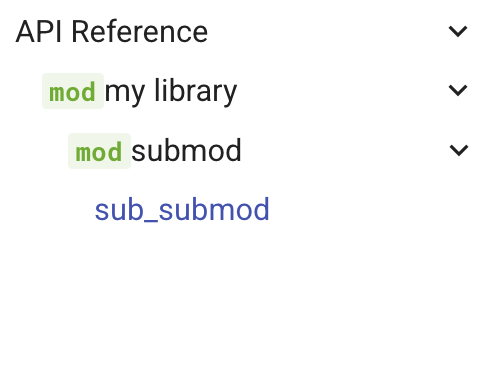
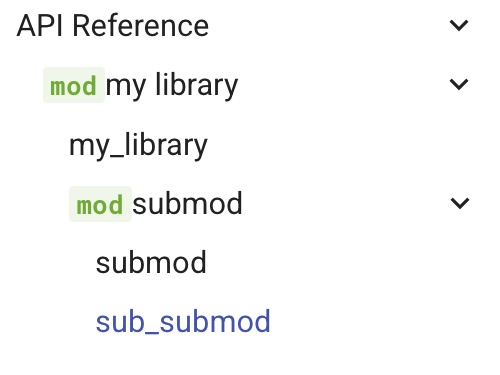
When working with mkdocs-material, use theme.features: ['navigation.indexes']
allow the module docs itself to be toggleable (rather than duplicated just
inside the section):
theme:
  name: material
  features:
    - navigation.indexes
with navigation.indexes |
without |
|---|---|
 |
 |
Why this plugin?
I very frequently find myself using three plugins in conjunction to generate API documentation for my projects.
- mkdocstrings with
mkdocstrings-python - to generate
the API documentation using mkdocstrings
::: <identifier>directives. - mkdocs-gen-files - Along with a script to look through my
srcfolder to generate virtual files (including just the mkdocstrings directives) for each (sub-)module in the project. - literate-nav - To consume a virtual
SUMMARY.mdfile generated usingmkdocs-gen-filesin the previous step, and generate a navigation structure that mirrors the module structure.
This requires copying the same script and configuring three different plugins. All I really want to do is point to the top level module(s) in my project and have the API documentation generated for all submodules, with navigation matching the module structure.
This plugin does that, using lower-level plugin APIs
(File.generated)
to avoid the need for mkdocs-gen-files and literate-nav. (Those plugins are
fantastic, but are more than what was necessary for this specific task).
It doesn't currently leave a ton of room for configuration, so it's mostly designed for those who want to document their entire public API. (I find it can actually be a useful way to remind myself of what I've actually exposed and omitted from the public API).
1 maintainer

Metadata
1 maintainer
Release files for mkdocs-api-autonav 0.4.0
For a detailed explanation of source distributions (sdists) and built distributions (wheels), please see the package formats documentation.
Source distribution (sdist)
| File | Size | Uploaded | |
|---|---|---|---|
| mkdocs_api_autonav-0.4.0.tar.gz | 18.0 kB | Details |
Built distribution (wheel)
| File | Interpreter | ABI | Platform | Reset |
|---|---|---|---|---|
| mkdocs_api_autonav-0.4.0-py3-none-any.whl | Python 3 | none | any | Details |
Total release size: 31.1 kB
Release files / mkdocs_api_autonav-0.4.0.tar.gz
| Download URL | mkdocs_api_autonav-0.4.0.tar.gz |
|---|---|
| Size | 18.0 kB |
| Tags | Source |
|
SHA-256 checksum How to use checksums |
3527b0e5cf1b682bd374a3ce699ac12d6288f5fcaf93877f34a6b14c79740637
|
|
BLAKE2b-256 checksum How to use checksums |
6db020960ee733a419a349877d09712d02e8ec2bda031672e5f0d0a15fc020b3
|
| Upload date | |
|
Uploaded using Trusted Publishing? What is trusted publishing? |
Yes |
| Uploaded via |
twine/6.1.0 CPython/3.13.7
|
Provenance
Provenance describes where a file came from. On PyPI, provenance is shared via attestations, which provide a verifiable record of the build or publishing details. View details, limitations and caveats.


PyPI Publish Attestation
PyPI verified that this artifact, at this checksum, originated from the publisher listed below.
Signed by GitHub Actions, verified by PyPI on Sep 9, 2025.
Transparency logRelease files / mkdocs_api_autonav-0.4.0-py3-none-any.whl
| Download URL | mkdocs_api_autonav-0.4.0-py3-none-any.whl |
|---|---|
| Size | 13.1 kB |
| Tags | Python 3 |
|
SHA-256 checksum How to use checksums |
87474e7919664fca75648a05e79de238dd5b39a0f711910d3638626b016acfe3
|
|
BLAKE2b-256 checksum How to use checksums |
f037e1413281aec69994a0ecb8baaff523b7b7da3119ae7d495b7dc659e630b0
|
| Upload date | |
|
Uploaded using Trusted Publishing? What is trusted publishing? |
Yes |
| Uploaded via |
twine/6.1.0 CPython/3.13.7
|
Provenance
Provenance describes where a file came from. On PyPI, provenance is shared via attestations, which provide a verifiable record of the build or publishing details. View details, limitations and caveats.
PyPI Publish Attestation
PyPI verified that this artifact, at this checksum, originated from the publisher listed below.
Signed by GitHub Actions, verified by PyPI on Sep 9, 2025.
Transparency log













