






About
Generate mkdocs documentation from Azure Pipelines yaml files.
-"But why?"
When managing a large repository of pipeline template files, it can be difficult to keep track of what each template does and how to use it. This plugin aims to make it easier to document pipeline templates by generating markdown documentation from the template files themselves and adding it to a mkdocs site.
How to use
Install the plugin:
pip install mkdocs-azure-pipelines
or
uv add mkdocs-azure-pipelines
Add the plugin to your mkdocs.yml, you can choose input files and directories to process.
Note, for now you can only specify a single output directory where all the generated markdowns will go.
plugins:
  - mkdocs-azure-pipelines:
      input_files:
        - steps-template.yml
        - jobs-template.yml
      input_dirs:
        - folder_with_pipelines
      output_dir: "Pipelines"
The output dir is relative to the root of your documentation.
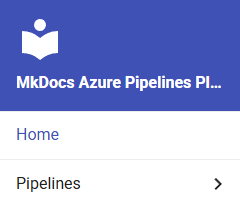
Parsing YAML
The plugin will parse the yaml files and extract the following information:
- Trigger
- Pool
- Variables
- Parameters
- Code (the first of steps, jobs or stages key found at top level, then all code under that key)
These will be added to the generated markdown file with the key as level 2 headers and the value as a code block, retaining the original, including comments.
Adding Extra Content
To add extra content to your generated markdown you can use the title, about, example and outputs start and end-tags in the following syntax #:::<tag>-start::: and #:::<tag>-end:::.
#:::title-start:::
# Pip cache step template
#:::title-end:::

#:::about-start:::
# This pipeline template is used to install pip deps and cache them.
#:::about-end:::

#:::example-start:::
# steps:
# - template: pip-install-and-cache-step.yml@templates
#   parameters:
#     python_version: '3.6'
#:::example-end:::

#:::outputs-start:::
# **encouraging_message**: A message to encourage the user.
#:::outputs-end:::

Pipeline/template code starts here...
These generate the following markdown:
# Pip cache step template

## About

This pipeline template is used to install pip deps and cache them.

## Outputs

**encouraging_message**: A message to encourage the user.

## Example

    ```yaml
    steps:
    - template: pip-install-and-cache-step.yml@templates
      parameters:
        python_version: '3.6'
    ```

Pipeline/template code starts here...
Debugging
If you are having issues with the plugin, you can run mkdocs build and mkdocs serve with the --verbose flag to get more information about what the plugin is doing. All logs from the plugin should be prefixed with mkdocs-azure-pipelines: .
Contributing
Contributions are welcome! If you find any bugs or have a feature request, please open an issue or even better, a pull request 🥳
Development
Development is done using uv. Python 3.10 or higher is required.
1. Install UV
See the uv repository for the latest and greatest in installation instructions.
2. Install dependencies
uv sync
3. Run tests
uv run pytest
4. Install the pre-commit hooks
If you want to be sure that your code is properly formatted and linted before committing, you can install the pre-commit hooks.
uv run pre-commit install
This will stop you from committing if the code is not properly formatted or linted.
5. Run pre-commit manually
You can run pre-commit manually on all files using:
uv run pre-commit run --all-files
Project Goals
Phase 1: Templates with parameters
- Establish a syntax for title, about, example, outputs etc.
- Create a Python script which can process a pipeline template and output a markdown file.
- Convert to a real installable mkdocs plugin.
Phase 2: Automatic parameter and code parsing
- Make the plugin document parameters based on the actual pipeline code, no need to use parameters/code-start and -end tags.
Phase 3: Any Azure Pipeline
- Make the plugin work with any Azure Pipeline yaml file, not just templates. This means parsing variables, pool, trigger, resources etc.
Phase 4: Automatic outputs parsing
- Make the plugin document outputs based on the actual pipeline code, no need to use outputs-start and outputs-end tags/section.
Phase 5: Mermaid diagrams
- Generate mermaid diagrams for the template which take conditions and expressions into consideration.
1 maintainer

Metadata
1 maintainer
Release files for mkdocs-azure-pipelines 0.1.3
For a detailed explanation of source distributions (sdists) and built distributions (wheels), please see the package formats documentation.
Source distribution (sdist)
| File | Size | Uploaded | Provenance | |
|---|---|---|---|---|
| mkdocs_azure_pipelines-0.1.3.tar.gz | 58.8 kB | Without provenance | Details |
Built distribution (wheel)
| File | Interpreter | ABI | Platform | Reset |
|---|---|---|---|---|
| mkdocs_azure_pipelines-0.1.3-py3-none-any.whl | Python 3 | none | any | Details |
Total release size: 68.0 kB
Release files / mkdocs_azure_pipelines-0.1.3.tar.gz
| Download URL | mkdocs_azure_pipelines-0.1.3.tar.gz |
|---|---|
| Size | 58.8 kB |
| Tags | Source |
|
SHA-256 checksum How to use checksums |
6c10692bc763c75f5068d3c915ebfe14c046f6f7b9a74491a732d97c4aba5f68
|
|
BLAKE2b-256 checksum How to use checksums |
323192f6e89f96c76004f088d2b70a1afde456c331cf9df1503da31a1fd50a1a
|
| Upload date | |
|
Uploaded using Trusted Publishing? What is trusted publishing? |
Yes |
| Uploaded via |
uv/0.6.3
|
Release files / mkdocs_azure_pipelines-0.1.3-py3-none-any.whl
| Download URL | mkdocs_azure_pipelines-0.1.3-py3-none-any.whl |
|---|---|
| Size | 9.2 kB |
| Tags | Python 3 |
|
SHA-256 checksum How to use checksums |
89d0b2aaec281bbf6db3af23806b6e9eec921c0151bbe0231575efd7b43375f8
|
|
BLAKE2b-256 checksum How to use checksums |
2a64a54b706c66603b5e913db33ec8812a6c7d9cc220e143d0b1b29c54a7728a
|
| Upload date | |
|
Uploaded using Trusted Publishing? What is trusted publishing? |
Yes |
| Uploaded via |
uv/0.6.3
|
Security for mkdocs-azure-pipelines 0.1.3
Provenance
Provenance describes where a file came from. On PyPI, provenance is shared via attestations, which provide a verifiable record of the build or publishing details. View details, limitations and caveats.
No provenance found
None of the files in this release were uploaded with provenance metadata.
A note on package security
PyPI is a repository for distributing packages, not a service for auditing them. While third-party security researchers and our staff do their best to detect and remove malicious packages, PyPI cannot guarantee the quality, security or suitability of any given package.














