
AI assistant plugin for MkDocs
AI assistant plugin for MkDocs sites, with an Ask AI button powered by Biel.ai.
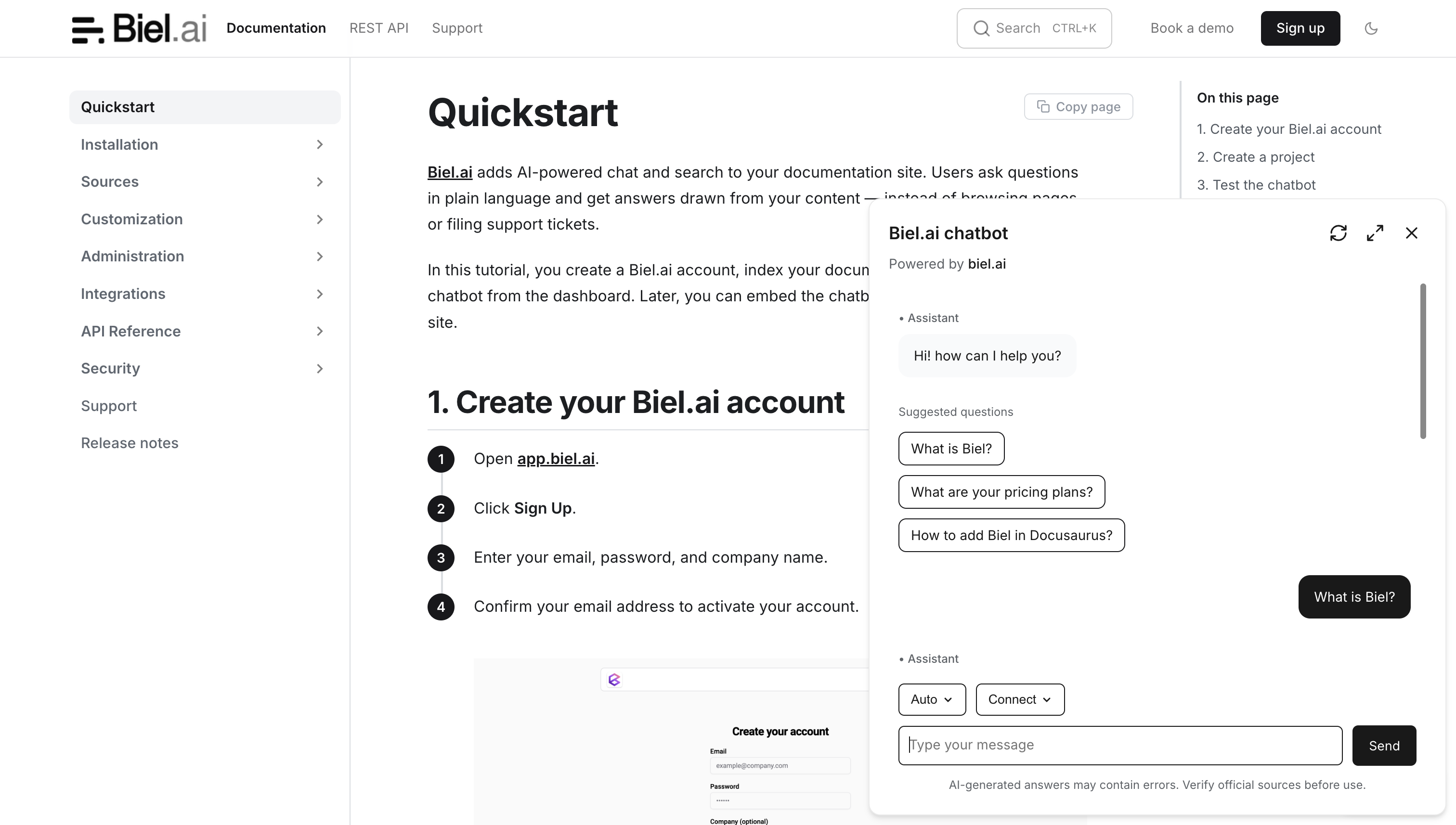
Add an AI assistant to your MkDocs documentation using Biel.ai's plugin. The integration works with any MkDocs theme, including Material for MkDocs, and embeds the Ask AI button without template overrides. Configure the documentation search widget separately.
Note: A Biel.ai plan is required to use this plugin. Try it free for 14 days—no credit card required.
Key features
- Ask AI button that opens an AI assistant to answer questions from your documentation.
- Documentation search to find matching pages from indexed docs with a separately configured search widget.
- Connect menu to link the same indexed docs to Claude Code, Codex, and other compatible AI clients via Biel.ai's hosted MCP server.
- Integration with MkDocs, no
custom_diror template overrides required. - Customizable to match your site's branding and user needs.
Installation
pip install mkdocs-biel
Add the plugin to your mkdocs.yml:
plugins:
  - search
  - biel:
      project: <YOUR_PROJECT_ID>
      header_title: Biel.ai chatbot
Replace <YOUR_PROJECT_ID> with your project's ID from the Biel.ai dashboard.
Run mkdocs serve and verify the chat button appears in the bottom-right corner.
Configuration
All widget options are supported as snake_case keys, for example:
plugins:
  - biel:
      project: <YOUR_PROJECT_ID>
      button_text: Ask AI
      button_position: bottom-right
      modal_position: bottom-right
      button_style: dark
      header_title: Documentation AI
Set enable: false to turn the widget off without removing the configuration.
Theme keyboard shortcuts
Some themes, including Material for MkDocs, register global keyboard shortcuts (f, s, /, p, n) that fire while typing inside the Biel.ai widget. The plugin fixes this automatically: keystrokes inside the widget are scoped to it, and theme shortcuts keep working everywhere else on the page. Set theme_shortcuts_fix: false to opt out.
Get started
See the MkDocs AI assistant integration guide for the full list of options and setup instructions.
Support
Need assistance? Contact us for help.
License
Copyright (c) 2024 Biel.ai
Licensed under the MIT License.
1 maintainer

Metadata
1 maintainer
Release files for mkdocs-biel 0.1.2
For a detailed explanation of source distributions (sdists) and built distributions (wheels), please see the package formats documentation.
Source distribution (sdist)
| File | Size | Uploaded | Provenance | Actions |
|---|---|---|---|---|
| mkdocs_biel-0.1.2.tar.gz | 4.8 kB | Without provenance | Details for mkdocs_biel-0.1.2.tar.gz |
Built distribution (wheel)
| File | Interpreter | ABI | Platform | Actions Reset |
|---|---|---|---|---|
| mkdocs_biel-0.1.2-py3-none-any.whl | Python 3 | none | any | Details for mkdocs_biel-0.1.2-py3-none-any.whl |
Total release size: 10.6 kB
Release files / mkdocs_biel-0.1.2.tar.gz
| Download URL | mkdocs_biel-0.1.2.tar.gz |
|---|---|
| Size | 4.8 kB |
| Tags | Source |
|
SHA-256 checksum How to use checksums |
85dc2b6fbe84ffc97c87bb7161f2fdf6b4f67ed801b6845be3687fa49006522c
|
|
BLAKE2b-256 checksum How to use checksums |
ef225105fa4fc9608e64ca284b58d2588979d7178c901a82cfaa2514e3c4b873
|
| Upload date | |
|
Uploaded using Trusted Publishing? What is trusted publishing? |
No |
| Uploaded via |
twine/6.2.0 CPython/3.12.9
|
Release files / mkdocs_biel-0.1.2-py3-none-any.whl
| Download URL | mkdocs_biel-0.1.2-py3-none-any.whl |
|---|---|
| Size | 5.8 kB |
| Tags | Python 3 |
|
SHA-256 checksum How to use checksums |
21b850ddfd653af4afb459a1781a0fe4792206117aa8211ee4ac374613b43b7c
|
|
BLAKE2b-256 checksum How to use checksums |
681bc123ecb444dd5516409283324d73566d13d837c5721e884442cb7f0ceac1
|
| Upload date | |
|
Uploaded using Trusted Publishing? What is trusted publishing? |
No |
| Uploaded via |
twine/6.2.0 CPython/3.12.9
|
Security for mkdocs-biel 0.1.2
Provenance
Provenance describes where a file came from. On PyPI, provenance is shared via attestations, which provide a verifiable record of the build or publishing details. View details, limitations and caveats.
No provenance found
None of the files in this release were uploaded with provenance metadata.
A note on package security
PyPI is a repository for distributing packages, not a service for auditing them. While third-party security researchers and our staff do their best to detect and remove malicious packages, PyPI cannot guarantee the quality, security or suitability of any given package.
To learn more about protecting yourself from malicious actors, visit our package security documentation.














