
Mkdocs plugin that allow to inject external markdown or markdown section from given url

Project description
MkDocs Embed External Markdown Plugin



About
MkDocs Embed External Markdown plugin that allows to inject section or full markdown content from a given url. The goal is to embed different markdown from different sources inside your MkDocs project.
Installation
Install the package with pip:
pip install mkdocs-embed-external-markdown
Installation for development
To run the tests, first install the package and its test dependencies with pip:
pip install .[test]
You can now run the tests in tests/ with pytest:
python -m pytest tests/
Configuration
Enable the plugin in your mkdocs.yml file:
plugins:
  - external-markdown
Compatibility with Github private repos
If the GH_TOKEN environment variable is set with an authorized personal access token then the authorization header will be added to the request and content from private repositories can be fetched
Compatibility with GitLab private repos
If the GL_TOKEN environment variable is set (or gitlab_token is configured in mkdocs.yml), the PRIVATE-TOKEN header will be added for requests to GitLab hostnames, allowing content from private repositories to be fetched.
By default, gitlab.com is treated as a GitLab host. To add self-hosted GitLab instances, configure gitlab_hostnames in mkdocs.yml:
plugins:
  - external-markdown:
      gitlab_token: !ENV GITLAB_TOKEN
      gitlab_hostnames:
        - gitlab.com
        - git.example.com
Alternatively, set only the GL_TOKEN environment variable without any mkdocs.yml changes (the default hostname list of [gitlab.com] applies).
Usage
- Section defined by "##/###/####..." header (h2/h3/h4...)
- "#" header (h1) will be removed from source content so you can use use your own header
- "##/###/####..." header (h2/h3/h4...) will be removed from source section content so you can use use your own header
- Supports multiple sections from any source
external_markdown requires 2 parameters: url and section name.
{{ external_markdown('url', '## section name') }}
Full Markdown Content
Embed full markdown content from a given url, you can use the following example:
{{ external_markdown('https://raw.githubusercontent.com/fire1ce/DDNS-Cloudflare-Bash/main/README.md', '') }}
Specific Section
Embed markdown section from a given url, you can use the following example:
{{ external_markdown('https://raw.githubusercontent.com/fire1ce/DDNS-Cloudflare-Bash/main/README.md', '## Installation') }}
MkDocs Example
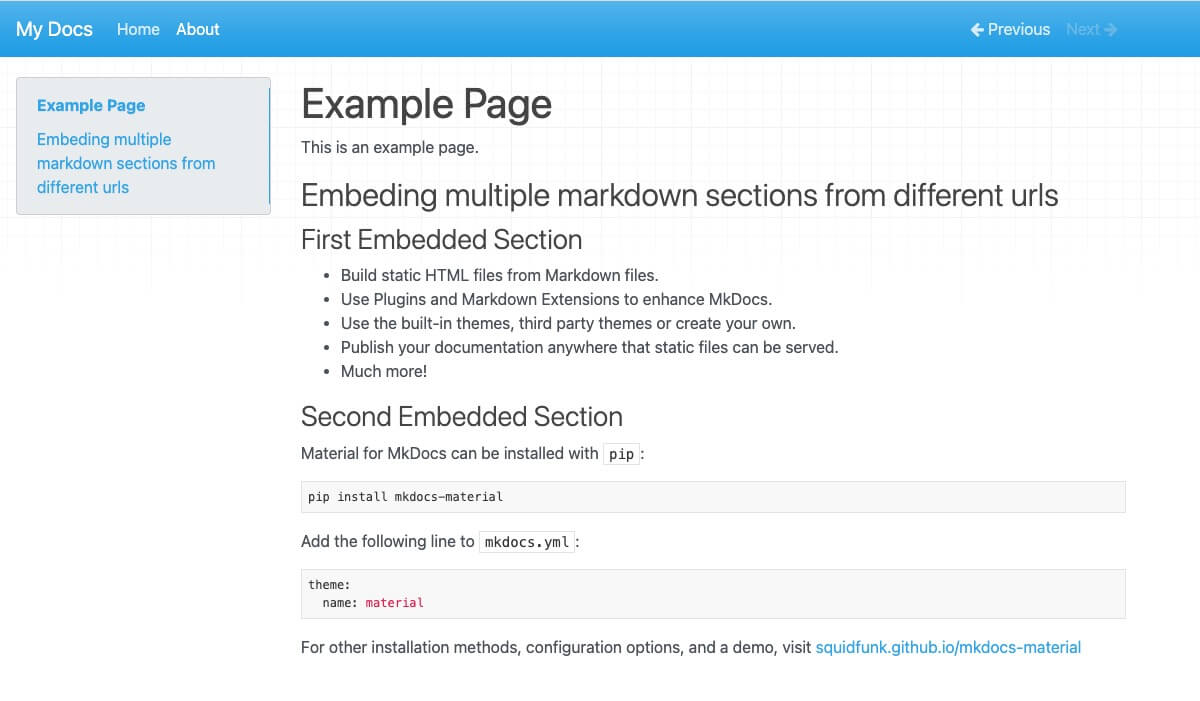
The following example shows how to use the plugin in mkdocs project:
# Example Page

This is an example page.

## Embedding Multiple Markdown Sections From Different URLs

### First Embedded Section

```markdown
{{ external_markdown('https://raw.githubusercontent.com/mkdocs/mkdocs/master/README.md', '## Features') }}
```

### Second Embedded Section

```markdown
{{ external_markdown('https://raw.githubusercontent.com/squidfunk/mkdocs-material/master/README.md', '## Quick start') }}
```
Will produce the following page:
How To Prevent Accidental Interpretation Of Jinja-like Statements
The most frequent issue when adding the MkDocs Embed External Markdown Plugin to an existing mkdocs project, is that some markdown pages may not be rendered correctly, or cause a syntax error, or some other error.
The reason is that if Jinja2 template engine in the MkDocs Embed External Markdown Plugin meets any text that has the standard markers (typically starting with {%} or {{) this will cause a conflict: it will try to interpret that text as a macro and fail to behave properly.
The most likely places where this can occur are the following:
| Location in Markdown file (Block or Inline) | Description |
|---|---|
| Code | Documented Jinja2 statements (or similar syntax), LaTeX |
| Maths | LaTeX statements |
| Elsewhere | Some pre-existing templating or macro language, typically with some constructs starting with {# or {{. |
Code Blocks Containing Similar Languages
With MkDocs, this situation typically occurs when the website is documenting an application that relies on a djangolike/jinjalike language like:
- Django Template Language
- Jinja2 (Python)
- Nunjucks (Javascript)
- Twig (PHP)
- ...
This may also happen for pages that documents Ansible directives, which often contain variables expressed in a Jinja2 syntax.
Solutions - Explicitly Marking The Snippets as raw
{% raw %}

```bash
docker inspect -f '{{range .NetworkSettings.Networks}}{{.IPAddress}}{{end}}' container_name_or_id
```

{% endraw %}
Known Issues
Changelog
Version 3.xx
Version 3.0.1 (2023-06-21)
Fixed:
- Crash caused by conflict with Jinja2 render engine expects
configparameter from other 3rd party plugins.
Version 3.0.0 (2023-06-20)
Added
- Modularized the code into separate methods for improved readability and maintainability.
- Added type hints for better code understanding and possible performance improvements.
- Included regex pre-compilation for performance enhancement.
- Enhanced URL validation to check for the structure of a URL rather than just the presence of .md.
- Improved error logging through the use of logger.warning instead of print statements, which integrates with MkDocs' logging system.
- Added handling for relative links in the markdown, making them absolute based on the base URL.
- Introduced better error handling for Connection Errors and Status Codes through optional return types.
Removed:
- Removed the use of sys.exit(1) on error, allowing the MkDocs build process to continue even if the plugin encounters an issue.
- Removed the strict requirement for a section level at the beginning of a section name.
Changed
- Switched from using re.compile for one-time regex patterns to using re.match or re.search.
- Extracted the GitHub token once at the beginning of the request method instead of multiple times.
- Replaced the check for .md at the end of the URL with a more comprehensive regular expression to validate the URL's structure.
Fixed:
- Handling of section extraction is now more robust and less prone to errors.
Please note that this is a major version update and may contain breaking changes. Carefully read the updated documentation and test the plugin thoroughly before upgrading in a production environment.
Version 2.xx Changelog Archive
Braking change: Section name must include Markdown Section header like: ## Section name
Changelog:
- Add ability to import content from private github repositories. Thanks to @sd0408
- Added support for multi level sections such as
### Section nameand#### Section name - Better Handling of parsing makrdowns wich contains
#in the content - Failing Mkdocs Build when Markdown content cannot be fetched
License
This project is licensed under the terms of the MIT License.
Release history Release notifications | RSS feed


Download files
Download the file for your platform. If you're not sure which to choose, learn more about installing packages.
Source Distribution
Built Distribution
Filter files by name, interpreter, ABI, and platform.
If you're not sure about the file name format, learn more about wheel file names.
Copy a direct link to the current filters
File details
Details for the file mkdocs_embed_external_markdown_gl-3.1.1.tar.gz.
File metadata
- Download URL: mkdocs_embed_external_markdown_gl-3.1.1.tar.gz
- Upload date:
- Size: 8.3 kB
- Tags: Source
- Uploaded using Trusted Publishing? No
- Uploaded via: twine/6.2.0 CPython/3.14.3
File hashes
| Algorithm | Hash digest | |
|---|---|---|
| SHA256 |
54a915db428192a80efad9f633e0e3a4e6c5b7288bfa4aa3ed51881d33f77ee6
|
|
| MD5 |
aa4f6f700d2426bfb8ec477d48b0d452
|
|
| BLAKE2b-256 |
a6f1166a26aeb8cb173bc819c0f9a9e7c00a2fe210837ca15359545cc995c7ad
|
File details
Details for the file mkdocs_embed_external_markdown_gl-3.1.1-py3-none-any.whl.
File metadata
- Download URL: mkdocs_embed_external_markdown_gl-3.1.1-py3-none-any.whl
- Upload date:
- Size: 8.6 kB
- Tags: Python 3
- Uploaded using Trusted Publishing? No
- Uploaded via: twine/6.2.0 CPython/3.14.3
File hashes
| Algorithm | Hash digest | |
|---|---|---|
| SHA256 |
f1732a5de54cb20b0228568a5db8b888e5367ed827a75bb50fdeefee54b7623c
|
|
| MD5 |
f14cfee3297304421374c892f76bb3a4
|
|
| BLAKE2b-256 |
f7d59107282b0e80ceff97c29cff27e355077a075f87a617942f4cee8dcf7299
|






