
MkDocs Embed External Markdown Plugin



About
MkDocs Embed External Markdown plugin that allows to inject section or full markdown content from a given url. The goal is to embed different markdown from different sources inside your MkDocs project.
Version 2.xx
Braking change: Section name must include Markdown Section header like: ## Section name
Changelog:
- Added support for multi level sections such as
### Section nameand#### Section name - Better Handling of parsing makrdowns wich contains
#in the content - Failing Mkdocs Build when Markdown content cannot be fetched
Installation
Install the package with pip:
pip install mkdocs-embed-external-markdown
Configuration
Enable the plugin in your mkdocs.yml file:
plugins:
  - external-markdown
Usage
- Section defined by "##/###/####..." header (h2/h3/h4...)
- "#" header (h1) will be removed from source content so you can use use your own header
- "##/###/####..." header (h2/h3/h4...) will be removed from source section content so you can use use your own header
- Supports multiple sections from any source
external_markdown requires 2 parameters: url and section name.
{{ external_markdown('url', '## section name') }}
Full Markdown Content
Embed full markdown content from a given url, you can use the following example:
{{ external_markdown('https://raw.githubusercontent.com/fire1ce/DDNS-Cloudflare-Bash/main/README.md', '') }}
Specific Section
Embed markdown section from a given url, you can use the following example:
{{ external_markdown('https://raw.githubusercontent.com/fire1ce/DDNS-Cloudflare-Bash/main/README.md', '## Installation') }}
MkDocs Example
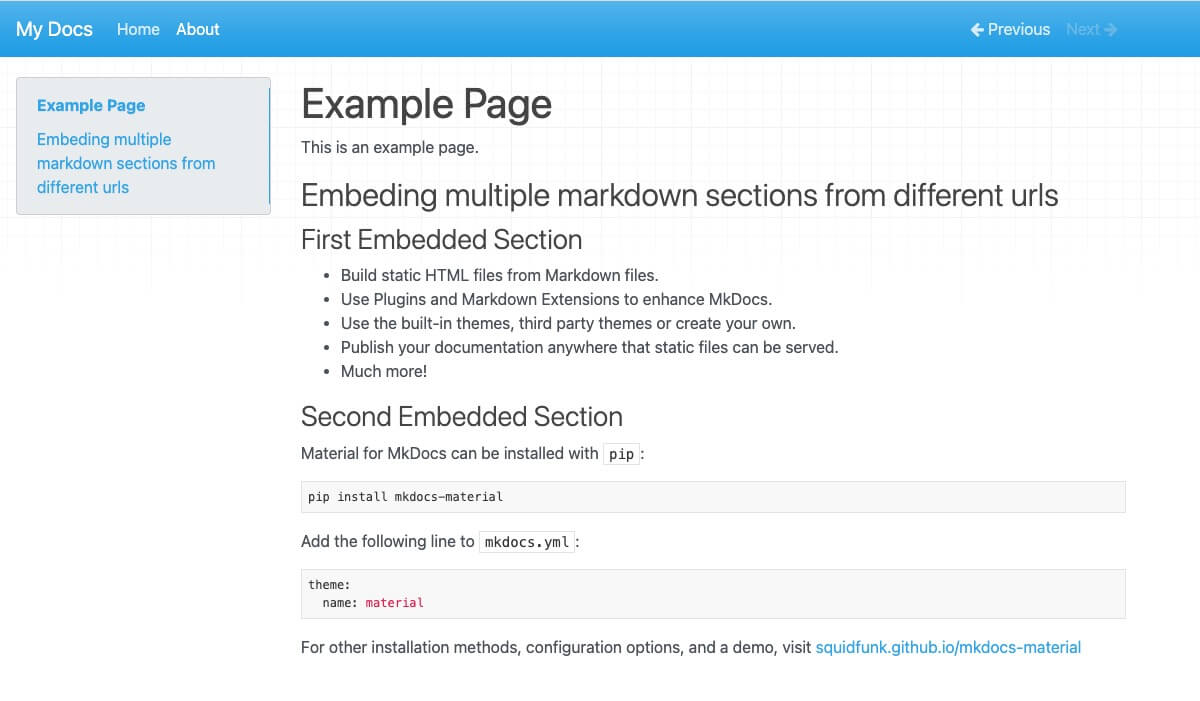
The following example shows how to use the plugin in mkdocs project:
# Example Page

This is an example page.

## Embedding Multiple Markdown Sections From Different URLs

### First Embedded Section

```markdown
{{ external_markdown('https://raw.githubusercontent.com/mkdocs/mkdocs/master/README.md', '## Features') }}
```

### Second Embedded Section

```markdown
{{ external_markdown('https://raw.githubusercontent.com/squidfunk/mkdocs-material/master/README.md', '## Quick start') }}
```
Will produce the following page:
How To Prevent Accidental Interpretation Of Jinja-like Statements
The most frequent issue when adding the MkDocs Embed External Markdown Plugin to an existing mkdocs project, is that some markdown pages may not be rendered correctly, or cause a syntax error, or some other error.
The reason is that if Jinja2 template engine in the MkDocs Embed External Markdown Plugin meets any text that has the standard markers (typically starting with {%} or {{) this will cause a conflict: it will try to interpret that text as a macro and fail to behave properly.
The most likely places where this can occur are the following:
| Location in Markdown file (Block or Inline) | Description |
|---|---|
| Code | Documented Jinja2 statements (or similar syntax), LaTeX |
| Maths | LaTeX statements |
| Elsewhere | Some pre-existing templating or macro language, typically with some constructs starting with {# or {{. |
Code Blocks Containing Similar Languages
With MkDocs, this situation typically occurs when the website is documenting an application that relies on a djangolike/jinjalike language like:
- Django Template Language
- Jinja2 (Python)
- Nunjucks (Javascript)
- Twig (PHP)
- ...
This may also happen for pages that documents Ansible directives, which often contain variables expressed in a Jinja2 syntax.
Solutions - Explicitly Marking The Snippets as raw
{% raw %}

```bash
docker inspect -f '{{range .NetworkSettings.Networks}}{{.IPAddress}}{{end}}' container_name_or_id
```

{% endraw %}
Known Issues
- Embedding links without
.mdextension not working properly
License
MIT License
Copyright© 3os.org @ 2022
Permission is hereby granted, free of charge, to any person obtaining a copy of this software and associated documentation files (the "Software"), to deal in the Software without restriction, including without limitation the rights to use, copy, modify, merge, publish, distribute, sublicense, and/or sell copies of the Software, and to permit persons to whom the Software is furnished to do so, subject to the following conditions:
The above copyright notice and this permission notice shall be included in all copies or substantial portions of the Software.
THE SOFTWARE IS PROVIDED "AS IS", WITHOUT WARRANTY OF ANY KIND, EXPRESS OR IMPLIED, INCLUDING BUT NOT LIMITED TO THE WARRANTIES OF MERCHANTABILITY, FITNESS FOR A PARTICULAR PURPOSE AND NON-INFRINGEMENT. IN NO EVENT SHALL THE AUTHORS OR COPYRIGHT HOLDERS BE LIABLE FOR ANY CLAIM, DAMAGES OR OTHER LIABILITY, WHETHER IN AN ACTION OF CONTRACT, TORT OR OTHERWISE, ARISING FROM, OUT OF OR IN CONNECTION WITH THE SOFTWARE OR THE USE OR OTHER DEALINGS IN THE SOFTWARE.
1 maintainer

Release files for mkdocs-embed-external-markdown-sd0408 2.1.6
For a detailed explanation of source distributions (sdists) and built distributions (wheels), please see the package formats documentation.
Source distribution (sdist)
| File | Size | Uploaded | |
|---|---|---|---|
| mkdocs-embed-external-markdown-sd0408-2.1.6.tar.gz | 5.7 kB | Details |
Built distribution (wheel)
| File | Interpreter | ABI | Platform | Reset |
|---|---|---|---|---|
| mkdocs_embed_external_markdown_sd0408-2.1.6-py3-none-any.whl | Python 3 | none | any | Details |
Total release size: 11.9 kB
Release files / mkdocs-embed-external-markdown-sd0408-2.1.6.tar.gz
| Download URL | mkdocs-embed-external-markdown-sd0408-2.1.6.tar.gz |
|---|---|
| Size | 5.7 kB |
| Tags | Source |
|
SHA-256 checksum How to use checksums |
56916e74df8469c64d8354c684c5ae5230ed943783b876eff2cef5c7e3eeea4d
|
|
BLAKE2b-256 checksum How to use checksums |
9f553adadb9cfb5ae018e560bc72ffeb08334359daca97c3fce6c73e8890b61c
|
| Upload date | |
|
Uploaded using Trusted Publishing? What is trusted publishing? |
No |
| Uploaded via |
poetry/1.2.1 CPython/3.10.4 Darwin/21.6.0
|
Release files / mkdocs_embed_external_markdown_sd0408-2.1.6-py3-none-any.whl
| Download URL | mkdocs_embed_external_markdown_sd0408-2.1.6-py3-none-any.whl |
|---|---|
| Size | 6.2 kB |
| Tags | Python 3 |
|
SHA-256 checksum How to use checksums |
091a01f264a9b4465fd357daa8c32c20d115c9135a52c018476c48162409eb2f
|
|
BLAKE2b-256 checksum How to use checksums |
5645f0f5f07ac3f04fa64249a92817a83e50c56a451e1caf57297f47b4cb7830
|
| Upload date | |
|
Uploaded using Trusted Publishing? What is trusted publishing? |
No |
| Uploaded via |
poetry/1.2.1 CPython/3.10.4 Darwin/21.6.0
|














