
MkDocs Embed Markdown Plugin

About
Fork from MkDocs Embed External Markdown Plugin and fix the conflict with mkdocs-macros plugin and support access of Gitea private repo by token. The basic functionality is the same as the original plugin. But when rendering markdown, it search the opening tag (@include) in the whole text and replace it with the content of the included file.
Installation
Install the package with pip:
pip install mkdocs-embed-markdown
Configuration
Enable the plugin in your mkdocs.yml file:
plugins:
  - external-markdown
Compatibility with Github/Gitea Private Repository
If the GH_TOKEN environment variable is set with an authorized personal access token then the authorization header will be added to the request and content from private repositories can be fetched.
For Gitea users, the GT_TOKEN environment variable can be used instead. You may need to go to profile > settings > applications > Manage Access Tokens, and add your token to the environment variable. The key is GT_TOKEN, and the value is your token.
Usage
- Section defined by "##/###/####..." header (h2/h3/h4...)
- "#" header (h1) will be removed from source content so you can use use your own header
- "##/###/####..." header (h2/h3/h4...) will be removed from source section content so you can use use your own header
- Supports multiple sections from any source
@include requires 2 parameters: url and section name.
@include('url', '## section name')
Full Markdown Content
Embed full markdown content from a given url, you can use the following example:
@include('https://raw.githubusercontent.com/fire1ce/DDNS-Cloudflare-Bash/main/README.md', '')
Specific Section
Embed markdown section from a given url, you can use the following example:
@include('https://raw.githubusercontent.com/fire1ce/DDNS-Cloudflare-Bash/main/README.md', '## Installation')
MkDocs Example
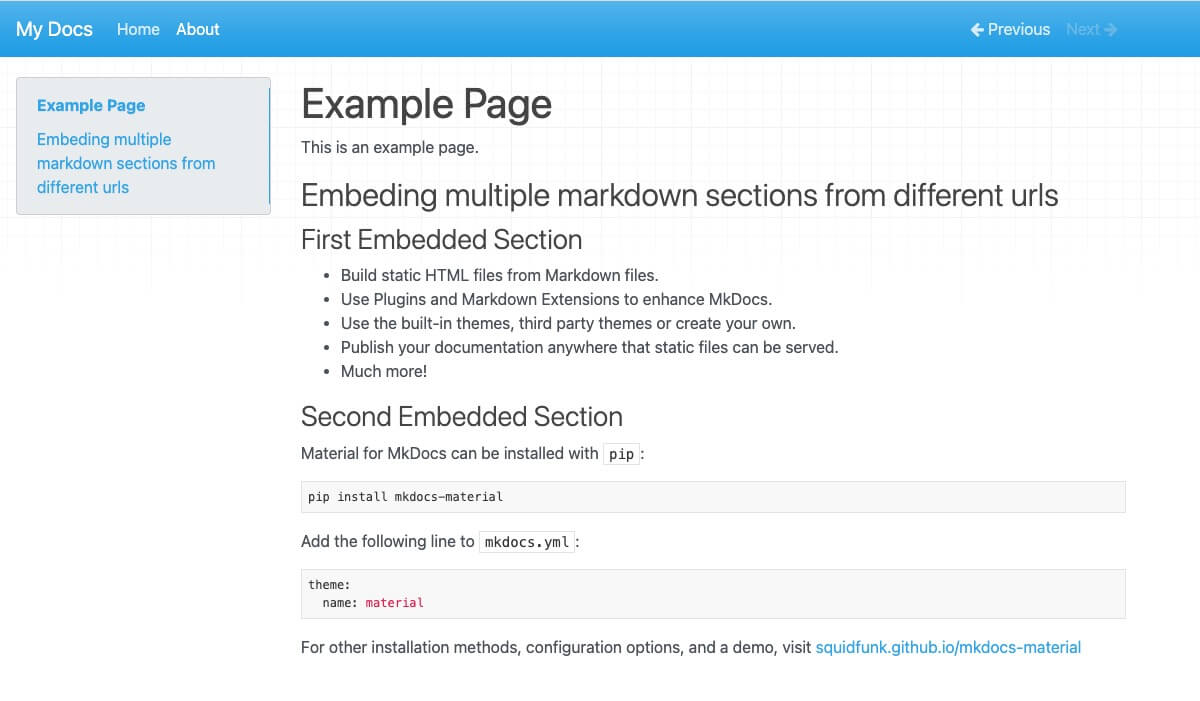
The following example shows how to use the plugin in mkdocs project:
# Example Page

This is an example page.

## Embedding Multiple Markdown Sections From Different URLs

### First Embedded Section

```markdown
@include('https://raw.githubusercontent.com/mkdocs/mkdocs/master/README.md', '## Features')
```

### Second Embedded Section

```markdown
@include('https://raw.githubusercontent.com/squidfunk/mkdocs-material/master/README.md', '## Quick start')
```
Will produce the following page:
Known Issues
Changelog
See https://github.com/fire1ce/mkdocs-embed-external-markdown#changelog
License
This project is licensed under the terms of the MIT License.
1 maintainer

Metadata
1 maintainer
Release files for mkdocs-embed-markdown 3.0.2
For a detailed explanation of source distributions (sdists) and built distributions (wheels), please see the package formats documentation.
Source distribution (sdist)
| File | Size | Uploaded | |
|---|---|---|---|
| mkdocs-embed-markdown-3.0.2.tar.gz | 5.5 kB | Details |
Built distribution (wheel)
| File | Interpreter | ABI | Platform | Reset |
|---|---|---|---|---|
| mkdocs_embed_markdown-3.0.2-py3-none-any.whl | Python 3 | none | any | Details |
Total release size: 11.7 kB
Release files / mkdocs-embed-markdown-3.0.2.tar.gz
| Download URL | mkdocs-embed-markdown-3.0.2.tar.gz |
|---|---|
| Size | 5.5 kB |
| Tags | Source |
|
SHA-256 checksum How to use checksums |
9ca37fb78f15c9c3ad3a592586da3fed3f06b9d3f69045d863adc3c8e3c1385d
|
|
BLAKE2b-256 checksum How to use checksums |
396fdc399e5dab9a3ca174a5cf713fd316ba3d607939ffdd8f2f4fa81a6a6d80
|
| Upload date | |
|
Uploaded using Trusted Publishing? What is trusted publishing? |
No |
| Uploaded via |
twine/4.0.2 CPython/3.9.11
|
Release files / mkdocs_embed_markdown-3.0.2-py3-none-any.whl
| Download URL | mkdocs_embed_markdown-3.0.2-py3-none-any.whl |
|---|---|
| Size | 6.1 kB |
| Tags | Python 3 |
|
SHA-256 checksum How to use checksums |
827b52edf8c832e5cd6a5ea3995fbf6269dd9d29bad950eb0e2c5b0e0608504a
|
|
BLAKE2b-256 checksum How to use checksums |
a37f26017ce5e4841215aa126fc83fe879e8925babdd4ae06316e6d0f0ccf0a2
|
| Upload date | |
|
Uploaded using Trusted Publishing? What is trusted publishing? |
No |
| Uploaded via |
twine/4.0.2 CPython/3.9.11
|














