
This release is a pre-release and may not be stable for production use.
MkDocs Exporter




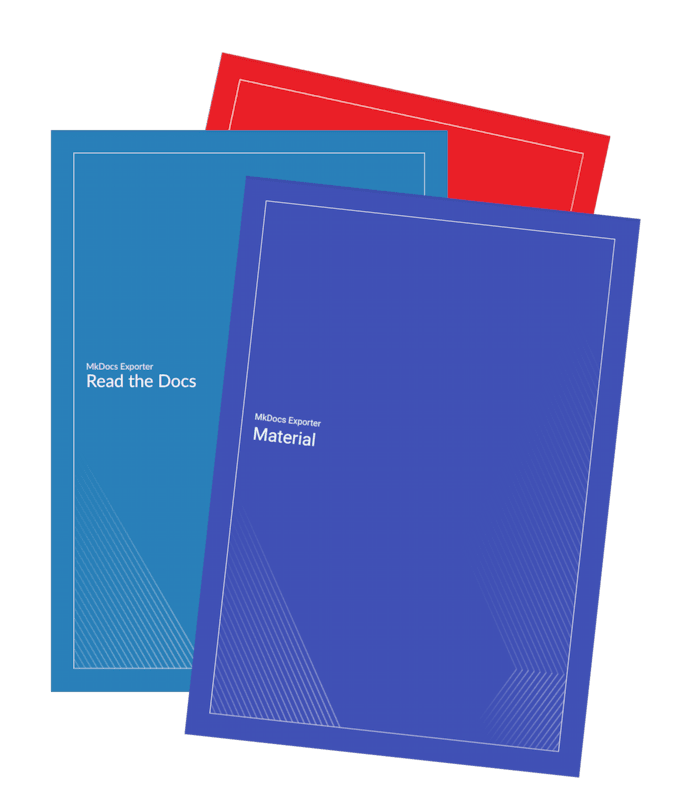
A highly configurable plugin for MkDocs that exports your pages as PDF documents.
Additionally, it can combine your entire documentation into a single PDF file.
Features
- 🚀 Fast - documents are rendered concurrently
- 📚 Books - combine pages into PDF documents with bookmarks, a table of contents and working links
- 🎨 Customizable - full control over the resulting documents
- Cover pages written as Jinja templates
- Headers and footers with page numbers
- Custom stylesheets, scripts and hooks
- Buttons at the top of your pages (e.g. to download the page as PDF)
- Dedicated support for the
materialandreadthedocsthemes, check out sample PDF documents
- ⭐ Powerful - documents are printed by Chromium, driven by Playwright, with CSS Paged Media support
Prerequisites
- Python
>= 3.11.5 - MkDocs
>= 1.6, < 2(or ProperDocs)
MkDocs 2.0 doesn't support plugins and Zensical ignores MkDocs plugins: websites built by Zensical can be exported by the mkdocs-exporter build command (experimental).
Installation
The plugin is hosted on PyPI and can be installed via pip (or your favourite package manager), along with the browser it uses:
pip install "mkdocs-exporter>=7.0.0rc1"
playwright install --with-deps --only-shell chromium
Version 7 is a release candidate: until 7.0.0 is released, pip install mkdocs-exporter (without a version) installs 6.2.0.
Upgrading from v6? Read the migration guide.
Usage
The following configuration (adapted from the mkdocs.yml file used by this documentation) covers the main features of this plugin:
plugins:
  - exporter:
      formats:
        pdf:
          enabled: !ENV [MKDOCS_EXPORTER_PDF, true]
          concurrency: 8
          stylesheets:
            - resources/stylesheets/pdf.css
          covers:
            front: resources/templates/covers/front.html.j2
            back: resources/templates/covers/back.html.j2
          footer:
            right: "Page {page} of {pages}"
          books:
            - output: documentation.pdf
              covers: front
              toc:
                enabled: true
Check out the examples: documents generated from a small website (with cover pages, tables of contents, headers and footers...), with their configuration (examples/).
Roadmap
- Combine all pages into a single PDF document (✅ released in
v6.0.0) - Bookmarks, table of contents and links in combined documents (✅ released in
v7.0.0) - A command exporting websites built by Zensical (experimental, MkDocs 2.0 to come)
- Create a GitHub action that includes all dependencies to build the documentation and generate PDF documents
Feel free to request additional features by submitting an issue or contributing through a pull request.
Contributing
We welcome contributions from the community to enhance MkDocs Exporter.
Whether you want to report a bug, suggest a feature, improve the documentation, or contribute code, your help is appreciated!
See AGENTS.md for how the project is organized, built and tested.
License
This project is licensed under the MIT License (MIT), which you can read here.
1 maintainer

Metadata
1 maintainer
Release files for mkdocs-exporter 7.0.0rc2
For a detailed explanation of source distributions (sdists) and built distributions (wheels), please see the package formats documentation.
Source distribution (sdist)
| File | Size | Uploaded | Provenance | Actions |
|---|---|---|---|---|
| mkdocs_exporter-7.0.0rc2.tar.gz | 74.0 kB | With provenance | Details for mkdocs_exporter-7.0.0rc2.tar.gz |
Built distribution (wheel)
| File | Interpreter | ABI | Platform | Actions Reset |
|---|---|---|---|---|
| mkdocs_exporter-7.0.0rc2-py3-none-any.whl | Python 3 | none | any | Details for mkdocs_exporter-7.0.0rc2-py3-none-any.whl |
Total release size: 172.0 kB
Release files / mkdocs_exporter-7.0.0rc2.tar.gz
| Download URL | mkdocs_exporter-7.0.0rc2.tar.gz |
|---|---|
| Size | 74.0 kB |
| Tags | Source |
|
SHA-256 checksum How to use checksums |
cb52ae31576435cabe47fb3157ce266f1fef8e85fba07e9b314271826a580a3b
|
|
BLAKE2b-256 checksum How to use checksums |
a2b13c17953a857c5d22eb5a4998605f6bc9064f15f7768debbb7b92cec0ca80
|
| Upload date | |
|
Uploaded using Trusted Publishing? What is trusted publishing? |
Yes |
| Uploaded via |
twine/7.0.0 CPython/3.13.16
|
Provenance
Provenance describes where a file came from. On PyPI, provenance is shared via attestations, which provide a verifiable record of the build or publishing details. View details, limitations and caveats.


PyPI Publish Attestation
PyPI verified that this artifact, at this checksum, originated from the publisher listed below.
Signed by GitHub Actions, verified by PyPI on Nov 16, 2026.
Transparency logRelease files / mkdocs_exporter-7.0.0rc2-py3-none-any.whl
| Download URL | mkdocs_exporter-7.0.0rc2-py3-none-any.whl |
|---|---|
| Size | 98.0 kB |
| Tags | Python 3 |
|
SHA-256 checksum How to use checksums |
18a8295b39cce66d78c146b02651e5d7e7286781ebae737ee375bd91fddb755c
|
|
BLAKE2b-256 checksum How to use checksums |
a6b7370ddb71640a6a71f383f9007bd2c495d71304af59cb4b175cd38ebb88d6
|
| Upload date | |
|
Uploaded using Trusted Publishing? What is trusted publishing? |
Yes |
| Uploaded via |
twine/7.0.0 CPython/3.13.16
|
Provenance
Provenance describes where a file came from. On PyPI, provenance is shared via attestations, which provide a verifiable record of the build or publishing details. View details, limitations and caveats.
PyPI Publish Attestation
PyPI verified that this artifact, at this checksum, originated from the publisher listed below.
Signed by GitHub Actions, verified by PyPI on Nov 16, 2026.
Transparency logSecurity for mkdocs-exporter 7.0.0rc2
Provenance
Provenance describes where a file came from. On PyPI, provenance is shared via attestations, which provide a verifiable record of the build or publishing details. View details, limitations and caveats.
Full provenance
Both files in this release have been uploaded with provenance metadata.
Attestation for mkdocs_exporter-7.0.0rc2.tar.gz
PyPI Publish Attestation
PyPI verified that this artifact, at this checksum, originated from the publisher listed below.
Signed by GitHub Actions, verified by PyPI on Nov 16, 2026.
Transparency logA note on package security
PyPI is a repository for distributing packages, not a service for auditing them. While third-party security researchers and our staff do their best to detect and remove malicious packages, PyPI cannot guarantee the quality, security or suitability of any given package.
To learn more about protecting yourself from malicious actors, visit our package security documentation.














