
An Mkdocs Plugin that Injects Cucumber Results in your Living Documentation

Project description
Mkdocs Gherkin Results Plugin
This plugin parses and injects the results of a Cucumber test report back into your Mkdocs pages.
This allows to create a living documentation where your Cucumber scenarios are written in Gherkin format (see link bellow).
It works by parsing the Cucumber messages, generated during the tests, and injecting the results in the Markdown before it is parsed as HTML, using the on_page_markdown hook.
Features
-
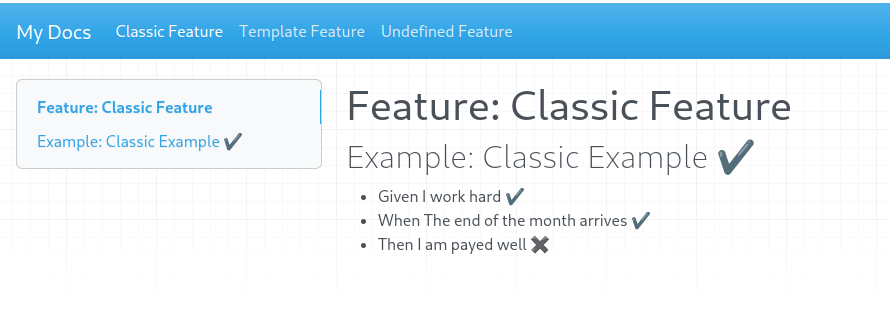
Whenever a test case has passed, a checkmark will be added next to it.
-
If a test case has failed a cross will be added.
-
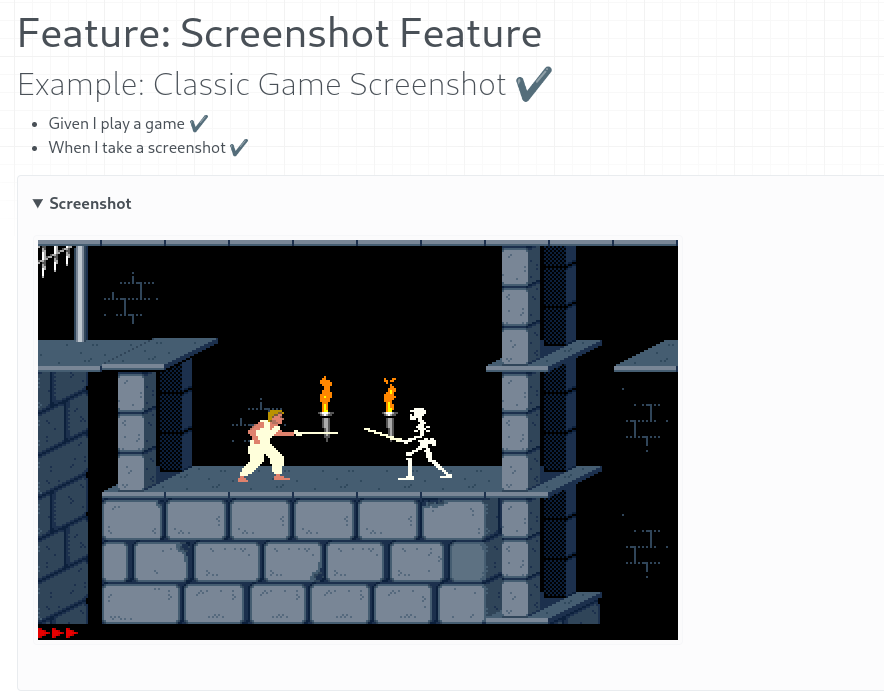
Screenshot attachments
Examples
Check the configuration example under example directory.
It configures both cucumber-js and mkdocs in the same directory.
To run the example, you need to:
-
Run the cucumber tests
- cd tests/test-docs
- npm i
- npm run test
-
Run the mkdocs documentation
-
Create and activate your python venv, using your preferred method
-
Run the documentation generator
python tests/test-docs/run.py
-
Installing
In your mkdocs.yaml add the following:
plugins:
- gherkin-plugin
Configuration
-
show_results - Boolean value that controls if the test results are shown next to each feature and step. Defaults to True
-
show_attachments - Boolean value that controls if the file attachements are shown in the final result. Defaults to True
-
messages_path - Location where to load the cucumber messages ndjson. Defaults to "gherkin_messages.ndjson"
Example:
plugins:
  show_attachments: True
  messages_path: "gherkin_messages.ndjson"
Dependencies
If you use screenshots attachments, you will need to add the following markdown dependencies as well:
markdown_extensions:
  - admonition
  - pymdownx.details
  - pymdownx.superfences
TODO
- Fix pending steps not shown
- Add a short video explaining how it all works
References
Release history Release notifications | RSS feed


Download files
Download the file for your platform. If you're not sure which to choose, learn more about installing packages.
Source Distribution
Built Distribution
Filter files by name, interpreter, ABI, and platform.
If you're not sure about the file name format, learn more about wheel file names.
Copy a direct link to the current filters
File details
Details for the file mkdocs_gherkin_plugin-0.0.11.tar.gz.
File metadata
- Download URL: mkdocs_gherkin_plugin-0.0.11.tar.gz
- Upload date:
- Size: 8.2 kB
- Tags: Source
- Uploaded using Trusted Publishing? No
- Uploaded via: twine/5.1.1 CPython/3.12.7
File hashes
| Algorithm | Hash digest | |
|---|---|---|
| SHA256 |
e4de4bff03ef89546525179f23ec7dc129cc47984d91e234e0b8e16edaffaeca
|
|
| MD5 |
8185a4e02190d9610643b6baf1fc506f
|
|
| BLAKE2b-256 |
5bad9ce485aba9e93f9b8d89ce9b042511a5b109fce7113024b3c0fee4ade603
|
File details
Details for the file mkdocs_gherkin_plugin-0.0.11-py3-none-any.whl.
File metadata
- Download URL: mkdocs_gherkin_plugin-0.0.11-py3-none-any.whl
- Upload date:
- Size: 8.5 kB
- Tags: Python 3
- Uploaded using Trusted Publishing? No
- Uploaded via: twine/5.1.1 CPython/3.12.7
File hashes
| Algorithm | Hash digest | |
|---|---|---|
| SHA256 |
0cc37d6c1f893aa9469917aa20e4a534f10ceaa331f89ce76972dc5d9b7de3e7
|
|
| MD5 |
1bce441cbd391a5271edd04ea9e9d7dd
|
|
| BLAKE2b-256 |
5858d3a49cb6a8493fb301bd22f808ad32874f196cfde0bdfad9e635238aae17
|






