
mkdocs-glossary-plugin
This plugin provides a simple glossary feature for mkdocs.
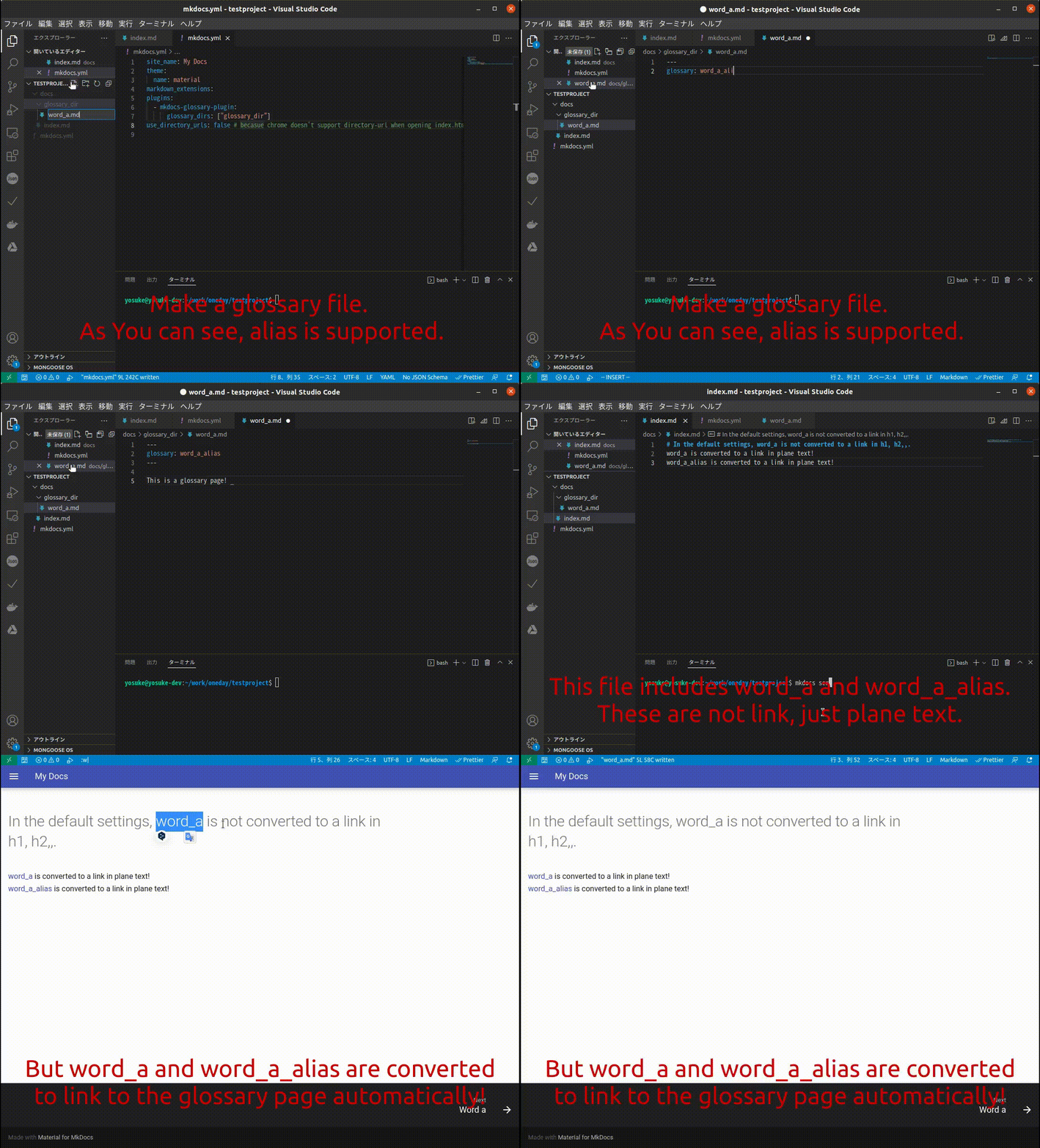
What's useful?
When you are writing documents for your project, you maybe use some project-specific words.
Of course, reader cannot understand these words without any explanation, but we want to avoid linking to all the places where these words are used.
In these cases, this plugin can ...
- replace these words with a link to a specified page automatically
- control the details, such as not converting words contained in h1 or emph, but converting words contained in plain text.
- alias support. you can set alias for each word.
Requirements
- python >= 3.7
- pandoc >= 2.11
- python pandoc(https://pypi.org/project/pandoc/)
How to install
python3 setup.py install
Getting started
Plugin configuration
Edit your mkdocs.yml file as follows.
plugins:
  - mkdocs-glossary-plugin:
      glossary_dirs: ["foo", "bar"] # This plugin considers the md files in "docs/foo" and "docs/bar" as glossary files.
You can set some options, see Options section.
Register glossary
For example, let's say you want to create a glossary of the word x_word .
At first, You have to create x_word.md file like below as a glossary page for x_word .
~/mkdocs_project/docs$ tree
.
├── foo
│   └── x_word.md
└── index.md
All that remains is for you to write freely in x_word.md!
If you want to add an alias to x_word, set the glossary metadata at the beginning of the x_word.md file as follows.
---
glossary: alias_word_a
glossary: alias_word_b
---

This is the glossary page for x_word!
That's all! Now, all the x_word, alias_word_a and alias_word_b in your project will be replaced with a link to x_word.md when building.
Options
| Name | Necessary | Type | Default | Detail |
|---|---|---|---|---|
| glossary_dirs | required | List[str] | None | Specify the dirs containing the glossary md files. This plugin will only search for glossaries here. Please fill out with relative path from docs dir. |
| input_format | optional | str | markdown_phpextra |
The input format of the markdown file. See pandoc |
| output_format | optional | str | markdown_phpextra |
The output format of the markdown file. See pandoc |
| enable_toc | optional | bool | True | If True, you can use table of contents([TOC]) feature. |
| replace_emphasized_text | optional | bool | True | If True, emphaseized text includes specified word. |
| replace_header | optional | bool | False | If True, h1,h2,.. includes specified word. |
| replace_table_header | optional | bool | True | If True, table header includes specified word. |
| replace_table_body | optional | bool | True | If True, table body includes specified word. |
1 maintainer

Metadata
1 maintainer
Release files for mkdocs-glossary-plugin 0.1.1
For a detailed explanation of source distributions (sdists) and built distributions (wheels), please see the package formats documentation.
Source distribution (sdist)
| File | Size | Uploaded | |
|---|---|---|---|
| mkdocs-glossary_plugin-0.1.1.tar.gz | 16.4 kB | Details |
Built distribution (wheel)
| File | Interpreter | ABI | Platform | Reset |
|---|---|---|---|---|
| mkdocs_glossary_plugin-0.1.1-py3-none-any.whl | Python 3 | none | any | Details |
Total release size: 67.6 kB
Release files / mkdocs-glossary_plugin-0.1.1.tar.gz
| Download URL | mkdocs-glossary_plugin-0.1.1.tar.gz |
|---|---|
| Size | 16.4 kB |
| Tags | Source |
|
SHA-256 checksum How to use checksums |
3ec7f88ef380cccb395ec016827e99eb8158c451769ee07df1a6f53be3a4b323
|
|
BLAKE2b-256 checksum How to use checksums |
2aecbdc8c10f2189defd8a78374b4991d9df0e556fa055341d61be1c05689a8f
|
| Upload date | |
|
Uploaded using Trusted Publishing? What is trusted publishing? |
No |
| Uploaded via |
twine/4.0.0 CPython/3.8.10
|
Release files / mkdocs_glossary_plugin-0.1.1-py3-none-any.whl
| Download URL | mkdocs_glossary_plugin-0.1.1-py3-none-any.whl |
|---|---|
| Size | 51.1 kB |
| Tags | Python 3 |
|
SHA-256 checksum How to use checksums |
ab497e88845dee23828014cd01b12088ee8acec176643587497082bfadf45bd8
|
|
BLAKE2b-256 checksum How to use checksums |
3ecaf3b63c6d83f17c97acfe2f1dec72e46d126b92506af854122322346b8e27
|
| Upload date | |
|
Uploaded using Trusted Publishing? What is trusted publishing? |
No |
| Uploaded via |
twine/4.0.0 CPython/3.8.10
|













