
An MkDocs plugin that allows editing pages directly from the browser.

Project description
mkdocs-live-edit-plugin




An MkDocs plugin that allows editing pages directly from the browser.
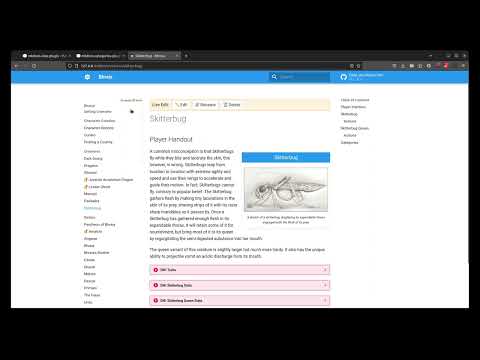
Things you can do with this plugin when running via mkdocs serve:
- Editing a page's Markdown source from the page itself.
- Renaming a page's filename
- Deleting a page
Some basic editor shortcuts available while editing:
- Ctrl+B/Cmd+B toggles your selection to be Bold
- Ctrl+I/Cmd+I toggles your selection to be Italic
- Alt+S/Opt+S toggles your selection to be
Strikethrough - Ctrl+S/Cmd+S to save your changes
If you enjoy this plugin, you may also like these other MkDocs plugins:
Installation
Using Python 3.10 or greater, install the package using pip:
pip install mkdocs-live-edit-plugin
Then add the following entry to the plugins section of your mkdocs.yml file:
plugins:
  - live-edit
Usage
TODO
- Creating new pages (not sure how picking directories would work)
- Moving pages (also not sure about handling directories here)
- Integration with mkdocs-categories-plugin
- Integration with mkdocs-alias-plugin
How Does it Work?
The short answer: WebSockets handle client-server communication, while MkDocs handles reloading when files change.
The Longer Answer
Once installed, when running your local live-reload server, the plugin registers a separate WebSockets server that runs on a specified port. Once your wiki is built, a WebSockets client is installed in your browser, allowing for asynchronous communication between the two.
When you edit the contents of a file, they are sent to the server via WebSockets where the plugin writes the contents to disk. Here, MkDocs picks up on the change and sends a reload signal back to the browser -- this is the same live-reload mechanism that picks up on changes you make via a text editor.
A similar mechanism is in place for other operations like renaming and deleting.
Changelog
0.1.0 / 0.1.1
Initial release with editing, renaming, and deletion logic in place.
Release history Release notifications | RSS feed


Download files
Download the file for your platform. If you're not sure which to choose, learn more about installing packages.
Source Distribution
Built Distribution
Filter files by name, interpreter, ABI, and platform.
If you're not sure about the file name format, learn more about wheel file names.
Copy a direct link to the current filters
File details
Details for the file mkdocs-live-edit-plugin-0.1.1.tar.gz.
File metadata
- Download URL: mkdocs-live-edit-plugin-0.1.1.tar.gz
- Upload date:
- Size: 6.0 kB
- Tags: Source
- Uploaded using Trusted Publishing? Yes
- Uploaded via: twine/4.0.1 CPython/3.11.4
File hashes
| Algorithm | Hash digest | |
|---|---|---|
| SHA256 |
a60e660e31f07b342ad7453b5c306991fb741255eeced1249b9d3ce2acee5513
|
|
| MD5 |
31f56ff457c5bb1b5148edf060843375
|
|
| BLAKE2b-256 |
78a273dc3da82c2b8c3ea2f096d936dd2b182040b507540b76b283eb44d0e425
|
File details
Details for the file mkdocs_live_edit_plugin-0.1.1-py3-none-any.whl.
File metadata
- Download URL: mkdocs_live_edit_plugin-0.1.1-py3-none-any.whl
- Upload date:
- Size: 6.5 kB
- Tags: Python 3
- Uploaded using Trusted Publishing? Yes
- Uploaded via: twine/4.0.1 CPython/3.11.4
File hashes
| Algorithm | Hash digest | |
|---|---|---|
| SHA256 |
5c9a3fad8e9b019b477772d1530f36dd4a9a729001df81085df1cb02b515d615
|
|
| MD5 |
f2360311e8ebb5e76ab2fddf9b9eea79
|
|
| BLAKE2b-256 |
79ea1b01b6a7c8d471db1819fc74c6d5aa7e9db9b0fd2f490a02a9f691eb75bd
|






