
mkdocs-live-edit-plugin




An MkDocs plugin that allows editing pages directly from the browser.
Things you can do with this plugin when running via mkdocs serve:
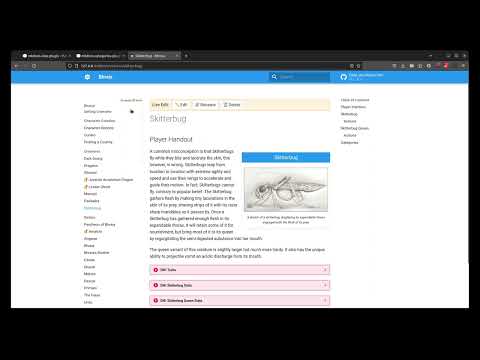
- Editing a page's Markdown source from the page itself.
- Renaming a page's filename
- Deleting a page
Some basic editor shortcuts available while editing:
- Ctrl+B/Cmd+B toggles your selection to be Bold
- Ctrl+I/Cmd+I toggles your selection to be Italic
- Alt+S/Opt+S toggles your selection to be
Strikethrough - Ctrl+S/Cmd+S to save your changes
If you like this plugin, you'll probably also like mkdocs-categories-plugin and mkdocs-alias-plugin.
Installation
Using Python 3.10 or greater, install the package using pip:
pip install mkdocs-live-edit-plugin
Then add the following entry to the plugins section of your mkdocs.yml file:
plugins:
  - live-edit
Usage
If for any reason you want to override the port that the Live Edit WebSocket is operating on, you can do so by setting the websockets_port option for the live-edit plugin, like so:
plugins:
  - live-edit:
      websockets_port: 9999 # or any other port you want
TODO
- Creating new pages (not sure how picking directories would work)
- Moving pages (also not sure about handling directories here)
- Integration with mkdocs-categories-plugin
- Integration with mkdocs-alias-plugin
How Does it Work?
The short answer: WebSockets handle client-server communication, while MkDocs handles reloading when files change.
The Longer Answer
Once installed, when running your local live-reload server, the plugin registers a separate WebSockets server that runs on a specified port. Once your wiki is built, a WebSockets client is installed in your browser, allowing for asynchronous communication between the two.
When you edit the contents of a file, they are sent to the server via WebSockets where the plugin writes the contents to disk. Here, MkDocs picks up on the change and sends a reload signal back to the browser -- this is the same live-reload mechanism that picks up on changes you make via a text editor.
A similar mechanism is in place for other operations like renaming and deleting.
Changelog
0.1.4
Bug fix: Improved WebSocket connectivity and error handling. Updated the documentation to match.
0.1.3
Bug fix: The WebSocket connection now honors the hostname as supplied by the browser in window.location.hostname.
0.1.2
Bug fix: include missing data files
0.1.1
Bug fix: include non-python files in the package
0.1.0
Initial release with editing, renaming, and deletion logic in place.
1 maintainer

Metadata
1 maintainer
Release files for mkdocs-live-edit-plugin 0.1.4
For a detailed explanation of source distributions (sdists) and built distributions (wheels), please see the package formats documentation.
Source distribution (sdist)
| File | Size | Uploaded | Provenance | |
|---|---|---|---|---|
| mkdocs-live-edit-plugin-0.1.4.tar.gz | 11.2 kB | Without provenance | Details |
Built distribution (wheel)
| File | Interpreter | ABI | Platform | Reset |
|---|---|---|---|---|
| mkdocs_live_edit_plugin-0.1.4-py3-none-any.whl | Python 3 | none | any | Details |
Total release size: 25.2 kB
Release files / mkdocs-live-edit-plugin-0.1.4.tar.gz
| Download URL | mkdocs-live-edit-plugin-0.1.4.tar.gz |
|---|---|
| Size | 11.2 kB |
| Tags | Source |
|
SHA-256 checksum How to use checksums |
308665e843189dd4207b12524cf7d1178bca513a28c5f337ed44d317f9066244
|
|
BLAKE2b-256 checksum How to use checksums |
05dc2e47753d754313195b514eb8614ffe6c80e0f6a94adf4c1d2d2da42dc771
|
| Upload date | |
|
Uploaded using Trusted Publishing? What is trusted publishing? |
Yes |
| Uploaded via |
twine/4.0.2 CPython/3.11.7
|
Release files / mkdocs_live_edit_plugin-0.1.4-py3-none-any.whl
| Download URL | mkdocs_live_edit_plugin-0.1.4-py3-none-any.whl |
|---|---|
| Size | 14.1 kB |
| Tags | Python 3 |
|
SHA-256 checksum How to use checksums |
0e64f064f1f47c5cdb7d3c4df25304a5a98510fd349d2ac3c4fde08af8073f92
|
|
BLAKE2b-256 checksum How to use checksums |
47e0962581dba7a880c98c54baa6f44c16f624c0c08890fffcc30ff620f53251
|
| Upload date | |
|
Uploaded using Trusted Publishing? What is trusted publishing? |
Yes |
| Uploaded via |
twine/4.0.2 CPython/3.11.7
|
Security for mkdocs-live-edit-plugin 0.1.4
Provenance
Provenance describes where a file came from. On PyPI, provenance is shared via attestations, which provide a verifiable record of the build or publishing details. View details, limitations and caveats.
No provenance found
None of the files in this release were uploaded with provenance metadata.
A note on package security
PyPI is a repository for distributing packages, not a service for auditing them. While third-party security researchers and our staff do their best to detect and remove malicious packages, PyPI cannot guarantee the quality, security or suitability of any given package.
To learn more about protecting yourself from malicious actors, visit our package security documentation.














