
Generate meta descriptions from the first paragraphs in your MkDocs pages
Verified details
These details have been verified by PyPIProject links
GitHub Statistics
Maintainers

Project description
mkdocs-meta-descriptions-plugin




Use this MkDocs plugin to automatically generate meta descriptions for your pages using the first paragraph of each page. This is useful if you start each page with a short introduction or summary that can be reused as the meta description.
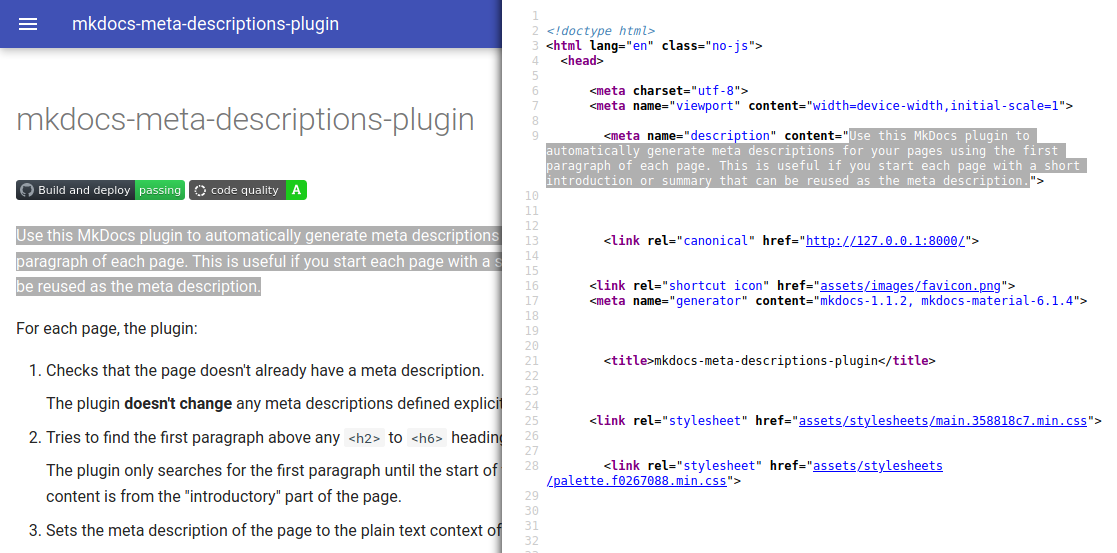
For each page, the plugin:
-
Checks that the page doesn't already have a meta description.
The plugin doesn't change any meta descriptions defined explicitly on the page meta-data.
-
Tries to find the first paragraph above any
<h2>to<h6>headings.The plugin only searches for the first paragraph until the start of the first section to ensure that the content is from the "introductory" part of the page.
-
Sets the meta description of the page to the plain text context of the paragraph, stripped of HTML tags.
If the page doesn't have a meta description defined manually by you nor automatically by the plugin, MkDocs sets the meta description of the page to the value of your site_description as a fallback.
Setting up and using the plugin
⚠️ Important: to use this plugin, you must either customize your existing theme to include the value of
page.meta.descriptionin the HTML element<meta name="description" content="...">, or use an MkDocs theme that already does this by default. I recommend using the excellent Material theme.
To set up and use the plugin:
-
Install the plugin using pip:
pip install mkdocs-meta-descriptions-plugin
Depending on your project, you may also need to add the plugin as a dependency on your
requirements.txtfile. -
Activate the plugin in your
mkdocs.yml:plugins: - search - meta-descriptions
Note: If you didn't have a
pluginsdeclaration in yourmkdocs.ymlfile before this step, you'll likely also want to add thesearchplugin. This is because MkDocs enables thesearchplugin by default when there is nopluginsdeclaration, but now you have to enable it explicitly.
Configuring the plugin
Use the following options to configure the behavior of the plugin:
plugins:
  - meta-descriptions:
      export_csv: false
      quiet: false
      enable_checks: false
      min_length: 50
      max_length: 160
      trim: false
      fallback_if_short: false
export_csv
If true, the plugin exports the meta descriptions of all Markdown pages to the CSV file <site_dir>/meta-descriptions.csv. The default is false.
This is useful to review and keep track of all the meta descriptions for your pages, especially if you're maintaining a big site.
quiet
If true, the plugin logs messages of level INFO using the level DEBUG instead. The default is false.
Enable this option to have a cleaner MkDocs console output. You can still see all logs by running MkDocs with the --verbose flag.
enable_checks
If true, the plugin outputs a warning for each page that will have an empty or default meta description, as well as for each meta description shorter than min_length or longer than max_length. The default is false.
Enable this option if you want to make sure that all pages have a meta description and that each meta description follows general SEO best practices.
min_length
Minimum number of characters that each meta description should have. The default is 50 characters, based on these general recommendations.
Make sure that you set enable_checks: true for this option to have an effect.
max_length
Maximum number of characters that each meta description should have. The default is 160 characters, based on these general recommendations.
Make sure that you set enable_checks: true or trim: true for this option to have an effect.
trim
If true, the plugin trims meta descriptions coming from the first paragraph of the pages to include at most max_length characters. The default is false.
Note that this option doesn't change any meta descriptions defined explicitly on the page meta-data.
fallback_if_short
If true, the plugin uses the value of site_description as the meta description when the first paragraph is shorter than min_length. The default is false.
Note that this option doesn't change any meta descriptions defined explicitly on the page meta-data.
See also
Read more about using MkDocs plugins.
Project details
Verified details
These details have been verified by PyPIProject links
GitHub Statistics
Maintainers
Release history Release notifications | RSS feed


Download files
Download the file for your platform. If you're not sure which to choose, learn more about installing packages.
Source Distribution
Built Distribution
Filter files by name, interpreter, ABI, and platform.
If you're not sure about the file name format, learn more about wheel file names.
Copy a direct link to the current filters
File details
Details for the file mkdocs_meta_descriptions_plugin-4.1.0.tar.gz.
File metadata
- Download URL: mkdocs_meta_descriptions_plugin-4.1.0.tar.gz
- Upload date:
- Size: 145.0 kB
- Tags: Source
- Uploaded using Trusted Publishing? Yes
- Uploaded via: twine/6.1.0 CPython/3.12.8
File hashes
| Algorithm | Hash digest | |
|---|---|---|
| SHA256 |
2da083f97ad4d580de3fcef9ea7d2c60037445addfb41d1272f5813659ddb765
|
|
| MD5 |
0e63acee1431c5ba3aae5168fc5e8299
|
|
| BLAKE2b-256 |
2b18ee307424dd767c14b3b90137180fb0bc4784148eb3b6985bcf7324ba3174
|
Provenance
The following attestation bundles were made for mkdocs_meta_descriptions_plugin-4.1.0.tar.gz:
Publisher:
test-build-deploy.yml on prcr/mkdocs-meta-descriptions-plugin
-
Statement:
-
Statement type:
https://in-toto.io/Statement/v1 -
Predicate type:
https://docs.pypi.org/attestations/publish/v1 -
Subject name:
mkdocs_meta_descriptions_plugin-4.1.0.tar.gz -
Subject digest:
2da083f97ad4d580de3fcef9ea7d2c60037445addfb41d1272f5813659ddb765 - Sigstore transparency entry: 199661582
- Sigstore integration time:
-
Permalink:
prcr/mkdocs-meta-descriptions-plugin@ca5584afedcb19052c4cd1fbb11f2501b66c13ff -
Branch / Tag:
refs/tags/v4.1.0 - Owner: https://github.com/prcr
-
Access:
public
-
Token Issuer:
https://token.actions.githubusercontent.com -
Runner Environment:
github-hosted -
Publication workflow:
test-build-deploy.yml@ca5584afedcb19052c4cd1fbb11f2501b66c13ff -
Trigger Event:
push
-
Statement type:
File details
Details for the file mkdocs_meta_descriptions_plugin-4.1.0-py3-none-any.whl.
File metadata
- Download URL: mkdocs_meta_descriptions_plugin-4.1.0-py3-none-any.whl
- Upload date:
- Size: 8.9 kB
- Tags: Python 3
- Uploaded using Trusted Publishing? Yes
- Uploaded via: twine/6.1.0 CPython/3.12.8
File hashes
| Algorithm | Hash digest | |
|---|---|---|
| SHA256 |
e1fb07c1de09e58af82d7ef85bd462766bac916f91b3a3de9f569ca495e6b810
|
|
| MD5 |
b29e8a52b46cd018a0533a3e31e876e2
|
|
| BLAKE2b-256 |
9454da9ea958a070aac4bc1bed682f55aa090eff3130af5f59ad83014b2191b3
|
Provenance
The following attestation bundles were made for mkdocs_meta_descriptions_plugin-4.1.0-py3-none-any.whl:
Publisher:
test-build-deploy.yml on prcr/mkdocs-meta-descriptions-plugin
-
Statement:
-
Statement type:
https://in-toto.io/Statement/v1 -
Predicate type:
https://docs.pypi.org/attestations/publish/v1 -
Subject name:
mkdocs_meta_descriptions_plugin-4.1.0-py3-none-any.whl -
Subject digest:
e1fb07c1de09e58af82d7ef85bd462766bac916f91b3a3de9f569ca495e6b810 - Sigstore transparency entry: 199661583
- Sigstore integration time:
-
Permalink:
prcr/mkdocs-meta-descriptions-plugin@ca5584afedcb19052c4cd1fbb11f2501b66c13ff -
Branch / Tag:
refs/tags/v4.1.0 - Owner: https://github.com/prcr
-
Access:
public
-
Token Issuer:
https://token.actions.githubusercontent.com -
Runner Environment:
github-hosted -
Publication workflow:
test-build-deploy.yml@ca5584afedcb19052c4cd1fbb11f2501b66c13ff -
Trigger Event:
push
-
Statement type:






