
mkdocs-neoabs
Apple Liquid Glass + NothingOS Design Language for MkDocs





Overview
NeoAbs is a custom MkDocs theme that blends the translucent, layered aesthetics of Apple's Liquid Glass design system with the minimal, industrial clarity of NothingOS. It combines pure black canvas, glass morphism panels, dot-matrix typography, and Nothing Red accents into a cohesive documentation experience.
Screenshot
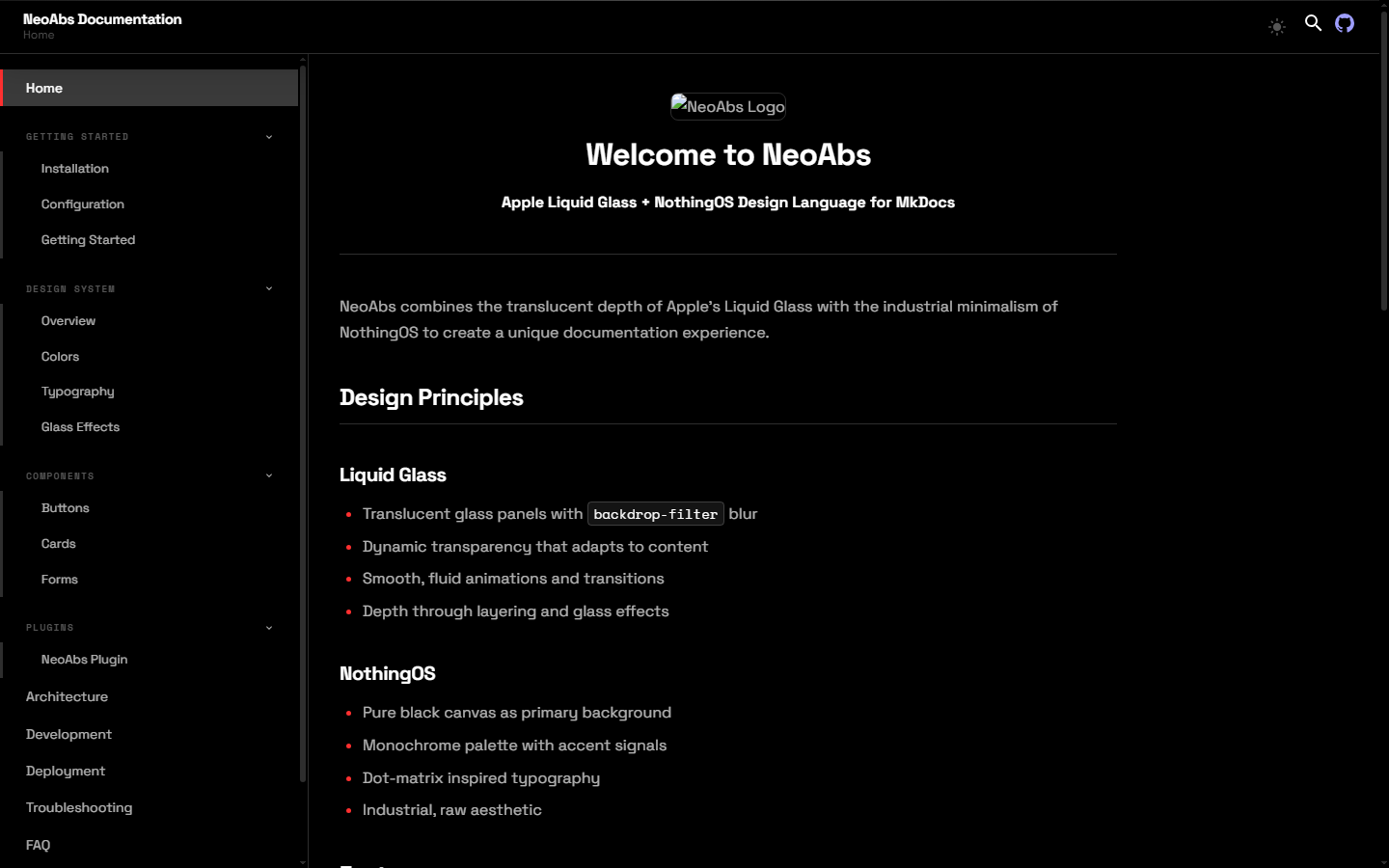
More screenshots: View all screenshots
Table of Contents
- Key Features
- Installation
- Quick Start
- Configuration
- Usage Examples
- Documentation
- Interface
- Architecture
- Requirements
- Prerequisites
- Development
- Contributing
- Security
- License
- Acknowledgments
Key Features
- Liquid Glass Morphism — Translucent glass panels with
backdrop-filterblur and configurable intensity (light / medium / heavy) - NothingOS Canvas — Pure black (#000000) background with monochrome palette and Nothing Red (#ff3030) accents
- Dot-Matrix Overlay — Subtle dot pattern texture inspired by NothingOS
- Dark & Light Modes — Toggle between slate (dark) and default (light) color schemes
- Typography — Space Grotesk for display/body, Space Mono for code/labels via Google Fonts
- Responsive Layout — Sidebar navigation, sticky header, and mobile-friendly drawer
- Table of Contents — Auto-generated TOC with active section tracking
- Full-Screen Search — Instant search with keyboard shortcut (
/) and result highlighting - Code Blocks — Syntax highlighting with one-click copy button
- Admonitions — Styled note, warning, tip, and danger callouts
- Tabbed Content — Alternating-style tabs for grouped content
- Task Lists — Interactive checkbox lists
- Reading Progress Bar — Visual indicator of scroll position
- Back-to-Top Button — Appears on scroll for quick navigation
- Keyboard Navigation — Shortcuts for search (
/), help (?), and close (Esc) - Reduced Motion Support — Animations disabled when
prefers-reduced-motionis active - SCSS Build Pipeline — Sass compilation with PostCSS autoprefixer and cssnano minification
Installation
pip install mkdocs-neoabs
This installs both the NeoAbs theme and the companion MkDocs plugin automatically.
Quick Start
-
Install the package:
pip install mkdocs-neoabs
-
Create a new MkDocs project:
mkdocs new my-docs
cd my-docs
-
Set the theme in
mkdocs.yml:site_name: My Docs theme: name: neoabs
-
Start the dev server:
mkdocs serve -
Open http://127.0.0.1:8000 in your browser.
Configuration
Minimal
theme:
  name: neoabs
Full
theme:
  name: neoabs
  favicon: assets/images/favicon.svg
  language: en
  palette:
    - scheme: slate
      primary: black
      accent: red
      toggle:
        name: Switch to light mode
    - scheme: default
      primary: white
      accent: red
      toggle:
        name: Switch to dark mode
  font:
    text: Space Grotesk
    code: Space Mono
  features:
    - navigation.sections
    - navigation.top
    - navigation.footer
    - content.code.copy
    - search.suggest
    - search.highlight
  neoabs:
    glass: medium
    dot_matrix: true
    animation: normal
    border: thin

plugins:
  - search
  - neoabs
Theme Options
| Option | Values | Default | Description |
|---|---|---|---|
neoabs.glass |
"light", "medium", "heavy" |
"medium" |
Glass panel blur intensity |
neoabs.dot_matrix |
true, false |
true |
Dot-matrix background pattern |
neoabs.animation |
"normal", "none" |
"normal" |
Entrance and hover animations |
neoabs.border |
"thin", "thick", "none" |
"thin" |
Glass panel border style |
Usage Examples
Admonitions
!!! note "Glass Note"
    This is a styled admonition with the NeoAbs design.

!!! warning "Accent Warning"
    This uses the Nothing Red accent color.

!!! tip "Pro Tip"
    Glass effects adapt to your color scheme choice.
Code Blocks
```python
def hello():
    print("Hello from NeoAbs")
```
Tabs
=== "Python"

    ```python
    pip install mkdocs-neoabs
    ```

=== "Node.js"

    Not applicable — NeoAbs is a Python package.
Task Lists
- [x] Install NeoAbs
- [x] Configure mkdocs.yml
- [ ] Deploy documentation
Documentation
| Page | Description |
|---|---|
| Getting Started | Installation and setup guide |
| Configuration | Full theme configuration reference |
| Design System Overview | How the design language works |
| Colors | Color tokens and palette reference |
| Typography | Font system and type scale |
| Glass Effects | Glass morphism implementation details |
| Buttons | Button component variants |
| Cards | Card component with glass effects |
| Forms | Form elements and validation |
| NeoAbs Plugin | Plugin configuration and options |
| Architecture | Project structure and internals |
| Development | Contributing and dev workflow |
| Deployment | Build and deployment guide |
| Troubleshooting | Common issues and fixes |
| FAQ | Frequently asked questions |
| Screenshots | Visual gallery of the theme |
| About | Credits and license |
Interface
NeoAbs is a MkDocs theme — it provides HTML templates, CSS, and JavaScript that render your Markdown documentation as a styled website.
Header
- Logo and site name (left)
- Hamburger menu toggle (mobile)
- Dark/light mode toggle
- Search button
- Repository link
Sidebar
- Collapsible navigation tree with section grouping
- Active page highlighting
- Toggle buttons for expanding/collapsing sections
Content
- Markdown content with typeset typography
- Code blocks with syntax highlighting and copy button
- Admonitions, tabs, tables, task lists
- Table of contents (right side on wide screens)
Keyboard Shortcuts
| Key | Action |
|---|---|
/ |
Open search |
? |
Show keyboard shortcuts |
Esc |
Close overlay |
Architecture
mkdocs-neoabs/
├── neoabs/                          # Python package
│   ├── __init__.py                  # Version (0.1.0)
│   ├── plugins/
│   │   └── neoabs_plugin.py         # MkDocs plugin (theme defaults)
│   ├── templates/
│   │   ├── base.html                # Root HTML template
│   │   ├── main.html                # Content wrapper
│   │   ├── 404.html                 # Error page
│   │   ├── mkdocs_theme.yml         # Theme registration
│   │   ├── partials/
│   │   │   ├── header.html          # Sticky header
│   │   │   ├── nav.html             # Sidebar navigation
│   │   │   ├── content.html         # Content renderer
│   │   │   ├── toc.html             # Table of contents
│   │   │   ├── footer.html          # Prev/next + copyright
│   │   │   ├── palette.html         # Dark/light toggle
│   │   │   ├── search.html          # Search modal
│   │   │   ├── progress.html        # Reading progress bar
│   │   │   └── javascripts/
│   │   │       └── palette.html     # FOUC prevention script
│   │   └── assets/
│   │       ├── neoabs.css           # Compiled CSS
│   │       ├── stylesheets/
│   │       │   ├── neoabs.scss      # Design tokens + base
│   │       │   └── components.scss  # Component styles
│   │       ├── javascripts/
│   │       │   └── neoabs.js        # Theme JS (vanilla ES6+)
│   │       └── images/
│   │           ├── logo.svg         # Theme logo
│   │           └── favicon.svg      # Browser favicon
│   ├── extensions/                  # Reserved for future use
│   └── utilities/                   # Reserved for future use
├── docs/                            # Documentation source
├── logo/
│   └── logo.svg                     # Project logo (512x512)
├── tools/
│   ├── build.js                     # SCSS build pipeline
│   └── screenshots_gen.py           # Screenshot generator
├── Screenshots/                     # Generated screenshots
├── mkdocs.yml                       # MkDocs configuration
├── pyproject.toml                   # Python package config
├── package.json                     # Node.js dependencies
└── requirements.txt                 # Python dependencies
Data Flow
graph TD
    A[Markdown Files] --> B[MkDocs]
    B --> C[neoabs_plugin.py]
    C --> D[HTML Templates]
    D --> E[base.html]
    E --> F[partials/header.html]
    E --> G[partials/nav.html]
    E --> H[partials/content.html]
    E --> I[partials/toc.html]
    E --> J[partials/footer.html]
    E --> K[partials/search.html]
    E --> L[assets/neoabs.css]
    E --> M[assets/javascripts/neoabs.js]
    N[neoabs.scss] --> O[tools/build.js]
    O --> P[neoabs.css]
CSS Architecture
The stylesheet is organized in layers:
- Design Tokens (
neoabs.scss:root) — CSS custom properties for colors, spacing, typography, glass, shadows, z-index, animations - Light Mode Overrides (
[data-md-color-scheme="default"]) — Token overrides for light theme - Glass Intensity Variants — Light/medium/heavy glass via
data-md-neoabs-glassattribute - Base Resets — Box-sizing, font smoothing, reduced motion
- Dot Matrix Overlay — Radial gradient pattern
- Glass Components —
.neoabs-glass,.neoabs-card - Typography — Display, labels, body, code
- Components (
components.scss) — Layout, header, nav, content, TOC, footer, search, tabs, admonitions, code blocks, tables, and more
Requirements
- Python 3.8 or higher
- MkDocs 1.5 or higher
- Node.js 18 or higher (for building CSS)
- A modern browser with support for
backdrop-filter
Prerequisites
pip(Python package manager)npm(Node.js package manager)- A text editor or IDE
Development
Clone and Install
git clone https://github.com/rkriad585/mkdocs-neoabs.git
cd mkdocs-neoabs
pip install -e .
npm install
Build CSS
npm run build
Watch Mode
npm run start
Dev Mode
npm run dev
Serve Documentation
mkdocs serve
Lint
ruff check neoabs/
Clean
rm -rf site/ dist/ build/ *.egg-info .ruff_cache/
find . -type d -name __pycache__ -exec rm -rf {} +
Or use Make:
make install    # Install dependencies
make build      # Build CSS
make dev        # Dev mode
make serve      # Serve docs
make lint       # Run linter
make clean      # Remove build artifacts
make help       # Show all commands
Contributing
Contributions are welcome. Please read CONTRIBUTING.md for guidelines.
Security
To report security vulnerabilities, please see SECURITY.md.
License
This project is licensed under the MIT License. See LICENSE for details.
MIT License

Copyright (c) 2025 rkriad585
Acknowledgments
- MkDocs — the static site generator this theme is built for
- Material for MkDocs — the reference implementation for MkDocs theming
- Space Grotesk and Space Mono — the typefaces used throughout the theme
- Apple Design Team — for the Liquid Glass design language
- Nothing Technology — for the NothingOS design identity
1 maintainer

Metadata
1 maintainer
Release files for mkdocs-neoabs 0.1.0
For a detailed explanation of source distributions (sdists) and built distributions (wheels), please see the package formats documentation.
Source distribution (sdist)
| File | Size | Uploaded | |
|---|---|---|---|
| mkdocs_neoabs-0.1.0.tar.gz | 42.0 kB | Details |
Built distribution (wheel)
| File | Interpreter | ABI | Platform | Reset |
|---|---|---|---|---|
| mkdocs_neoabs-0.1.0-py3-none-any.whl | Python 3 | none | any | Details |
Total release size: 93.7 kB
Release files / mkdocs_neoabs-0.1.0.tar.gz
| Download URL | mkdocs_neoabs-0.1.0.tar.gz |
|---|---|
| Size | 42.0 kB |
| Tags | Source |
|
SHA-256 checksum How to use checksums |
481184cb38d259f3f490a3a7c1664b194115cf117b30fdf3e840c804b80216d5
|
|
BLAKE2b-256 checksum How to use checksums |
b14a4dc61aa23c2b48944e3c7915c4441d1ce40f2d8e3312cbe651f9c9e28fba
|
| Upload date | |
|
Uploaded using Trusted Publishing? What is trusted publishing? |
No |
| Uploaded via |
twine/7.0.0 CPython/3.12.7
|
Release files / mkdocs_neoabs-0.1.0-py3-none-any.whl
| Download URL | mkdocs_neoabs-0.1.0-py3-none-any.whl |
|---|---|
| Size | 51.7 kB |
| Tags | Python 3 |
|
SHA-256 checksum How to use checksums |
765e99dc2d3890ca9f5309a67de6b88cf38c484aa742894b4d2bf4e628240b5b
|
|
BLAKE2b-256 checksum How to use checksums |
572d99ade7ff7314cbca9c6628618b2a597924c83e8f9cc032daee6b4c05a52d
|
| Upload date | |
|
Uploaded using Trusted Publishing? What is trusted publishing? |
No |
| Uploaded via |
twine/7.0.0 CPython/3.12.7
|













