
mkdocs-nodegraph
mkdocs-nodegraph - A Plugin for Visualizing Network Graphs in MkDocs
Summary
mkdocs-nodegraph is a documents network graph visualization plugin for the mkdocs-material.
It allows you to create interactive visualizations of your documentation structure, helping users navigate through topics more easily.
Example
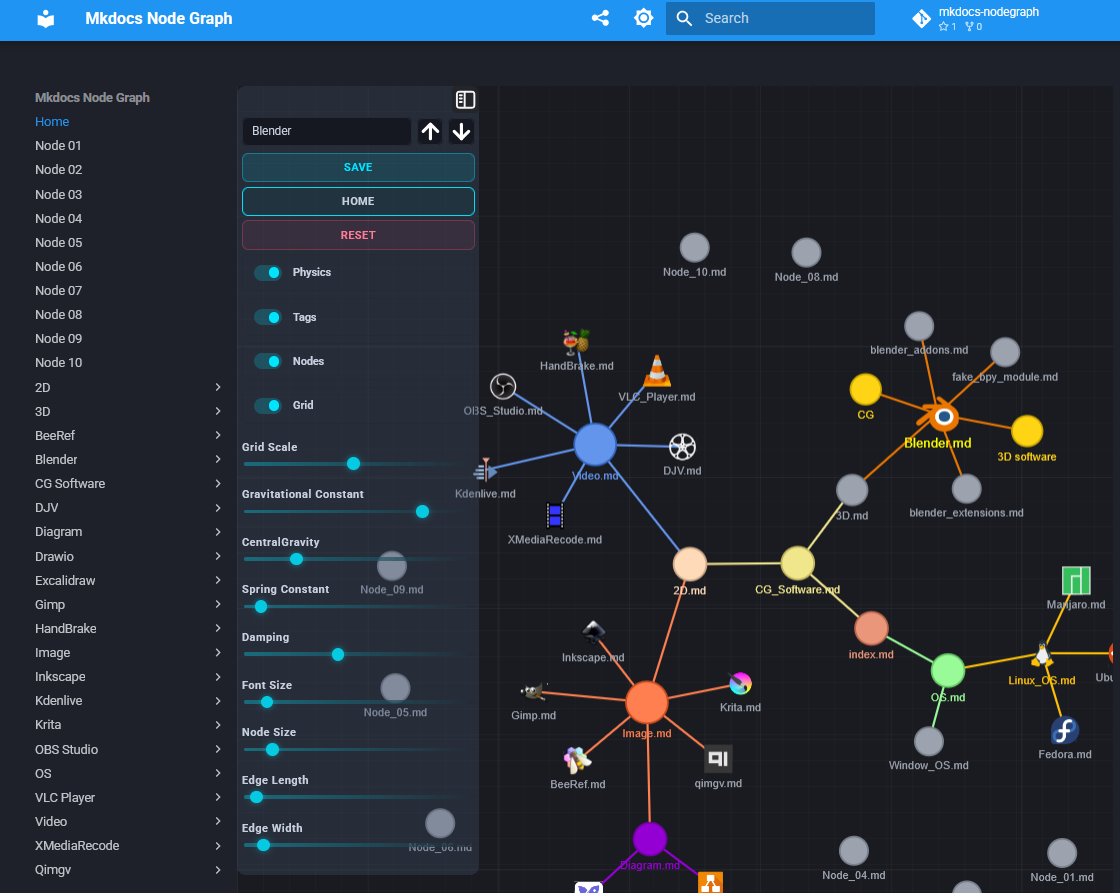
YouTube Link
Install
Install with setup.py
python.exe setup.py install
Install with pip
pip install mkdocs-nodegraph
Uninstall with pip
pip uninstall mkdocs-nodegraph
Setup Tags, Node Icon and Color on Markdown File
---
tags:
  - CG
  - 3D software
mdfile_icon: "_sources/svgs/blender.svg"
mdfile_color: "#ea7600"
mdfile_site: "https://www.blender.org/"
---
mdfile_icon -> Node Icon
mdfile_color -> Node Color
mdfile_site -> A website URL that opens on click while holding the Alt key
Click Node
LMB -> Open Node Page
Ctrl + LMB -> Open Node Page in a New Tab
Alt + LMB -> Open the mdfile_site Page from the metadata
mkdocs.yml Configuration
theme:
    # pip install mkdocs-material
    name: material
    # name: readthedocs
    features:
        # - navigation.tabs
        - content.code.copy
    palette:
      # Palette toggle for dark mode
      - media: "(prefers-color-scheme: dark)"
        scheme: slate
        primary: blue
        accent: blue
        toggle:
          icon: material/brightness-7
          name: Switch to light mode
      # Palette toggle for light mode
      - media: "(prefers-color-scheme: light)"
        scheme: default
        primary: blue
        accent: blue
        toggle:
          icon: material/brightness-4
          name: Switch to dark mode

plugins:
    - search
    - offline
    - glightbox:
        skip_classes:
            - collapse-btn
    - nodegraph:
        graphfile: "nodegraph.html"
After setting up the nodegraph plugin with its graphfile path, you can build your site
mkdocs build
After building the site, you can click the button 
References
1 maintainer

Metadata
1 maintainer
Release files for mkdocs-nodegraph 0.5.1
For a detailed explanation of source distributions (sdists) and built distributions (wheels), please see the package formats documentation.
Source distribution (sdist)
| File | Size | Uploaded | |
|---|---|---|---|
| mkdocs_nodegraph-0.5.1.tar.gz | 22.9 kB | Details |
Built distribution (wheel)
| File | Interpreter | ABI | Platform | Reset |
|---|---|---|---|---|
| mkdocs_nodegraph-0.5.1-py3-none-any.whl | Python 3 | none | any | Details |
Total release size: 46.3 kB
Release files / mkdocs_nodegraph-0.5.1.tar.gz
| Download URL | mkdocs_nodegraph-0.5.1.tar.gz |
|---|---|
| Size | 22.9 kB |
| Tags | Source |
|
SHA-256 checksum How to use checksums |
d5f5a0dda2d81dd2d742e73c78ba2edd2d6cdcafd3c3408cede0142c5366d5c8
|
|
BLAKE2b-256 checksum How to use checksums |
6d9a0d1d33b57c464de4e2d15176834fc6a91b82d4e7ed1317a76b3fee2c00c5
|
| Upload date | |
|
Uploaded using Trusted Publishing? What is trusted publishing? |
No |
| Uploaded via |
twine/6.2.0 CPython/3.13.6
|
Release files / mkdocs_nodegraph-0.5.1-py3-none-any.whl
| Download URL | mkdocs_nodegraph-0.5.1-py3-none-any.whl |
|---|---|
| Size | 23.3 kB |
| Tags | Python 3 |
|
SHA-256 checksum How to use checksums |
fcc900613fe277cb366da6b274bc0b266d85e706c4f864d222a084b97b8720da
|
|
BLAKE2b-256 checksum How to use checksums |
01313f2993bbafc745db51c9356fcf021ef9435ef1030cefcc6faf1f7e7b4ca4
|
| Upload date | |
|
Uploaded using Trusted Publishing? What is trusted publishing? |
No |
| Uploaded via |
twine/6.2.0 CPython/3.13.6
|














