
mkdocs-toc-md
mkdocs-toc-md is a MkDocs plugin that generates a table-of-contents Markdown file from your MkDocs navigation and page headings.
The generated Markdown file must be created before mkdocs build renders it as HTML. During local development, run mkdocs serve once to generate or update the Markdown output.
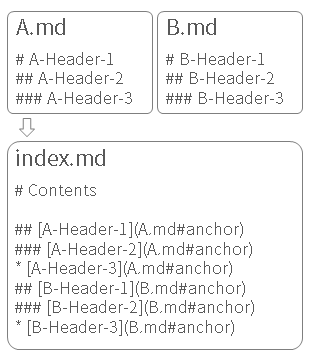
Sample
Installation
pip install mkdocs-toc-md
Basic Usage
Add the plugin to mkdocs.yml.
plugins:
  - toc-md
Then run:
mkdocs serve
By default, the plugin generates docs/index.md.
Add Descriptions
To show a description under a page heading, add toc_md_description to the page front matter.
---
toc_md_description: Description shown in the generated TOC.
---
You can also extract descriptions from HTML metadata or an element with the toc-md-description class by enabling pickup_description_meta or pickup_description_class.
<meta name="description" content="Description shown in the generated TOC." />
<div class="toc-md-description">
Description shown in the generated TOC.
</div>
Subdirectory Indexes
Set subdir_index_depth to generate index.md files under directories that contain pages listed in nav.
plugins:
  - toc-md:
      subdir_index_depth: 1
      overwrite: generated
With this navigation:
nav:
  - Guide:
      - Intro: guide/intro.md
      - Config: guide/advanced/config.md
subdir_index_depth: 1 generates:
docs/guide/index.md
The generated guide/index.md contains only the nav-backed pages under guide/, and links are written relative to guide/index.md.
To generate only subdirectory indexes and skip the root output file:
plugins:
  - toc-md:
      output_root_index: false
      subdir_index_depth: 1
Templates
The default template is toc.md.j2.
To use a custom template directory:
plugins:
  - toc-md:
      template_dir_path: custom_template
For subdirectory indexes, template selection uses this order:
toc.subdir.<parent-directory>.md.j2toc.subdir.md.j2toc.md.j2
For example, docs/admin/index.md first looks for toc.subdir.admin.md.j2.
Subdirectory templates receive these additional values:
data.is_subdir_index
data.directory_name
data.directory_path
data.directory_depth
Full Configuration Example
plugins:
  - toc-md:
      toc_page_title: Contents
      toc_page_description: Usage mkdocs-toc-md
      header_level: 3
      pickup_description_meta: false
      pickup_description_class: false
      output_path: index.md
      output_root_index: true
      subdir_index_depth: 0
      overwrite: always
      output_log: false
      ignore_page_pattern: index.*.md$
      remove_navigation_page_pattern: index.*.md$
      template_dir_path: custom_template
      beautiful_soup_parser: html.parser
      integrate_mkdocs_static_i18n: true
      languages:
        en:
          toc_page_title: Contents
          toc_page_description: Usage mkdocs-toc-md
        ja:
          toc_page_title: 目次
          toc_page_description: mkdocs-toc-md プラグインの使い方
      shift_header: after_h1_of_index
      extend_module: true
      output_comment: html
Options
toc_page_title: str
H1 text in the generated table-of-contents Markdown file.
Default: Contents
toc_page_description: str
Description rendered below the H1 title.
Default: None
header_level: int
Heading depth to collect. 1 collects h1, 2 collects h1 through h2, and so on.
Default: 3
pickup_description_meta: bool
Read descriptions from <meta name="description" content="..." />.
Default: False
pickup_description_class: bool
Read descriptions from an element with class toc-md-description.
Default: False
output_path: str
Path to save the root generated Markdown file, relative to docs_dir.
Default: index.md
output_root_index: bool
Generate the root TOC Markdown file configured by output_path. Set this to false when you only want subdirectory TOC files.
Default: True
subdir_index_depth: int
Generate TOC Markdown files in subdirectories that contain pages listed in nav.
0: disable subdirectory TOC files1: target directories directly under the docs root2: also target their child directories
Only directories backed by Markdown pages that appear in nav are considered.
Default: 0
overwrite: str
Controls how existing generated files are handled.
always: always overwrite existing filesgenerated: overwrite only when the existing file contains the mkdocs-toc-md generated markernever: never overwrite existing files
Default: always
When using generated, keep output_comment enabled or include the generated marker in your custom template.
output_log: bool
Print generated Markdown to the console.
Default: False
ignore_page_pattern: str
Regular expression for Markdown source paths to exclude from the generated TOC. To prevent the TOC page from listing itself, use a pattern that matches output_path.
Default: ''
remove_navigation_page_pattern: str
Regular expression for Markdown source paths whose secondary page navigation should be removed from rendered HTML. To hide the navigation on the generated TOC page, use a pattern that matches output_path.
Default: ''
template_dir_path: str
Path to a directory containing toc.md.j2.
Subdirectory indexes also resolve templates from this directory. The lookup order is:
toc.subdir.<parent-directory>.md.j2toc.subdir.md.j2toc.md.j2
For example, docs/admin/index.md first looks for toc.subdir.admin.md.j2.
Default: ''
beautiful_soup_parser: str
Parser used by BeautifulSoup. If you use html5lib or lxml, install the additional dependency yourself.
Default: html.parser
integrate_mkdocs_static_i18n: bool
Integrate with mkdocs-static-i18n.
Default: False
languages: dict
Per-language settings used with integrate_mkdocs_static_i18n.
languages:
  en:
    toc_page_title: Contents
    toc_page_description: Usage mkdocs-toc-md
  ja:
    toc_page_title: 目次
    toc_page_description: mkdocs-toc-md プラグインの使い方
Default: dict()
shift_header: str
Controls heading level shifts for index pages.
after_index: shift heading levels by+1except for the index file in the directoryafter_h1_of_index: shift heading levels by+1after H1 in the index file, and for non-index files in the directorynone: do not shift heading levels
Default: none
extend_module: bool
Enable extension hooks by placing toc_extend_module.py in the MkDocs working directory.
docs/
mkdocs.yml
toc_extend_module.py
See sample/toc_extend_module.py.
Available hooks:
find_src_elements(bs_page_soup, page, toc_config) -> list[bs4.element.Tag]create_toc_items(page, page_description, src_elements, toc_config) -> list[mkdocs_toc_md.objects.TocItem]on_create_toc_item(toc_item, src_element, page, toc_config)on_before_output(nav, toc_items, toc_config)
Default: False
output_comment: str
Controls the generated marker comment.
html:
<!-- ====================== TOC ====================== -->
<!-- Generated by mkdocs-toc-md plugin -->
<!-- ================================================= -->
metadata:
---
toc_output_comment: Generated by mkdocs-toc-md plugin
---
none: no marker comment.
Default: html
1 maintainer

Metadata
1 maintainer
Release files for mkdocs-toc-md 0.0.10
For a detailed explanation of source distributions (sdists) and built distributions (wheels), please see the package formats documentation.
Source distribution (sdist)
| File | Size | Uploaded | |
|---|---|---|---|
| mkdocs_toc_md-0.0.10.tar.gz | 14.8 kB | Details |
Built distribution (wheel)
| File | Interpreter | ABI | Platform | Reset |
|---|---|---|---|---|
| mkdocs_toc_md-0.0.10-py3-none-any.whl | Python 3 | none | any | Details |
Total release size: 27.5 kB
Release files / mkdocs_toc_md-0.0.10.tar.gz
| Download URL | mkdocs_toc_md-0.0.10.tar.gz |
|---|---|
| Size | 14.8 kB |
| Tags | Source |
|
SHA-256 checksum How to use checksums |
588222fd11c8c9df52101399eca69ac79daedf5ed5ce6766dd4f695afb9ef497
|
|
BLAKE2b-256 checksum How to use checksums |
5b90f6f917efc93fa93f6b6c95f83079fd7dab701598bb5f13d7c3cb1772cb64
|
| Upload date | |
|
Uploaded using Trusted Publishing? What is trusted publishing? |
No |
| Uploaded via |
twine/6.2.0 CPython/3.11.3
|
Release files / mkdocs_toc_md-0.0.10-py3-none-any.whl
| Download URL | mkdocs_toc_md-0.0.10-py3-none-any.whl |
|---|---|
| Size | 12.7 kB |
| Tags | Python 3 |
|
SHA-256 checksum How to use checksums |
7827d94188fdbfeffa67177c676e9f35daddd310ed94ba896732720e05ff9172
|
|
BLAKE2b-256 checksum How to use checksums |
dc80d39eb0f828a98558415101a87fa40bb78c1a196228ea2e8a4f7c1aa7348f
|
| Upload date | |
|
Uploaded using Trusted Publishing? What is trusted publishing? |
No |
| Uploaded via |
twine/6.2.0 CPython/3.11.3
|














