

mkdocs-void
Glass + NothingOS Design Language for MkDocs






Overview
Void is a custom MkDocs theme that blends the translucent, layered aesthetics of Glass design system with the minimal, industrial clarity of NothingOS. It combines pure black canvas, glass morphism panels, dot-matrix typography, and Nothing Red accents into a cohesive documentation experience.
GitHub Statistics






Live repository metrics for rkriad585/mkdocs-void, mirrored on both GitHub and PyPI.
Screenshot
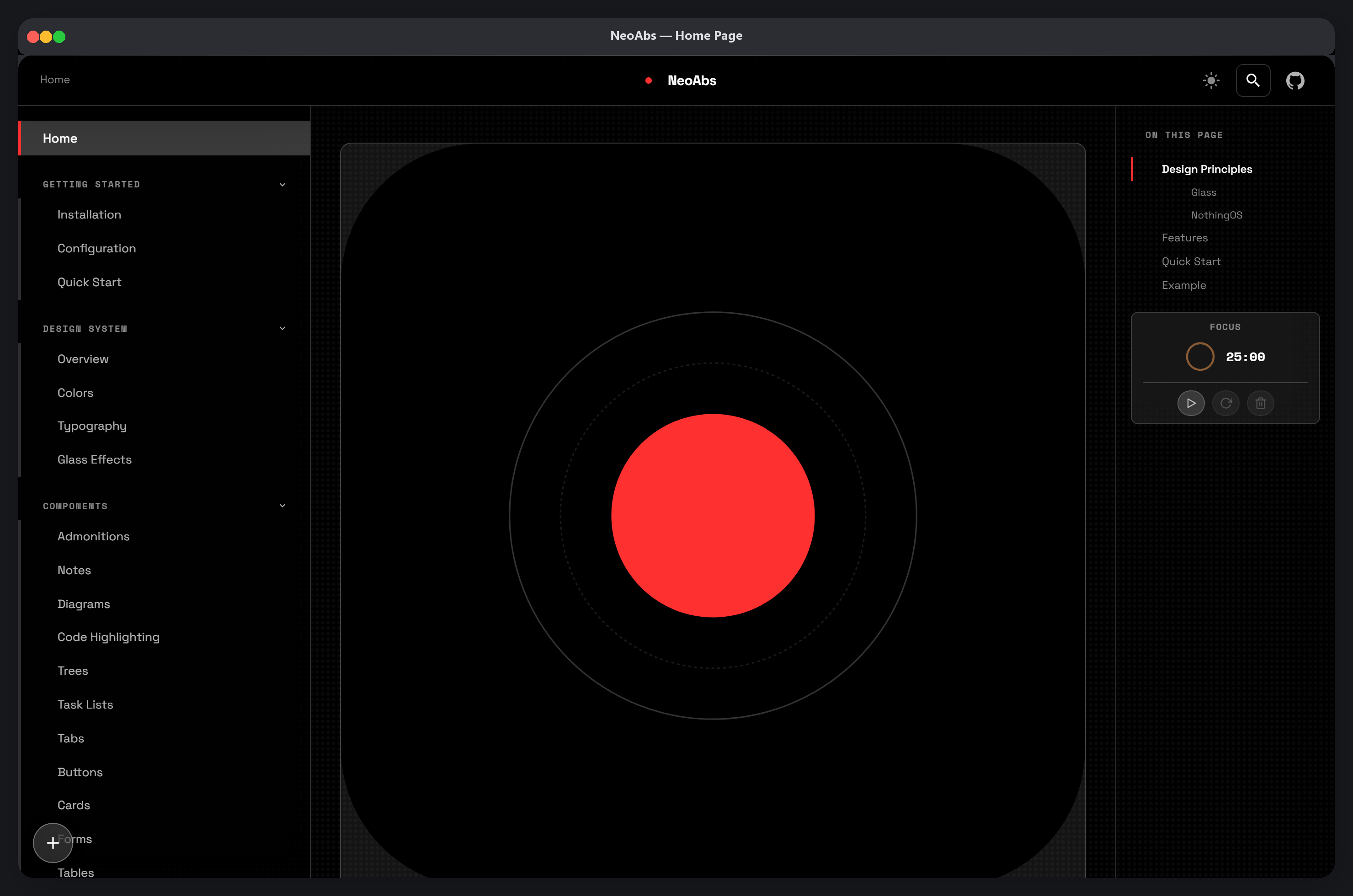
More screenshots: View all screenshots
Table of Contents
- Key Features
- GitHub Statistics
- Installation
- Quick Start
- Configuration
- Usage Examples
- Documentation
- Interface
- Architecture
- Requirements
- Prerequisites
- Development
- Community
- Acknowledgments
Key Features
Void ships every feature enabled by default — tune behavior with theme.void.*
keys, never by editing code.
Visual system
- Glass Morphism — Translucent glass panels with
backdrop-filterblur and configurable intensity (light / medium / heavy), plus blur/saturation/opacity token overrides - NothingOS Canvas — Pure black (#000000) background with monochrome palette and Nothing Red (#ff3030) accents
- Dot-Matrix Overlay — Subtle dot pattern texture inspired by NothingOS (color, size, gap, opacity, position configurable)
- Dark & Light Modes — Toggle between slate (dark) and default (light) color schemes
- Typography — Space Grotesk for display/body, Space Mono for code/labels via Google Fonts (
theme.fontdrives the link AND the body/mono tokens) - Borders, Shadows, Scrollbar & Selection — Full token groups to re-skin the chrome (
border,shadows,scrollbar,selection) - Animations — Page transitions, hover effects, scroll progressives, reduced-motion aware
Layout & navigation
- Responsive Layout — Glass sidebar, sticky header, TOC rail, and mobile-friendly drawer
- Collapsible Sidebar / TOC —
Ctrl+Shift+BandCtrl+Shift+T, with active tracking and scrollspy - Breadcrumbs — Auto trail above content when ancestors exist
- SPA navigation — In-page transitions with scroll restore and back/forward handling
- Reading progress + Back-to-Top — Visual scroll indicator and threshold-gated floating button
- Flexible Header & Footer —
header:andfooter:sections with custom links/buttons, social icons, columns, anddefault | minimal | extendedlayouts - Page-Level Overrides — Front matter
void:blocks (hide any region, per-page glass, wide/full layouts, custom CSS)
Content & components
- Table of Contents — Auto-generated TOC with active section tracking
- Full-Screen Search — Instant modal with
/, suggestions, highlighting, context snippets, and copy-link results - Code Blocks — Syntax highlighting with one-click copy, optional line numbers and
hl_lines - Admonitions — Styled note, warning, tip, and danger callouts with per-type colors
- Tabbed Content — Alternating-style tabs for grouped content
- Task Lists — Interactive checkbox lists with persisted state
- Footnotes, Tables, Trees, Toast — Footnote lists, responsive/striped tables,
treecode blocks with dimmed comments, and a toast notification system - Notes & Annotations — Quick side notes with TTL expiry and export (
Ctrl+Shift+N) - Diagrams & Math — Mermaid superfence with zoom/pan/fullscreen, KaTeX math
- Images & SVG — Click-to-zoom lightbox, lazy loading, dark-aware logos
Engagement & privacy
- Page Feedback — "Was this page helpful?" widget that opens a prefilled GitHub issue (no analytics, no tracking)
- Announcement Bar — Dismissable one-line banner (top/right/bottom/left/center), remembered per site
- Privacy-First Cookie Consent — Banner appears only when a real integration is configured; a single accept/decline flag, nothing tracked
- Opt-in Comments (giscus) — Consent-gated comments with palette-synced theme
- "Powered by Void" badge — Footer credit + dot-matrix badge (
void_showcase)
Productivity (app layer)
- Reader Mode —
Alt+Shift+Rdistraction-free reading (chrome hidden, article re-measured, persisted) - Action Cluster — Floating hub (gears/notes/timer/reading) with per-action shortcuts and badges
- Focus Timer — Built-in session timer in the TOC + reading-mode chip, chime + toast on complete
- Repo Popover — Hover the repo link for description, stars, forks, issues, latest commit (cached)
- Keyboard Navigation — Search (
/), help (?), close (Esc), and every shortcut remappable - Reduced Motion Support — Animations disabled when
prefers-reduced-motionis active
Developer & extensibility
- Command Shortcuts — Custom rebindings and registered actions in
keyboard.custom - Design Tokens — Override colors, typography, spacing, radius, transitions, shadows under
theme.void.* - Component Toggles — Show/hide any piece via
components.*.show(config only) - Custom CSS/JS/head/body —
custom_css,custom_js,extra_*,void_custom_head/body_*, html-attr injection - Config Builder — Standalone dev tool generating a
mkdocs.ymlfrom grouped questions (gear in the cluster, OFF by default) - AI-Readable Mode — Watermarked Markdown mirrors per page,
llms.txt+llms-full.txtfor agents - PWA & Offline — Auto manifest, service-worker caching, CDN/local/bundle asset modes
- Social Cards & JSON-LD — Per-page OG card images and Article structured data
- i18n — Flat alias strings for search/TOC/labels
- SCSS Build Pipeline — Sass compilation with PostCSS autoprefixer and cssnano minification
Installation
pip install mkdocs-void
This installs both the Void theme and the companion MkDocs plugin automatically.
Quick Start
-
Install the package:
pip install mkdocs-void
-
Scaffold a new project with Void's CLI — it pre-enables the theme and the
voidplugin:void new my-docs cd my-docs
-
Start the dev server:
mkdocs serve -
Open http://127.0.0.1:8000 in your browser.
Configuration
Minimal
theme:
  name: void
Full
theme:
  name: void
  favicon: assets/images/favicon.svg
  language: en
  palette:
    - scheme: slate
      primary: black
      accent: red
      toggle:
        name: Switch to light mode
    - scheme: default
      primary: white
      accent: red
      toggle:
        name: Switch to dark mode
  font:
    text: Space Grotesk
    code: Space Mono
  features:            # Material-compatible passthrough (always-on, no gating)
    - navigation.sections
    - navigation.top
    - navigation.footer
    - content.code.copy
    - search.suggest
    - search.highlight
  void:
    glass: medium
    dot_matrix: true
    animation: normal
    border: thin

plugins:
  - search
  - void
Theme Options
| Option | Values | Default | Description |
|---|---|---|---|
void.glass |
"light", "medium", "heavy" |
"medium" |
Glass panel blur intensity |
void.dot_matrix |
true, false |
true |
Dot-matrix background pattern |
void.animation |
"normal", "none" |
"normal" |
Entrance and hover animations |
void.border |
"thin", "thick", "none" |
"thin" |
Glass panel border style |
Usage Examples
Admonitions
!!! note "Glass Note"
    This is a styled admonition with the Void design.

!!! warning "Accent Warning"
    This uses the Nothing Red accent color.

!!! tip "Pro Tip"
    Glass effects adapt to your color scheme choice.
Code Blocks
```python
def hello():
    print("Hello from Void")
```
Tabs
=== "Python"

    ```python
    pip install mkdocs-void
    ```

=== "Node.js"

    Not applicable — Void is a Python package.
Task Lists
- [x] Install Void
- [x] Configure mkdocs.yml
- [ ] Deploy documentation
Documentation
| Page | Description |
|---|---|
| Getting Started | Installation and setup guide |
| Configuration | Full theme configuration reference |
| Design System Overview | How the design language works |
| Colors | Color tokens and palette reference |
| Typography | Font system and type scale |
| Glass Effects | Glass morphism implementation details |
| Buttons | Button component variants |
| Cards | Card component with glass effects |
| Forms | Form elements and validation |
| Void Plugin | Plugin configuration and options |
| Third-Party Integrations | Recipe-grade setups (search, glightbox, table-reader, print-site, awesome-pages) |
| Identity & i18n | Branding, breadcrumbs, PWA, translation guide |
| Architecture | Project structure and internals |
| Development | Contributing and dev workflow |
| Deployment | Build and deployment guide |
| Performance | Page-weight budget and how performance is guarded |
| Troubleshooting | Common issues and fixes |
| Benchmarks | CI-regenerated page-weight + Lighthouse receipts |
| FAQ | Frequently asked questions |
| Screenshots | Visual gallery of the theme |
| About | Credits and license |
Interface
Void is a MkDocs theme — it provides HTML templates, CSS, and JavaScript that render your Markdown documentation as a styled website.
Header
- Logo and site name (left)
- Hamburger menu toggle (mobile)
- Dark/light mode toggle
- Search button
- Repository link
Sidebar
- Collapsible navigation tree with section grouping
- Active page highlighting
- Toggle buttons for expanding/collapsing sections
Content
- Markdown content with typeset typography
- Code blocks with syntax highlighting and copy button
- Admonitions, tabs, tables, task lists
- Table of contents (right side on wide screens)
Keyboard Shortcuts
| Key | Action |
|---|---|
/ |
Open search |
? |
Show keyboard shortcuts |
Esc |
Close overlay |
Architecture
mkdocs-void/
├── void/                          # Python package
│   ├── __init__.py                  # Version (0.2.2)
│   ├── plugins/
│   │   └── void_plugin.py         # MkDocs plugin (theme defaults)
│   ├── templates/
│   │   ├── base.html                # Root HTML template
│   │   ├── main.html                # Content wrapper
│   │   ├── 404.html                 # Error page
│   │   ├── mkdocs_theme.yml         # Theme registration
│   │   ├── partials/
│   │   │   ├── header.html          # Sticky header
│   │   │   ├── nav.html             # Sidebar navigation
│   │   │   ├── content.html         # Content renderer
│   │   │   ├── toc.html             # Table of contents
│   │   │   ├── footer.html          # Prev/next + copyright
│   │   │   ├── palette.html         # Dark/light toggle
│   │   │   ├── search.html          # Search modal
│   │   │   ├── progress.html        # Reading progress bar
│   │   │   └── javascripts/
│   │   │       └── palette.html     # FOUC prevention script
│   │   └── assets/
│   │       ├── void.css           # Compiled CSS
│   │       ├── stylesheets/
│   │       │   ├── void.scss      # Design tokens + base
│   │       │   └── components.scss  # Component styles
│   │       ├── javascripts/
│   │       │   └── void.js        # Theme JS (vanilla ES6+)
│   │       └── images/
│   │           ├── logo.svg         # Theme logo
│   │           └── favicon.svg      # Browser favicon
│   ├── extensions/                  # Reserved for future use
│   └── utilities/                   # Reserved for future use
├── docs/                            # Documentation source
├── logo/
│   └── logo.svg                     # Project logo (512x512)
├── tools/
│   ├── build.js                     # SCSS build pipeline
│   └── screenshots_gen.py           # Screenshot generator
├── Screenshots/                     # Generated screenshots
├── mkdocs.yml                       # MkDocs configuration
├── pyproject.toml                   # Python package config
├── package.json                     # Node.js dependencies
└── requirements.txt                 # Python dependencies
Data Flow
graph TD
    A[Markdown Files] --> B[MkDocs]
    B --> C[void_plugin.py]
    C --> D[HTML Templates]
    D --> E[base.html]
    E --> F[partials/header.html]
    E --> G[partials/nav.html]
    E --> H[partials/content.html]
    E --> I[partials/toc.html]
    E --> J[partials/footer.html]
    E --> K[partials/search.html]
    E --> L[assets/void.css]
    E --> M[assets/javascripts/void.js]
    N[void.scss] --> O[tools/build.js]
    O --> P[void.css]
CSS Architecture
The stylesheet is organized in layers:
- Design Tokens (
void.scss:root) — CSS custom properties for colors, spacing, typography, glass, shadows, z-index, animations - Light Mode Overrides (
[data-md-color-scheme="default"]) — Token overrides for light theme - Glass Intensity Variants — Light/medium/heavy glass via
data-md-void-glassattribute - Base Resets — Box-sizing, font smoothing, reduced motion
- Dot Matrix Overlay — Radial gradient pattern
- Glass Components —
.void-glass,.void-card - Typography — Display, labels, body, code
- Components (
components.scss) — Layout, header, nav, content, TOC, footer, search, tabs, admonitions, code blocks, tables, and more
Requirements
- Python 3.8 or higher
- MkDocs 1.5 or higher
- Node.js 18 or higher (for building CSS)
- A modern browser with support for
backdrop-filter
Prerequisites
pip(Python package manager)npm(Node.js package manager)- A text editor or IDE
Development
Clone and Install
git clone https://github.com/rkriad585/mkdocs-void.git
cd mkdocs-void
pip install -e .
npm install
Build CSS
npm run build
Watch Mode
npm run start
Dev Mode
npm run dev
Serve Documentation
mkdocs serve
Docs Health
- The documentation (
docs/**) and every README in this repository never link to, embed, or depend on planning artifacts. They stand on their own and link only user-facing pages. - The config reference is generated, not hand-written:
python tools/emit_config_reference.py→docs/_config_ref.generated.md(snippets-included into the Configuration page).
Lint
ruff check void/
Clean
rm -rf site/ dist/ build/ *.egg-info .ruff_cache/
find . -type d -name __pycache__ -exec rm -rf {} +
Or use Make:
make install    # Install dependencies
make build      # Build CSS
make dev        # Dev mode
make serve      # Serve docs
make lint       # Run linter
make clean      # Remove build artifacts
make help       # Show all commands
Community
- Discussions — ask questions and share showsites at github.com/rkriad585/mkdocs-void/discussions
- Good first issues — browse
issues labeled
good first issueto start contributing - Translations — see the Translating Void guide
- Sponsor — fund development via GitHub Sponsors or Open Collective
Acknowledgments
- MkDocs — the static site generator this theme is built for
- Space Grotesk and Space Mono — the typefaces used throughout the theme
- Nothing Technology — for the NothingOS design identity
Developed with ♥ by rkriad585
Make documentation feel app-like — fast, private, distinctive.
GitHub · Docs · Changelog · Discussions
1 maintainer

Metadata
1 maintainer
Release files for mkdocs-void 0.3.0
For a detailed explanation of source distributions (sdists) and built distributions (wheels), please see the package formats documentation.
Source distribution (sdist)
| File | Size | Uploaded | Provenance | |
|---|---|---|---|---|
| mkdocs_void-0.3.0.tar.gz | 194.0 kB | Without provenance | Details |
Built distribution (wheel)
| File | Interpreter | ABI | Platform | Reset |
|---|---|---|---|---|
| mkdocs_void-0.3.0-py3-none-any.whl | Python 3 | none | any | Details |
Total release size: 366.6 kB
Release files / mkdocs_void-0.3.0.tar.gz
| Download URL | mkdocs_void-0.3.0.tar.gz |
|---|---|
| Size | 194.0 kB |
| Tags | Source |
|
SHA-256 checksum How to use checksums |
b9d07cf31d07523903ab0b65cb5554446202e1a1cf97dad4e16156e7cb03523c
|
|
BLAKE2b-256 checksum How to use checksums |
b35e74d0132008ae9f3d3436d76fe31e3a990f9c5bab8ae698467b63fbb32cd0
|
| Upload date | |
|
Uploaded using Trusted Publishing? What is trusted publishing? |
No |
| Uploaded via |
twine/7.0.0 CPython/3.13.14
|
Release files / mkdocs_void-0.3.0-py3-none-any.whl
| Download URL | mkdocs_void-0.3.0-py3-none-any.whl |
|---|---|
| Size | 172.5 kB |
| Tags | Python 3 |
|
SHA-256 checksum How to use checksums |
2ddf77ffe19c406562d6abe1a9223e4cb0507c5359e288a745a3063ea93d9ca2
|
|
BLAKE2b-256 checksum How to use checksums |
acedf28c88e85b58d3d0ac24a982e35054072e33b0be898e339b63274898fc4b
|
| Upload date | |
|
Uploaded using Trusted Publishing? What is trusted publishing? |
No |
| Uploaded via |
twine/7.0.0 CPython/3.13.14
|
Security for mkdocs-void 0.3.0
Provenance
Provenance describes where a file came from. On PyPI, provenance is shared via attestations, which provide a verifiable record of the build or publishing details. View details, limitations and caveats.
No provenance found
None of the files in this release were uploaded with provenance metadata.
A note on package security
PyPI is a repository for distributing packages, not a service for auditing them. While third-party security researchers and our staff do their best to detect and remove malicious packages, PyPI cannot guarantee the quality, security or suitability of any given package.
To learn more about protecting yourself from malicious actors, visit our package security documentation.














