
mkdocstrings-python
A Python handler for mkdocstrings.


The Python handler uses Griffe to collect documentation from Python source code. The word "griffe" can sometimes be used instead of "signature" in French. Griffe is able to visit the Abstract Syntax Tree (AST) of the source code to extract useful information. It is also able to execute the code (by importing it) and introspect objects in memory when source code is not available. Finally, it can parse docstrings following different styles.
Installation
You can install this handler as a mkdocstrings extra:
# PEP 621 dependencies declaration
# adapt to your dependencies manager
[project]
dependencies = [
    "mkdocstrings[python]>=0.18",
]
You can also explicitly depend on the handler:
# PEP 621 dependencies declaration
# adapt to your dependencies manager
[project]
dependencies = [
    "mkdocstrings-python",
]
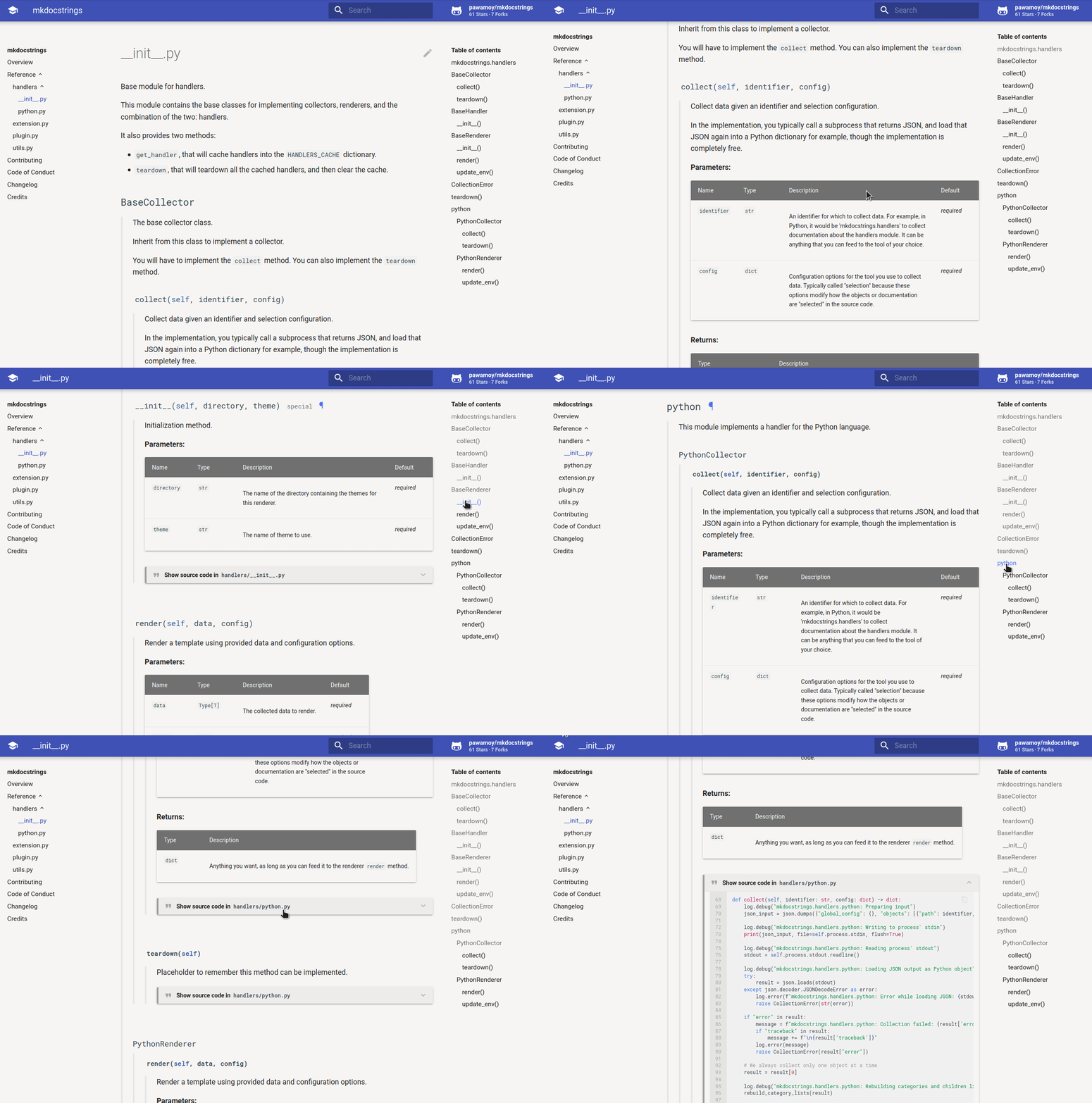
Preview
Features
-
Data collection from source code: collection of the object-tree and the docstrings is done thanks to Griffe.
-
Support for type annotations: Griffe collects your type annotations and mkdocstrings uses them to display parameter types or return types. It is even able to automatically add cross-references to other objects from your API, from the standard library or third-party libraries! See how to load inventories to enable it.
-
Recursive documentation of Python objects: just use the module dotted-path as an identifier, and you get the full module docs. You don't need to inject documentation for each class, function, etc.
-
Support for documented attributes: attributes (variables) followed by a docstring (triple-quoted string) will be recognized by Griffe in modules, classes and even in
__init__methods. -
Multiple docstring-styles support: common support for Google-style, Numpydoc-style, and Sphinx-style docstrings. See Griffe's documentation on docstrings support.
-
Admonition support in Google docstrings: blocks like
Note:orWarning:will be transformed to their admonition equivalent. We do not support nested admonitions in docstrings! -
Every object has a TOC entry: we render a heading for each object, meaning MkDocs picks them into the Table of Contents, which is nicely displayed by the Material theme. Thanks to mkdocstrings cross-reference ability, you can reference other objects within your docstrings, with the classic Markdown syntax:
[this object][package.module.object]or directly with[package.module.object][] -
Source code display: mkdocstrings can add a collapsible div containing the highlighted source code of the Python object.
Metadata
Release files for mkdocstrings-owa 1.16.12.post2
For a detailed explanation of source distributions (sdists) and built distributions (wheels), please see the package formats documentation.
Source distribution (sdist)
| File | Size | Uploaded | |
|---|---|---|---|
| mkdocstrings_owa-1.16.12.post2.tar.gz | 210.9 kB | Details |
Built distribution (wheel)
| File | Interpreter | ABI | Platform | Reset |
|---|---|---|---|---|
| mkdocstrings_owa-1.16.12.post2-py3-none-any.whl | Python 3 | none | any | Details |
Total release size: 342.0 kB
Release files / mkdocstrings_owa-1.16.12.post2.tar.gz
| Download URL | mkdocstrings_owa-1.16.12.post2.tar.gz |
|---|---|
| Size | 210.9 kB |
| Tags | Source |
|
SHA-256 checksum How to use checksums |
1e1e3ec7df3c579473d3dcbcc67d32b2faab050f52c21b8eb6de2b6c564984ca
|
|
BLAKE2b-256 checksum How to use checksums |
38b13a714063c0ac7901d22e98ab85114104c4320d51a4d38ba322c15aa33b11
|
| Upload date | |
|
Uploaded using Trusted Publishing? What is trusted publishing? |
No |
| Uploaded via |
uv/0.7.11
|
Release files / mkdocstrings_owa-1.16.12.post2-py3-none-any.whl
| Download URL | mkdocstrings_owa-1.16.12.post2-py3-none-any.whl |
|---|---|
| Size | 131.1 kB |
| Tags | Python 3 |
|
SHA-256 checksum How to use checksums |
ee3db790be68592cb0d5719712173938c6ba3fa6fe87bae72794ed6c7bfa0037
|
|
BLAKE2b-256 checksum How to use checksums |
82ffce5999da89ad77074df97d4146bfb21a2ea4bc6281f9ad73b30c25a46ccc
|
| Upload date | |
|
Uploaded using Trusted Publishing? What is trusted publishing? |
No |
| Uploaded via |
uv/0.7.11
|














