
mkkey - Application-Layer Key (JWK/PASERK) Generator




mkkey is a CLI tool for generating following application-layer keys:
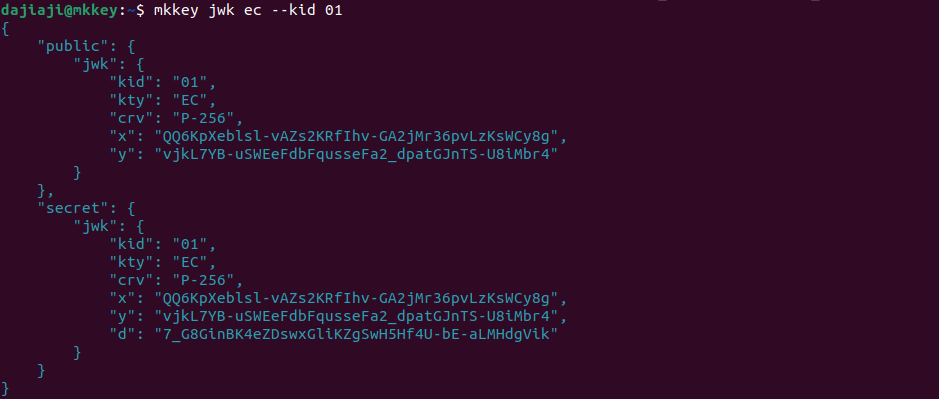
Until now, in order to create a JWK, you had to create a PEM-formatted key pair using a command
such as openssl, and then load it and convert it into a JWK. With mkkey, you can
directly and easily create JWKs and PASERKs that can be used in applications as shown below,
without generating intermediate keys (PEM-formatted keys):
Index
- Installation
- Basic Usage
- kid generation methods for JWK
- Contributing
Installation
You can install mkkey with pip:
$ pip install mkkey
If the shell you are using is bash, zsh or fish, you can activate tab completion
by following the steps below:
- Run
mkkey --install. - Follow the steps described in the output of
mkkey --install.
Basic Usage
JWK (JSON Web Key)
JWKs can be generated using the mkkey jwk command.
Typical use cases are shown in this section but for details, see help:
$ mkkey jwk --help
Generate a simple (default) JWK
The simplest way to use mkkey jwt is as follows. Simply specify a key type (in this case, ec).
Now you will get the minimum JWK you need.
$ mkkey jwk ec
{
    "public": {
        "jwk": {
            "kty": "EC",
            "crv": "P-256",
            "x": "Ti-mNoi-uQFYBVNkH6BSmuTAd8WL8kyEVJufZYv3mG8",
            "y": "ANwoZQFI_teNrltM0s9LPjWli0_zyYvvv8cEZWKx1CQ"
        }
    },
    "secret": {
        "jwk": {
            "kty": "EC",
            "crv": "P-256",
            "x": "Ti-mNoi-uQFYBVNkH6BSmuTAd8WL8kyEVJufZYv3mG8",
            "y": "ANwoZQFI_teNrltM0s9LPjWli0_zyYvvv8cEZWKx1CQ",
            "d": "l9Pbq0BmCsOzdapBtSxVpRiHhDTK5-ATteA0nMKzvFU"
        }
    }
}
In addtion to ec, rsa and okp (Octet Key Pair) can be used as key types:
$ mkkey jwk rsa
$ mkkey jwk okp
Generate a JWK with specifying curve
If you want to use a curve other than P-256, use the --crv option:
$ mkkey jwk ec --crv P-384
Generate a JWK with optional attributes
If you want to include kid, alg, use and key_ops in the JWK,
use the --kid, --alg, --use, and --key-ops respectively:
$ mkkey jwk ec --kid 01 --alg ES256 --use sig --key-ops
{
    "public": {
        "jwk": {
            "kid": "01",
            "kty": "EC",
            "crv": "P-256",
            "alg": "ES256",
            "use": "sig",
            "key_ops": ["verify"],
            "x": "qg-3SA7jNvG7DPF8ajuRR69d5LoBz-I8Xg4ze1kjdHs",
            "y": "JctPLnWOeyJM3apWxyEX3bHDo97kel4gdI8x0FlTwHc"
        }
    },
    "secret": {
        "jwk": {
            "kid": "01",
            "kty": "EC",
            "crv": "P-256",
            "alg": "ES256",
            "use": "sig",
            "key_ops": ["sign"],
            "x": "qg-3SA7jNvG7DPF8ajuRR69d5LoBz-I8Xg4ze1kjdHs",
            "y": "JctPLnWOeyJM3apWxyEX3bHDo97kel4gdI8x0FlTwHc",
            "d": "GZ9ihMNwYYbglWHV8vau-W5gaZal5ajBb_NiY7Ci7Uk"
        }
    }
}
Generate a JWK with kid generation method
kid can also be generated automatically. In this case, use --kid-type to specify the generation method.
For now, only sha256 (see kid generation methods for JWK) is available.
You can adjust the size of the auto-generated kid by using --kid-size as well:
$ mkkey jwk ec --kid-type sha256 --kid-size 16
{
    "public": {
        "jwk": {
            "kid": "ozh_CYlRd3A1f2RLlA3Y5w",
            "kty": "EC",
            "crv": "P-256",
            "x": "hDuMnnmlnFAKMsn-qP37XsKchg6K0bXPhsFgmWOpnVw",
            "y": "_oQgP8b8V0hC_H73gIVBaMylAoTOA4mwM57Y2hC2xIk"
        }
    },
    "secret": {
        "jwk": {
            "kid": "ozh_CYlRd3A1f2RLlA3Y5w",
            "kty": "EC",
            "crv": "P-256",
            "x": "hDuMnnmlnFAKMsn-qP37XsKchg6K0bXPhsFgmWOpnVw",
            "y": "_oQgP8b8V0hC_H73gIVBaMylAoTOA4mwM57Y2hC2xIk",
            "d": "1b0lNEiyV_C8U0fGXDczfwTrKnHpWwjt_OU0H-MLJvs"
        }
    }
}
PASERK (Platform-Agnostic Serialized Keys)
PASERKs can be generated using the mkkey paserk command.
Typical use cases are shown in this section but for details, see help:
$ mkkey paserk --help
Generate a PASERK
PASERKs can be generated using the mkkey paserk command with a target PASETO version
and a purpose (in this case, v4 and public respectively).
$ mkkey paserk v4 public
{
    "public": {
        "paserk": "k4.public.2BWUTPg5pmXZ3EVrOBv9I4I_F8Afj0TJ21HkaPT926M"
    },
    "secret": {
        "paserk": "k4.secret.fKIawV2PPVpEONDcEH3_p1dc4OEYlTncmMa8gvwMVy_YFZRM-DmmZdncRWs4G_0jgj8XwB-PRMnbUeRo9P3bow"
    }
}
Generate a PASERK along with a PASERK ID
If you want to generate a PASERK ID (kid) along with a PASERK, use the --kid option:
$ mkkey paserk v4 public --kid
{
    "public": {
        "kid": "k4.pid.B7i9vMzTQv32mDV9JKjyRy5Iu4eyuufb_RjXwQeZiGrh",
        "paserk": "k4.public.Qo7ipKpEa2RxCqmVXSpHdRbWMGtg9QsesMUbLQfU_Pw"
    },
    "secret": {
        "kid": "k4.sid.v1091k4VuZOEKfIO5hLByGwK-RP6dFhfaltURc4CFkUd",
        "paserk": "k4.secret.0h5Q2HDR8PbFMZhN8z7iXbbCyn5-bRQdNPRYIglvnWdCjuKkqkRrZHEKqZVdKkd1FtYwa2D1Cx6wxRstB9T8_A"
    }
}
Generate a PASERK wrapped using password-based encryption
If you want to wrap a secret PASERK with password-based encryption, use the --password option:
$ mkkey paserk v4 public --password mysecretpassword
{
    "public": {
        "paserk": "k4.public.qRUKsDFUDgi0zKuvax9fIEmaeRjyVdLqRMDli0YTDC0"
    },
    "secret": {
        "paserk": "k4.secret-pw.62BwtRDohBqFGR-ohJau2AAAAAAA8AAAAAAAAgAAAAHToEnMr1aNWaJsfwxfjHiZkVqdfn8cuMqIburaesjyt7Un-UKE3Umdi3T2YnrNjoie_BGCFguNk_Q2C7qpKC6nehvr6oM3p-4BzrfZLzmKX7jqfgZlC9xZHe0NFfH5DphWqVfPZ5hoUv8gCYKhz7vZ1lyXNgbuCFI"
    }
}
Generate a PASERK wrapped by another symmetric key
If you want to wrap a secret PASERK by another symmetric key, use the --wrapping-key option:
$ mkkey paserk v4 public --wrapping-key 123456789abcdefghi
{
    "public": {
        "paserk": "k4.public.Dpdjm_Dd_4t7lzePcWkFLTPBQSBRwB-XZIJnpGbQcf0"
    },
    "secret": {
        "paserk": "k4.secret-wrap.pie.aIbROal8a-FxyTddcC8cny98i-1IuZ5UrwBD64AZDt8b6_9z0DidT7KVKoyK9mTGwtTSSUFtRT9BYdkUc4kZJy0zio12KSw3hwkLqzYPtgUtxBqwlCIb9D2ug-2eaJw67iv1sNV4ovQsutSumob-po6Bt0IwoFXX0bDOVWHHqV8"
    }
}
kid generation methods for JWK
Following kid generation methods are available that can be specified as --kid-type option:
sha256: Use a SHA256 hash value of DER formatted public key as a kid value. The DER format must be SubjectPublicKeyInfo which is the typical public key format and consists of an algorithm identifier and the public key bytes.none: Do not generate kid [default].
Contributing
We welcome all kind of contributions, filing issues, suggesting new features or sending PRs.
1 maintainer

Metadata
1 maintainer
Release files for mkkey 0.7.2
For a detailed explanation of source distributions (sdists) and built distributions (wheels), please see the package formats documentation.
Source distribution (sdist)
| File | Size | Uploaded | |
|---|---|---|---|
| mkkey-0.7.2.tar.gz | 15.6 kB | Details |
Built distribution (wheel)
| File | Interpreter | ABI | Platform | Reset |
|---|---|---|---|---|
| mkkey-0.7.2-py3-none-any.whl | Python 3 | none | any | Details |
Total release size: 31.7 kB
Release files / mkkey-0.7.2.tar.gz
| Download URL | mkkey-0.7.2.tar.gz |
|---|---|
| Size | 15.6 kB |
| Tags | Source |
|
SHA-256 checksum How to use checksums |
3ea83dc5e785389659dc9decb408a7b5d7bf3977cea280191bee3b256e09f462
|
|
BLAKE2b-256 checksum How to use checksums |
d3e8aa0a65cf4cffe034fc580b6897812942fea9bf4f3e33e023c640370da425
|
| Upload date | |
|
Uploaded using Trusted Publishing? What is trusted publishing? |
No |
| Uploaded via |
poetry/1.8.3 CPython/3.10.14 Linux/6.5.0-1025-azure
|
Release files / mkkey-0.7.2-py3-none-any.whl
| Download URL | mkkey-0.7.2-py3-none-any.whl |
|---|---|
| Size | 16.1 kB |
| Tags | Python 3 |
|
SHA-256 checksum How to use checksums |
4e431cb67fda44fcfbc26d031848a07afa2307f653789e56b89ca310749a23bf
|
|
BLAKE2b-256 checksum How to use checksums |
982c88adba15d8b3f79922cbec61fa53327d2aee3ecaf81c2bd239f624b0a66e
|
| Upload date | |
|
Uploaded using Trusted Publishing? What is trusted publishing? |
No |
| Uploaded via |
poetry/1.8.3 CPython/3.10.14 Linux/6.5.0-1025-azure
|














