
ml-drift-detection 📈🔍
A Streamlit dashboard for visual monitoring of machine learning data drift and model performance metrics.




Overview
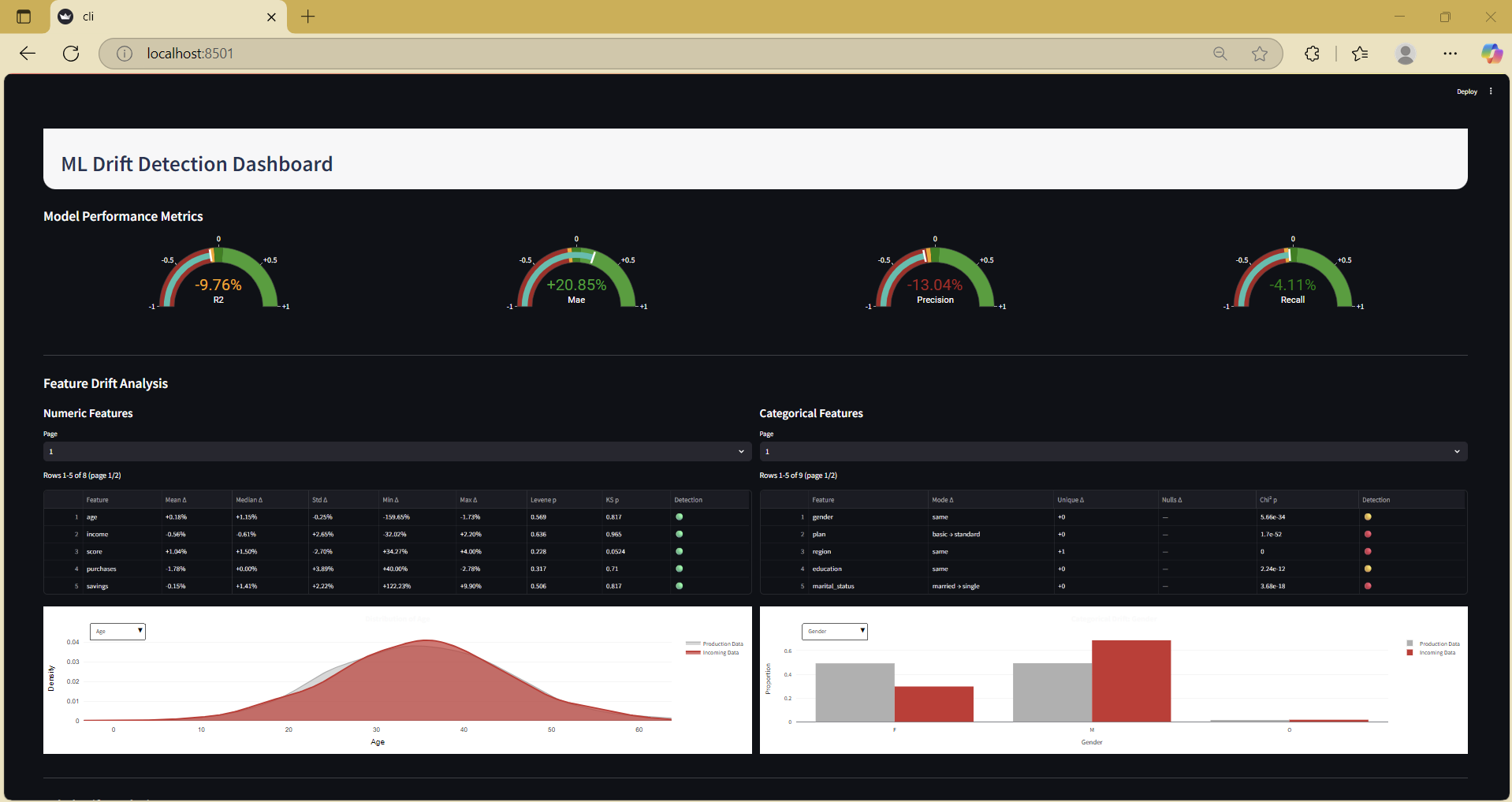
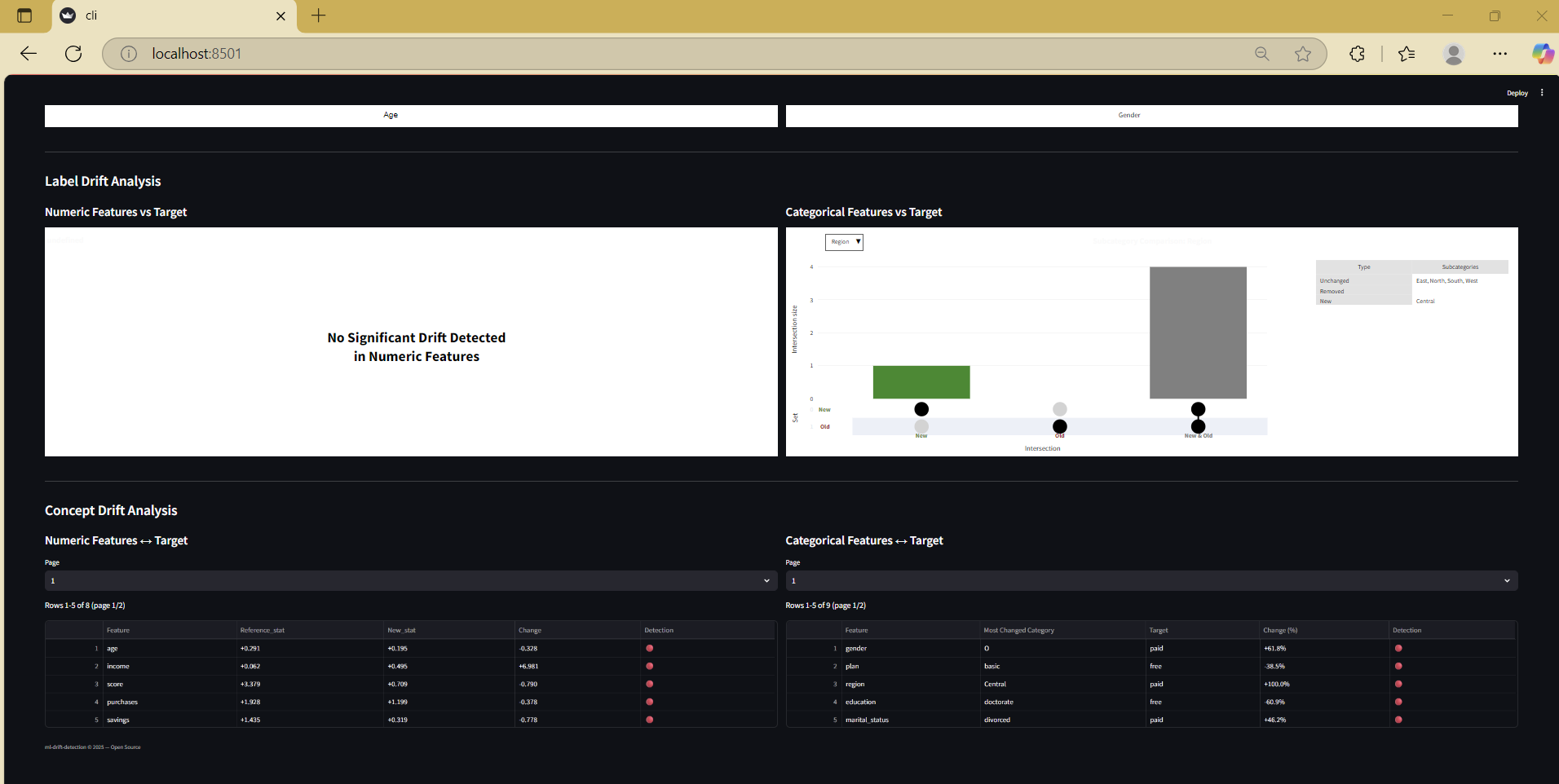
ml-drift-detection provides an instant, interactive dashboard to compare two datasets (e.g., baseline/reference vs. new/production data) for feature drift, label drift, and concept drift, alongside the latest model performance metrics.
- Visualizes drift in both numeric and categorical features
- Highlights changes in model evaluation metrics
- Supports light and dark dashboard themes
- Usable as a command-line tool or Python library
Installation
pip install ml-drift-detection
Requires Python ≥ 3.9.
Usage
1. Command-Line Interface (CLI)
Run the dashboard using Streamlit, providing your datasets and settings as arguments:
streamlit run -m ml_drift_detection.cli -- \
  --prod-data=PATH_TO_REFERENCE_DATA \
  --new-data=PATH_TO_NEW_DATA \
  --numeric-cols=NUMERIC_COLUMN_NAMES \
  --categorical-cols=CATEGORICAL_COLUMN_NAMES \
  --target-variable=TARGET_COLUMN_NAME \
  --target-type=TARGET_TYPE \
  --prod-metrics=PRODUCTION_METRICS \
  --new-metrics=NEW_METRICS
Argument descriptions
| Argument | Description |
|---|---|
--prod-data |
Path to your reference or baseline dataset (CSV or Excel file) |
--new-data |
Path to your new or current dataset (CSV or Excel file) |
--numeric-cols |
Comma-separated list of numeric feature column names |
--categorical-cols |
Comma-separated list of categorical feature column names |
--target-variable |
Name of the target column (label or outcome) |
--target-type |
Type of target variable: either categorical (classification) or continuous (regression) |
--prod-metrics |
Comma-separated list of metric_name=value pairs for reference data performance |
--new-metrics |
Comma-separated list of metric_name=value pairs for new data performance |
Optional arguments
| Argument | Description | Default |
|---|---|---|
--background-color |
Dashboard background color: "white" or "#0E1117" for dark mode |
"white" |
--metric-one-threshold-steps |
JSON or Python list for custom gauge bands (Metric 1); defaults used if omitted | See below |
--metric-two-threshold-steps |
Custom gauge bands for Metric 2 (same format) | Defaults |
--metric-three-threshold-steps |
Custom gauge bands for Metric 3 | Defaults |
--metric-four-threshold-steps |
Custom gauge bands for Metric 4 | Defaults |
Default gauge colour bands
Unless customized, all metrics use these relative change bands:
| Range (relative change) | Gauge color |
|---|---|
| -1.0 to -0.10 | firebrick |
| -0.10 to -0.05 | orange |
| -0.05 to 0.05 | green |
| 0.05 to 1.0 | #2ca02c |
Custom bands can be provided as JSON/Python lists (see documentation).
2. Library Usage
You can also use the dashboard as part of a Python workflow:
import pandas as pd
from ml_drift_detection import dashboard_main

reference_df = pd.read_csv("PATH_TO_REFERENCE_DATA")
current_df = pd.read_csv("PATH_TO_NEW_DATA")

dashboard_main(
    prod_df=reference_df,
    new_df=current_df,
    numeric_cols=[...],          # List of your numeric feature names
    categorical_cols=[...],      # List of your categorical feature names
    target_variable="...",       # Your target column name
    target_type="...",           # "categorical" or "continuous"
    prod_metrics={...},          # Dict of production metrics
    new_metrics={...},           # Dict of new metrics
    # Optional: background_color, metric_x_threshold_steps
)
All arguments follow the same meaning as in the CLI.
Public API
| Symbol | Description |
|---|---|
ml_drift_detection.cli_main |
CLI entry point for Streamlit |
ml_drift_detection.dashboard_main |
Programmatic dashboard launcher |
get_plotly_dist |
Helper: numeric KDE distribution plot |
get_plotly_boxplot |
Helper: numeric boxplot plot |
get_plotly_barplot |
Helper: categorical barplot plot |
Example
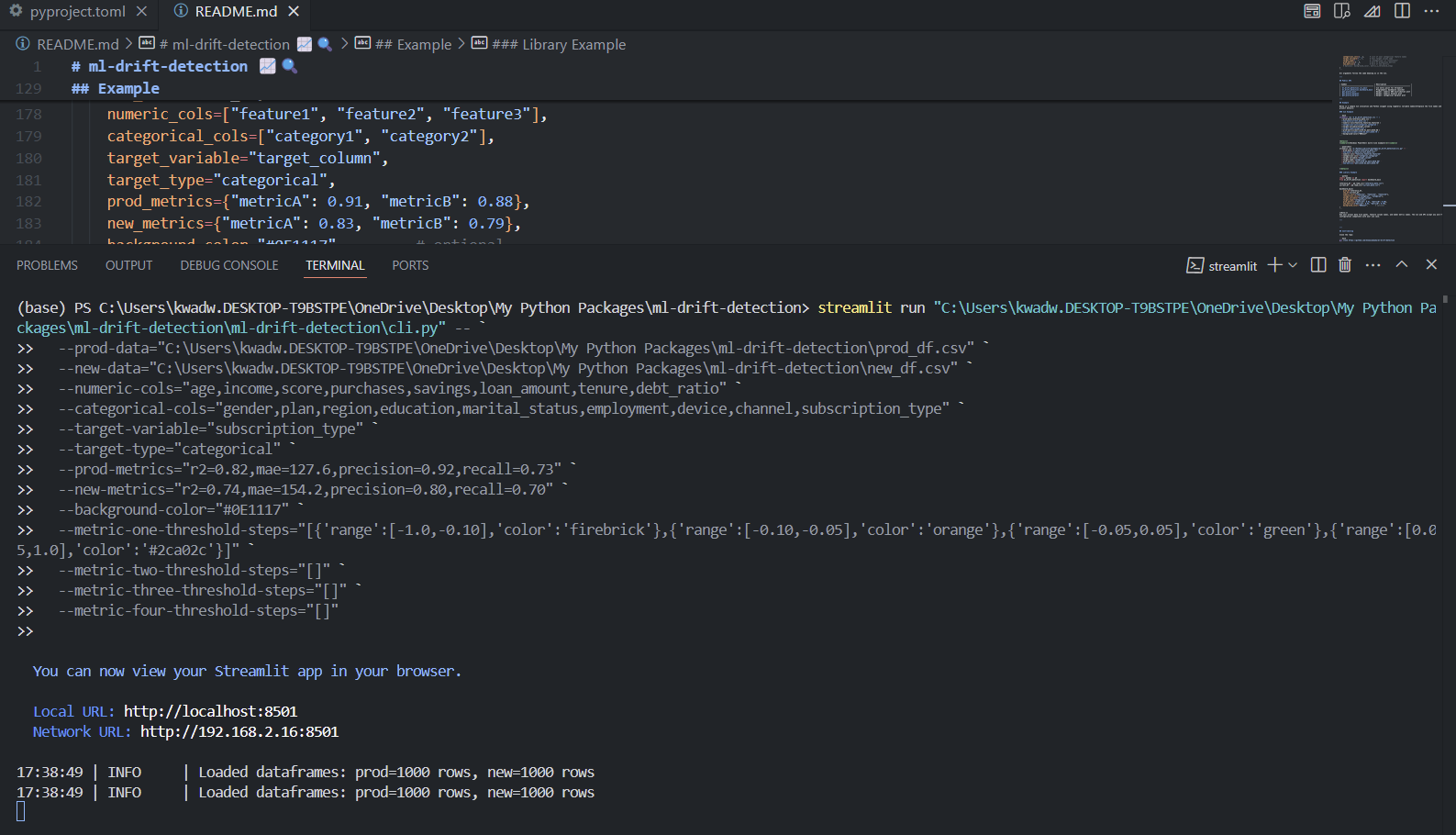
Below is a sample CLI invocation and Python snippet using generic variable names—replace the file names and column names with your actual project details:
CLI Example
streamlit run -m ml_drift_detection.cli -- \
  --prod-data=reference_data.csv \
  --new-data=current_data.csv \
  --numeric-cols=feature1,feature2,feature3 \
  --categorical-cols=category1,category2 \
  --target-variable=target_column \
  --target-type=categorical \
  --prod-metrics=metricA=0.91,metricB=0.88 \
  --new-metrics=metricA=0.83,metricB=0.79 \
  --background-color="#0E1117"
Windows PowerShell multi-line example
streamlit run "C:\Python\Lib\site-packages\ml_drift_detection\cli.py" -- `
  --prod-data="C:\data\reference_data.csv" `
  --new-data="C:\data\current_data.csv" `
  --numeric-cols="feature1,feature2,feature3" `
  --categorical-cols="category1,category2" `
  --target-variable="target_column" `
  --target-type="categorical" `
  --prod-metrics="metricA=0.91,metricB=0.88" `
  --new-metrics="metricA=0.83,metricB=0.79"
Library Example
import pandas as pd
from ml_drift_detection import dashboard_main

reference_df = pd.read_csv("reference_data.csv")
current_df = pd.read_csv("current_data.csv")

dashboard_main(
    prod_df=reference_df,
    new_df=current_df,
    numeric_cols=["feature1", "feature2", "feature3"],
    categorical_cols=["category1", "category2"],
    target_variable="target_column",
    target_type="categorical",
    prod_metrics={"metricA": 0.91, "metricB": 0.88},
    new_metrics={"metricA": 0.83, "metricB": 0.79},
    background_color="#0E1117",        # optional
)
Note: Use your actual data file paths, feature column names, and model metric names. The CLI and API accept any well-formed data file and column configuration compatible with your use case.
Contributing
Clone the repo:
git clone https://github.com/knowusuboaky/ml-drift-detection
Install dev dependencies:
pip install -e ".[dev,test]"
Run code quality checks:
pre-commit install
Test:
pytest
Pull requests and feature requests are welcome! Please open an issue first to discuss any major changes.
License
MIT © Kwadwo Daddy Nyame Owusu-Boakye
1 maintainer

Release files for ml-drift-detection 0.1.1
For a detailed explanation of source distributions (sdists) and built distributions (wheels), please see the package formats documentation.
Source distribution (sdist)
| File | Size | Uploaded | |
|---|---|---|---|
| ml_drift_detection-0.1.1.tar.gz | 4.7 kB | Details |
Built distribution (wheel)
| File | Interpreter | ABI | Platform | Reset |
|---|---|---|---|---|
| ml_drift_detection-0.1.1-py3-none-any.whl | Python 3 | none | any | Details |
Total release size: 9.2 kB
Release files / ml_drift_detection-0.1.1.tar.gz
| Download URL | ml_drift_detection-0.1.1.tar.gz |
|---|---|
| Size | 4.7 kB |
| Tags | Source |
|
SHA-256 checksum How to use checksums |
48e644603bac0fb3875ad48ca6d63874971d477ab97886a99e5c063585725011
|
|
BLAKE2b-256 checksum How to use checksums |
e97ea2c2c284ebdf5fe3edcd71e0303560473aad72b8a7d23a68f457dd94c44f
|
| Upload date | |
|
Uploaded using Trusted Publishing? What is trusted publishing? |
No |
| Uploaded via |
twine/6.1.0 CPython/3.12.7
|
Release files / ml_drift_detection-0.1.1-py3-none-any.whl
| Download URL | ml_drift_detection-0.1.1-py3-none-any.whl |
|---|---|
| Size | 4.5 kB |
| Tags | Python 3 |
|
SHA-256 checksum How to use checksums |
690b6a81b9a0164892312b04791fce856c162cd8f743c8d15565870496d2dcfd
|
|
BLAKE2b-256 checksum How to use checksums |
8b5c47272132e9f28bdb9560704f6f596c9a14a34539455482812e0e02ded0e4
|
| Upload date | |
|
Uploaded using Trusted Publishing? What is trusted publishing? |
No |
| Uploaded via |
twine/6.1.0 CPython/3.12.7
|














