
ml4fmri
A one-line Python toolkit for fMRI classification that allows you to benchmark multiple deep learning models for fMRI analysis on your data with a single function call. While designed for fMRI time series, it can work with any temporal classification task.
Originally based on the codebase behind the NeuroImage paper "A simple but tough-to-beat baseline for fMRI time-series classification". This work was funded by the National Science Foundation grant 2112455, NIH grant R01MH123610, and in part by NIH grant R01MH129047.
Use example
You can install the package directly from PyPI:
pip install ml4fmri
Check out the 👉 Colab tutorial for a more detailed guide and ways to modify the default behavior.
# In Python, get fMRI time series DATA in shape (SAMPLES, TIME, FEATURES)
# and LABELS in shape (SAMPLES) (binary or multiclass)

from ml4fmri import cvbench  # runs CV experiments with implemented models on the given data

# Run cross-validation with all available models. See below for more info on available `models`
# Results are written to `save_dir` as the run proceeds; omit it to get a timestamped
# ./cvbench_YYYYmmdd_HHMMSS/ directory or set to False to keep everything in memory.
report = cvbench(DATA, LABELS, models='all', n_folds=5, save_dir='my_cvbench_run')

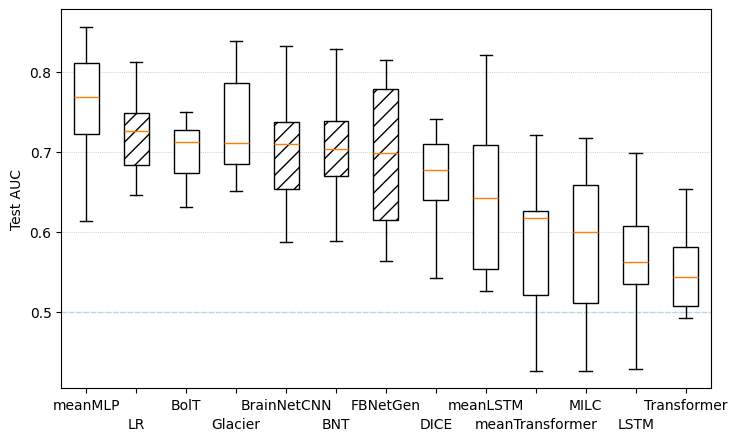
# Plot test AUC boxplots and confusion matrices for all models
report.plot_scores()
report.plot_confusion()

# Access logs directly as variables
train_df = report.get_train_dataframe()
test_df  = report.get_test_dataframe()
pred_df  = report.get_predictions_dataframe()  # raw test-fold probabilities
meta     = report.get_meta()

# Inspect training curves
report.plot_training_curves()
Results on disk
Everything is written as the run proceeds.
my_cvbench_run/
├── cvbench_meta.json            # run configuration, seeds, environment, status
├── cvbench_train.csv            # model,fold,epoch,... per-epoch training log
├── cvbench_test.csv             # model,fold,... one row per (model, fold)
├── cvbench_predictions.csv      # model,fold,sample_id,y_true,y_pred,p_0,...,p_{C-1}
└── fold_records/
    ├── sample_order.csv         # pos,sample_id -- only written if sample_ids= was passed
    ├── fold_00/
    │   ├── indices.json         # positional train/val/test indices
    │   └── checkpoints/         # best-validation weights per model
    │       ├── meanMLP.pt
    │       └── LR.joblib
    └── fold_01/ ...
cvbench_predictions.csv– the raw probability for every test sample under every model, so any probability- or threshold-based metric can be recomputed afterwards.cvbench_test.csv– final test metrics per model and fold, plus confusion counts, training time and parameter count. Confusion counts are namedcm_true{i}_pred{j}for any number of classes.cvbench_train.csv– train and validation metrics at every epoch; this is whatplot_training_curves()draws.cvbench_meta.json– the run's configuration, seeds and timing, plus astatusfield recording whether it finished.fold_records/sample_order.csv– generated if you passsample_ids=tocvbench; it maps row positions to yoursample_idsin the fold records.
Set save_checkpoints=False to skip storing weights, or save_dir=False to keep results in memory only.
Available Models
You can set models input in cvbench to:
- 'all' - (default for non-CPU) run all models,
- 'lite' (default for CPU) – use only faster models, better for quick tests
- 'ts' – run only time series models
- 'fnc' – run only FNC models; FNC data is derived from input time series
- '<model_name>' – run only the specified model (e.g. 'meanMLP'); see below for full model list
- ['<model_name_1>', '<model_name_2>'] – run only the listed models
Time Series Models
-
"meanMLP" (Time Series)
A simple MLP model for time series classification, surprisingly good for fMRi time series. Paper
Code and bib item -
"LSTM" (Time Series)
Standard LSTM recurrent network for sequence classification.
Paper
Code and bib item -
"meanLSTM" (Time Series)
A variant of LSTM where outputs are mean-aggregated across time.
Paper
Code and bib item -
"Transformer" (Time Series)
Vanilla transformer encoder for modeling temporal dependencies in fMRI time series.
Paper
Code and bib item -
"meanTransformer" (Time Series)
Transformer with temporal mean pooling for classification.
Paper
Code and bib item -
"MILC" (Time Series)
CNN+LSTM model for fMRI time series.
Paper
Code and bib item -
"BolT" (Time Series) Fused window Transformer for fMRI time series; slow but good, outperformed meanMLP on larger datasets. Paper Code and bib item
-
"DICE" (Time Series) LSTM-based connectivity estimator and classifier, works with time series. Paper Code and bib item
-
"Glacier" (Time Series) Transformer-based connectivity estimator and classifier, works with time series. Paper Code and bib item
FNC Models
-
"LR" (FNC)
Logistic regression, wired for FNC classification.
Paper
Code and bib item -
"FBNetGen" (Time Series + FNC) Estimates connectivity from time series, fuses it with FNC to do classification. Paper Code and bib item
-
"BNT" (FNC) Transformer/GNN model for FNC classification. Paper Code and bib item
-
"BrainNetCNN" (FNC) CNN classifier, designed for FNC-like matrices in mind. Paper Code and bib item
1 maintainer

Metadata
1 maintainer
Release files for ml4fmri 1.1.0
For a detailed explanation of source distributions (sdists) and built distributions (wheels), please see the package formats documentation.
Source distribution (sdist)
| File | Size | Uploaded | Provenance | |
|---|---|---|---|---|
| ml4fmri-1.1.0.tar.gz | 1.6 MB | Without provenance | Details |
Built distribution (wheel)
| File | Interpreter | ABI | Platform | Reset |
|---|---|---|---|---|
| ml4fmri-1.1.0-py3-none-any.whl | Python 3 | none | any | Details |
Total release size: 1.7 MB
Release files / ml4fmri-1.1.0.tar.gz
| Download URL | ml4fmri-1.1.0.tar.gz |
|---|---|
| Size | 1.6 MB |
| Tags | Source |
|
SHA-256 checksum How to use checksums |
4748cb7994f236f24a95ede20f3fef6c9b382eb0c3be175a80a88851223e02bd
|
|
BLAKE2b-256 checksum How to use checksums |
41545c89176828a2457cc8b938c0e8584c720e0a28a6aae1150365373eed8bd3
|
| Upload date | |
|
Uploaded using Trusted Publishing? What is trusted publishing? |
No |
| Uploaded via |
twine/7.0.0 CPython/3.12.13
|
Release files / ml4fmri-1.1.0-py3-none-any.whl
| Download URL | ml4fmri-1.1.0-py3-none-any.whl |
|---|---|
| Size | 67.7 kB |
| Tags | Python 3 |
|
SHA-256 checksum How to use checksums |
64b1b030adb77f746b64873a6567eed2a5ff72b3153299ba79b36c38264c7659
|
|
BLAKE2b-256 checksum How to use checksums |
cbd3ac1a20c66d186a57203dbba2bd47ba6684127f1fdbf0f9bdbd7b36311e55
|
| Upload date | |
|
Uploaded using Trusted Publishing? What is trusted publishing? |
No |
| Uploaded via |
twine/7.0.0 CPython/3.12.13
|
Security for ml4fmri 1.1.0
Provenance
Provenance describes where a file came from. On PyPI, provenance is shared via attestations, which provide a verifiable record of the build or publishing details. View details, limitations and caveats.
No provenance found
None of the files in this release were uploaded with provenance metadata.
A note on package security
PyPI is a repository for distributing packages, not a service for auditing them. While third-party security researchers and our staff do their best to detect and remove malicious packages, PyPI cannot guarantee the quality, security or suitability of any given package.
To learn more about protecting yourself from malicious actors, visit our package security documentation.














