
An algorithm-agnostic machine learning toolkit for model training, diagnostics and optimization

Project description
MLArena








mlarena is an algorithm-agnostic machine learning toolkit for streamlined model training, diagnostics, and optimization. Implemented as a custom mlflow.pyfunc model, it ensures seamless integration with the MLflow ecosystem for robust experiment tracking, model versioning, and framework-agnostic deployment.
It blends smart automation that embeds ML best practices with comprehensive tools for expert-level customization and diagnostics. This unique combination fills the gap between manual ML development and fully automated AutoML platforms. Moreover, it comes with a suite of practical utilities for data analysis and visualizations - see our comparison with AutoML platforms to determine which approach best fits your needs.
Publications
For a quick guide over the package
-
Build Algorithm-Agnostic ML Pipelines in a Breeze - Published in Towards Data Science
This article discussed some key challenges in algorithm-agnostic ML Pipeline building and demonstractes how MLarena can help to address them. Although more functionalities have been added after the publication of the article on 7 July 2025, it is nonetheless a good overview of MLarena's core functionalies and a good quick guide for starting with the package.
On specific functionalities
-
Help Your Model Learn the True Signal - Published in Towards Data Science
This article explores the challenges of investigating data points that disproportionately disrupt a model's ability to learn the dominant signal. By leveraging an algorithm-agnostic approach inspired by Cook's Distance, it provides a method to effectively identify and diagnose these disruptive data points, ensuring that models capture stable, generalizable patterns. This technique is implemented as a helper function
calculate_cooks_d_like_influencein the MLarena package, and is compatiable with any sklearn style ML algorithms. -
When a Difference Actually Makes a Difference - Published in Towards Data Science
This article offers actional steps for business decision makers to analyze group differences and avoid costly data misinterpretations. It demonstrates how three distinct business realities can hide behind a single bar chart, and offers a method to reveal the full story for more informed decision-making. This technique, including the visualization and statistical testing, is implemented as a helper function
plot_box_scatterin the MLarena package.
The concepts and methodologies behind MLArena:
-
Algorithm-Agnostic Model Building with MLflow - Published in Towards Data Science
A foundational guide demonstrating how to build algorithm-agnostic ML pipelines using mlflow.pyfunc. The article explores creating generic model wrappers, encapsulating preprocessing logic, and leveraging MLflow's unified model representation for seamless algorithm transitions.
-
Explainable Generic ML Pipeline with MLflow - Published in Towards Data Science
An advanced implementation guide that extends the generic ML pipeline with more sophisticated preprocessing and SHAP-based model explanations. The article demonstrates how to build a production-ready pipeline that supports both classification and regression tasks, handles feature preprocessing, and provides interpretable model insights while maintaining algorithm agnosticism.
Installation
The package is undergoing rapid development at the moment (pls see CHANGELOG for details), it is therefore highly recommended to install with specific versions. For example
%pip install mlarena==0.4.6
If you are using the package in Databricks ML Cluster with DBR runtime >= 16.0, you can install without dependencies like below:
%pip install mlarena==0.4.6 --no-deps
If you are using earlier DBR runtimes, simply install optuna in addition like below. Note: As of 2025-04-26, optuna is recommended by Databricks, while hyperopt will be removed from Databricks ML Runtime.
%pip install mlarena==0.4.6 --no-deps
%pip install optuna==3.6.1
Usage Example
- For quick start with a basic example, see 1.basic_usage.ipynb.
- For more advanced examples on model optimization, see 2.advanced_usage.ipynb.
- For visualization utilities, see 3.utils_plot.ipynb.
- For data cleaning and manipulation utilities, see 3.utils_data.ipynb.
- For statistical analysis utilities, see 3.utils_stats.ipynb.
- For input/output utilities, see 3.utils_io.ipynb
- For handling common challenges in machine learning, see 4.ml_discussions.ipynb.
Visual Examples:
Quick Start
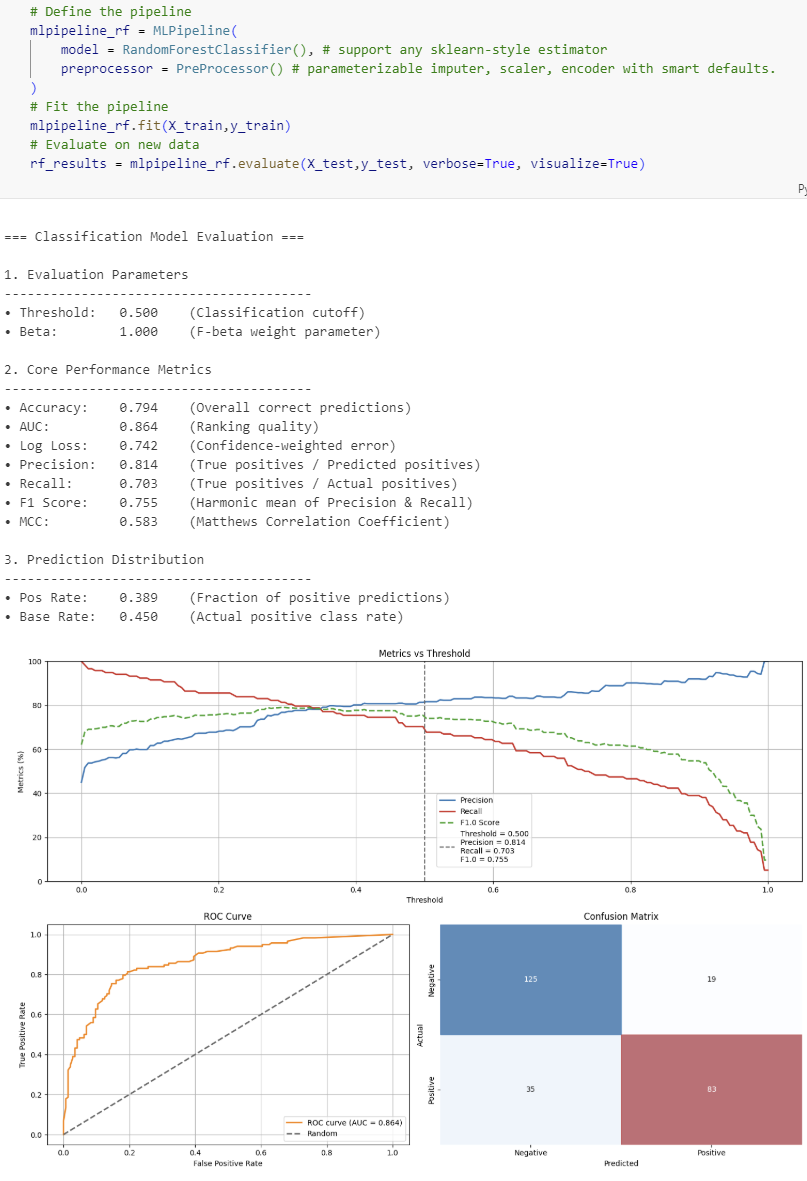
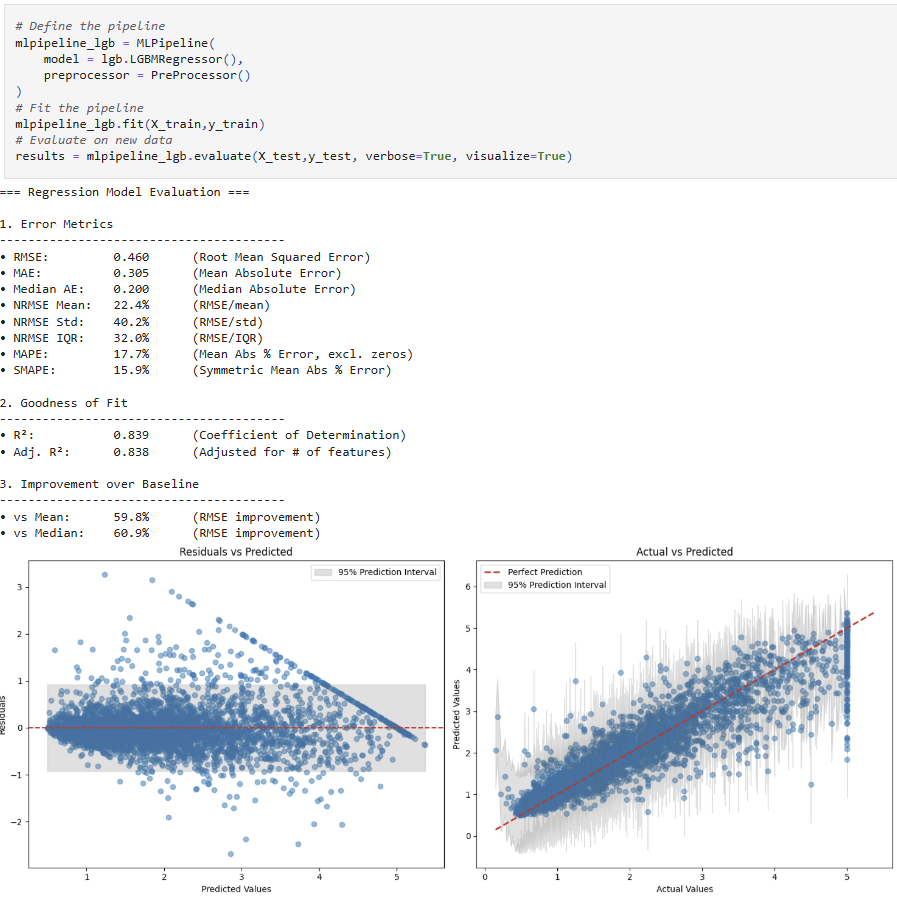
Train and evaluate models quickly with mlarena's default preprocessing pipeline, comprehensive reporting, and model explainability. The framework handles the complexities behind the scenes, allowing you to focus on insights rather than boilerplate code. See 1.basic_usage.ipynb for complete examples.
| Category | Classification Metrics & Plots | Regression Metrics & Plots |
|---|---|---|
| Metrics | Evaluation Parameters • Threshold (classification cutoff) • Beta (F-beta weight parameter) Core Performance Metrics • Accuracy (overall correct predictions) • Precision (true positives / predicted positives) • Recall (true positives / actual positives) • F1 Score (harmonic mean of Precision & Recall) • Fβ Score (weighted harmonic mean, if β ≠ 1) • MCC (Matthews Correlation Coefficient) • AUC (ranking quality) • Log Loss (confidence-weighted error) Prediction Distribution • Positive Rate (fraction of positive predictions) • Base Rate (actual positive class rate) |
Error Metrics • RMSE (Root Mean Squared Error) • MAE (Mean Absolute Error) • Median Absolute Error • NRMSE (Normalized RMSE as % of)
• SMAPE (Symmetric Mean Absolute Percentage Error) Goodness of Fit • R² (Coefficient of Determination) • Adjusted R² Improvement over Baseline • RMSE Improvement over Mean Baseline (%) • RMSE Improvement over Median Baseline (%) |
| Plots | • Metrics vs Threshold (Precision, Recall, Fβ, with vertical threshold line) • ROC Curve • Confusion Matrix (with colored overlays) |
• Residual analysis (residuals vs predicted, with 95% prediction interval) • Prediction error plot (actual vs predicted, with perfect prediction line and error bands) |
Classification Models
Regression Models
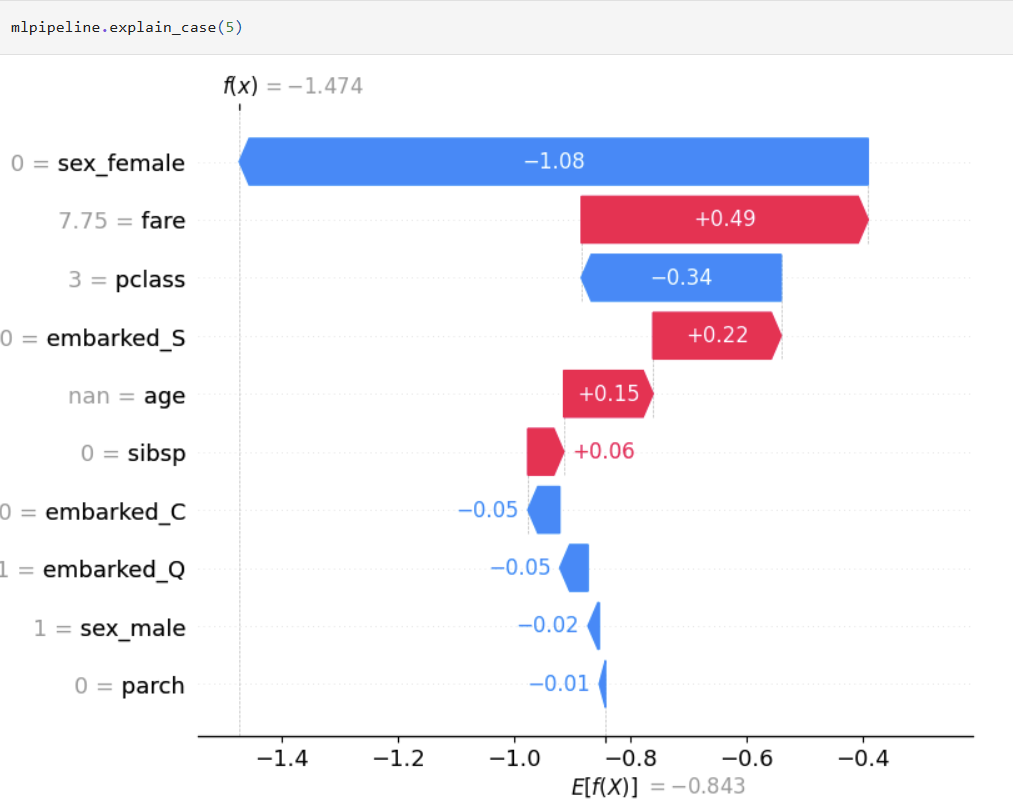
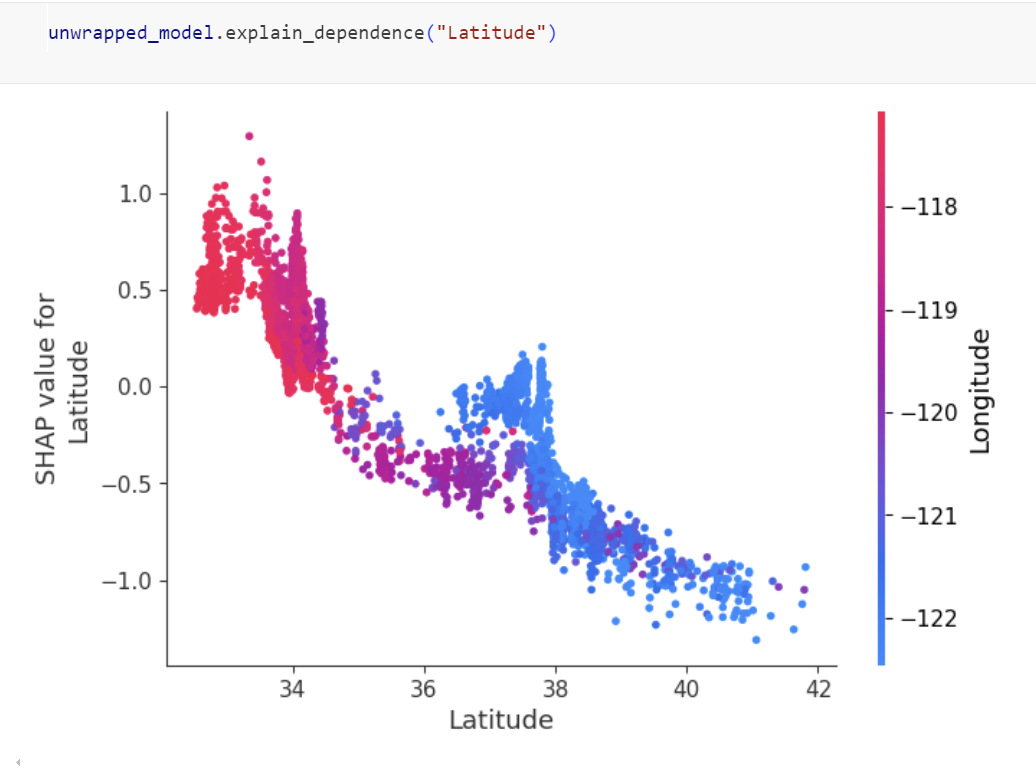
Explainable ML
One liner to create global and local explanation based on SHAP that will work across various classification and regression algorithms.

Hyperparameter Optimization
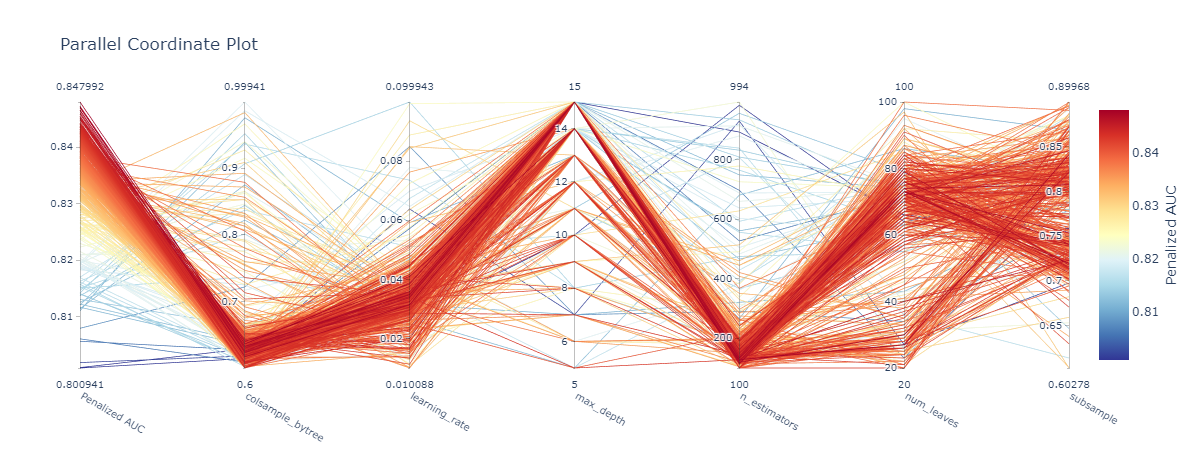
mlarena offers iterative hyperparameter tuning with cross-validation for robust results and parallel coordinates visualization for search space diagnostics. See 2.advanced_usage.ipynb for more.
Plotting Utility Functions
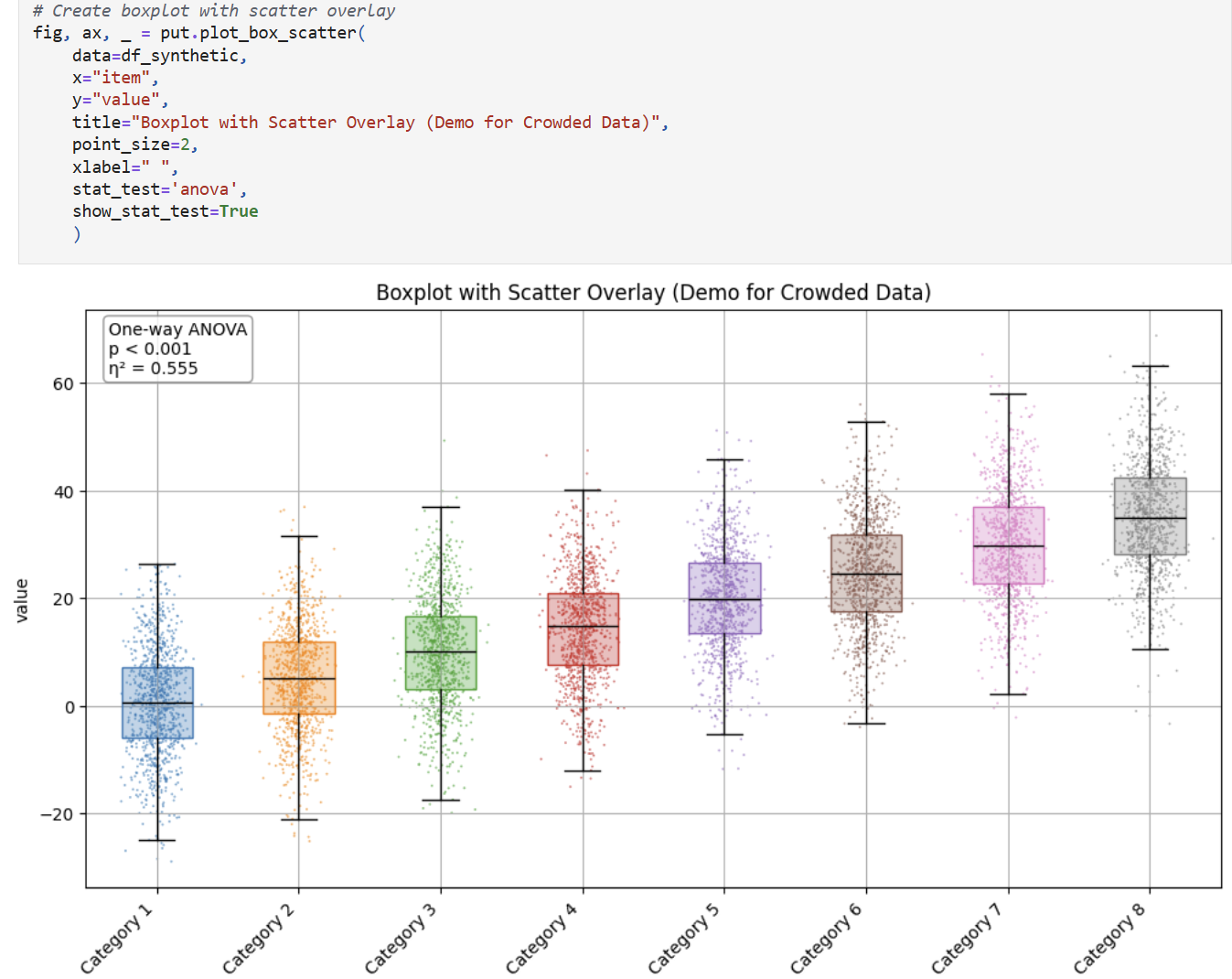
mlarena offers handy utility visualizations for data exploration. Pls see 3.utils_plot.ipynb for more.
plot_box_scatter for comparing numerical distributions across categories with optional statistical testing
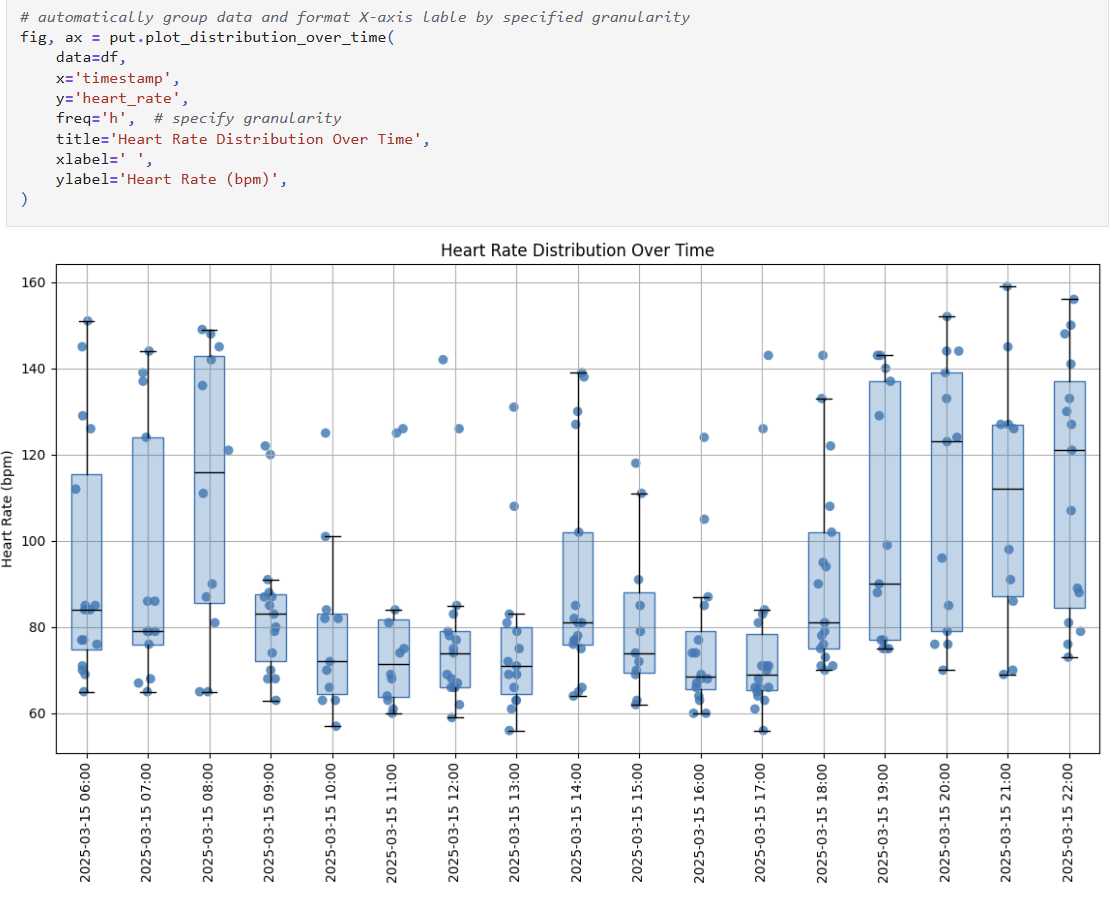
plot_distribution_over_time for comparing numerical distributions over time
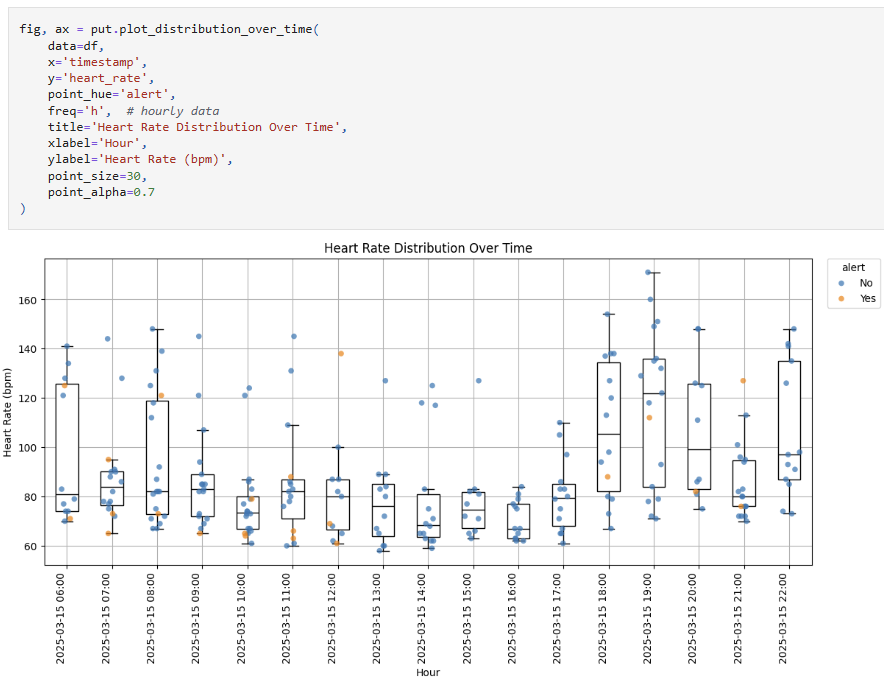
plot_distribution_over_time color points using point_hue
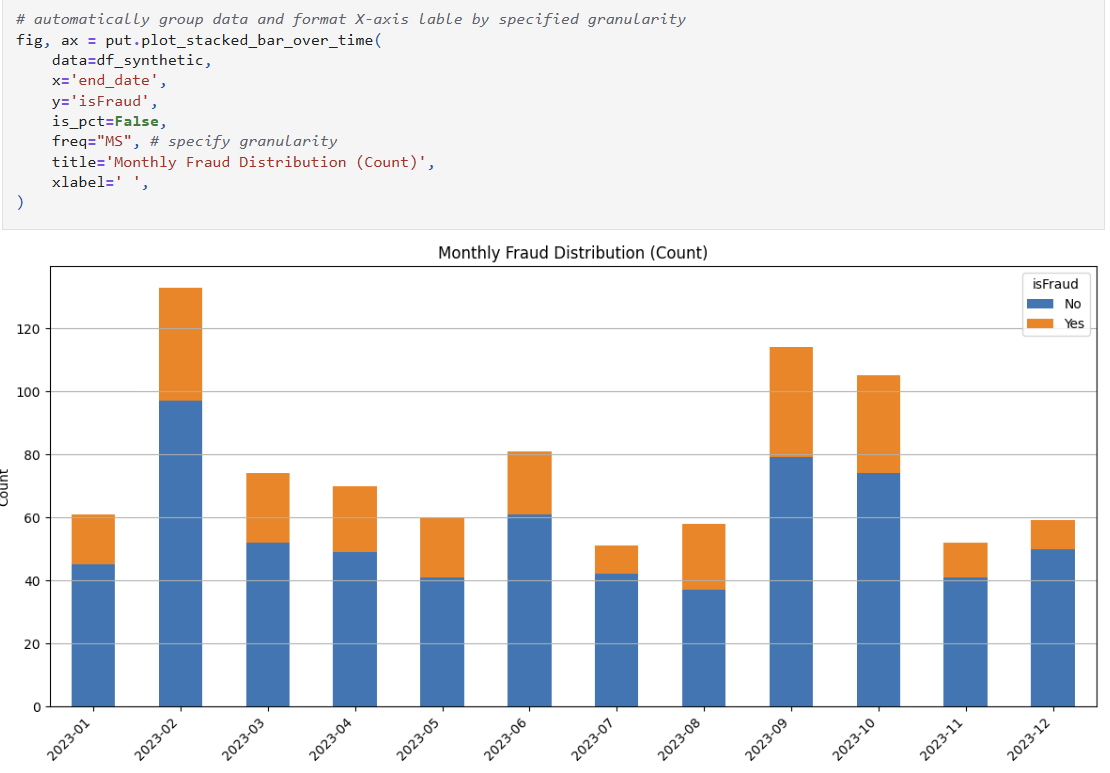
plot_stacked_bar_over_time for comparing categorical distributions over time
plot_metric_event_over_time for timeseries trends and events

Data Utilities
Some handy utilities for data validation, cleaning and manipulations. Pls see 3.utils_data.ipynb for more.
is_primary_key

Features
Algorithm Agnostic ML Pipeline
- Unified interface for any scikit-learn compatible model
- Consistent workflow across classification and regression tasks
- Automated report generation with comprehensive metrics and visuals
- Built on
mlflow.pyfuncfor seamless MLOps integration - Automated experiment tracking of parameters, metrics, and models
- Simplified handoff from experimentation to production via the MLflow framework
Intelligent Preprocessing
- Streamlined feature preprocessing with smart defaults and minimal code
- Automatic feature analysis with data-driven encoding recommendations
- Integrated target encoding with visualization for optimal smoothing selection
- Feature filtering based on information theory metrics (mutual information)
- Intelligent feature name sanitization to prevent pipeline failure
- Handles the full preprocessing pipeline from missing values to feature encoding
- Seamless integration with scikit-learn and MLflow for production deployment
Model Optimization
- Efficient hyperparameter tuning with Optuna's TPE sampler
- Smart early stopping with patient pruning to save computation resources
- Configurable early stopping parameter
- Startup trials before pruning begins
- Warmup steps per trial
- Cross-validation with variance penalty to prevent overfitting
- Parallel coordinates visualization for search history tracking and parameter space diagnostics
- Automated threshold optimization with business-focused F-beta scoring
- Cross-validation or bootstrap methods
- Configurable beta parameter for precision/recall trade-off
- Confidence intervals for bootstrap method
- Flexible metric selection for optimization
- Classification: AUC (default), F1, accuracy, log_loss, MCC
- Regression: RMSE (default), MAE, median_ae, SMAPE, NRMSE (mean/std/IQR)
Performance Analysis
- Comprehensive metric tracking
- Classification: AUC, F1, Fbeta, precision, recall, accuracy, log_loss, MCC, positive_rate, base_rate
- Regression: RMSE, MAE, median_ae, R2, adjusted R2, MAPE, SMAPE, NRMSE (mean/std/IQR), improvement over mean/median baselines
- Performance visualization
- Classification:
- Metrics vs Threshold plot (precision, recall, F-beta)
- ROC curve with AUC score
- Confusion matrix with color-coded cells
- Regression:
- Residual analysis with 95% prediction intervals
- Prediction error plot with perfect prediction line and error bands
- Classification:
- Model interpretability
- Global feature importance
- Local prediction explanations
Utils
- Advanced plotting utilities
- Distribution analysis
plot_box_scatter: Box plots with scatter overlay and statistical testing- Optional point coloring by category
- Built-in statistical tests (ANOVA, Welch, Kruskal)
- Customizable point jittering and transparency
- Time series visualization
plot_metric_event_over_time: Track metrics with event annotations- Support for dual y-axes
- Automatic date formatting based on time range
- Customizable event markers and labels
- Min/max value annotations
plot_distribution_over_time: Track distributions over time- Box plots with scatter overlay for each time period
- Optional point coloring by category
- Flexible time aggregation (hourly/daily/monthly/yearly)
- Summary statistics for each period
plot_stacked_bar_over_time: Track categorical distributions- Percentage or count-based stacking
- Flexible time aggregation
- Custom category labeling
- Automatic legend and color management
- Categorical analysis
plot_stacked_bar: Stacked bar charts with statistical testing- Built-in chi-square and G-tests
- Percentage or count-based visualization
- Custom category labeling
- Distribution analysis
- Statistical analysis utilities
- Group comparison tools
compare_groups: Statistical testing across groups with visualizationadd_stratified_groups: Create balanced groups with stratificationoptimize_stratification_strategy: Find optimal stratification columns
- Power analysis and sample size calculation
power_analysis_numeric: Power calculation for t-testspower_analysis_proportion: Power calculation for proportion testssample_size_numeric: Required sample size for numeric outcomessample_size_proportion: Required sample size for proportion testsnumeric_effectsize: Cohen's d effect size calculation
- Group comparison tools
- Data manipulation tools
- Standardized dollar amount cleaning for financial analysis
- Value counts with percentage calculation for categorical analysis
- Smart date column transformation with flexible format handling
- Schema and data quality utilities
- Primary key validation with detailed diagnostics
- Alphabetically sorted schema display
- Safe column selection with case sensitivity options
- Automatic removal of fully null columns
- Complete Duplicate Management Workflow: "Discover → Investigate → Resolve":
- Use
is_primary_keyto discover the existance of duplication issues - Use
find_duplicatesto analyze duplicate patterns - Use
deduplicate_by_rankto intelligently resolve duplicates with business logic
- Use
- I/O utilities
save_object: Store Python objects to disk with customizable options- Support for pickle and joblib backends
- Optional date stamping in filenames
- Compression support for joblib backend
load_object: Retrieve Python objects with automatic backend detection- Seamless loading regardless of storage format
- Direct compatibility with paths returned by
save_object
Contributing
Contributions are welcome! Please feel free to submit a Pull Request.
License
This project is licensed under the MIT License - see the LICENSE file for details.
Release history Release notifications | RSS feed


Download files
Download the file for your platform. If you're not sure which to choose, learn more about installing packages.
Source Distribution
Built Distribution
Filter files by name, interpreter, ABI, and platform.
If you're not sure about the file name format, learn more about wheel file names.
Copy a direct link to the current filters
File details
Details for the file mlarena-0.4.6.tar.gz.
File metadata
- Download URL: mlarena-0.4.6.tar.gz
- Upload date:
- Size: 77.2 kB
- Tags: Source
- Uploaded using Trusted Publishing? No
- Uploaded via: poetry/2.2.1 CPython/3.11.13 Linux/6.11.0-1018-azure
File hashes
| Algorithm | Hash digest | |
|---|---|---|
| SHA256 |
8a746c91b5a6a01eeaf6dba901041bfc030ae3134cf70f6893544b039f00c877
|
|
| MD5 |
c1e596cf96a1c55cb79c391c3f19cbe5
|
|
| BLAKE2b-256 |
3843e0033b9ae5389d9055fe322d82859fe2e0f0d5c0eb0ca97372de634956e8
|
File details
Details for the file mlarena-0.4.6-py3-none-any.whl.
File metadata
- Download URL: mlarena-0.4.6-py3-none-any.whl
- Upload date:
- Size: 75.9 kB
- Tags: Python 3
- Uploaded using Trusted Publishing? No
- Uploaded via: poetry/2.2.1 CPython/3.11.13 Linux/6.11.0-1018-azure
File hashes
| Algorithm | Hash digest | |
|---|---|---|
| SHA256 |
bf449f3c12e1f792a26b59605b2088a565cdcfa24aff4c5c7093d26c9fe7fef6
|
|
| MD5 |
4a72250266f7bd47cfd2fddcd832b272
|
|
| BLAKE2b-256 |
a427f608fcc738f1abcfe06334857297b55a4698df7c6c5d48af6dc7c1bee414
|






