
ML D&D
A visual PyTorch pipeline editor. Build, train and run image classification models without writing code.
What it does
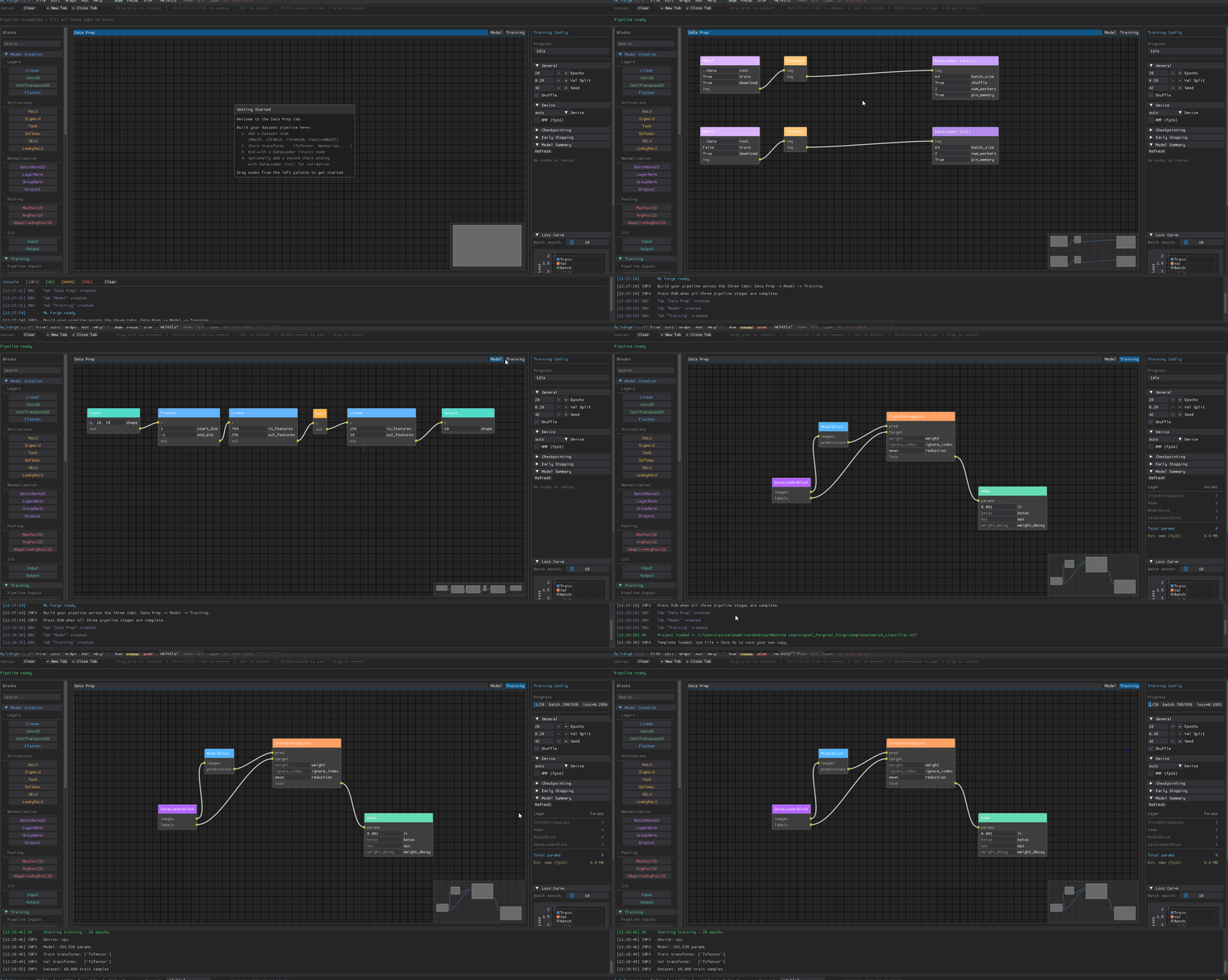
- Visual pipeline - drag nodes onto a canvas, connect them with wires, and ML Forge generates and runs the training code for you
- Three-tab workflow - Data Prep -> Model -> Training
- Live training - watch loss curves update in real time, save checkpoints, run inference on your trained model
- Export - export projects into clean PyTorch
Requirements
IMPORTANT: PyTorch must be preinstalled for training, it is not installed as a dependency.
- Python 3.10 or newer
- PyTorch 2.0 or newer
- torchvision
pip install torch torchvision
GPU training is automatic if CUDA is available. CPU and Apple MPS are also supported.
Building your first model
1. Data Prep tab
- Add a Dataset node (MNIST, CIFAR10, CIFAR100, FashionMNIST, or ImageFolder)
- Chain transforms: ToTensor is required, add Normalize for best results
- End with a DataLoader (train) node
- For proper validation, add a second chain (same dataset with
train=False) ending with DataLoader (val)
2. Model tab
- Start with an Input node - shape is auto-filled from your dataset
- Add layers: Linear, Conv2D, ReLU, BatchNorm2D, Flatten, Dropout, etc.
- End with an Output node - num classes is auto-filled from your dataset
- Connect nodes by dragging from an output pin to an input pin
in_featuresandin_channelsauto-fill when you connect layers- After a Flatten node, the next Linear's
in_featuresis calculated automatically
3. Training tab
Add these four nodes from the palette and wire them up:
DataLoaderBlock.images  ->  ModelBlock.images
ModelBlock.predictions  ->  Loss.pred
DataLoaderBlock.labels  ->  Loss.target
Loss.loss               ->  Optimizer.params
Configure epochs, device, checkpointing and early stopping in the right panel, then press RUN.
Keyboard shortcuts
| Key | Action |
|---|---|
Del |
Delete selected nodes |
Ctrl+S |
Save project |
Ctrl+Z |
Undo |
Ctrl+Y |
Redo |
| Middle-drag | Pan the canvas |
Supported datasets
| Dataset | Classes | Input shape |
|---|---|---|
| MNIST | 10 | 1 × 28 × 28 |
| FashionMNIST | 10 | 1 × 28 × 28 |
| CIFAR-10 | 10 | 3 × 32 × 32 |
| CIFAR-100 | 100 | 3 × 32 × 32 |
| ImageFolder | custom | 3 × 224 × 224 |
Inference
After training, open Run -> Inference, browse to your checkpoint (.pth), and click Run Inference to sample from the test set and see top-k predictions.
Metrics
Click the METRICS button to see a summary of your training run: final loss, best validation accuracy, fit diagnosis, and loss/accuracy curves, you may also see the curves on the right training panel.
Saving and loading
Projects are saved as .mlf files (JSON). Use File -> Save / Save As or Ctrl+S.
Exporting code
File -> Export -> Python -> PyTorch generates a standalone train.py that reproduces your pipeline. No ML Forge required to run it.
RUN
python -m ml_D_D
2 maintainers


Download files
Download the file for your platform. If you're not sure which to choose, learn more about installing packages.
Source Distribution
Built Distribution
Filter files by name, interpreter, ABI, and platform.
If you're not sure about the file name format, learn more about wheel file names.
Copy a direct link to the current filters
File details
Details for the file mldd_core-1.0.7.tar.gz.
File metadata
- Download URL: mldd_core-1.0.7.tar.gz
- Upload date:
- Size: 58.8 kB
- Tags: Source
- Uploaded using Trusted Publishing? Yes
- Uploaded via:
twine/6.1.0 CPython/3.13.7
File hashes
| Algorithm | Hash digest | |
|---|---|---|
| SHA256 |
3df6b59451d6f3ea825cac429b3ab9caf07c534d42077e2bfc828c23e1152c6d
|
|
| MD5 |
fc71979b8285de2a56aeef646e69cd61
|
|
| BLAKE2b-256 |
bc1694c39580e05ec4944d9e5e8a4d375648aebccae0076a50e4c6888d9f9c8a
|
Provenance
The following attestation bundles were made for mldd_core-1.0.7.tar.gz:
Publisher:
python-publish.yml on NNEngine/ML-D-D
-
Statement:
-
Statement type:
https://in-toto.io/Statement/v1 -
Predicate type:
https://docs.pypi.org/attestations/publish/v1 -
Subject name:
mldd_core-1.0.7.tar.gz -
Subject digest:
3df6b59451d6f3ea825cac429b3ab9caf07c534d42077e2bfc828c23e1152c6d - Sigstore transparency entry: 1187916606
- Sigstore integration time:
-
Permalink:
NNEngine/ML-D-D@07d5189d6bc1179bf34e05d461c7c0417bec0441 -
Branch / Tag:
refs/tags/v1.0.7 - Owner: https://github.com/NNEngine
-
Access:
public
-
Token Issuer:
https://token.actions.githubusercontent.com -
Runner Environment:
github-hosted -
Publication workflow:
python-publish.yml@07d5189d6bc1179bf34e05d461c7c0417bec0441 -
Trigger Event:
push
-
Statement type:
File details
Details for the file mldd_core-1.0.7-py3-none-any.whl.
File metadata
- Download URL: mldd_core-1.0.7-py3-none-any.whl
- Upload date:
- Size: 70.9 kB
- Tags: Python 3
- Uploaded using Trusted Publishing? Yes
- Uploaded via:
twine/6.1.0 CPython/3.13.7
File hashes
| Algorithm | Hash digest | |
|---|---|---|
| SHA256 |
a09167b47bead511532f52dafa5d95632d0b72e8dd22bc1a26d92a20411bef95
|
|
| MD5 |
9ed6e266a1419f29059898587f9f7536
|
|
| BLAKE2b-256 |
0bfb65875cd6beff7c8faf7a1e4de72e1600ed186d34d821bb35e5edfd795e23
|
Provenance
The following attestation bundles were made for mldd_core-1.0.7-py3-none-any.whl:
Publisher:
python-publish.yml on NNEngine/ML-D-D
-
Statement:
-
Statement type:
https://in-toto.io/Statement/v1 -
Predicate type:
https://docs.pypi.org/attestations/publish/v1 -
Subject name:
mldd_core-1.0.7-py3-none-any.whl -
Subject digest:
a09167b47bead511532f52dafa5d95632d0b72e8dd22bc1a26d92a20411bef95 - Sigstore transparency entry: 1187916613
- Sigstore integration time:
-
Permalink:
NNEngine/ML-D-D@07d5189d6bc1179bf34e05d461c7c0417bec0441 -
Branch / Tag:
refs/tags/v1.0.7 - Owner: https://github.com/NNEngine
-
Access:
public
-
Token Issuer:
https://token.actions.githubusercontent.com -
Runner Environment:
github-hosted -
Publication workflow:
python-publish.yml@07d5189d6bc1179bf34e05d461c7c0417bec0441 -
Trigger Event:
push
-
Statement type:














