
MLE-Agent: Your intelligent companion for seamless AI engineering and research.


:love_letter: Fathers' love for Kaia :love_letter:






📚 Docs | 🐞 Report Issues | 👋 Join us on Discord
Overview
MLE-Agent is designed as a pairing LLM agent for machine learning engineers and researchers. It is featured by:
- 🤖 Autonomous Baseline Creation: Automatically builds ML/AI baselines.
- 🔍 Arxiv and Papers with Code Integration: Access best practices and state-of-the-art methods.
- 🐛 Smart Debugging: Ensures high-quality code through automatic debugger-coder interactions.
- 📂 File System Integration: Organizes your project structure efficiently.
- 🧰 Comprehensive Tools Integration: Includes AI/ML functions and MLOps tools for a seamless workflow.
- ☕ Interactive CLI Chat: Enhances your projects with an easy-to-use chat interface.
- 📊 Weekly Report: Automatically generates detailed summaries of your weekly works.
https://github.com/user-attachments/assets/dac7be90-c662-4d0d-8d3a-2bc4df9cffb9
Milestones
- 🚀 09/10/2024: Release the
0.4.0with new CLIs likeMLE report,MLE kaggle,MLE integrationand many new models likeMistral. - 🚀 07/25/2024: Release the
0.3.0with huge refactoring, many integrations, etc (v0.3.0) - 🚀 07/11/2024: Release the
0.2.0with multiple agents interaction (v0.2.0) - 👨🍼 07/03/2024: Kaia is born
- 🚀 06/01/2024: Release the first rule-based version of MLE agent (v0.1.0)
Get started
Installation
pip install mle-agent -U
# or from source
git clone git@github.com:MLSysOps/MLE-agent.git
pip install -e .
Usage
mle new <project name>
And a project directory will be created under the current path, you need to start the project under the project directory.
cd <project name>
mle start
You can also start an interactive chat in the terminal under the project directory:
mle chat
Use cases
📊 Generate Work Report
MLE agent can help you summarize your weekly report, including development progress, communication notes, and to-do lists.
cd <project name>
mle report
Then, you can visit http://localhost:3000/ to generate your report locally.
🏆 Start with Kaggle Competition
MLE agent can participate in Kaggle competitions and finish coding and debugging from data preparation to model training independently. For more details, see the MLE-Agent Tutorials.
cd <project name>
mle kaggle
Roadmap
The following is a list of the tasks we plan to do, welcome to propose something new!
:hammer: General Features
- Understand users' requirements to create an end-to-end AI project
- Suggest the SOTA data science solutions by using the web search
- Plan the ML engineering tasks with human interaction
- Execute the code on the local machine/cloud, debug and fix the errors
- Leverage the built-in functions to complete ML engineering tasks
- Interactive chat: A human-in-the-loop mode to help improve the existing ML projects
- Kaggle mode: to finish a Kaggle task without humans
- Summary and reflect the whole ML/AI pipeline
- Integration with Cloud data and testing and debugging platforms
- Local RAG support to make personal ML/AI coding assistant
- Function zoo: generate AI/ML functions and save them for future usage
:star: More LLMs and Serving Tools
- Ollama LLama3
- OpenAI GPTs
- Anthropic Claude 3.5 Sonnet
:sparkling_heart: Better user experience
- CLI Application
- Web UI
- Discord
:jigsaw: Functions and Integrations
- Local file system
- Local code exectutor
- Arxiv.org search
- Papers with Code search
- General keyword search
- Hugging Face
- SkyPilot cloud deployment
- Snowflake data
- AWS S3 data
- Databricks data catalog
- Wandb experiment monitoring
- MLflow management
- DBT data transform
Contributing
We welcome contributions from the community. We are looking for contributors to help us with the following tasks:
- Benchmark and Evaluate the agent
- Add more features to the agent
- Improve the documentation
- Write tests
Please check the CONTRIBUTING.md file if you want to contribute.
Support and Community
- Discord community. If you have any questions, please ask in the Discord community.
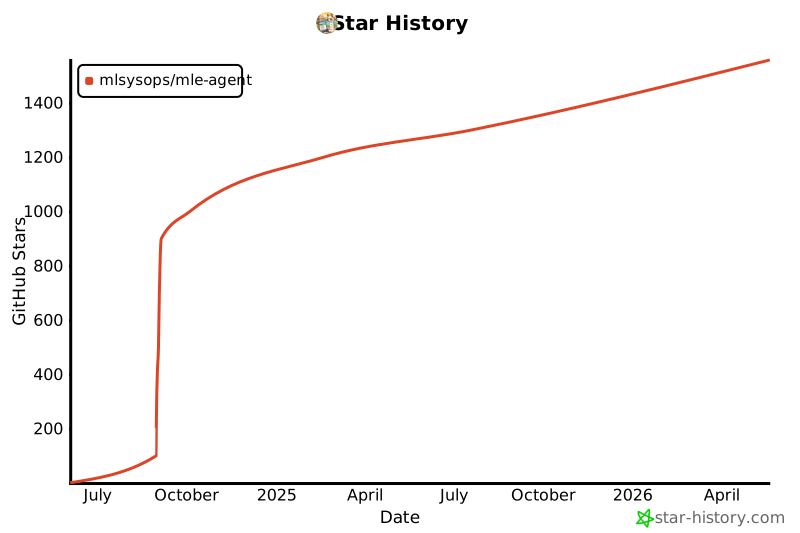
Star History
License
Check MIT License file for more information.
2 maintainers


Metadata
2 maintainers
Release files for mle-agent 0.4.2
For a detailed explanation of source distributions (sdists) and built distributions (wheels), please see the package formats documentation.
Source distribution (sdist)
| File | Size | Uploaded | |
|---|---|---|---|
| mle_agent-0.4.2.tar.gz | 354.5 kB | Details |
Built distribution (wheel)
| File | Interpreter | ABI | Platform | Reset |
|---|---|---|---|---|
| mle_agent-0.4.2-py3-none-any.whl | Python 3 | none | any | Details |
Total release size: 420.2 kB
Release files / mle_agent-0.4.2.tar.gz
| Download URL | mle_agent-0.4.2.tar.gz |
|---|---|
| Size | 354.5 kB |
| Tags | Source |
|
SHA-256 checksum How to use checksums |
440c60701826f428962cea563b2d1d1f4c05cca86818b0496c00b6ca5229faa8
|
|
BLAKE2b-256 checksum How to use checksums |
13cf59fa53308cced9caaac6c9128fe4eeb9baff338d949334172d265d8328ba
|
| Upload date | |
|
Uploaded using Trusted Publishing? What is trusted publishing? |
No |
| Uploaded via |
twine/5.1.1 CPython/3.12.7
|
Release files / mle_agent-0.4.2-py3-none-any.whl
| Download URL | mle_agent-0.4.2-py3-none-any.whl |
|---|---|
| Size | 65.7 kB |
| Tags | Python 3 |
|
SHA-256 checksum How to use checksums |
d3e962440ec789c7ca3acf45cb0d4ab866616445738a8decf4a4919155df2c19
|
|
BLAKE2b-256 checksum How to use checksums |
eb19116aa723d8133af8fadd3c302e2226f7f61d85f3386a0dd77eb00d11bf51
|
| Upload date | |
|
Uploaded using Trusted Publishing? What is trusted publishing? |
No |
| Uploaded via |
twine/5.1.1 CPython/3.12.7
|














