
A Lightweight Logger for ML Experiments 📖





Simple logging of statistics, model checkpoints, plots and other objects for your Machine Learning Experiments (MLE). Furthermore, the MLELogger comes with smooth multi-seed result aggregation and combination of multi-configuration runs. For a quickstart check out the notebook blog 🚀
The API 🎮
from mle_logging import MLELogger

# Instantiate logging to experiment_dir
log = MLELogger(time_to_track=['num_updates', 'num_epochs'],
                what_to_track=['train_loss', 'test_loss'],
                experiment_dir="experiment_dir/",
                model_type='torch')

time_tic = {'num_updates': 10, 'num_epochs': 1}
stats_tic = {'train_loss': 0.1234, 'test_loss': 0.1235}

# Update the log with collected data & save it to .hdf5
log.update(time_tic, stats_tic)
log.save()
You can also log model checkpoints, matplotlib figures and other .pkl compatible objects.
# Save a model (torch, tensorflow, sklearn, jax, numpy)
import torchvision.models as models
model = models.resnet18()
log.save_model(model)

# Save a matplotlib figure as .png
fig, ax = plt.subplots()
log.save_plot(fig)

# You can also save (somewhat) arbitrary objects .pkl
some_dict = {"hi" : "there"}
log.save_extra(some_dict)
Or do everything in a single line...
log.update(time_tic, stats_tic, model, fig, extra, save=True)
File Structure & Re-Loading 📚
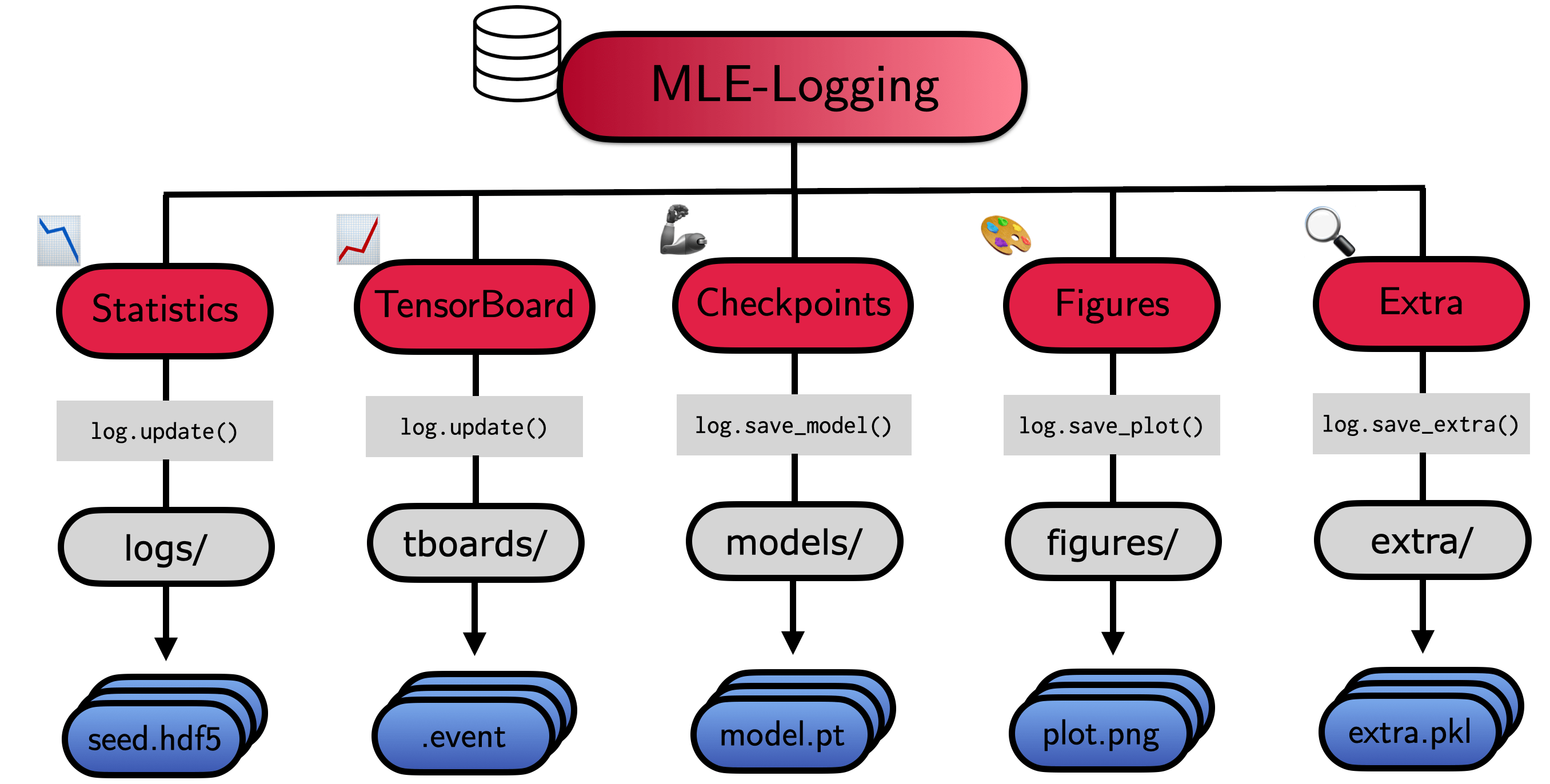
The MLELogger will create a nested directory, which looks as follows:
experiment_dir
├── extra: Stores saved .pkl object files
├── figures: Stores saved .png figures
├── logs: Stores .hdf5 log files (meta, stats, time)
├── models: Stores different model checkpoints
    ├── init: Stores initial checkpoint
    ├── final: Stores most recent checkpoint
    ├── every_k: Stores every k-th checkpoint provided in update
    ├── top_k: Stores portfolio of top-k checkpoints based on performance
├── tboards: Stores tensorboards for model checkpointing
├── <config_name>.json: Copy of configuration file (if provided)
For visualization and post-processing load the results via
from mle_logging import load_log
log_out = load_log("experiment_dir/")

# The results can be accessed via meta, stats and time keys
# >>> log_out.meta.keys()
# odict_keys(['experiment_dir', 'extra_storage_paths', 'fig_storage_paths', 'log_paths', 'model_ckpt', 'model_type'])
# >>> log_out.stats.keys()
# odict_keys(['test_loss', 'train_loss'])
# >>> log_out.time.keys()
# odict_keys(['time', 'num_epochs', 'num_updates', 'time_elapsed'])
If an experiment was aborted, you can reload and continue the previous run via the reload=True option:
log = MLELogger(time_to_track=['num_updates', 'num_epochs'],
                what_to_track=['train_loss', 'test_loss'],
                experiment_dir="experiment_dir/",
                model_type='torch',
                reload=True)
Installation ⏳
A PyPI installation is available via:
pip install mle-logging
If you want to get the most recent commit, please install directly from the repository:
pip install git+https://github.com/mle-infrastructure/mle-logging.git@main
Advanced Options 🚴
Merging Multiple Logs 👫
Merging Multiple Random Seeds 🌱 + 🌱
from mle_logging import merge_seed_logs
merge_seed_logs("multi_seed.hdf", "experiment_dir/")
log_out = load_log("experiment_dir/")
# >>> log.eval_ids
# ['seed_1', 'seed_2']
Merging Multiple Configurations 🔖 + 🔖
from mle_logging import merge_config_logs, load_meta_log
merge_config_logs(experiment_dir="experiment_dir/",
                  all_run_ids=["config_1", "config_2"])
meta_log = load_meta_log("multi_config_dir/meta_log.hdf5")
# >>> log.eval_ids
# ['config_2', 'config_1']
# >>> meta_log.config_1.stats.test_loss.keys()
# odict_keys(['mean', 'std', 'p50', 'p10', 'p25', 'p75', 'p90']))
Plotting of Logs 🧑🎨
meta_log = load_meta_log("multi_config_dir/meta_log.hdf5")
meta_log.plot("train_loss", "num_updates")
Storing Checkpoint Portfolios 📂
Logging every k-th checkpoint update ❗ ⏩ ... ⏩ ❗
# Save every second checkpoint provided in log.update (stored in models/every_k)
log = MLELogger(time_to_track=['num_updates', 'num_epochs'],
                what_to_track=['train_loss', 'test_loss'],
                experiment_dir='every_k_dir/',
                model_type='torch',
                ckpt_time_to_track='num_updates',
                save_every_k_ckpt=2)
Logging top-k checkpoints based on metric 🔱
# Save top-3 checkpoints provided in log.update (stored in models/top_k)
# Based on minimizing the test_loss metric
log = MLELogger(time_to_track=['num_updates', 'num_epochs'],
                what_to_track=['train_loss', 'test_loss'],
                experiment_dir="top_k_dir/",
                model_type='torch',
                ckpt_time_to_track='num_updates',
                save_top_k_ckpt=3,
                top_k_metric_name="test_loss",
                top_k_minimize_metric=True)
Weights&Biases Backend Integration 🧑🎨
You can also use W&B as a backend for logging. All results are stored as before but additionally we report to the W&B server:
# Provide all configuration details as option
log = MLELogger(time_to_track=['num_updates', 'num_epochs'],
                what_to_track=['train_loss', 'test_loss'],
                use_wandb=True,
                wandb_config={
                  "key": "sadfasd",  # Only needed if not logged in
                  "entity": "roberttlange",  # Only needed if not logged in
                  "project": "some-project-name",
                  "group": "some-group-name"
                })
Citing the MLE-Infrastructure ✏️
If you use mle-logging in your research, please cite it as follows:
@software{mle_infrastructure2021github,
  author = {Robert Tjarko Lange},
  title = {{MLE-Infrastructure}: A Set of Lightweight Tools for Distributed Machine Learning Experimentation},
  url = {http://github.com/mle-infrastructure},
  year = {2021},
}
Development 👷
You can run the test suite via python -m pytest -vv tests/. If you find a bug or are missing your favourite feature, feel free to create an issue and/or start contributing 🤗.
1 maintainer

Metadata
1 maintainer
Release files for mle-logging 0.0.6
For a detailed explanation of source distributions (sdists) and built distributions (wheels), please see the package formats documentation.
Source distribution (sdist)
| File | Size | Uploaded | Provenance | Actions |
|---|---|---|---|---|
| mle_logging-0.0.6.tar.gz | 34.6 kB | Without provenance | Details for mle_logging-0.0.6.tar.gz |
Built distribution (wheel)
| File | Interpreter | ABI | Platform | Actions Reset |
|---|---|---|---|---|
| mle_logging-0.0.6-py3-none-any.whl | Python 3 | none | any | Details for mle_logging-0.0.6-py3-none-any.whl |
Total release size: 69.6 kB
Release files / mle_logging-0.0.6.tar.gz
| Download URL | mle_logging-0.0.6.tar.gz |
|---|---|
| Size | 34.6 kB |
| Tags | Source |
|
SHA-256 checksum How to use checksums |
a1d0803841c6f278e9d1b7499ddc69f8598258ab73128a06ec493de6c3683b83
|
|
BLAKE2b-256 checksum How to use checksums |
fc81dad2b934a91c01d63f8898283bc0faf0100e3241fcc66f4ae57042bcd5d3
|
| Upload date | |
|
Uploaded using Trusted Publishing? What is trusted publishing? |
No |
| Uploaded via |
twine/5.1.1 CPython/3.12.5
|
Release files / mle_logging-0.0.6-py3-none-any.whl
| Download URL | mle_logging-0.0.6-py3-none-any.whl |
|---|---|
| Size | 35.0 kB |
| Tags | Python 3 |
|
SHA-256 checksum How to use checksums |
ddbab1e93e4982c9aa10d09fce80db3d627866eb5a170ddeb4f9960187eed9f4
|
|
BLAKE2b-256 checksum How to use checksums |
daa0f7cd5184f6471ac9aaf3b59c7ef0ee60dd3540f60dd15cfc31ed7fdff773
|
| Upload date | |
|
Uploaded using Trusted Publishing? What is trusted publishing? |
No |
| Uploaded via |
twine/5.1.1 CPython/3.12.5
|
Security for mle-logging 0.0.6
Provenance
Provenance describes where a file came from. On PyPI, provenance is shared via attestations, which provide a verifiable record of the build or publishing details. View details, limitations and caveats.
No provenance found
None of the files in this release were uploaded with provenance metadata.
A note on package security
PyPI is a repository for distributing packages, not a service for auditing them. While third-party security researchers and our staff do their best to detect and remove malicious packages, PyPI cannot guarantee the quality, security or suitability of any given package.
To learn more about protecting yourself from malicious actors, visit our package security documentation.














