
PyPI package management integrated directly into MLflow's web interface

Project description
MLflow Plugin Manager

Welcome to the MLflow Plugin Manager, inspired by wbond's package manager for Sublime Text. This tool seamlessly integrates with MLflow, allowing you to install, update, and uninstall MLflow plugins directly from the MLflow web interface.
Features
- 🛠 Install new MLflow plugins with ease.
- 🔄 Update existing plugins to their latest versions.
- 🗑 Uninstall plugins you no longer need.
- 🌐 Direct integration into the MLflow web interface.
Preview
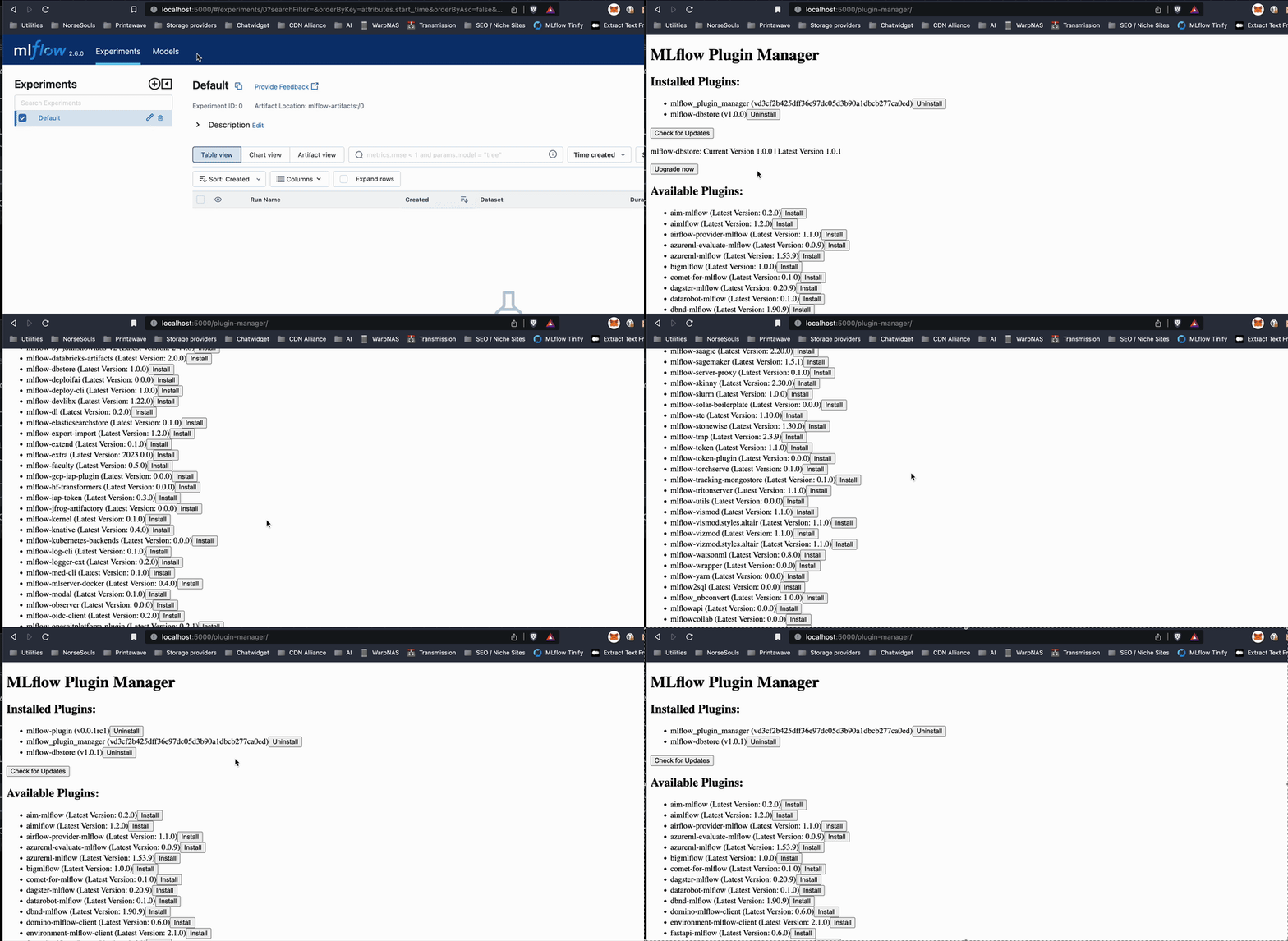
Installation
Clone this repository:
git clone git@github.com:thijsdezoete/mlflow-plugin-manager.git
Navigate to the cloned directory and install the package:
cd mlflow-plugin-manager
pip install -e .
Usage
To run the MLflow server with the Plugin Manager, use the following command:
mlflow server --app-name plugin_manager
Once the server is running, navigate to the MLflow web interface. You'll find the Plugin Manager integrated and ready for use at:
http://localhost:5000/plugin-manager/
Configuration
Environment Variables
PLUGIN_SERVER_URL: URL of the plugin metadata server- Default:
https://api.mlflowplugins.com(production) - Local Development: Set to
http://localhost:5001if running your own server
- Default:
Example for local development:
export PLUGIN_SERVER_URL="http://localhost:5001"
mlflow server --app-name plugin_manager
Architecture
The MLflow Plugin Manager consists of two components:
- MLflow Plugin (this package): Integrates with MLflow's web interface and handles package installation locally via pip
- Metadata Server: Provides plugin information (hosted at api.mlflowplugins.com)
Important: Package installation happens locally on your machine. The remote server only provides plugin metadata (available packages, versions, etc.).
For Server Maintainers Only
If you're maintaining your own plugin metadata server:
cd server
python reindex_plugins.py  # Index packages from PyPI
python app.py              # Run metadata server on port 5001
End users don't need to run these commands - the default configuration uses api.mlflowplugins.com.
License
This project is licensed under the MIT License. Refer to the LICENSE file for more details.
Release history Release notifications | RSS feed


Download files
Download the file for your platform. If you're not sure which to choose, learn more about installing packages.
Source Distribution
Built Distribution
Filter files by name, interpreter, ABI, and platform.
If you're not sure about the file name format, learn more about wheel file names.
Copy a direct link to the current filters
File details
Details for the file mlflow_plugin_manager-0.1.0.tar.gz.
File metadata
- Download URL: mlflow_plugin_manager-0.1.0.tar.gz
- Upload date:
- Size: 23.9 kB
- Tags: Source
- Uploaded using Trusted Publishing? No
- Uploaded via: twine/6.1.0 CPython/3.11.11
File hashes
| Algorithm | Hash digest | |
|---|---|---|
| SHA256 |
3e7ca3263ea48add8c35ac0a106de30344cbd02726064ffd3431c2a81be7bafc
|
|
| MD5 |
4d0040cdd19322295cc209c0c6b6d2b9
|
|
| BLAKE2b-256 |
0a9c43460645d064b90b034c2bbe2dd95e41b013f222bd240ea5a9824e813916
|
File details
Details for the file mlflow_plugin_manager-0.1.0-py3-none-any.whl.
File metadata
- Download URL: mlflow_plugin_manager-0.1.0-py3-none-any.whl
- Upload date:
- Size: 24.2 kB
- Tags: Python 3
- Uploaded using Trusted Publishing? No
- Uploaded via: twine/6.1.0 CPython/3.11.11
File hashes
| Algorithm | Hash digest | |
|---|---|---|
| SHA256 |
674ccc1f4a5f274e88318a402e215aab24f88c4a1922ff767eddd545847626cb
|
|
| MD5 |
721af8dda299a191466016003d34af93
|
|
| BLAKE2b-256 |
218de344d7eca90e8b4d12c3a84aba4ce557051a59564f377fe48084f3560388
|






