
A CLI tool that generates production-ready MLOps project templates for Scikit-learn, PyTorch, and TensorFlow

Project description
🧠 MLOps Project Generator

Generate production-ready MLOps project templates — via Web UI or CLI.
Scikit-learn · PyTorch · TensorFlow · Multi-cloud · Zero setup required.


This stack supports the full MLOps lifecycle:
Data → Train → Track → Orchestrate → Deploy → Monitor → Improve
🎉 What's New in v2.0.0
🚀 Major Enterprise-Grade Enhancements:
- 🔧 Advanced CLI Commands - clone, archive, check_deps, profile, migrate, doctor
- 📊 Enhanced Analytics System - AI-powered insights, trending analysis, benchmarking
- ⚙️ Advanced Configuration Management - Environment configs, templates, pipelines
- ☁️ Production-Ready Cloud Deployment - Real AWS templates, CI/CD, monitoring
- 🔄 Project Lifecycle Management - Smart cloning, migration, health checks
- � Security-First Approach - Vulnerability scanning, best practices, compliance
🆕 New CLI Commands:
mlops-project-generator clone <source> --name <target>
mlops-project-generator archive <project> --type zip
mlops-project-generator check_deps --update --security
mlops-project-generator profile --format json
mlops-project-generator migrate <old> <new-framework>
mlops-project-generator doctor --fix --deep
🚀 Features
🏗️ Core Generation
- 🔧 Framework Support: Scikit-learn, PyTorch, TensorFlow/Keras
- 📊 Task Types: Classification, Regression, Time-Series, NLP, Computer Vision
- 🎯 Stack Presets: 6 pre-configured MLOps stacks (Quick Start, Data Science, Deep Learning, Production MLOps, Enterprise, Research)
- 🌐 Web UI: Browser-based generator — no install needed
- 🤖 CI/CD Ready: Non-interactive CLI mode for DevOps pipelines
🔬 MLOps Integration
- 📈 Experiment Tracking: MLflow, W&B, Custom solutions
- 🎯 Orchestration: Airflow, Kubeflow
- 🚀 Deployment: FastAPI, Docker, Kubernetes, Cloud platforms
- � Monitoring: Evidently AI, Custom solutions
- ☁️ Cloud Deployment: Multi-cloud templates (AWS, GCP, Azure)
🛠️ Advanced CLI Commands
- 📋 clone: Smart project cloning with configuration preservation
- 📦 archive: Selective project archiving (exclude data/models)
- 🔍 check_deps: Dependency management with security vulnerability scanning
- 📊 profile: Performance profiling and resource usage analysis
- 🔄 migrate: Framework migration with automated code conversion
- 🩺 doctor: Comprehensive health checks with auto-fix capabilities
📈 Enhanced Analytics
- 📊 Trending Analysis: Framework usage, complexity trends, deployment patterns
- 🤖 AI-Powered Insights: Actionable recommendations based on project patterns
- 📈 Benchmarking: Compare projects against historical data
- 📊 Productivity Metrics: Projects per month, file/line generation statistics
- 📋 Export Reports: Comprehensive analytics reports in JSON format
⚙️ Configuration Management
- 🌍 Environment Configs: Development/staging/production configurations
- 📋 Configuration Templates: Reusable templates for different use cases
- 🔄 Configuration Pipelines: Multi-stage deployment configurations
- 🔍 Diff & Merge: Configuration comparison and merging capabilities
- 💾 Backup & Restore: Configuration backup and restoration system
🚀 Production-Ready Deployment
- 🐳 Real Dockerfiles: Multi-stage builds with security best practices
- ☁️ AWS Templates: Production-grade CloudFormation, Terraform-ready
- 🔄 CI/CD Integration: GitHub Actions with testing, security scanning, deployment
- 📊 Monitoring Setup: CloudWatch dashboards, alerting configurations
- 🔒 Security Best Practices: IAM roles, VPC configuration, encryption
� MLOps Presets
Choose from 6 pre-configured MLOps stacks tailored for different use cases:
| Preset | Framework | Tracking | Orchestration | Deploy | Monitor |
|---|---|---|---|---|---|
| ⚡ Quick Start | Sklearn | None | None | FastAPI | None |
| 🧪 Data Science | Sklearn | MLflow | None | FastAPI | Custom |
| 🧠 Deep Learning | PyTorch | W&B | None | Docker | None |
| 📡 Production MLOps | PyTorch | MLflow | Airflow | Docker | Evidently |
| 🏢 Enterprise | TensorFlow | MLflow | Kubeflow | Kubernetes | Evidently |
| 🔬 Research | PyTorch | W&B | None | FastAPI | None |
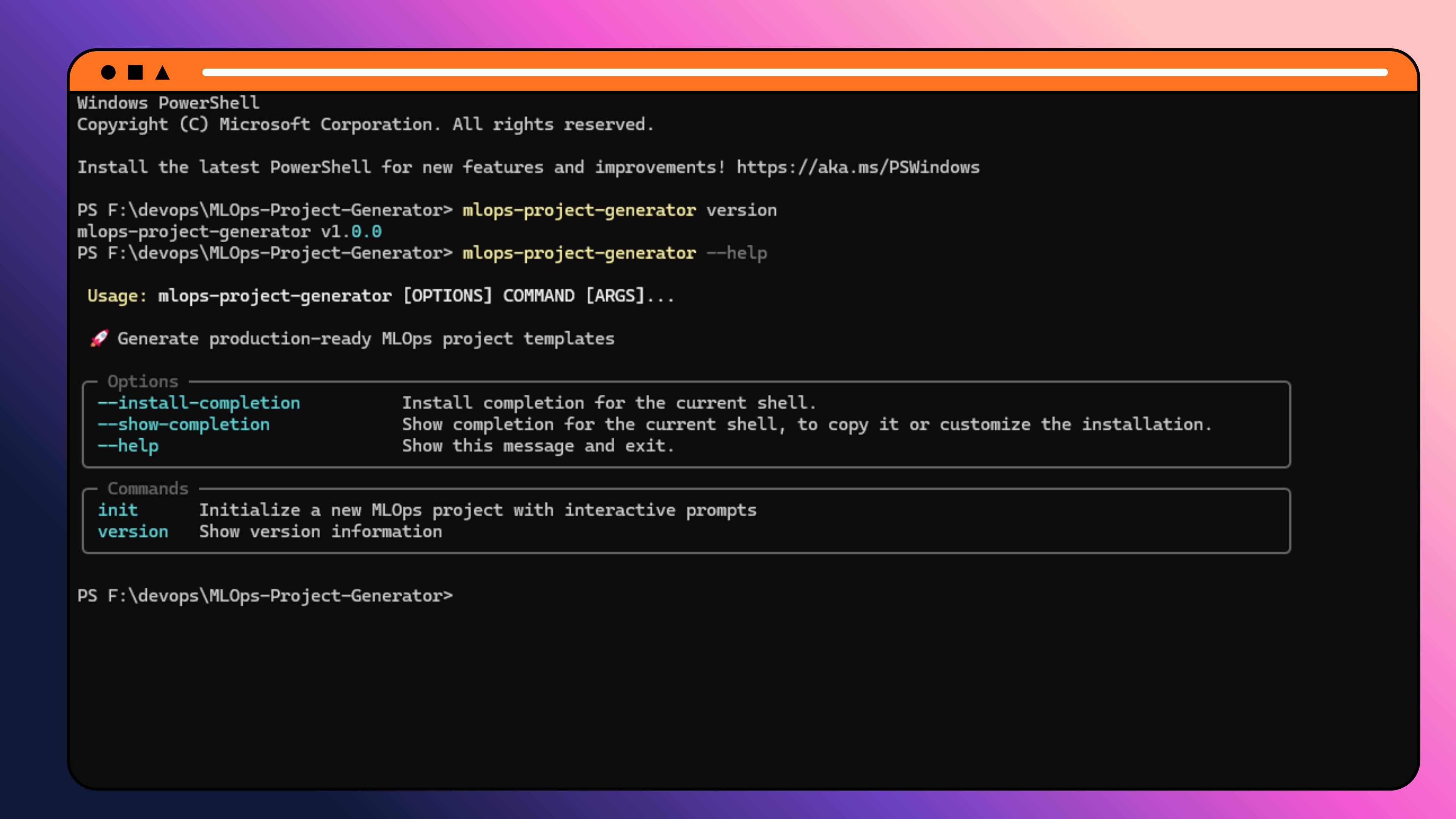
Use presets via CLI: mlops-project-generator init --preset <name> or select them in the Web UI.
�🌐 Web UI (Recommended)
The fastest way to generate a project — open it in your browser, fill in the form, and download a ready-to-use ZIP.
Run locally
cd web_ui
npm install
npm run dev
# → http://localhost:3000
Self-host / Deploy
The web UI is a Next.js 15 app with no external backend dependency. The generator runs entirely as Next.js API routes — deploy to Vercel, Netlify, Railway, or any Node.js host:
cd web_ui
npm run build
npm start
Vercel one-click deploy: set the root directory to
web_uiand it works out of the box.
Web UI Tech Stack
| Layer | Technology |
|---|---|
| Framework | Next.js 15 (App Router) |
| Styling | Tailwind CSS v4 + Glassmorphism |
| Forms | react-hook-form + zod |
| Generator | Pure TypeScript (no Python runtime needed) |
| ZIP output | archiver |
📦 CLI Installation
Prefer the command line? Install the Python package:
From PyPI
pip install mlops-project-generator==2.0.0
From Source
git clone https://github.com/NotHarshhaa/MLOps-Project-Generator.git
cd MLOps-Project-Generator
pip install -e .
Development Install
pip install -e ".[dev]"
🎯 CLI Quick Start
Interactive mode (recommended for beginners)
mlops-project-generator init
Using Stack Presets (NEW!)
# Quick start with preset
mlops-project-generator init --preset quick-start

# Enterprise stack with custom project name
mlops-project-generator init --preset enterprise --project-name my-platform

# Override preset values
mlops-project-generator init --preset production-mlops --deployment kubernetes

# List all available presets
mlops-project-generator list-presets
Non-interactive mode (CI/CD)
mlops-project-generator init \
  --framework pytorch \
  --task-type classification \
  --tracking mlflow \
  --orchestration airflow \
  --deployment docker \
  --monitoring evidently \
  --project-name enterprise-ml \
  --author-name "ML Team" \
  --description "Production ML pipeline"
Available CLI Commands
Core
| Command | Description |
|---|---|
init |
Generate a new MLOps project |
validate |
Validate an existing project structure |
version |
Show version |
Configuration Management
| Command | Description |
|---|---|
save-preset <name> |
Save current config as a preset |
list-presets |
List all presets |
load-preset <name> |
Load a preset |
delete-preset <name> |
Delete a preset |
Template Management
| Command | Description |
|---|---|
create-template <name> <framework> |
Create a custom template |
list-templates |
List custom templates |
delete-template <name> |
Delete a template |
add-template-file <template> <path> |
Add a file to a template |
Advanced CLI Commands (NEW!)
| Command | Description |
|---|---|
clone <source> |
Clone existing projects with configuration preservation |
archive <project> |
Project archiving with selective content inclusion |
check_deps |
Dependency management with security vulnerability scanning |
profile |
Performance profiling and resource usage analysis |
migrate <old> <new> |
Framework migration with automated conversion |
doctor |
Comprehensive project health check with auto-fix capabilities |
Analytics & Insights (NEW!)
| Command | Description |
|---|---|
stats |
Show generation statistics and trends |
analyze <path> |
Analyze a generated project with AI insights |
benchmark <project> |
Compare project against historical baselines |
export-analytics |
Export comprehensive analytics reports |
Configuration Management (ENHANCED!)
| Command | Description |
|---|---|
save-preset <name> |
Save current config as a preset |
list-presets |
List all presets |
load-preset <name> |
Load a preset |
delete-preset <name> |
Delete a preset |
backup-config |
Backup all project configurations |
restore-config <backup> |
Restore from configuration backup |
diff-configs <config1> <config2> |
Compare two configurations |
merge-configs <base> <other> |
Merge configuration files |
init Flag Reference
| Flag | Short | Values |
|---|---|---|
--framework |
-f |
sklearn, pytorch, tensorflow |
--task-type |
-t |
classification, regression, timeseries, nlp, computer-vision |
--tracking |
-r |
mlflow, wandb, custom, none |
--orchestration |
-o |
airflow, kubeflow, none |
--deployment |
-d |
fastapi, docker, kubernetes |
--monitoring |
-m |
evidently, custom, none |
--project-name |
-p |
Any valid identifier |
--author-name |
-a |
Any string |
--description |
--desc |
Any string |
🏢 Enterprise-Grade Features
� Security & Compliance
- Vulnerability Scanning: Automated security checks for dependencies
- IAM Best Practices: Proper role-based access controls
- VPC Configuration: Network isolation and security groups
- Encryption: Data encryption at rest and in transit
- Compliance Templates: SOC2, GDPR, HIPAA-ready configurations
📊 Production Monitoring
- CloudWatch Integration: Real-time metrics and alerting
- Dashboard Templates: Pre-built monitoring dashboards
- Performance Profiling: Resource usage analysis and optimization
- Health Checks: Comprehensive system validation with auto-fix
- SLA Monitoring: Service level agreement tracking
🚀 Real-World CI/CD
- GitHub Actions: Complete workflows with testing, security, deployment
- Multi-Stage Dockerfiles: Optimized builds with security best practices
- Automated Testing: Unit, integration, and end-to-end tests
- Security Scanning: Code quality and vulnerability analysis
- Rollback Strategies: Automated rollback capabilities
📈 Advanced Analytics
# Generate comprehensive analytics report
mlops-project-generator export-analytics --format json --output report.json

# Analyze project performance
mlops-project-generator profile --project my-ml-platform --format json

# Benchmark against historical data
mlops-project-generator benchmark my-project --baseline industry-standard
🔄 Project Lifecycle Management
Smart Project Cloning
# Clone project with configuration preservation
mlops-project-generator clone existing-project --name new-project --exclude-data
Framework Migration
# Migrate from sklearn to pytorch
mlops-project-generator migrate sklearn-project pytorch --auto-convert
Dependency Management
# Check dependencies with security scanning
mlops-project-generator check_deps --update --security --fix
Project Health Checks
# Comprehensive health check with auto-fix
mlops-project-generator doctor --fix --deep --generate-report
🖼️ Screenshots
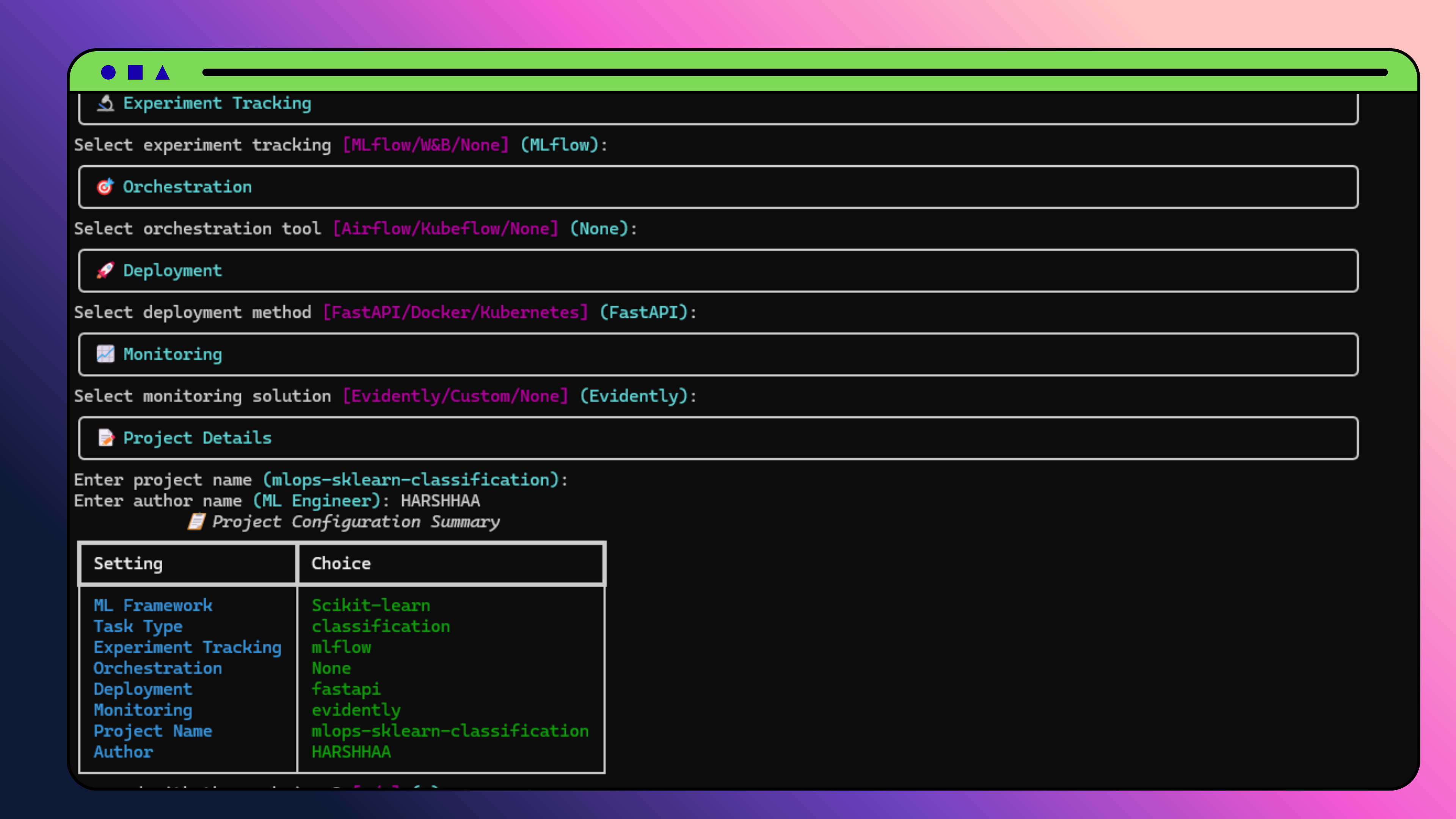
Scikit-learn Generation
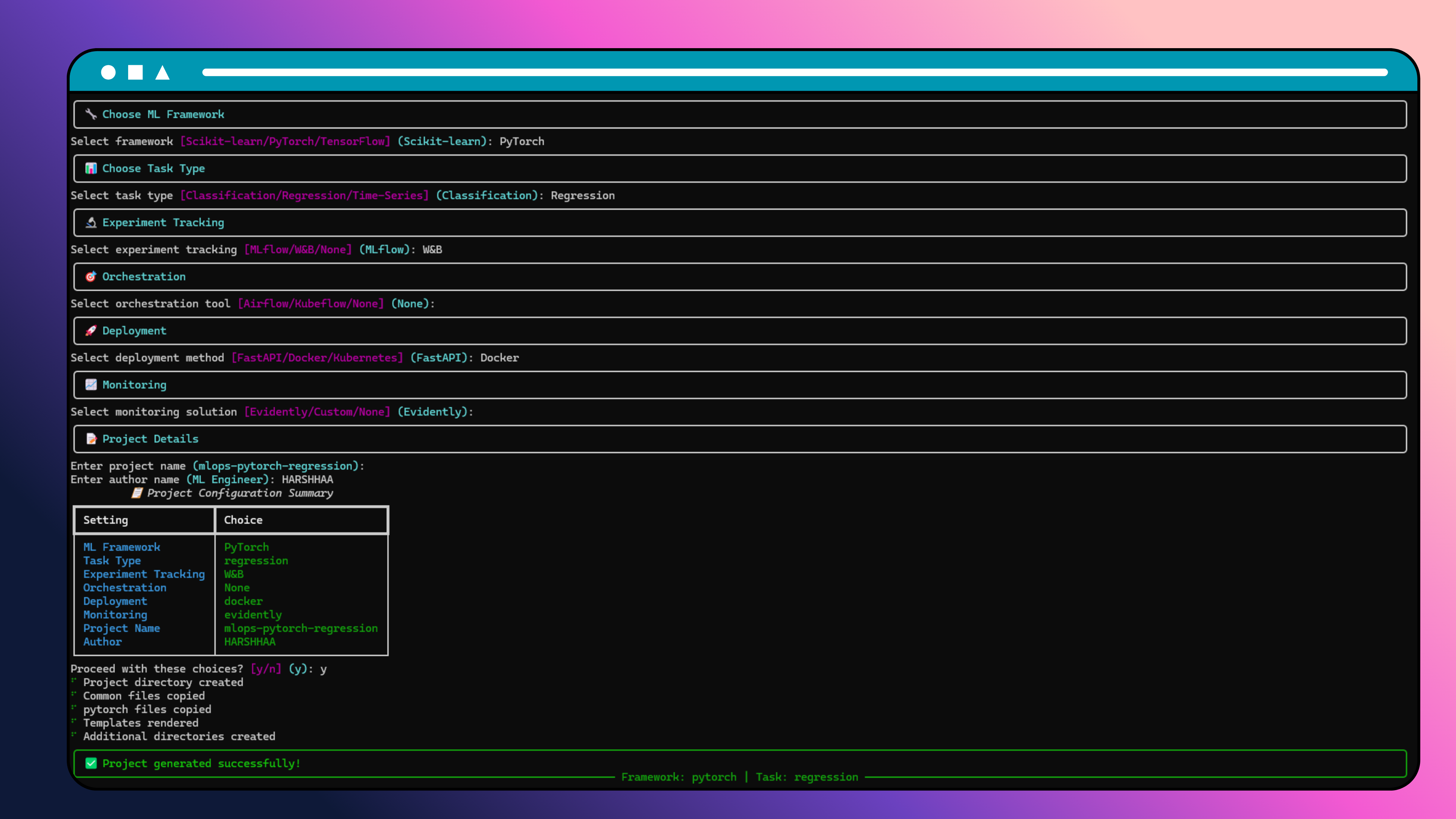
PyTorch Generation
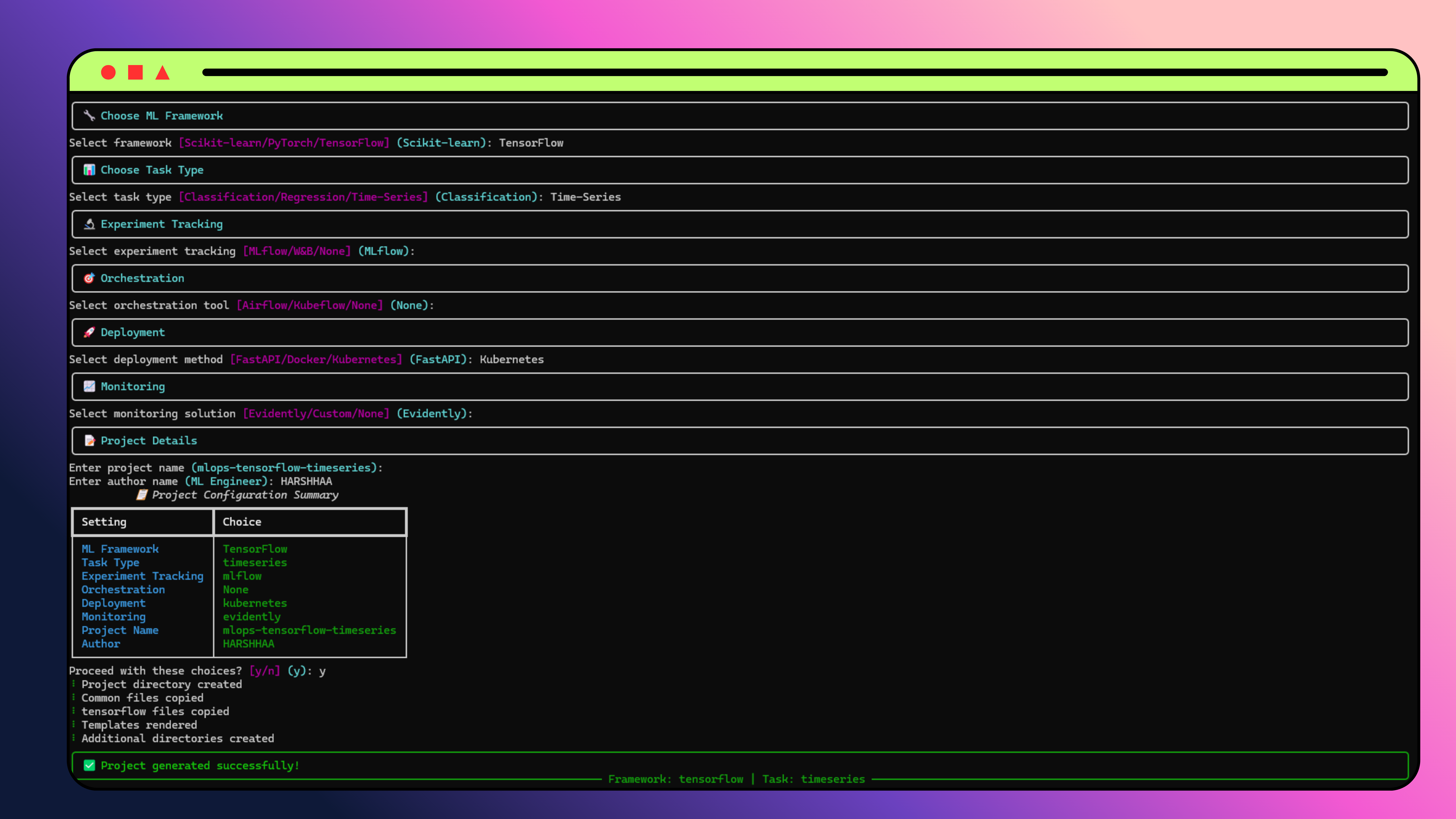
TensorFlow Generation
📁 Generated Project Structure
your-project/
├── src/
│   ├── data/              # Data loading utilities
│   ├── models/            # Model implementations
│   ├── features/          # Feature engineering (sklearn)
│   ├── utils/             # Training utilities (pytorch/tensorflow)
│   ├── train.py           # Training entry point
│   └── inference.py       # Inference / FastAPI server
├── configs/
│   └── config.yaml        # Project configuration
├── data/
│   ├── raw/
│   ├── processed/
│   └── external/
├── models/
│   ├── checkpoints/
│   └── production/
├── notebooks/
├── tests/
│   └── test_model.py
├── cloud/                 # Cloud deployment files (if selected)
│   └── <provider>/<service>/
│       ├── Dockerfile
│       ├── cloud-config.yaml
│       └── deploy.sh
├── requirements.txt
├── Makefile
├── .gitignore
├── .env.example
├── project_config.json
└── README.md
🛠️ Framework-Specific Features
Scikit-learn
- RandomForest / Ridge with cross-validation and joblib serialization
DataLoader+FeatureEngineerclasses ready to extend- FastAPI inference server included when
--deployment fastapi
PyTorch
- Configurable
nn.Sequentialmodel with Dropout - Full training loop with
DataLoader, early stopping torch.save/torch.loadmodel persistence
TensorFlow / Keras
keras.Sequentialwith BatchNorm and DropoutEarlyStoppingcallback pre-configuredmodel.save()/tf.keras.models.load_model()persistence
📊 Experiment Tracking
MLflow
mlflow.set_tracking_uri("http://localhost:5000")
with mlflow.start_run():
    mlflow.log_params(config["model"])
    mlflow.log_metrics({"accuracy": 0.95})
W&B
wandb.init(project="my-project")
wandb.log({"loss": 0.12, "accuracy": 0.95})
wandb.finish()
🚀 Deployment Options
FastAPI
uvicorn src.inference:app --reload
# → http://localhost:8000/docs
Docker
docker build -t my-ml-project .
docker run -p 8000:8000 my-ml-project
Kubernetes
kubectl apply -f k8s/
📈 Monitoring
Evidently AI
from evidently.report import Report
from evidently.metric_preset import DataDriftPreset

report = Report(metrics=[DataDriftPreset()])
report.run(current_data=current, reference_data=reference)
🤖 CI/CD Integration
GitHub Actions
name: Generate ML Project
on:
  workflow_dispatch:
    inputs:
      framework:
        type: choice
        options: [sklearn, pytorch, tensorflow]
      project_name:
        type: string
        default: ml-project

jobs:
  generate:
    runs-on: ubuntu-latest
    steps:
      - uses: actions/checkout@v4
      - uses: actions/setup-python@v4
        with:
          python-version: '3.11'
      - run: pip install mlops-project-generator
      - run: |
          mlops-project-generator init \
            --framework ${{ github.event.inputs.framework }} \
            --project-name ${{ github.event.inputs.project_name }} \
            --tracking mlflow \
            --deployment docker
      - uses: actions/upload-artifact@v3
        with:
          name: ${{ github.event.inputs.project_name }}
          path: ${{ github.event.inputs.project_name }}/
GitLab CI
generate_ml_project:
  image: python:3.11
  script:
    - pip install mlops-project-generator
    - mlops-project-generator init \
        --framework $FRAMEWORK \
        --project-name $PROJECT_NAME \
        --tracking mlflow \
        --deployment docker
  artifacts:
    paths: [$PROJECT_NAME/]
    expire_in: 1 week
🏗️ Repository Structure
MLOps-Project-Generator/
├── generator/              # Python CLI source
│   ├── cli.py             # Typer CLI entry point
│   ├── renderer.py        # Jinja2 template renderer
│   ├── validators.py      # Input validation
│   ├── cloud_deployer.py  # Cloud template generation
│   └── ...
├── templates/              # Jinja2 project templates
│   ├── common/            # Shared across all frameworks
│   ├── sklearn/
│   ├── pytorch/
│   └── tensorflow/
├── web_ui/                 # Next.js web application
│   ├── app/
│   │   └── api/           # Next.js API routes (generator backend)
│   │       ├── generate/  # POST — start generation
│   │       ├── status/    # GET  — poll task status
│   │       ├── download/  # GET  — download ZIP
│   │       └── options/   # GET  — dropdown options
│   └── src/
│       └── lib/
│           ├── generator/ # Pure TS generator (no Python needed)
│           └── task-store.ts
├── tests/                  # Python CLI tests
├── pyproject.toml
└── README.md
🧪 Testing (CLI)
pytest tests/ -v
pytest tests/ --cov=generator --cov-report=html
🛠️ Development (CLI)
git clone https://github.com/NotHarshhaa/MLOps-Project-Generator.git
cd MLOps-Project-Generator
pip install -e ".[dev]"
black generator/ tests/
isort generator/ tests/
flake8 generator/ tests/
mypy generator/
🤝 Contributing
Contributions are welcome! Please:
- Fork the repository
- Create a feature branch
- Add tests for new functionality
- Submit a pull request
📄 License
MIT — see LICENSE for details.
🙏 Acknowledgments
- Typer · Beautiful Python CLI framework
- Next.js · React framework powering the Web UI
- Rich · Stunning terminal output
- archiver · ZIP generation for project downloads
📞 Support
🗺️ Roadmap
✅ Completed
- Python CLI with interactive + non-interactive modes
- Scikit-learn, PyTorch, TensorFlow project templates
- MLflow, W&B experiment tracking integration
- Multi-cloud deployment templates (AWS, GCP, Azure)
- Configuration presets and template customization
- Project analytics and validation
- Web UI — Next.js app with glassmorphism UI (v1.0.8)
- Backend migration — generator ported to pure TypeScript, no Python runtime needed on the server (v1.0.8)
- Stack Presets — 6 pre-configured MLOps stacks (Quick Start, Data Science, Deep Learning, Production MLOps, Enterprise, Research) (v1.0.8)
- Advanced CLI Commands — clone, archive, check_deps, profile, migrate, doctor (v2.0.0)
- Enhanced Analytics — AI-powered insights, trending analysis, benchmarking (v2.0.0)
- Production-Ready Deployment — Real AWS templates, CI/CD, monitoring (v2.0.0)
- Security-First Approach — Vulnerability scanning, best practices (v2.0.0)
- Configuration Management — Environment configs, templates, pipelines (v2.0.0)
🚀 Upcoming
- Additional frameworks (XGBoost, LightGBM, HuggingFace)
- Shareable project config links
- Template marketplace
- Team collaboration features
⭐ If you find this useful, please give it a star on GitHub!
Generated with ❤️ by MLOps Project Generator


Download files
Download the file for your platform. If you're not sure which to choose, learn more about installing packages.
Source Distribution
File details
Details for the file mlops_project_generator-2.0.1.tar.gz.
File metadata
- Download URL: mlops_project_generator-2.0.1.tar.gz
- Upload date:
- Size: 120.5 kB
- Tags: Source
- Uploaded using Trusted Publishing? No
- Uploaded via: twine/6.2.0 CPython/3.11.9
File hashes
| Algorithm | Hash digest | |
|---|---|---|
| SHA256 |
ad4a473e812cb70eb422240cf612a1e4b3f1fa1592ba20bf27cf84a4dbbd3699
|
|
| MD5 |
6748617261c8137ff8caeae4a44bea95
|
|
| BLAKE2b-256 |
75ae1a0b9effac17b3ca4539f872d58496c930ec01900d762d8750810c76593d
|






