
A CLI tool that generates production-ready MLOps project templates for Scikit-learn, PyTorch, and TensorFlow

Project description
🧠 MLOps Project Generator

A CLI tool that generates production-ready MLOps project templates for Scikit-learn, PyTorch, and TensorFlow.
This stack supports the full MLOps lifecycle:
Data → Train → Track → Orchestrate → Deploy → Monitor → Improve
🚀 Features
- 🔧 Framework Support: Scikit-learn, PyTorch, TensorFlow/Keras
- 📊 Task Types: Classification, Regression, Time-Series
- 🔬 Experiment Tracking: MLflow, W&B
- 🎯 Orchestration: Airflow, Kubeflow
- 🚀 Deployment: FastAPI, Docker, Kubernetes
- 📈 Monitoring: Evidently AI, Custom solutions
- 🛠️ Production-Ready: CI/CD, monitoring, best practices by default
- 🤖 CI/CD Automation: Non-interactive mode for DevOps pipelines
- 🔍 Project Validation: Comprehensive project structure and configuration validation
🌟 NEW: v1.0.6 Advanced Features
🔍 Project Validation Command
- Comprehensive validation: Checks project structure, configuration, and deployment readiness
- Framework-specific validation: Validates sklearn, PyTorch, and TensorFlow projects
- Smart framework detection: Automatically detects ML framework from project files
- Beautiful Rich UI: Professional terminal output with pass/warn/fail status
- CI/CD integration: Proper exit codes for automation pipelines
- Extensible design: Easy to add new validation checks
# Validate current directory
mlops-project-generator validate

# Validate specific project
mlops-project-generator validate --path /path/to/project

# CI/CD integration
mlops-project-generator validate --path . || exit 1
🚀 Non-Interactive CLI Mode (CI/CD Ready)
- One-liner project generation with command-line flags
- Perfect for automation and CI/CD pipelines
- Enterprise-ready with clean, log-friendly output
- Zero prompts when flags are provided
- Smart defaults for unspecified options
# Generate a complete project in one command
mlops-project-generator init \
  --framework pytorch \
  --tracking mlflow \
  --deployment docker \
  --monitoring evidently \
  --project-name my-ml-project
🔍 Smart System Validation
- Automatic system check for Python, Git, Docker, Conda
- Real-time status indicators (✅/❌) with visual feedback
- System information display (OS, Python version, architecture)
- Early validation to prevent setup issues
🧠 Intelligent Project Generation
- Smart project naming based on framework and task type
- Framework comparison table with complexity indicators
- Project size estimation (files, lines of code, storage)
- Impact analysis for each configuration choice
📊 Enhanced User Experience
- Beautiful progress indicators with real-time updates
- Interactive framework recommendations with use cases
- Comprehensive project summary before generation
- Step-by-step next steps after project creation
🔧 Advanced Template Features
- Dynamic .gitignore generation based on tools selected
- Framework-specific patterns (PyTorch: *.pth, TensorFlow: *.pb)
- Tool-specific configurations (MLflow, W&B, Airflow, Kubeflow)
- Comprehensive MLOps artifact management
📦 Installation
From PyPI (Recommended)
pip install mlops-project-generator
From Source
git clone https://github.com/NotHarshhaa/MLOps-Project-Generator.git
cd MLOps-Project-Generator
pip install -e .
Development Installation
git clone https://github.com/NotHarshhaa/MLOps-Project-Generator.git
cd MLOps-Project-Generator
pip install -e ".[dev]"
🖼️ Screenshots
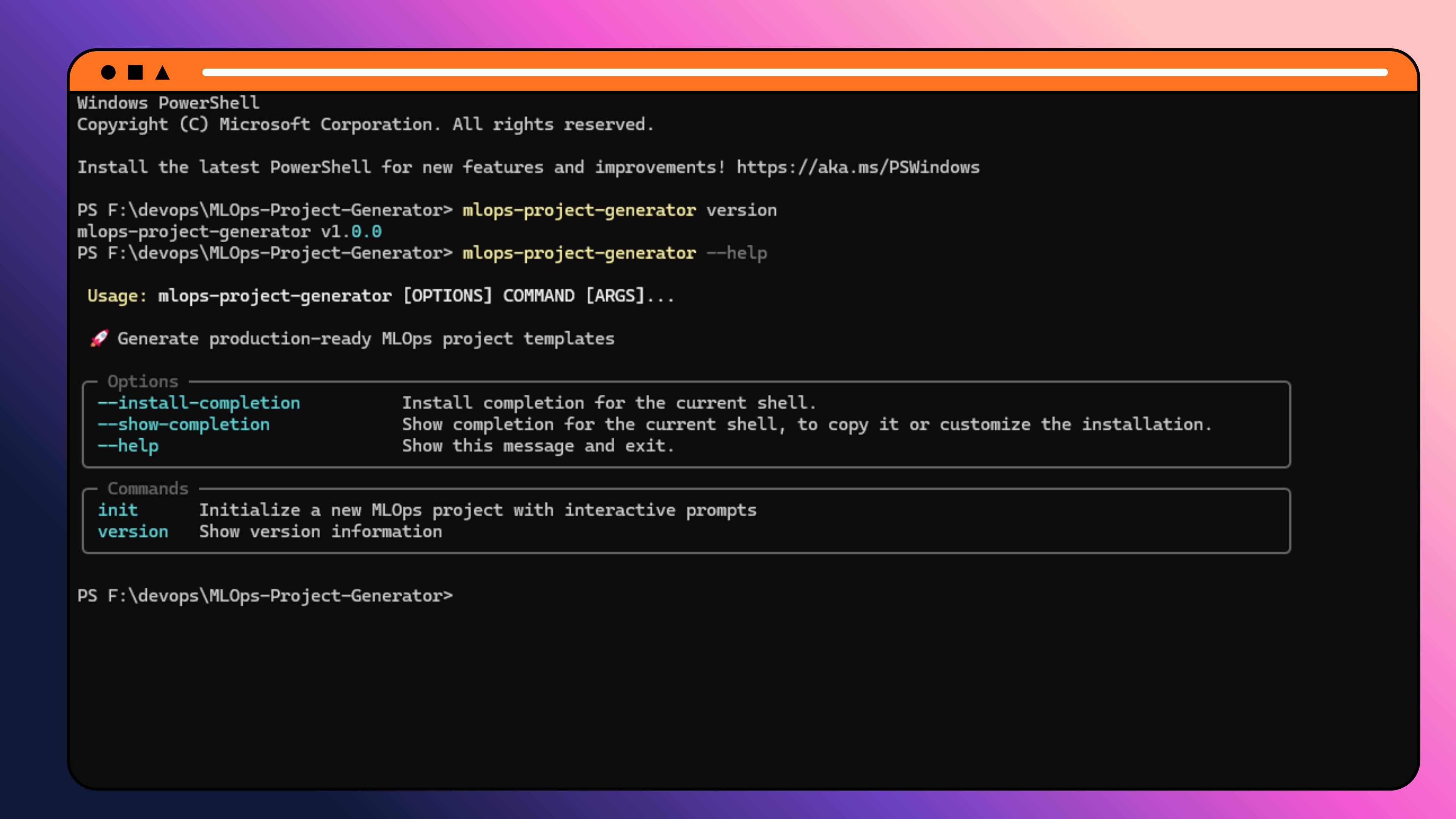
CLI Commands
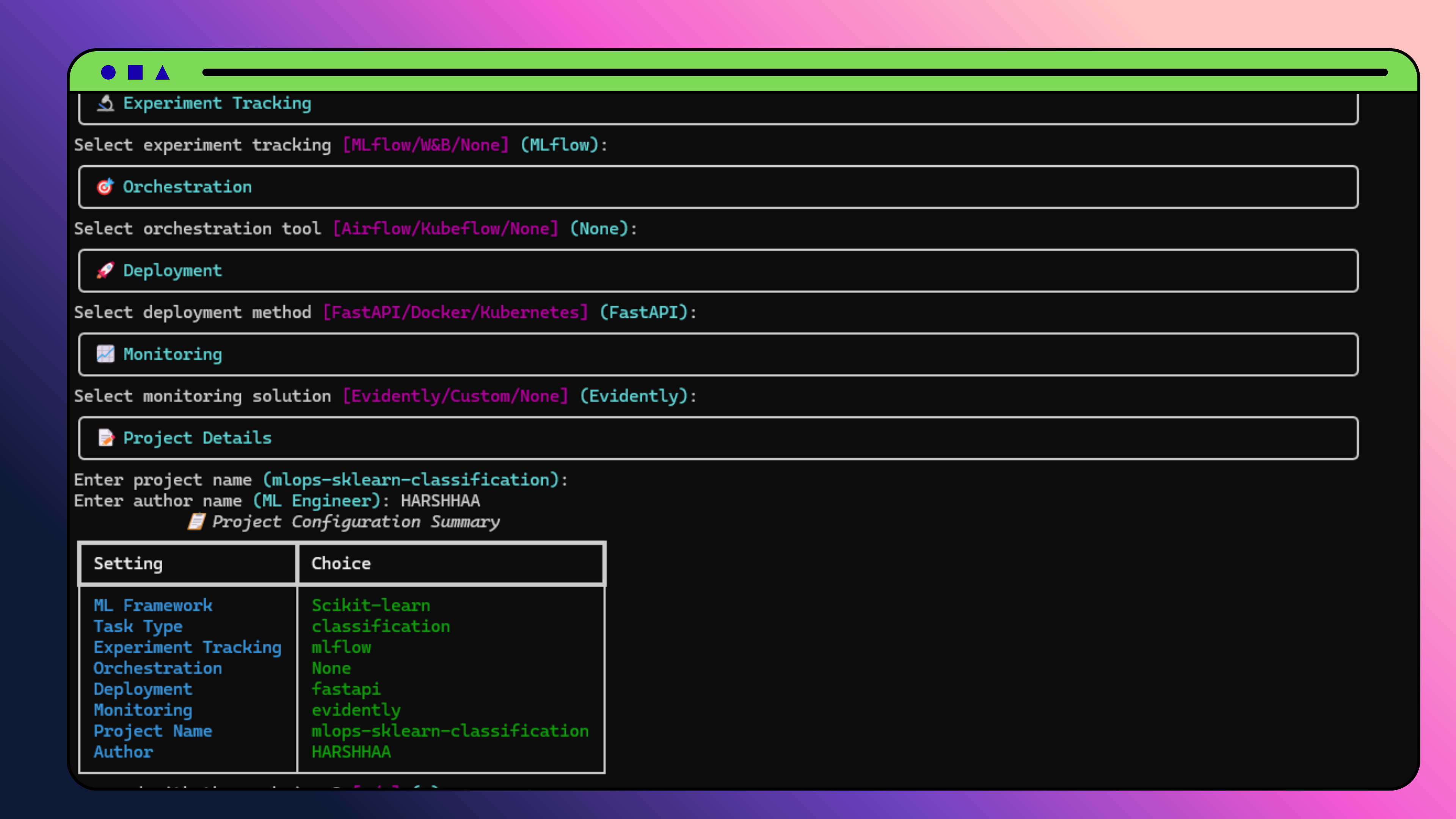
Scikit-learn Project Generation
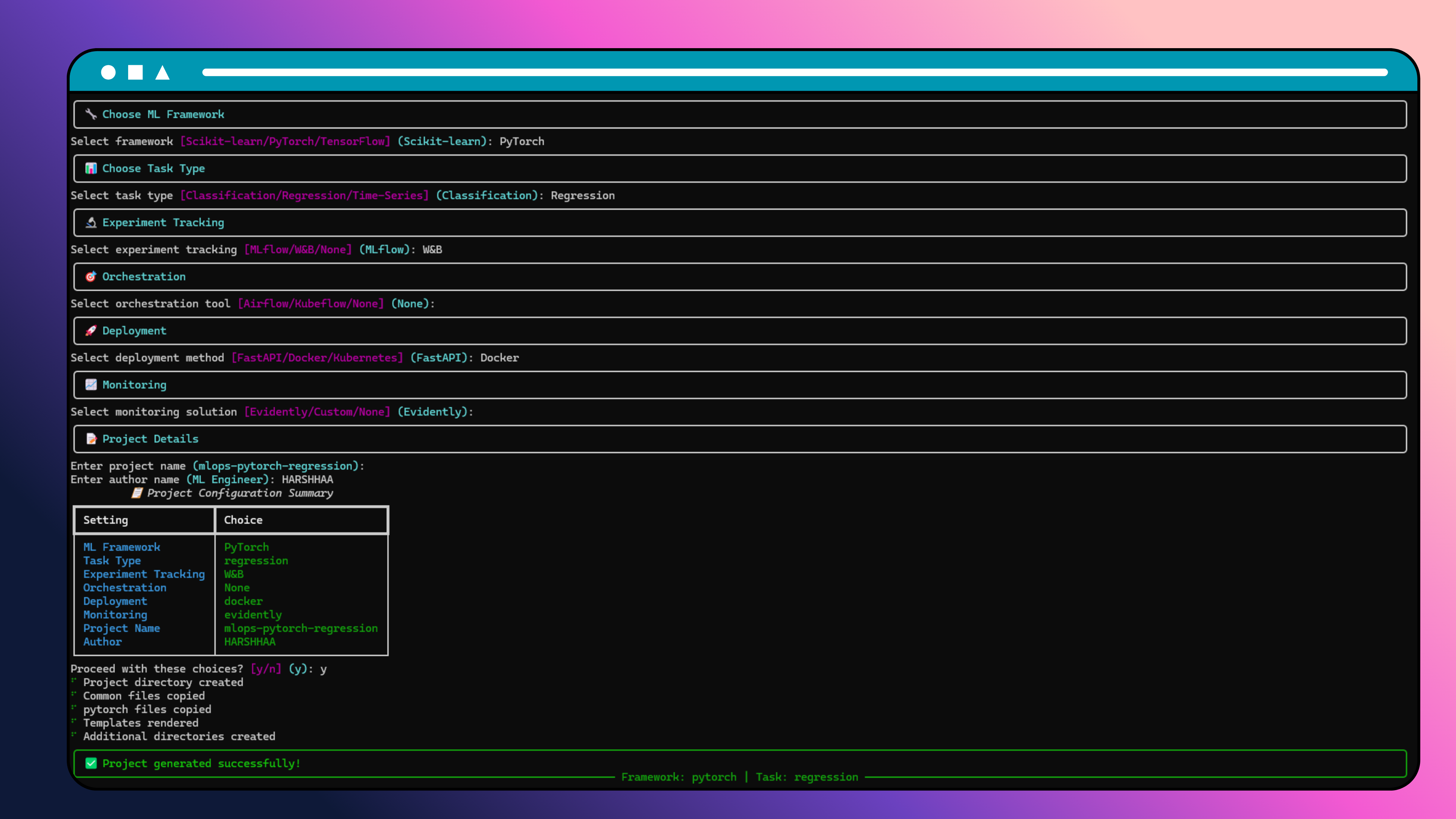
PyTorch Project Generation
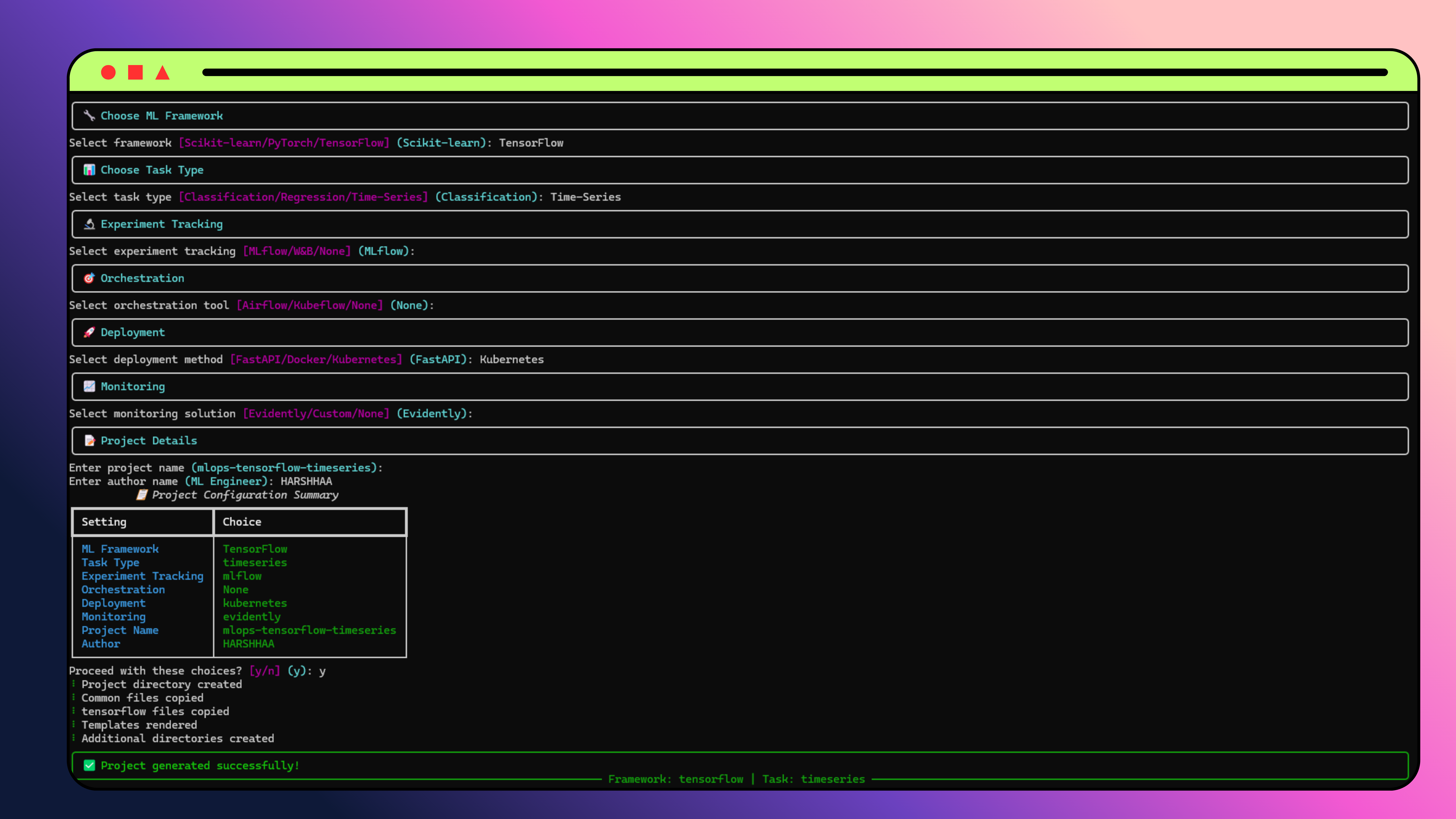
TensorFlow Project Generation
🎯 Quick Start
🚀 Option 1: Interactive Mode (Recommended for beginners)
mlops-project-generator init
🤖 Option 2: Non-Interactive Mode (Perfect for CI/CD)
# Quick start with defaults
mlops-project-generator init --framework sklearn --project-name my-project

# Full configuration
mlops-project-generator init \
  --framework pytorch \
  --task-type classification \
  --tracking mlflow \
  --orchestration airflow \
  --deployment docker \
  --monitoring evidently \
  --project-name enterprise-ml \
  --author-name "ML Team" \
  --description "Production ML pipeline"
📋 Available CLI Commands
| Command | Description | Options |
|---|---|---|
init |
Generate new MLOps project | Framework, task type, tracking, deployment flags |
validate |
Validate existing project structure | --path to specify project directory |
version |
Show version information | None |
📋 Available CLI Flags (for init command)
| Flag | Short | Description | Options |
|---|---|---|---|
--framework |
-f |
ML framework | sklearn, pytorch, tensorflow |
--task-type |
-t |
Task type | classification, regression, time-series, nlp, computer-vision |
--tracking |
-r |
Experiment tracking | mlflow, wandb, custom, none |
--orchestration |
-o |
Orchestration | airflow, kubeflow, none |
--deployment |
-d |
Deployment | fastapi, docker, kubernetes |
--monitoring |
-m |
Monitoring | evidently, custom, none |
--project-name |
-p |
Project name | Any valid name |
--author-name |
-a |
Author name | Any string |
--description |
--desc |
Project description | Any string |
📋 Validation Options
| Flag | Short | Description | Default |
|---|---|---|---|
--path |
-p |
Path to project to validate | . (current directory) |
🎯 Use Case Examples
🔬 Data Science Quick Start
mlops-project-generator init \
  --framework sklearn \
  --task-type classification \
  --tracking mlflow \
  --project-name fraud-detection
🚀 Deep Learning Production
mlops-project-generator init \
  --framework pytorch \
  --deployment docker \
  --monitoring evidently \
  --project-name image-classifier
🏢 Enterprise MLOps
mlops-project-generator init \
  --framework tensorflow \
  --orchestration kubeflow \
  --deployment kubernetes \
  --tracking mlflow \
  --project-name enterprise-ml
⚡ CI/CD Pipeline Integration
# In GitHub Actions, GitLab CI, or Jenkins
mlops-project-generator init \
  --framework $FRAMEWORK \
  --deployment $DEPLOYMENT \
  --project-name $PROJECT_NAME \
  --author-name "CI/CD Pipeline"
This will launch an enhanced interactive CLI that guides you through:
🔍 Step 1: System Validation
- Automatic system check for required tools
- Visual status indicators (✅/❌)
- System information display
- Early problem detection
🔧 Step 2: Framework Selection
- Interactive comparison table with use cases
- Complexity indicators (Low/Medium/High)
- Smart recommendations based on your needs
- Framework guidance for better decisions
📊 Step 3: Configuration
- Task type selection (Classification/Regression/Time-Series)
- Experiment tracking (MLflow/W&B/Custom)
- Orchestration (Airflow/Kubeflow/None)
- Deployment (FastAPI/Docker/Kubernetes)
- Monitoring (Evidently/Custom/None)
🧠 Step 4: Smart Project Setup
- Intelligent project naming suggestions
- Directory validation to prevent conflicts
- Project size estimation (files, lines, storage)
- Impact analysis of your choices
📋 Step 5: Enhanced Summary
- Comprehensive project overview
- Next steps preview before generation
- Real-time progress tracking
- Step-by-step guidance after creation
🎯 Step 6: Ready-to-Go Project
- Framework-specific code ready to run
- Production-ready structure
- Comprehensive documentation
- Next steps checklist
Example Usage
# Generate a Scikit-learn classification project with MLflow tracking
mlops-project-generator init

# Follow the prompts:
# ✔ ML Framework: Scikit-learn
# ✔ Task Type: Classification
# ✔ Experiment Tracking: MLflow
# ✔ Orchestration: None
# ✔ Deployment: FastAPI
# ✔ Monitoring: Evidently
# ✔ Project Name: ml-classification-project
# ✔ Author Name: Your Name
📁 Generated Project Structure
your-project/
├── data/                   # Data files
│   ├── raw/               # Raw data
│   ├── processed/         # Processed data
│   └── external/          # External data
├── models/                 # Model files
│   ├── checkpoints/       # Model checkpoints
│   └── production/        # Production models
├── notebooks/              # Jupyter notebooks
├── scripts/                # Utility scripts
├── src/                    # Source code
│   ├── data/              # Data loading utilities
│   ├── models/            # Model implementations
│   ├── features/          # Feature engineering (sklearn)
│   └── utils/             # Training utilities (pytorch/tensorflow)
├── configs/                # Configuration files
├── tests/                  # Test files
├── requirements.txt        # Dependencies
├── pyproject.toml         # Project configuration
├── Makefile               # Build commands
├── .gitignore             # Git ignore rules
└── README.md              # Project documentation
🛠️ Framework-Specific Features
Scikit-learn Projects
- Models: RandomForest, LogisticRegression, SVM, etc.
- Feature Engineering: Scaling, selection, PCA
- Evaluation: Cross-validation, comprehensive metrics
- Deployment: Joblib serialization, FastAPI integration
PyTorch Projects
- Models: Neural networks with residual connections, attention mechanisms
- Training: Advanced optimizers, learning rate schedulers, early stopping
- Utilities: Gradient clipping, data augmentation, model profiling
- Deployment: TorchScript, FastAPI integration
TensorFlow Projects
- Models: Keras models with batch normalization, attention mechanisms
- Training: Callbacks, custom loss functions, gradient clipping
- Utilities: Model profiling, data augmentation, custom schedulers
- Deployment: SavedModel format, FastAPI integration
📊 Experiment Tracking Integration
MLflow Integration
# Automatically logged metrics
mlflow.log_metrics({
    "train_loss": 0.123,
    "val_accuracy": 0.95,
    "learning_rate": 0.001
})

# Model artifacts
mlflow.log_artifact("models/production/model.joblib")
W&B Integration
# Automatic logging with W&B callback
wandb.init(project="my-project")
wandb.log({"loss": 0.123, "accuracy": 0.95})
🚀 Deployment Options
FastAPI Deployment
# Start the API server
uvicorn src.inference:app --reload

# API documentation at http://localhost:8000/docs
Docker Deployment
# Build and run
docker build -t my-ml-project .
docker run -p 8000:8000 my-ml-project
Kubernetes Deployment
# Deploy to Kubernetes
kubectl apply -f k8s/
📈 Monitoring Solutions
Evidently AI Integration
# Data drift monitoring
from evidently.report import Report
from evidently.metric_preset import DataDriftPreset

report = Report(metrics=[DataDriftPreset()])
report.run(current_data=current, reference_data=reference)
Custom Monitoring
# Custom monitoring implementation
class ModelMonitor:
    def check_performance(self, predictions, ground_truth):
        # Custom performance checks
        pass
🧪 Testing
# Run tests
pytest tests/ -v

# Run with coverage
pytest tests/ --cov=src --cov-report=html
🛠️ Development
Setup Development Environment
# Clone repository
git clone https://github.com/NotHarshhaa/MLOps-Project-Generator.git
cd MLOps-Project-Generator

# Install in development mode
pip install -e ".[dev]"

# Run tests
pytest tests/

# Run linting
black generator/ tests/
isort generator/ tests/
flake8 generator/ tests/
mypy generator/
Project Structure
mlops-project-generator/
├── generator/              # CLI tool source code
│   ├── cli.py             # Main CLI interface
│   ├── prompts.py         # Interactive prompts
│   ├── renderer.py        # Template rendering
│   └── validators.py      # Input validation
├── templates/              # Project templates
│   ├── common/            # Common files across frameworks
│   ├── sklearn/           # Scikit-learn specific templates
│   ├── pytorch/           # PyTorch specific templates
│   └── tensorflow/        # TensorFlow specific templates
├── tests/                  # Test files
├── docs/                   # Documentation
├── pyproject.toml         # Project configuration
└── README.md              # This file
🔧 Configuration
The generated projects use YAML configuration files:
# configs/config.yaml
project:
  name: "my-project"
  author: "Your Name"
  version: "0.1.0"

model:
  type: "RandomForestClassifier"
  n_estimators: 100
  max_depth: 10

training:
  batch_size: 32
  learning_rate: 0.001
  epochs: 100

experiment_tracking:
  tool: "mlflow"
  tracking_uri: "http://localhost:5000"

deployment:
  method: "fastapi"
  host: "0.0.0.0"
  port: 8000
🚀 CI/CD Integration
GitHub Actions Example
name: Generate ML Project
on:
  workflow_dispatch:
    inputs:
      framework:
        type: choice
        options: [sklearn, pytorch, tensorflow]
        default: sklearn
      project_name:
        type: string
        default: ml-project

jobs:
  generate:
    runs-on: ubuntu-latest
    steps:
      - uses: actions/checkout@v4
      - name: Set up Python
        uses: actions/setup-python@v4
        with:
          python-version: '3.11'

      - name: Install MLOps Generator
        run: pip install mlops-project-generator

      - name: Generate ML Project
        run: |
          mlops-project-generator init \
            --framework ${{ github.event.inputs.framework }} \
            --project-name ${{ github.event.inputs.project_name }} \
            --tracking mlflow \
            --deployment docker

      - name: Upload generated project
        uses: actions/upload-artifact@v3
        with:
          name: ${{ github.event.inputs.project_name }}
          path: ${{ github.event.inputs.project_name }}/
GitLab CI Example
stages:
  - generate

generate_ml_project:
  stage: generate
  image: python:3.11
  script:
    - pip install mlops-project-generator
    - mlops-project-generator init \
        --framework $FRAMEWORK \
        --project-name $PROJECT_NAME \
        --tracking mlflow \
        --deployment docker
  artifacts:
    paths:
      - $PROJECT_NAME/
    expire_in: 1 week
Jenkins Pipeline Example
pipeline {
    agent any
    parameters {
        choice(name: 'FRAMEWORK', choices: ['sklearn', 'pytorch', 'tensorflow'], description: 'ML Framework')
        string(name: 'PROJECT_NAME', defaultValue: 'ml-project', description: 'Project Name')
    }

    stages {
        stage('Generate ML Project') {
            steps {
                sh 'pip install mlops-project-generator'
                sh """
                    mlops-project-generator init \
                        --framework ${params.FRAMEWORK} \
                        --project-name ${params.PROJECT_NAME} \
                        --tracking mlflow \
                        --deployment docker
                """
                archiveArtifacts artifacts: "${params.PROJECT_NAME}/**/*", fingerprint: true
            }
        }
    }
}
Docker Integration
FROM python:3.11-slim

WORKDIR /app
RUN pip install mlops-project-generator

# Copy project generation script
COPY generate-project.sh .
RUN chmod +x generate-project.sh

# Generate project on container start
CMD ["./generate-project.sh"]
Environment Variables Support
# Using environment variables in CI/CD
export FRAMEWORK=pytorch
export DEPLOYMENT=kubernetes
export PROJECT_NAME=prod-ml

mlops-project-generator init \
  --framework $FRAMEWORK \
  --deployment $DEPLOYMENT \
  --project-name $PROJECT_NAME \
  --author-name "CI/CD Pipeline"
🤝 Contributing
We welcome contributions! Please see our Contributing Guide for details.
Development Workflow
- Fork the repository
- Create a feature branch
- Make your changes
- Add tests for new functionality
- Run the test suite
- Submit a pull request
📄 License
This project is licensed under the MIT License - see the LICENSE file for details.
🙏 Acknowledgments
- Typer - For the beautiful CLI interface
- Jinja2 - For powerful template rendering
- Rich - For stunning terminal output
- Cookiecutter - For project template inspiration
📞 Support
- 📧 Email: contact@example.com
- 🐛 Issues: GitHub Issues
- 💬 Discussions: GitHub Discussions
� Roadmap
- v1.1: Additional frameworks (XGBoost, LightGBM)
- v1.2: Cloud deployment templates (AWS, GCP, Azure)
- v1.3: Advanced monitoring solutions
- v2.0: GUI interface for project generation
- v2.1: Template marketplace
⭐ If you find this tool helpful, please give us a star on GitHub!
Generated with ❤️ by MLOps Project Generator


Download files
Download the file for your platform. If you're not sure which to choose, learn more about installing packages.
Source Distribution
Built Distribution
Filter files by name, interpreter, ABI, and platform.
If you're not sure about the file name format, learn more about wheel file names.
Copy a direct link to the current filters
File details
Details for the file mlops_project_generator-1.0.6.tar.gz.
File metadata
- Download URL: mlops_project_generator-1.0.6.tar.gz
- Upload date:
- Size: 76.3 kB
- Tags: Source
- Uploaded using Trusted Publishing? No
- Uploaded via: twine/6.2.0 CPython/3.11.9
File hashes
| Algorithm | Hash digest | |
|---|---|---|
| SHA256 |
06c7607118d6df2fa9ba50527653632518c09306be01f0d6c6676aae675a90ab
|
|
| MD5 |
2f18f9bf6c3de2073ee539e34ee89edb
|
|
| BLAKE2b-256 |
6ef3b7ff444482901ef1a22f804ecf298400f6ba3926b90fecda8a46d86af160
|
File details
Details for the file mlops_project_generator-1.0.6-py3-none-any.whl.
File metadata
- Download URL: mlops_project_generator-1.0.6-py3-none-any.whl
- Upload date:
- Size: 26.2 kB
- Tags: Python 3
- Uploaded using Trusted Publishing? No
- Uploaded via: twine/6.2.0 CPython/3.11.9
File hashes
| Algorithm | Hash digest | |
|---|---|---|
| SHA256 |
0fa218d57113f0789418be914fdd819e47cc14602bf63b657c3ab8d86a6a8eb7
|
|
| MD5 |
2797e33ccd157fb06a77b8ab12ed13bc
|
|
| BLAKE2b-256 |
16ec4a2abe4c10205240fa2fb7d0add374fb256ce9c21033f46fb37d60a5b0a0
|






