
Multiple linear regression for low- and high-dimensional data, including validation, diagnostics, applicability domain analysis, visualization, and predictive modeling.

Project description

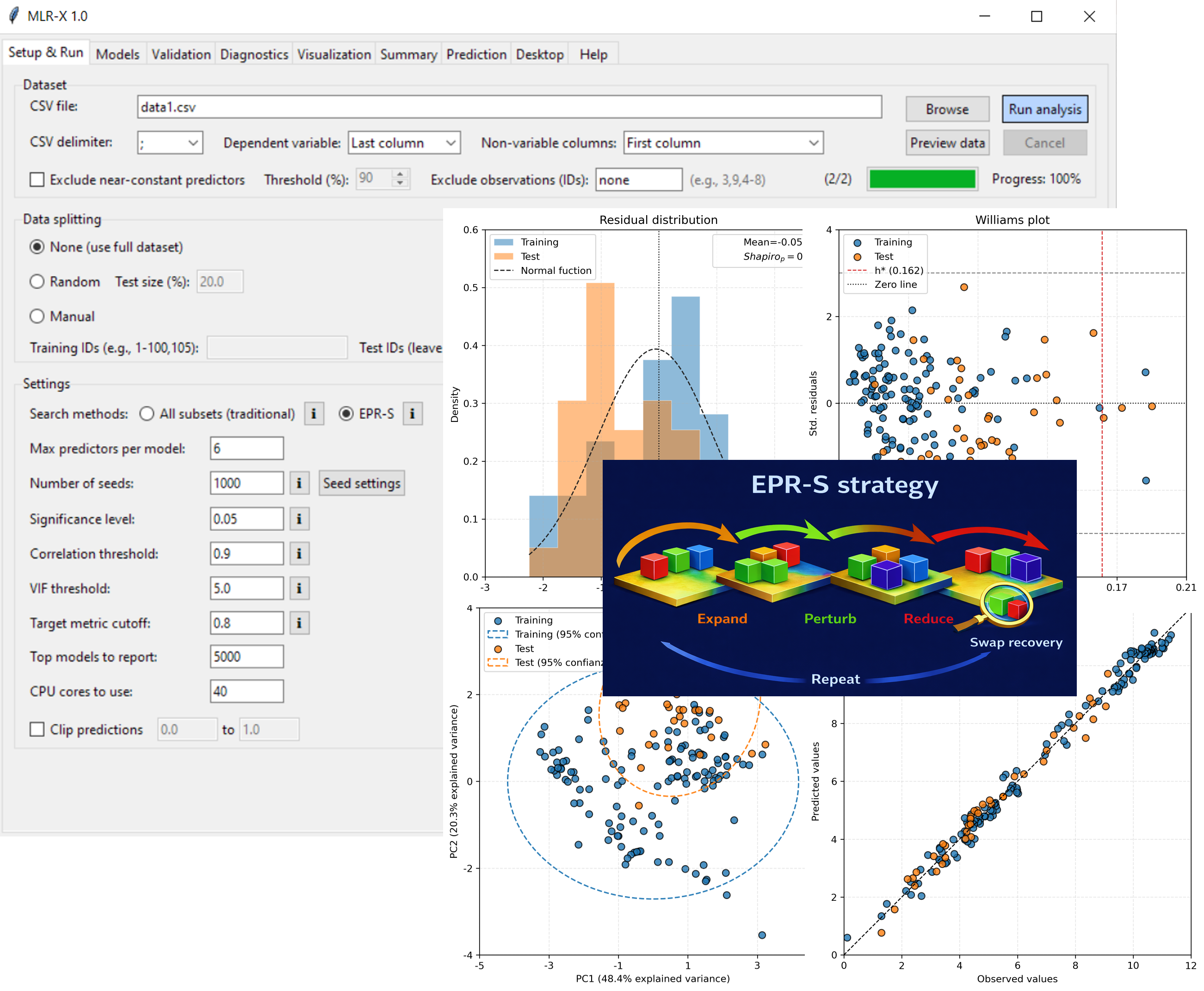
MLR-X is a cross-platform software package for multiple linear regression designed for low- and high-dimensional data, integrating model fitting, subset selection, validation, diagnostic analysis, and prediction into a unified workflow.
The software includes an implementation of EPR-C3, a reproducible heuristic search strategy based on Expand, Perturb, Reduce, and C3 refinement. This strategy explores the MLR model space while enforcing statistical admissibility constraints, including coefficient-significance thresholds, multicollinearity control, and pairwise-correlation filtering.
MLR-X provides a comprehensive set of internal and external validation metrics, applicability-domain assessment, and graphical diagnostics, enabling rigorous model evaluation and interpretation. Results are automatically compiled into structured, export-ready reports suitable for research and publication.
Install
pip install mlr-x
Run
Launch GUI mode:
mlrx
Run CLI mode:
mlrx <config.conf>
Or
mlrx <config.conf> [--onlyIV]
Helpful parameters:
--version: show the version and exit.--model: select a model identifier for requested outputs.--outputs: define which outputs to generate (for example:diagnostics,visualization,summary).pdf,png,tiff, andsvgare export formats used for visualization outputs.--noruns: use an existing results file from the configuration output path.--onlyIVand--onlyEV: execute internal or external validation only, respectively, using models from an existing results file at the configured output path. Both options skip model search and require that the results file already exists.
Example:
python MLRX.py example.conf --model 1 --outputs summary
Requirements
- Python 3.10+
On Linux, install GUI dependencies if needed:
sudo apt-get install python3-tk
sudo apt-get install xvfb
Prebuilt binaries
You can also download standalone binaries from the official release:
Available platforms:
- Windows 10/11 (64-bit)
- macOS X (Arm64)
- Ubuntu 20.04 (x86-64)
How to cite
Article under review. For now, please cite as follows:
- Alcázar, Jackson J. (2026). "MLR-X 1.0 software. Available at: https://jacksonalcazar.github.io/MLR-X/".
Release history Release notifications | RSS feed

Download files
Download the file for your platform. If you're not sure which to choose, learn more about installing packages.
Source Distribution
Built Distribution
Filter files by name, interpreter, ABI, and platform.
If you're not sure about the file name format, learn more about wheel file names.
Copy a direct link to the current filters
File details
Details for the file mlr_x-1.0.3.tar.gz.
File metadata
- Download URL: mlr_x-1.0.3.tar.gz
- Upload date:
- Size: 240.1 kB
- Tags: Source
- Uploaded using Trusted Publishing? No
- Uploaded via: twine/6.1.0 CPython/3.8.20
File hashes
| Algorithm | Hash digest | |
|---|---|---|
| SHA256 |
d6006c9c8f3ccd4c2d95a7504a52e9ee305f57ca8ac181598bd3912bcc54c18e
|
|
| MD5 |
1d2fafbeca800ca2a1eb51e01c762e9e
|
|
| BLAKE2b-256 |
2f4692eba1ac9204e1e9bd581ccabda125d5726377d78cae8f12027dd1ca7f32
|
File details
Details for the file mlr_x-1.0.3-py3-none-any.whl.
File metadata
- Download URL: mlr_x-1.0.3-py3-none-any.whl
- Upload date:
- Size: 243.1 kB
- Tags: Python 3
- Uploaded using Trusted Publishing? No
- Uploaded via: twine/6.1.0 CPython/3.8.20
File hashes
| Algorithm | Hash digest | |
|---|---|---|
| SHA256 |
f72b3b136aa07259d9b3681dd9cf6f935286488b319ae2228fa8838a15a7dd40
|
|
| MD5 |
9a73d5deea9f5be02bd5471ec5a44629
|
|
| BLAKE2b-256 |
47868803e759397b51672c69c09f33e6a13f5a189fd7aeb1a33ecd6596712c90
|






