

mlsurv
Low-code machine learning package for survival analysis
Intro to mlsurv
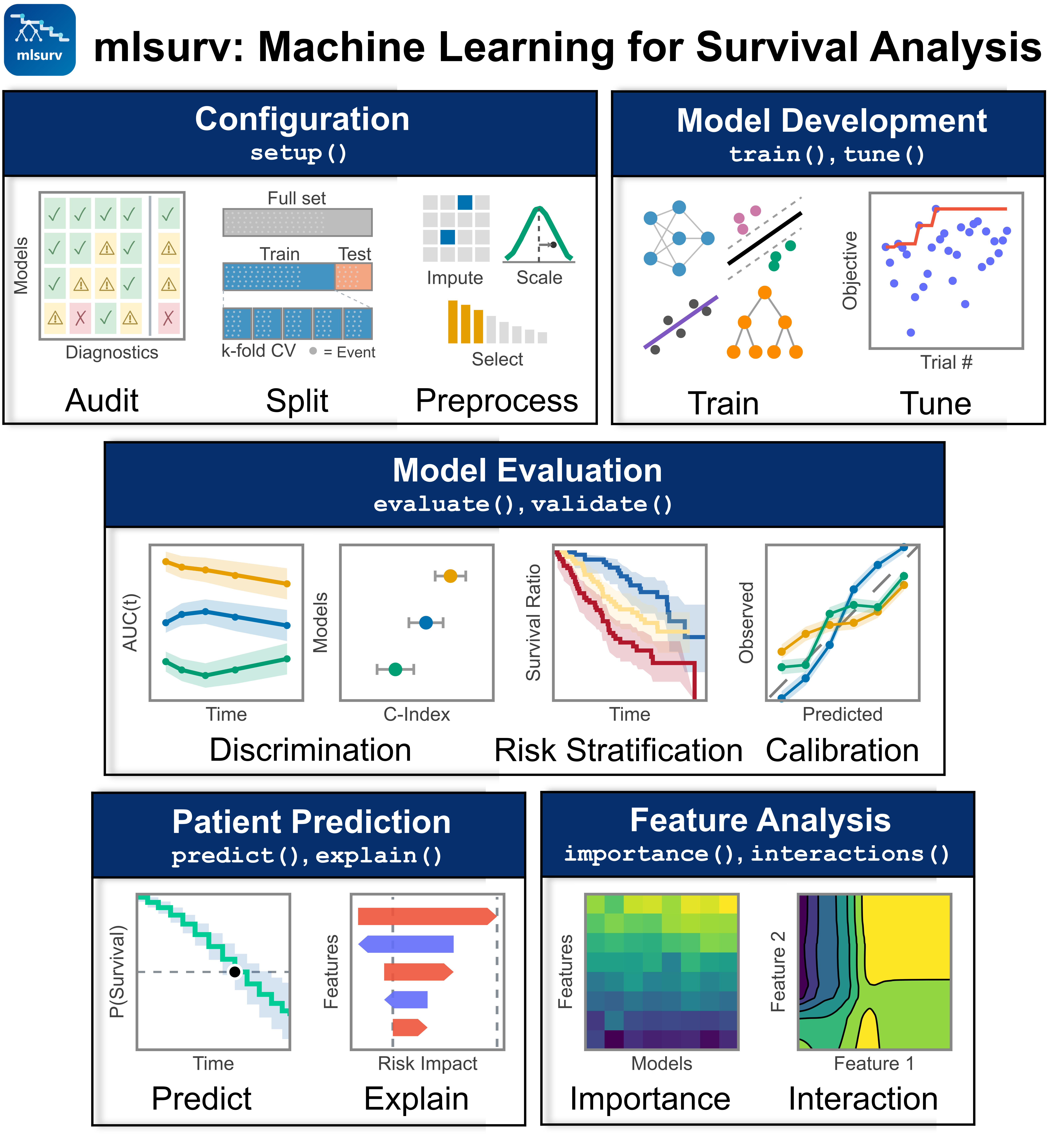
Survival analysis in clinical research typically requires stitching together various software tools for modeling, visualization, tuning, validation, and reporting. mlsurv unifies these processes into a single package: train, tune, and validate 10 survival models, generate publication-ready reports, and test on independent cohorts — all in under 10 lines of code.
Quick Start
from mlsurv import SurvivalLearner
from mlsurv.utils import load_survival_data

# Load data (pandas DataFrame + structured array with 'event' and 'time' fields)
X, y = load_survival_data('data.csv', time_col='OS_MONTHS', event_col='OS_STATUS')

# Train, tune, evaluate, and bootstrap all models
learner = SurvivalLearner(X, y)
learner.setup(random_state=42)
learner.run()

# Generate a publication-ready interactive HTML report
learner.generate_report('report.html')
See Vignette 01 for a complete walkthrough.
Accessing results and saving your analysis
The learner stores every result internally, so you don't need to capture what
run() returns. Reach any result through these read-only accessors at any time,
including after a reload:
result   = learner.models['coxph']      # ModelResult: .evaluation, .bootstrap, .model, .coefficients
best     = learner.best_model           # winning ModelResult
eval_all = learner.evaluation_result    # combined EvaluationResult (None before evaluate())
boot_all = learner.bootstrap_result     # combined BootstrapResult (None before bootstrap())
Export the result tables, or save and reload the whole session:
# Export all result tables to a single Excel workbook (or CSVs with format='csv')
learner.export_results('results.xlsx')

# Save the whole session and reload it later; results survive the round-trip
learner.save_learner('analysis.learner')
from mlsurv import load_learner
learner = load_learner('analysis.learner')
learner.models['coxph']                 # still here after reload
Command-Line Interface
mlsurv also provides a CLI for scripting, HPC pipelines, and quick one-off analyses:
# Full pipeline in one command
mlsurv run data.csv --time-col OS_MONTHS --event-col OS_STATUS --output report.html

# List available models
mlsurv models

# Train and tune a specific model
mlsurv tune data.csv --time-col OS_MONTHS --event-col OS_STATUS --model rsf --n-trials 50

# Validate on an external cohort
mlsurv validate data.csv --time-col OS_MONTHS --event-col OS_STATUS \
    --model coxph --validation-data external.csv \
    --val-time-col OS_MONTHS --val-event-col OS_STATUS
Run mlsurv --help for the full list of 26 subcommands, or see the
CLI Guide for detailed documentation and workflows.
Data Format
mlsurv expects a feature matrix X (pandas DataFrame) and a structured survival array y with event (bool) and time (float) fields.
From CSV (recommended):
from mlsurv.utils import load_survival_data

X, y = load_survival_data('data.csv', time_col='OS_MONTHS', event_col='OS_STATUS')
load_survival_data automatically drops the time/event columns from X and converts events to boolean and times to float, following scikit-survival conventions.
From existing DataFrame:
from mlsurv.utils import to_structured_array

y = to_structured_array(times=df['OS_MONTHS'], events=df['OS_STATUS'])
X = df.drop(columns=['OS_MONTHS', 'OS_STATUS'])
From date columns (when your data has diagnosis/follow-up dates instead of pre-computed times):
from mlsurv.utils import compute_survival_time

X, y = compute_survival_time(
    df, start_col='diagnosis_date', end_col='last_followup_date',
    event_col='vital_status', time_unit='months',
    event_values=['deceased'],
)
Missing values are handled automatically via median imputation during preprocessing (configurable via setup(imputer=...)).
Installation
Install from PyPI:
pip install mlsurv
With deep learning support (PyTorch, pycox) for DeepSurv / DeepHit:
pip install "mlsurv[deep]"
macOS note: the XGBoost models (xgbaft, xgbcox) need the OpenMP runtime,
which macOS does not ship by default. If you see an error about libomp.dylib
failing to load, install it once with Homebrew:
brew install libomp
To install the latest unreleased version from GitHub:
pip install git+https://github.com/goeckslab/mlsurv.git
For development:
git clone https://github.com/goeckslab/mlsurv.git
cd mlsurv
pip install -e ".[dev]"
See CONTRIBUTING.md for the architecture overview, coding rules, and test conventions.
Features
- Low-code interface:
setup()/run()/predict()/generate_report()for a full analysis in under 10 lines of code (Architecture) - 10 survival models across 4 families (linear, ensemble, kernel, neural) with unified interface (Models)
- Configurable preprocessing: Imputation, scaling, and 5 feature selectors with leak-free CV pipelines (Pipeline)
- Automated checks: EPV warnings, leakage detection, PH and linearity testing, model recommendations (Pipeline)
- Optuna tuning: EPV-aware search spaces, auto-trial sizing, convergence detection, study persistence (Evaluation)
- Multi-metric evaluation: Harrell/IPCW/Antolini C-index, Brier/IBS, AUC(t), calibration slope/intercept, GND test (Metrics)
- Multi-scale evaluation: Subpopulation analysis, prospective patient prediction, and single-patient HTML reports with SHAP waterfall + cohort context (Evaluation); feature importance, SHAP, interactions, and individual patient explanations (Feature Analysis)
- External validation & benchmarking: Independent cohort validation, delta-C/NRI/IDI incremental metrics (Validation)
- S(t|x) calibration: Opt-in per-model calibration via
train(calibrate=...)(isotonic / lowdof / breslow_slope) fit on leakage-free OOF predictions and applied automatically across evaluate / predict / validate, with a calibration banner in reports (Calibration) - Automated reporting: 12-section interactive HTML report, 14 limitation flags, TRIPOD+AI compliance checklist (Reporting)
- Parallel computing: One-line
n_jobs=-1setup with smart auto-disable and no oversubscription - 26 CLI subcommands for scripting and HPC pipelines (CLI Guide)
- Reproducible by default: Single
random_stateseeds all frameworks (scikit-learn, XGBoost, PyTorch). Bit-exact reproducibility requiresn_jobs=1; see Reproducibility
Documentation
| Guide | Description |
|---|---|
| Architecture & Models | Four-stage workflow, 10 survival models, complexity tiers, unified interface |
| Pipeline Configuration | Data loading, setup(), cross-validation, preprocessing, automated checks |
| Model Development & Evaluation | Training, tuning, metrics, bootstrap CIs, model comparison, subpopulation analysis, patient prediction |
| Feature Analysis | Feature importance, SHAP, interactions, individual patient explanations |
| Validation & Benchmarking | External cohort validation, incremental benchmarking metrics |
| Reporting & Compliance | Limitation flags, HTML reports, TRIPOD+AI checklist, data export |
| CLI Guide | 26 command-line subcommands for scripting and HPC |
| Tutorial Vignettes | 7 Jupyter notebooks from quickstart to immunotherapy case study |
Supported Models
mlsurv includes 10 survival models across 4 categories:
Linear/Parametric (3)
| Model | Description |
|---|---|
| CoxPH | Cox Proportional Hazards |
| CoxNet | Elastic Net penalized Cox |
| Weibull AFT | Parametric Weibull Accelerated Failure Time model |
Tree-Based Ensemble (4)
| Model | Description |
|---|---|
| RSF | Random Survival Forest |
| GBSA | Gradient Boosting Survival Analysis |
| XGBoost-Cox | XGBoost with survival:cox objective |
| XGBoost AFT | XGBoost with Accelerated Failure Time objective |
Support Vector Machine (1)
| Model | Description |
|---|---|
| FSSVM | Fast Survival SVM |
Neural Networks (2)
| Model | Description |
|---|---|
| DeepSurv | Continuous-time Cox neural network |
| DeepHit | Discrete-time neural network (DeepHitSingle) |
Note: All 10 models assume a single event type. See Limitations for clinical implications.
Limitations
- Single-event right-censored outcomes only (no competing risks, no time-varying covariates)
- See Reporting & Compliance for the full list of 14 automatically detected limitation flags
Citation
If you use mlsurv in published work, please cite:
mlsurv: Low-code machine learning for survival analysis. Goecks Lab, Moffitt Cancer Center. https://github.com/goeckslab/mlsurv
Changelog
See CHANGELOG.md for the release history.
License
MIT License - see LICENSE
Acknowledgments
mlsurv was built in part with Claude Code, Anthropic's agentic coding tool.
1 maintainer

Download files
Download the file for your platform. If you're not sure which to choose, learn more about installing packages.
Source Distribution
Built Distribution
Filter files by name, interpreter, ABI, and platform.
If you're not sure about the file name format, learn more about wheel file names.
Copy a direct link to the current filters
File details
Details for the file mlsurv-0.2.0.tar.gz.
File metadata
- Download URL: mlsurv-0.2.0.tar.gz
- Upload date:
- Size: 2.1 MB
- Tags: Source
- Uploaded using Trusted Publishing? No
- Uploaded via:
twine/6.2.0 CPython/3.11.14
File hashes
| Algorithm | Hash digest | |
|---|---|---|
| SHA256 |
033c51927f2640d4673802c90340b057914dab8025769816df40eff4e548850c
|
|
| MD5 |
bef032514da929143bdefdb8b4c4c74e
|
|
| BLAKE2b-256 |
f167c284b189f6e2a82e2245db4c654190e0333b9e1bbd1358f98e3e93e5fe17
|
File details
Details for the file mlsurv-0.2.0-py3-none-any.whl.
File metadata
- Download URL: mlsurv-0.2.0-py3-none-any.whl
- Upload date:
- Size: 1.3 MB
- Tags: Python 3
- Uploaded using Trusted Publishing? No
- Uploaded via:
twine/6.2.0 CPython/3.11.14
File hashes
| Algorithm | Hash digest | |
|---|---|---|
| SHA256 |
8b308ed64844682cf983a15c9e37416ddc2e6a3fa6ace238bd5c77fca29721cc
|
|
| MD5 |
c4416f507bf74a3fbafbf2c7d2df835b
|
|
| BLAKE2b-256 |
f899a763af43ac07322fb355182f0d9ab6cf3c63f3ce6543198d7d5f77aa558f
|














