
mltree-mcp




Your ML workflow as a node map, your experiments as a tree — filled in by your coding assistant as it works.
mltree-mcp is an MCP server for Codex, Claude Code and any other MCP client.
While the assistant writes and runs your ML / QSAR / GNN code, it calls mltree tools to:
- register each pipeline step (load → clean → featurize / graph-build → split → HPO → train → evaluate) as a node, with its own
.pyscript, inputs, outputs and default params; - wire the steps into a DAG;
- log every execution as a run with params, metrics and artifacts, branching from a parent run (HPO trials, GNN variants…), so experiments form a mind-map tree instead of being scattered down a notebook.
Everything lives as plain files in your repo under .mltree/, and mltree-mcp view opens a KNIME-style map of it in your browser.
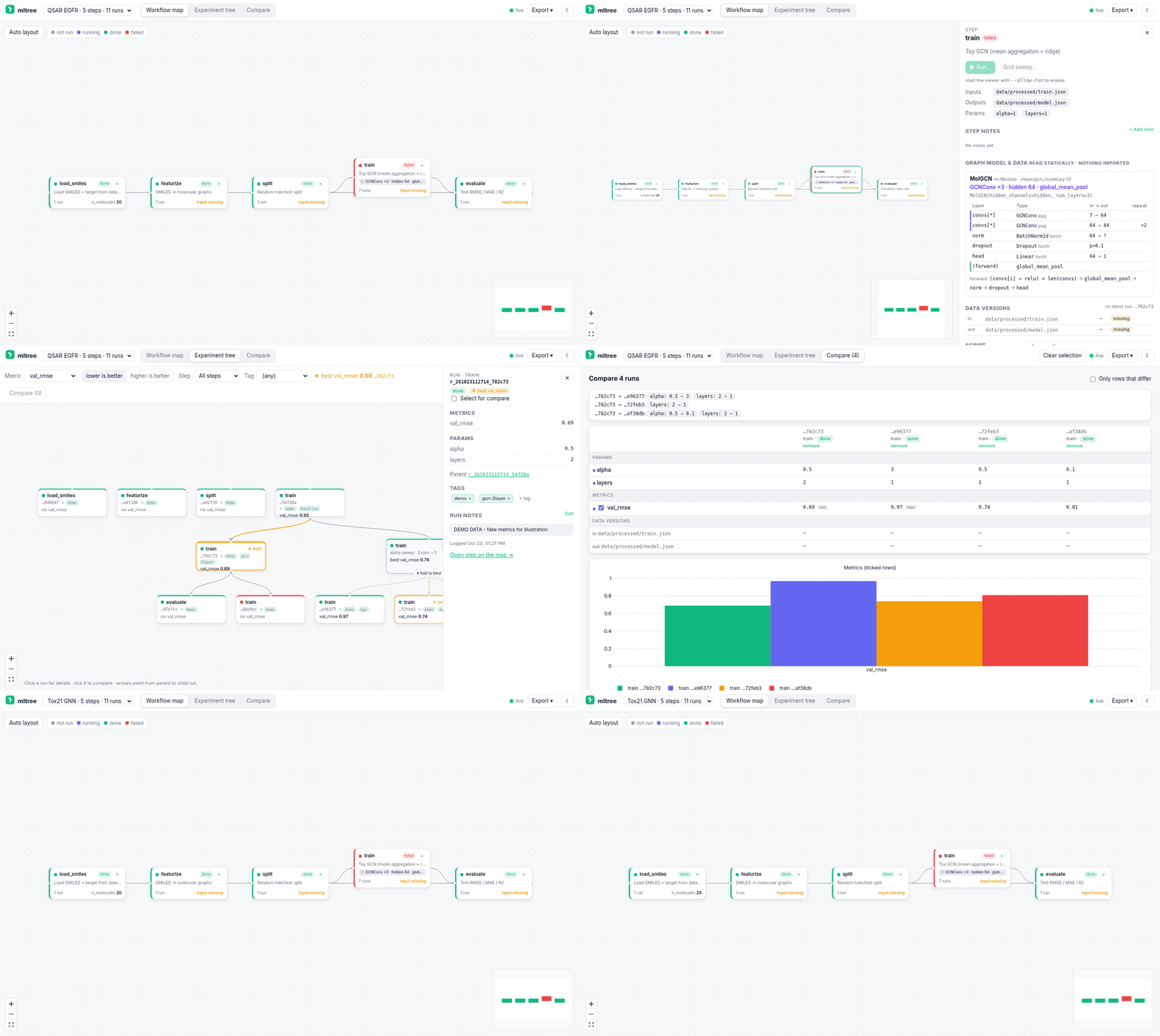
Status: 0.8.0. MCP core, map viewer,
scan_projectfor existing projects, shareable HTML export, running steps and grid sweeps from the map (opt-in), data versions, compare with param changes / curves / code diffs, notes and tags, GNN views, and now PyPI packaging, CI and a multi-project viewer. See the changelog.
Install
Requires Python 3.11+. Works with the MCP Python SDK 1.x (FastMCP) and 2.x (MCPServer).
pip install mltree-mcp      # or: uv tool install mltree-mcp
mltree-mcp --version

# or run it without installing
uvx mltree-mcp --version
The wheel ships the prebuilt viewer, so Node is not needed. From source:
git clone https://github.com/yboulaamane/mltree-mcp
cd mltree-mcp
pip install -e .            # or: uv pip install -e ".[dev]"

# straight from the git repo
uvx --from git+https://github.com/yboulaamane/mltree-mcp mltree-mcp --version
The mltree-mcp command starts a stdio MCP server (that is what Claude Code and Codex expect). Clients launch it for you; you don't run it by hand.
Which project does it use?
The project root is resolved on every call, in this order:
--project <dir>flag /MLTREE_PROJECTenvironment variableCLAUDE_PROJECT_DIR(Claude Code sets this for stdio servers automatically)- the server's current working directory
Add it to Claude Code
# once on PyPI
claude mcp add mltree -- uvx mltree-mcp

# before that, from your clone
claude mcp add mltree -- uvx --from /path/to/mltree-mcp mltree-mcp

# make it available in every project, or share it with the repo via .mcp.json
claude mcp add --scope user    mltree -- uvx mltree-mcp
claude mcp add --scope project mltree -- uvx mltree-mcp

claude mcp list        # should show: mltree ... ✔ Connected
Inside Claude Code, /mcp shows the server and its tools. Claude Code passes CLAUDE_PROJECT_DIR, so the store lands in the project you opened.
Add it to Codex
Either use the CLI:
codex mcp add mltree -- uvx mltree-mcp
codex mcp list
or edit ~/.codex/config.toml (or a project-scoped .codex/config.toml in a trusted project):
[mcp_servers.mltree]
command = "uvx"
args = ["mltree-mcp"]
# before PyPI: args = ["--from", "/path/to/mltree-mcp", "mltree-mcp"]
startup_timeout_sec = 20   # first uvx run downloads dependencies

# Optional: pin the project instead of using the directory Codex starts in
# [mcp_servers.mltree.env]
# MLTREE_PROJECT = "/home/you/projects/qsar-gnn"
In the Codex TUI, /mcp lists active servers. Codex also reads the server's built-in instructions, which tell it when to call each tool.
Use it on an existing project over SSH with Codex
You already have a project on a GPU server: numbered scripts, a utils.py, a notebook or two, some metrics.json
files, maybe mlruns/ or an Optuna study. scan_project builds the map from that code without running any of it.
It parses scripts with Python's ast and reads notebooks as JSON.
1. Install on the server (once):
ssh you@server
pip install --user "git+https://github.com/yboulaamane/mltree-mcp"   # or: uv tool install git+https://github.com/yboulaamane/mltree-mcp
mltree-mcp --version
2. Register it with Codex on the server, pinned to the project:
codex mcp add mltree -- mltree-mcp --project /path/to/your/project
3. Ask Codex to scan it. Start codex in the project and say:
Scan this project with mltree and show me the map. Fix anything the scan got wrong.
Codex calls scan_project (the server instructions tell it to do this first on an existing project). It reviews
the summary and corrects edges or kinds with connect_steps / add_step. You can also scan from the shell:
mltree-mcp scan --project /path/to/your/project --dry-run   # preview, writes nothing
mltree-mcp scan --project /path/to/your/project             # write .mltree/
4. Look at it from your laptop. On the server:
mltree-mcp view --project /path/to/your/project # serves on localhost:8765 on the server
On your laptop:
ssh -L 8765:localhost:8765 you@server
# then open http://localhost:8765
What the scan detects
| Signal | How |
|---|---|
| Data reads / writes | pd.read_* / .to_*, open() (by mode), np.load/save, torch.load/save, joblib, pickle, json, yaml, Path.read_*/write_*, h5py, shutil.copy, RDKit / PyG loaders, project helpers such as load("x.json") / save(obj, "y.pkl"). Paths are folded from string constants, f-strings, Path(__file__).parent / "data", os.path.join, and argparse / click defaults. |
| Params | argparse add_argument and click @option defaults, sys.argv[...] if ... else default, UPPERCASE numeric constants, and literal kwargs like test_size, random_state, n_trials, lr, epochs. |
| Description | The module docstring, or the notebook's first markdown heading. |
| Kind | data / clean / split / featurize / hpo / train / eval, from the file name, imports and calls. For example, optuna.create_study gives hpo, train_test_split gives split, .fit or optimizer.step() gives train, and sklearn.metrics gives eval. |
| Utilities | A helper module such as utils.py (imported, with no entry point and no I/O) is not a step. It is noted in the description of each step that uses it. |
| Edges | 1) one step's output path matches another's input (exact, glob, or folder); 2) imports of other step modules; 3) notebook section order; 4) file numbering (01_, step2_) for steps that have no other upstream. Cycles are never added. |
| Notebooks | One step per notebook, or one step per markdown-headed section with notebook_sections=true. Magics are ignored. |
Existing results → runs tagged imported |
*metrics*.json / *results*.csv style files; MLflow mlruns/ (params, last metric values, status); Optuna SQLite studies (one parent run per study, trials as child runs, categorical params decoded, read-only); Lightning lightning_logs/version_* (hparams + last metrics.csv values); wandb offline runs (summary + config). TensorBoard event files are noted but not parsed. |
Re-scanning is safe. Steps the scanner owns are refreshed, new scripts become new steps, and nothing is deleted.
A step you or the assistant edited with add_step keeps its description, kind and param values; the scan only adds
new inputs, outputs and param keys. Results are imported once (they are keyed by source). The summary lists new,
updated, merged and unchanged steps, edges, inputs no step produces, outputs no step consumes, skipped files, and
imported runs. Default excludes: virtualenvs, .git, tests/, test_*.py, __pycache__, .mltree,
node_modules, build/, dist/.
The map viewer
mltree-mcp view                                   # project = $MLTREE_PROJECT / cwd
mltree-mcp view --project ~/projects/qsar-gnn --port 8765
# then open http://localhost:8765
Or ask the assistant: it calls open_map, which starts the viewer in the background if needed and returns the URL.
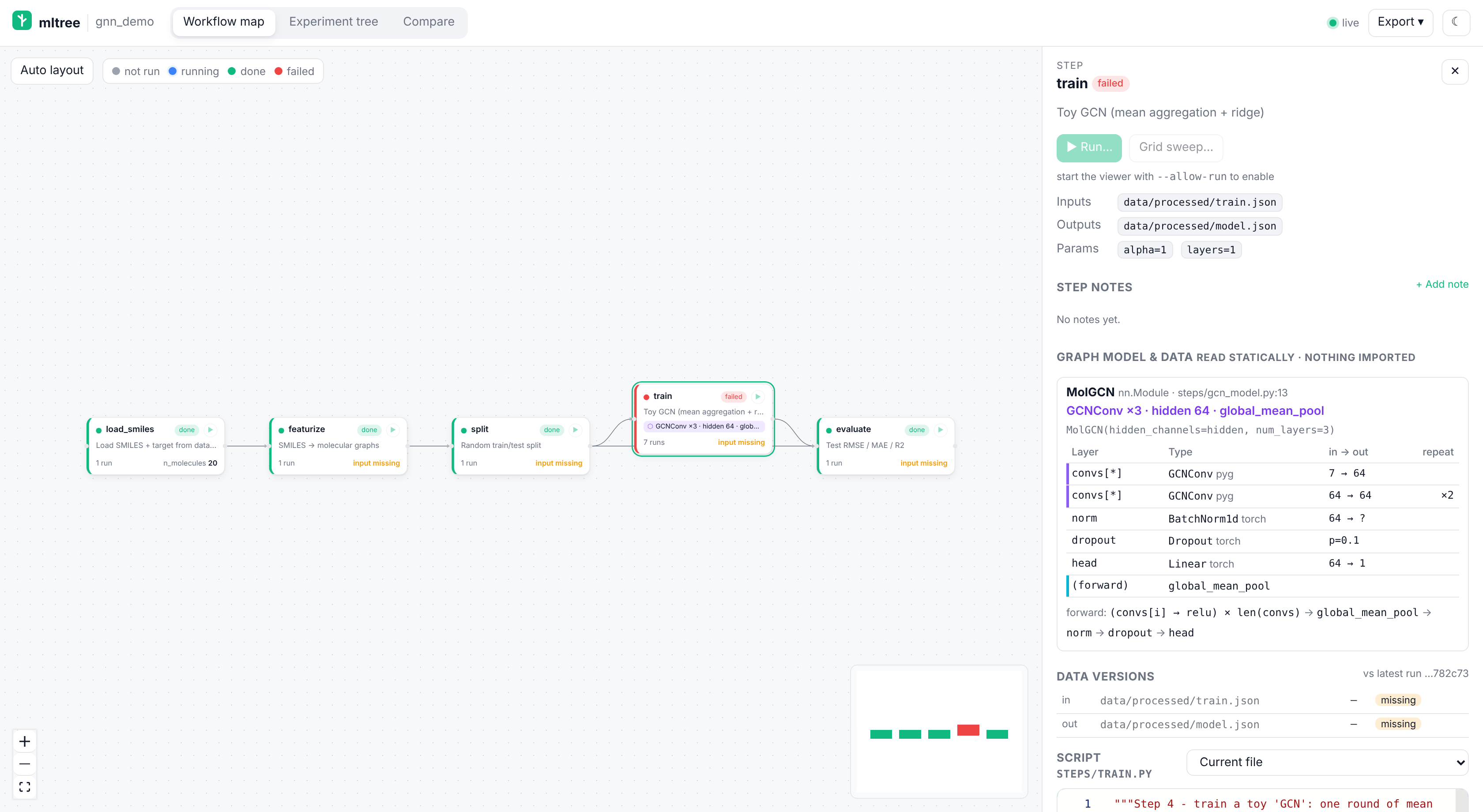
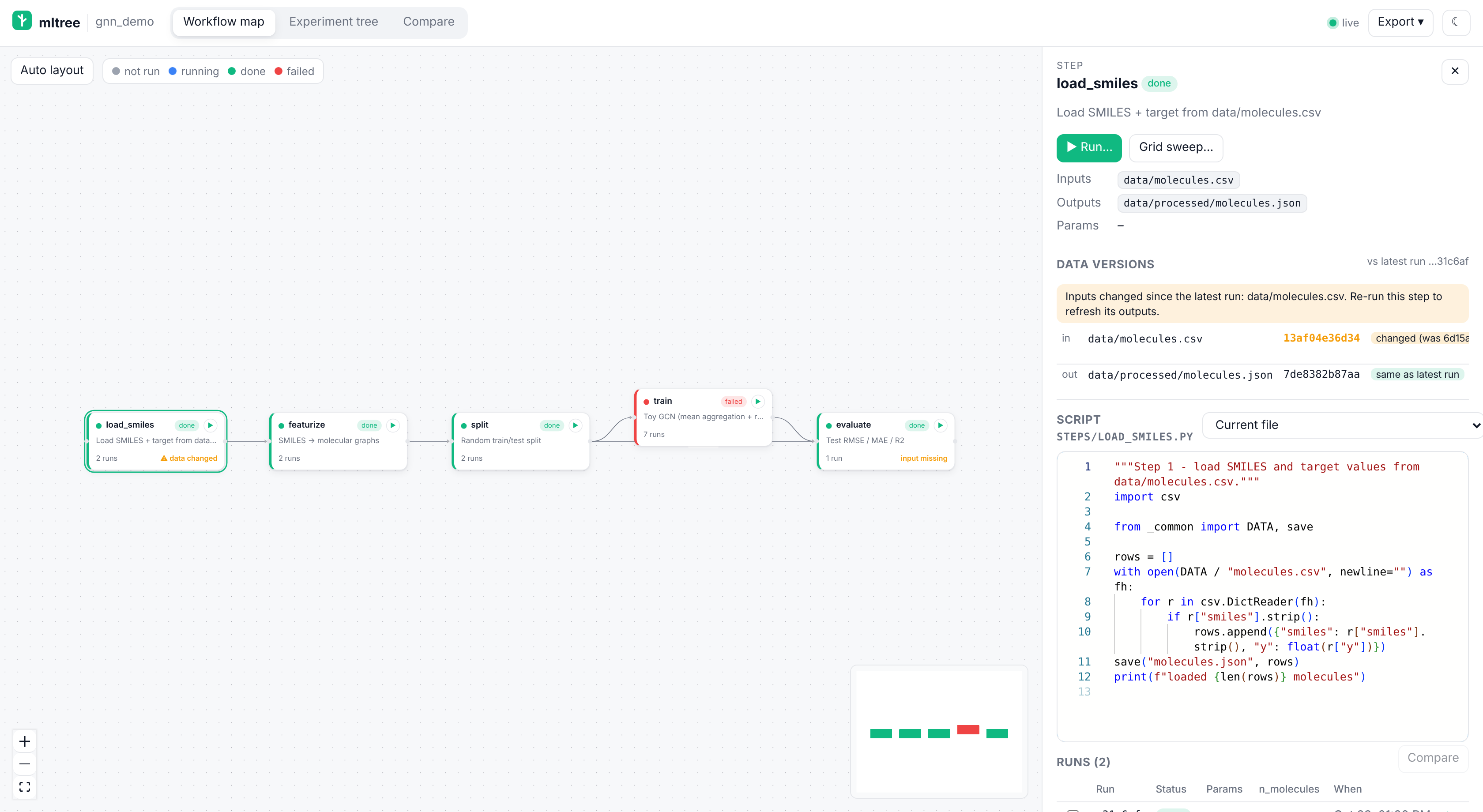
- Workflow map. Your steps form a DAG, coloured by each step's latest run (grey not run, blue running, green done, red failed). Nodes are laid out automatically (dagre). If you drag them, their positions are saved to the store (
pos_x/pos_y), and Auto layout resets them. - Step panel. Click a node to see its inputs, outputs and params, and a read-only editor (Monaco, the VS Code editor) showing the script. A dropdown switches between the current file and the snapshot saved with each run, marked "same as current" or "changed". Below it is the step's runs table.
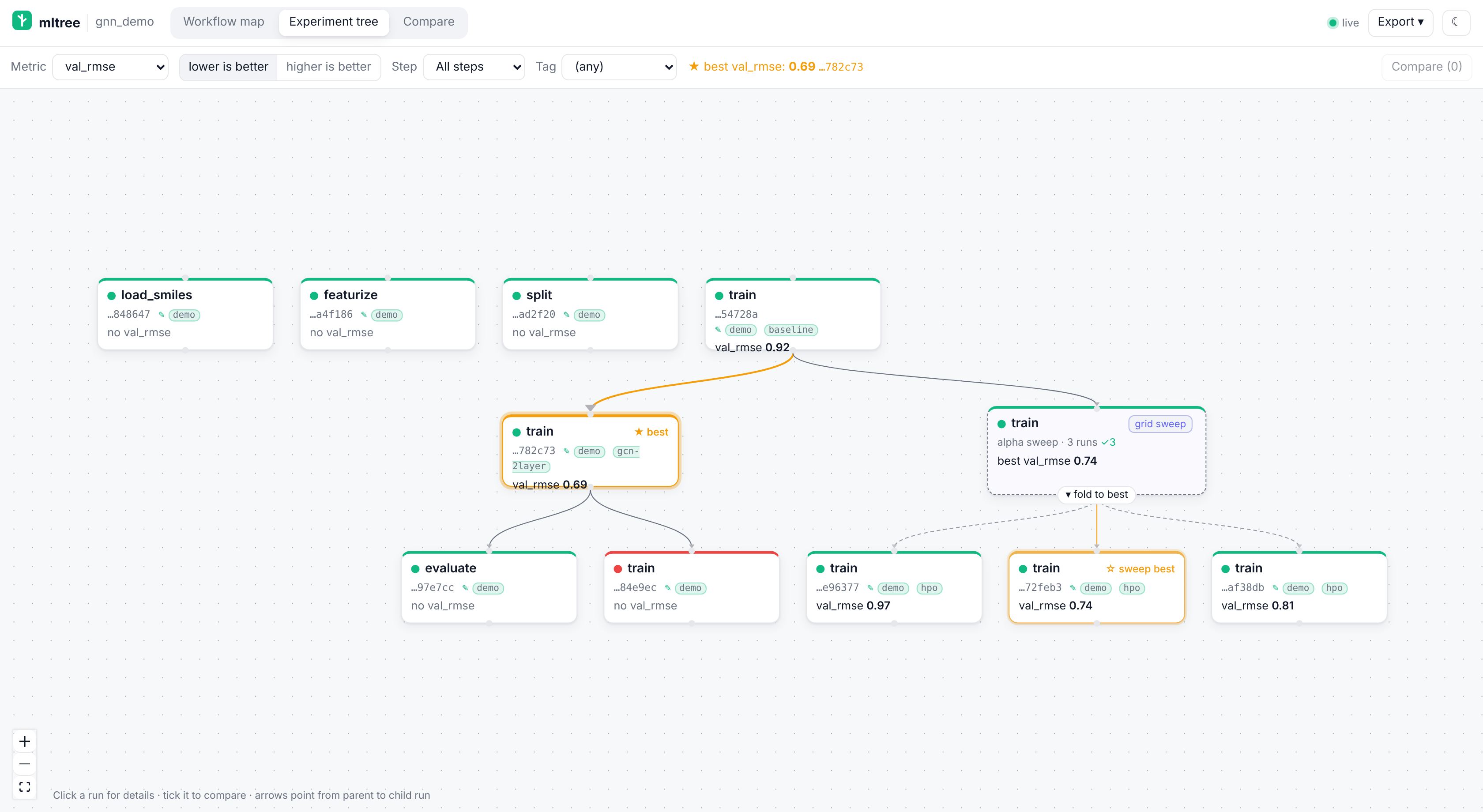
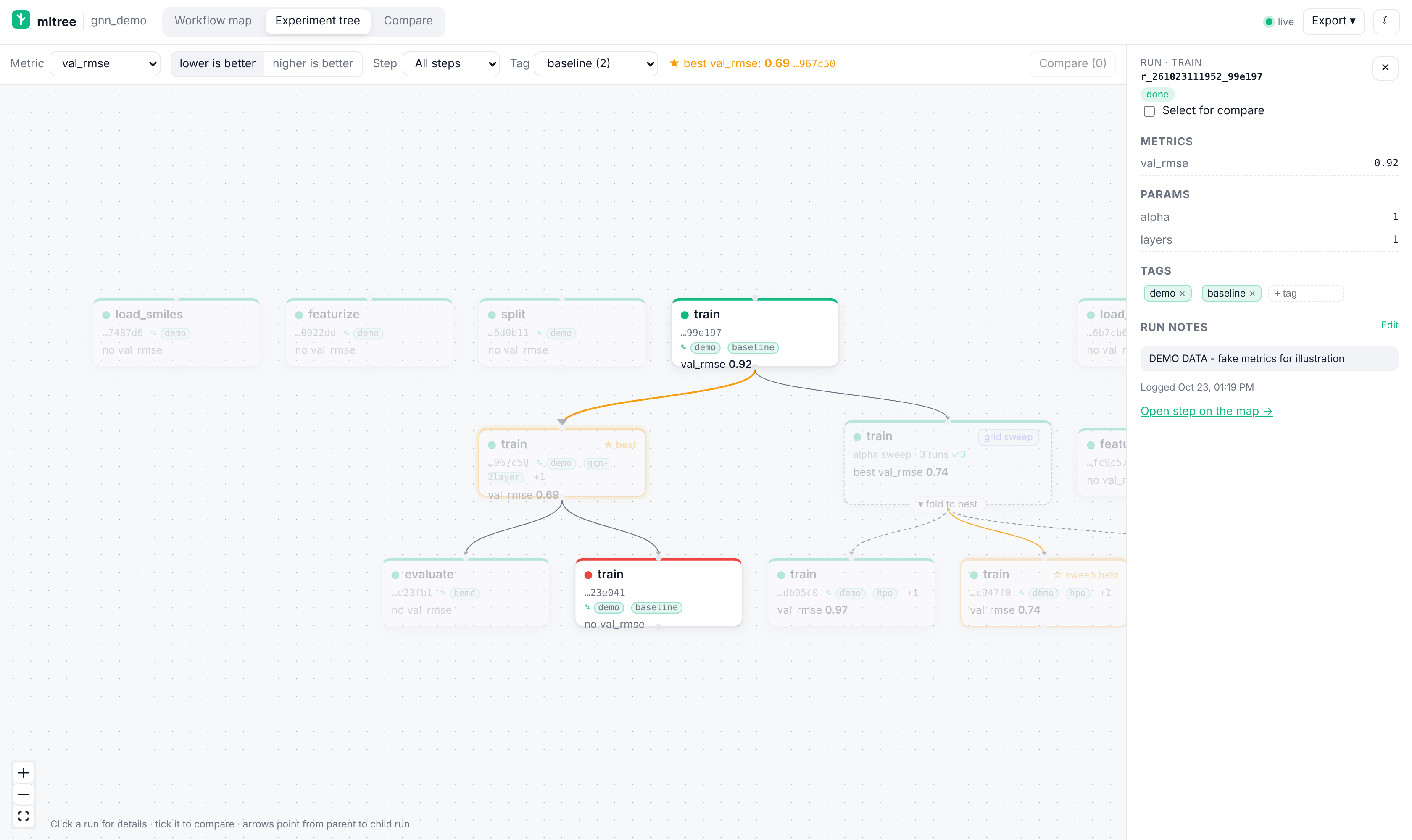
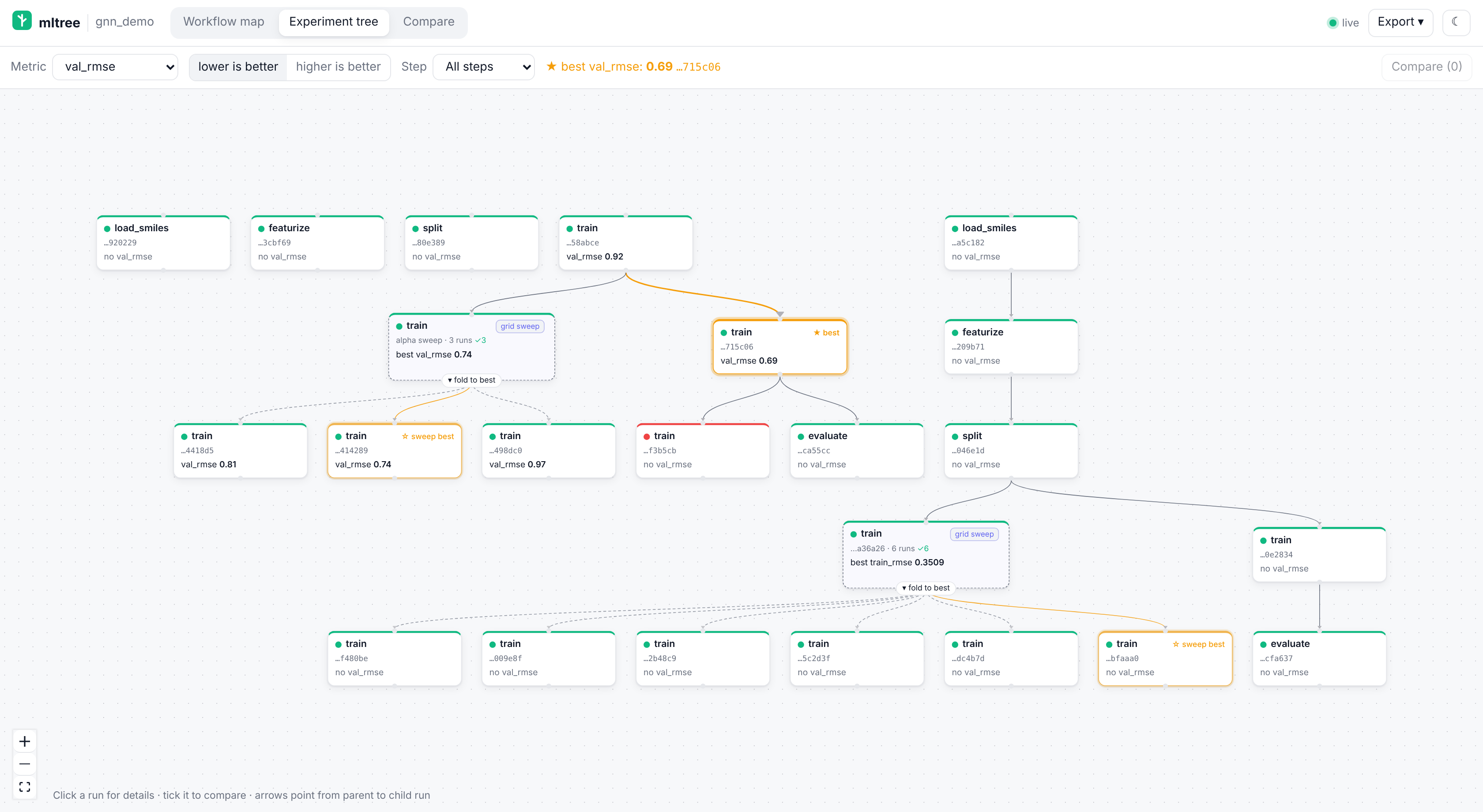
- Experiment tree. All runs form a mind-map built from
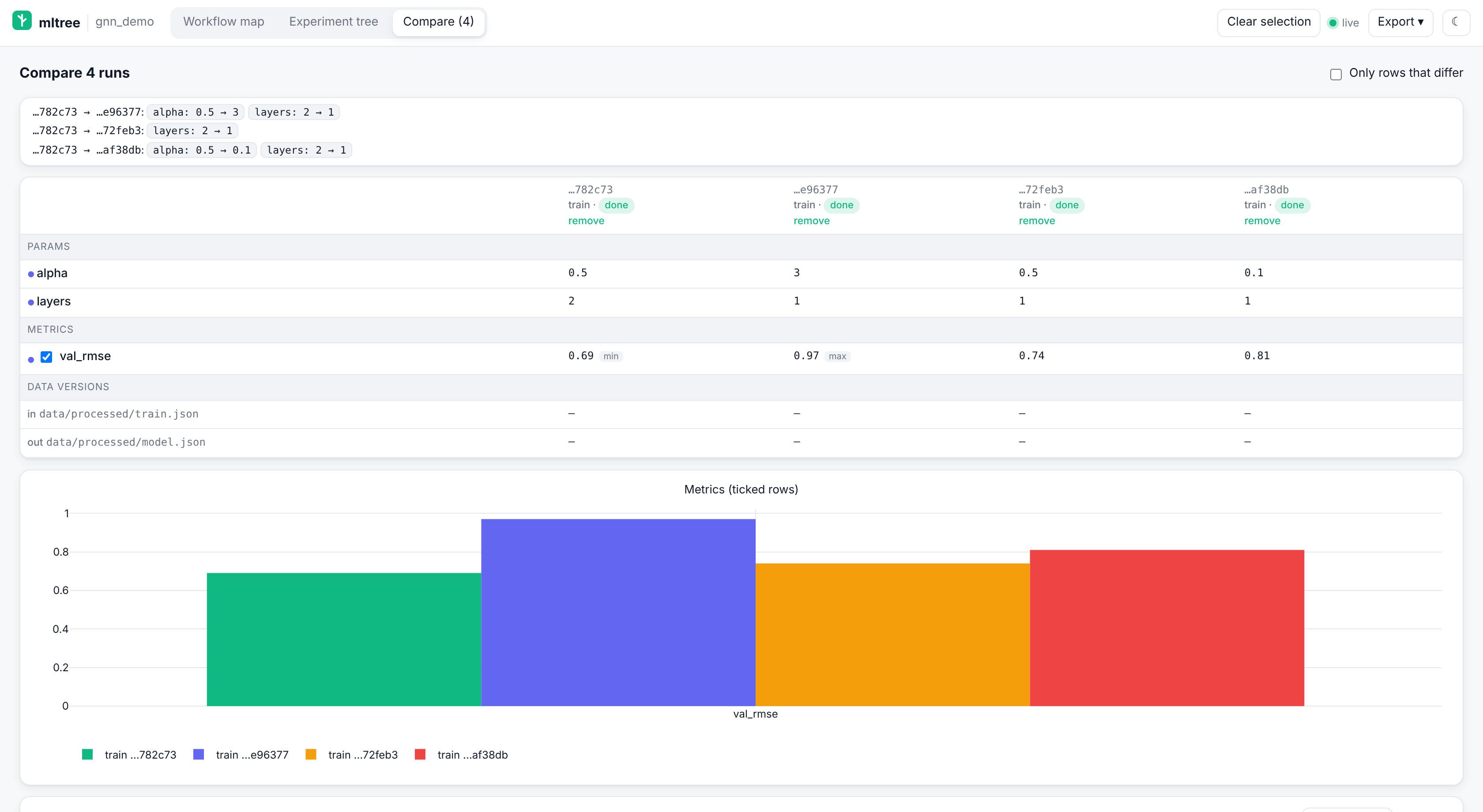
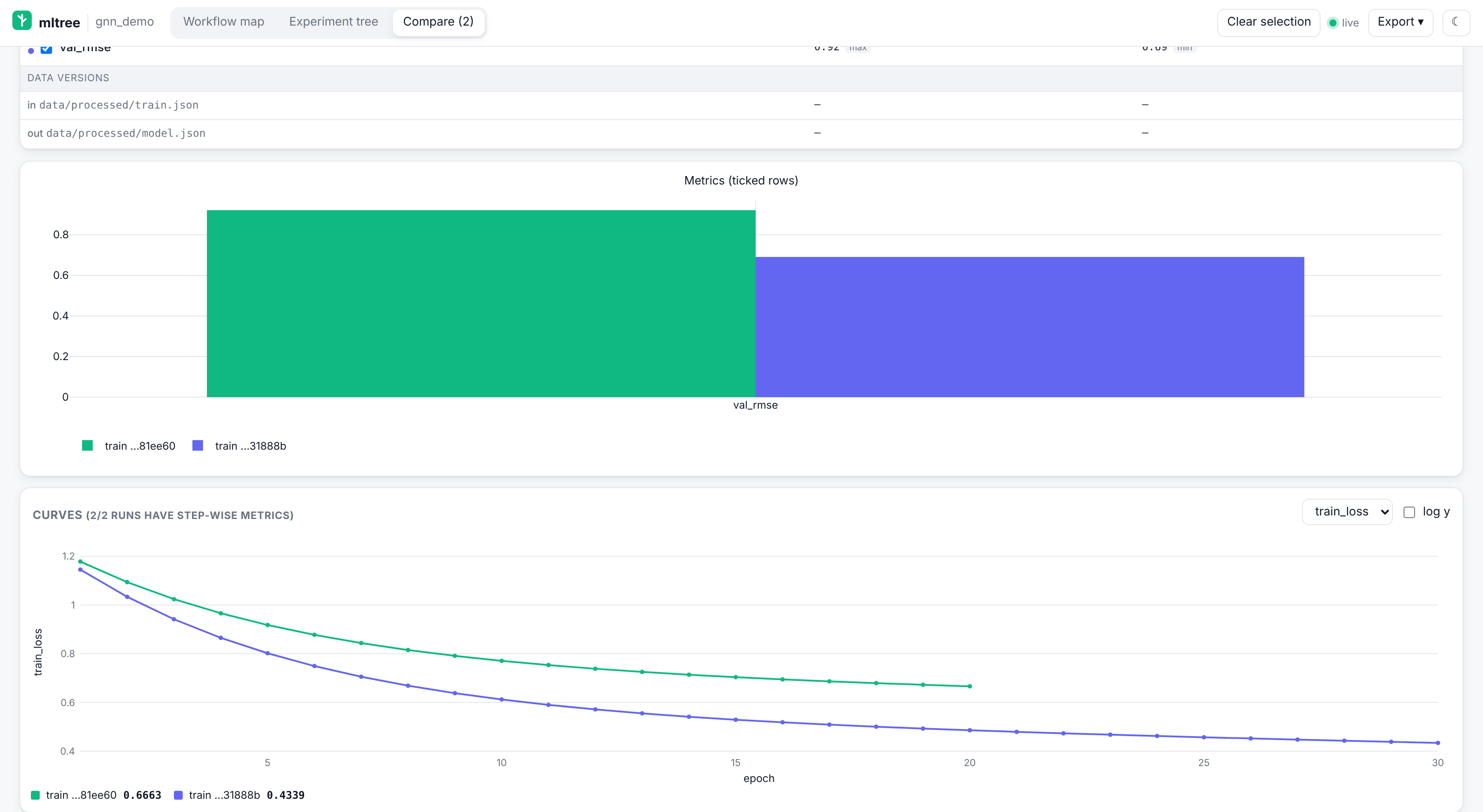
parent_run_id. Pick a metric and "lower/higher is better" to highlight the best run (★). You can filter by step. - Compare. Tick 2 or more runs anywhere to get a params/metrics table (rows that differ are marked) and a grouped Plotly bar chart.
- Live. The page updates by itself as the assistant logs runs, using Server-Sent Events with polling as a fallback. Dark and light themes follow your OS and can be toggled.
The built frontend ships inside the Python package (src/mltree_mcp/static/), so pip install needs no Node. Monaco is bundled too, with no CDN, so it works offline and on air-gapped clusters.
Data versions
Each step's inputs and outputs that are files or folders inside the project are fingerprinted. The fingerprint is
the SHA-256 of the content (a folder hashes its sorted relative path + file hash list) and the version shown is
its first 12 hex characters. Hashes are cached in mltree.db by path, size and mtime, so unchanged files are not
re-read. Files over 4 GiB and folders over 5000 files get a quick digest (size + mtime only, marked ~) instead.
- Runs record the versions they used:
log_runrecords inputs and outputs, a run started from the map or byrun_steprecords inputs at start and outputs when it succeeds. Runs imported byscan_projectrecord none (it never runs or reads your data beyond the scan). - The step panel's Data versions table compares the files now with the latest run. The node shows ⚠ data changed when an input changed since that run and input missing when one is gone, so you know which steps to re-run.
- Compare has a Data versions row group, and the
data_status(step?)tool gives the assistant the same view. - Only paths are hashed, never executed or parsed. Paths outside the project are shown by name only in the export.
Compare: param changes, curves and code diff
Tick 2 or more runs (or use the Runs table's Compare):
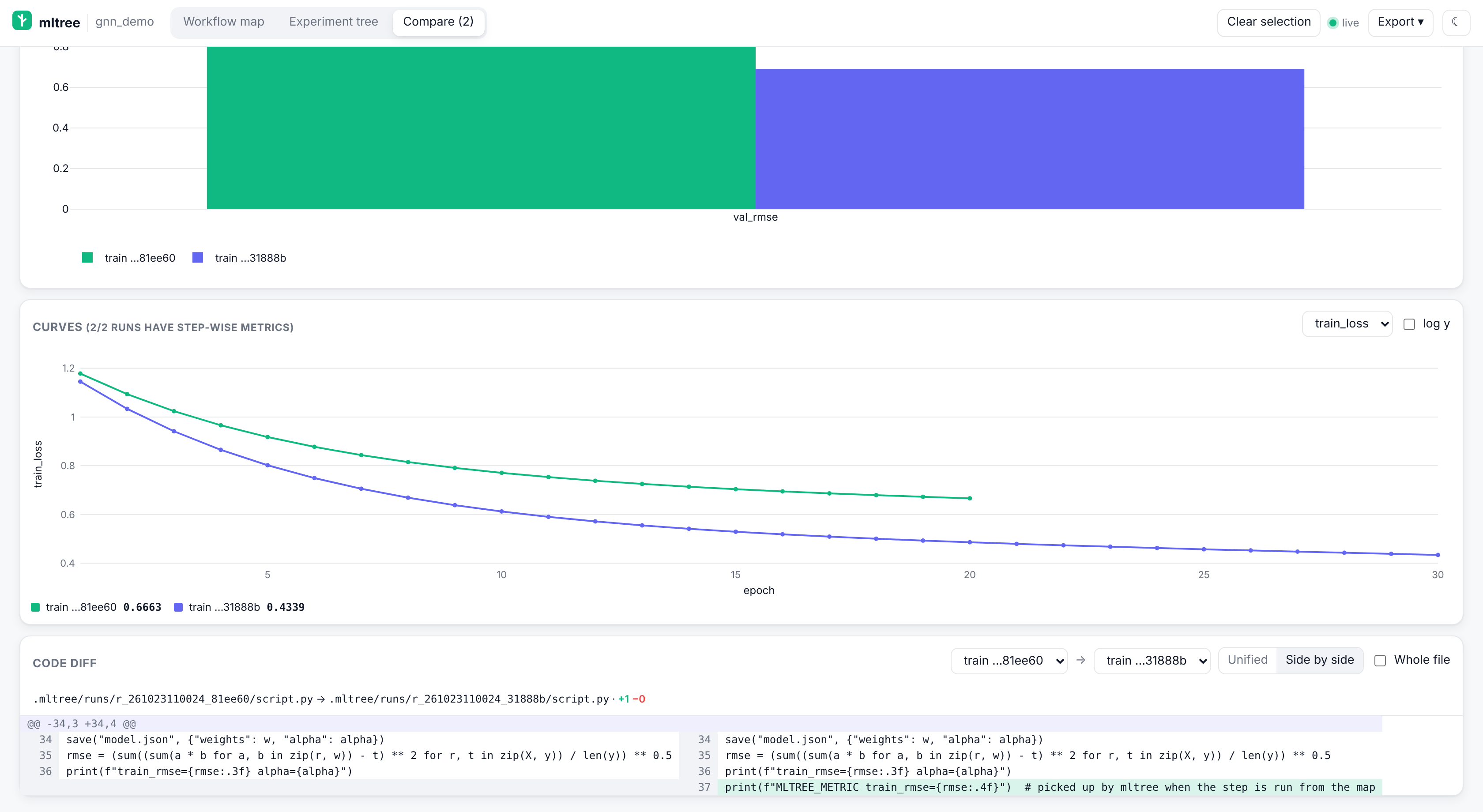
- Param changes: for each run, the params that differ from the first one (
alpha: 1 → 0.5). - Params / metrics / data versions table, rows that differ marked, and a grouped bar chart of the ticked metrics.
- Curves: step-wise metrics (
MLTREE_METRIClines, orlog_run(history=[{"epoch": 1, "loss": 0.9}, ...])) overlaid per run, with a metric picker and log-y. - Code diff of two runs' script snapshots, unified or side by side, hunks or the whole file. It is computed in the browser, so it also works in the HTML export.
Notes and tags
Click + Add note / Edit in a step's panel or a run's panel to write free-text notes (Ctrl+Enter saves, Esc
cancels). Runs also get tags: type one or more (comma-separated) in the run panel's tag box, × removes one. Notes
show as ✎ on map nodes, tree cards and the runs table; the experiment tree's Tag filter dims every run without
that tag. The assistant uses add_note and tag_run, and get_pipeline returns each step's notes and the tags in
use. Notes and tags are in the HTML export (read-only there).
Editing notes doesn't need --allow-run, but the same request checks apply as for runs: an X-MLTree: 1 header,
a loopback Host and, if present, a loopback Origin.
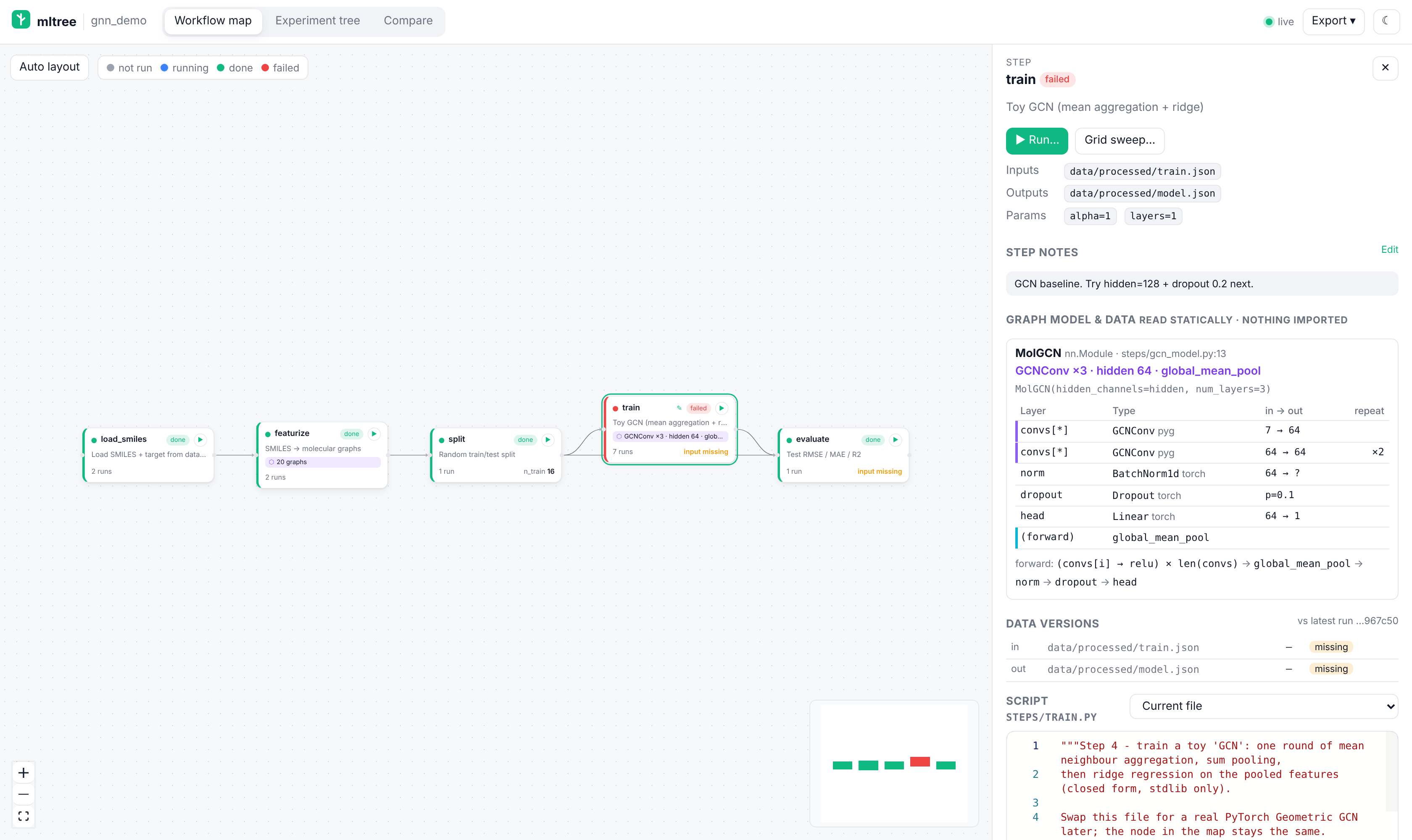
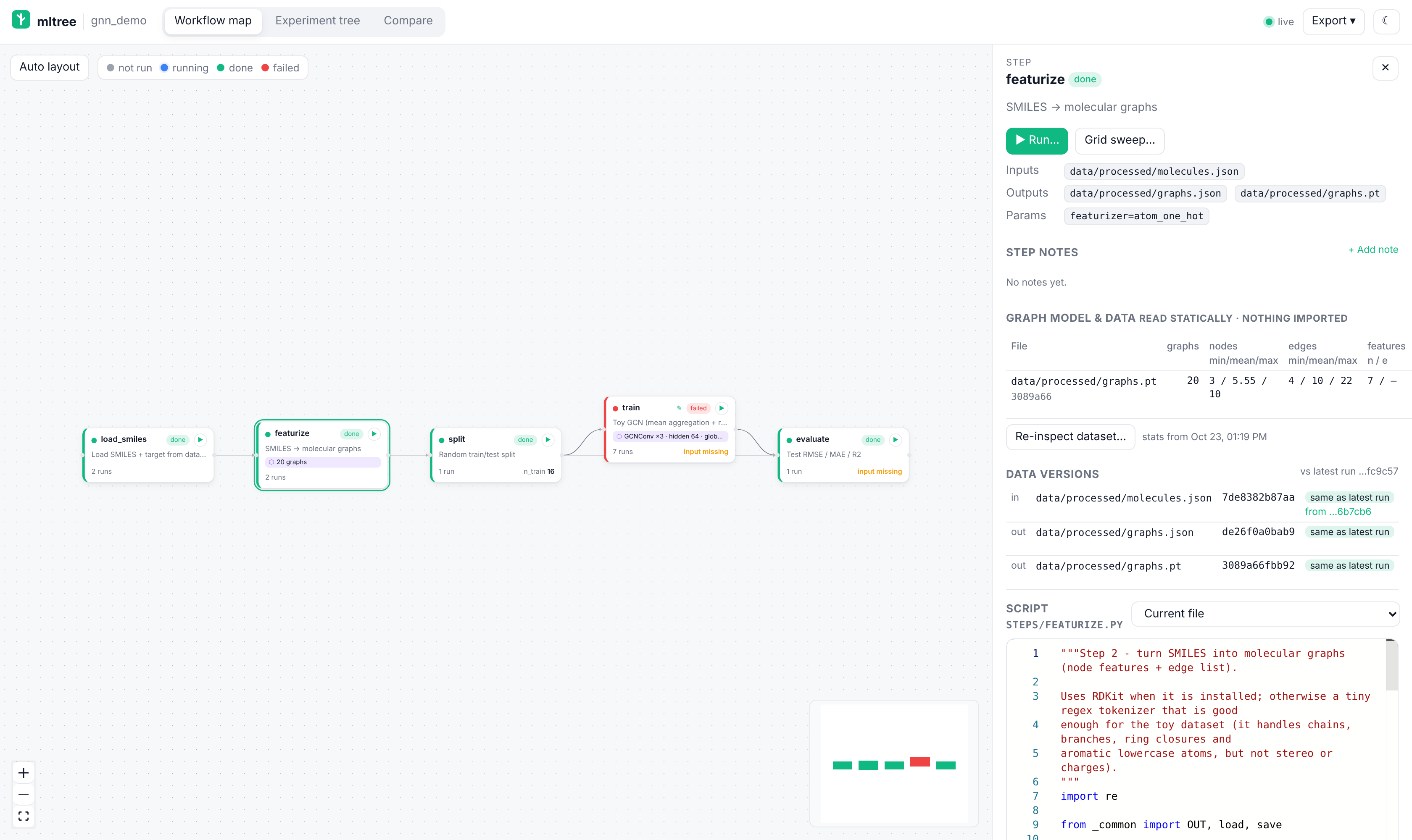
GNN views
For graph-learning steps the step panel gets a Graph model & data section, and the node a chip like
GCNConv ×3 · hidden 64 · global_mean_pool or 20 graphs.
- Architecture summary (static). mltree parses the step's script and the project modules it imports (it never
imports or runs them). For
torch.nn.Modulesubclasses that use PyTorch Geometric or DGL layers it lists the layers in__init__(type, library, in → out channels, heads, repeats fromfor _ in range(num_layers)/ModuleListcomprehensions), the readout / pooling and the order the layers are called inforward. Prebuilt models (GCN(in, hidden, num_layers),GAT,GIN, …) and literal / default / module-constant dimensions are resolved; anything else is shown as the source text. - Dataset stats (opt-in introspection). The section lists dataset classes the script uses (
TUDataset,MoleculeNet,DGLDataset, …) and.pt/.bingraph files among the step's outputs. Inspect dataset… loads the file in a separate Python process (--python/$MLTREE_PYTHONwith torch installed) without importing your code, and caches: number of graphs, nodes / edges min/mean/max, node and edge feature sizes, self loops, isolated nodes, average degree, labels (classes and counts, or the regression range) and train/val/test masks. Astate_dictcheckpoint gives tensor shapes and the parameter count. Stats are marked stale when the file changes. This loads data withtorch.load(which can run code embedded in a pickle ifweights_only=Truefails), so it needsview --allow-run,MLTREE_ALLOW_RUN(MCPgnn_summary(introspect=true)) or the explicit CLI:
mltree-mcp gnn --project . --step featurize                  # static summary + cached stats (JSON)
mltree-mcp gnn --project . --step featurize --introspect --python ~/envs/pyg/bin/python
Broken or unusual scripts never break the map; the section just shows less. The export keeps the summaries and cached stats (not the source fragments when scripts are left out) and never offers introspection.
On a remote server or HPC cluster
The viewer binds to 127.0.0.1 by default. Run it on the server and tunnel the port from your laptop:
# on the server (or let the assistant call open_map there)
mltree-mcp view --project ~/projects/qsar-gnn

# on your laptop
ssh -L 8765:localhost:8765 you@server
# open http://localhost:8765
Use --host 0.0.0.0 only on a network you trust. The viewer has no authentication; without --allow-run its only
writes are node positions and notes/tags, and notes/tags are refused unless the request comes through a loopback
Host (an SSH tunnel). --allow-run refuses any bind other than 127.0.0.1, so run steps through the SSH tunnel.
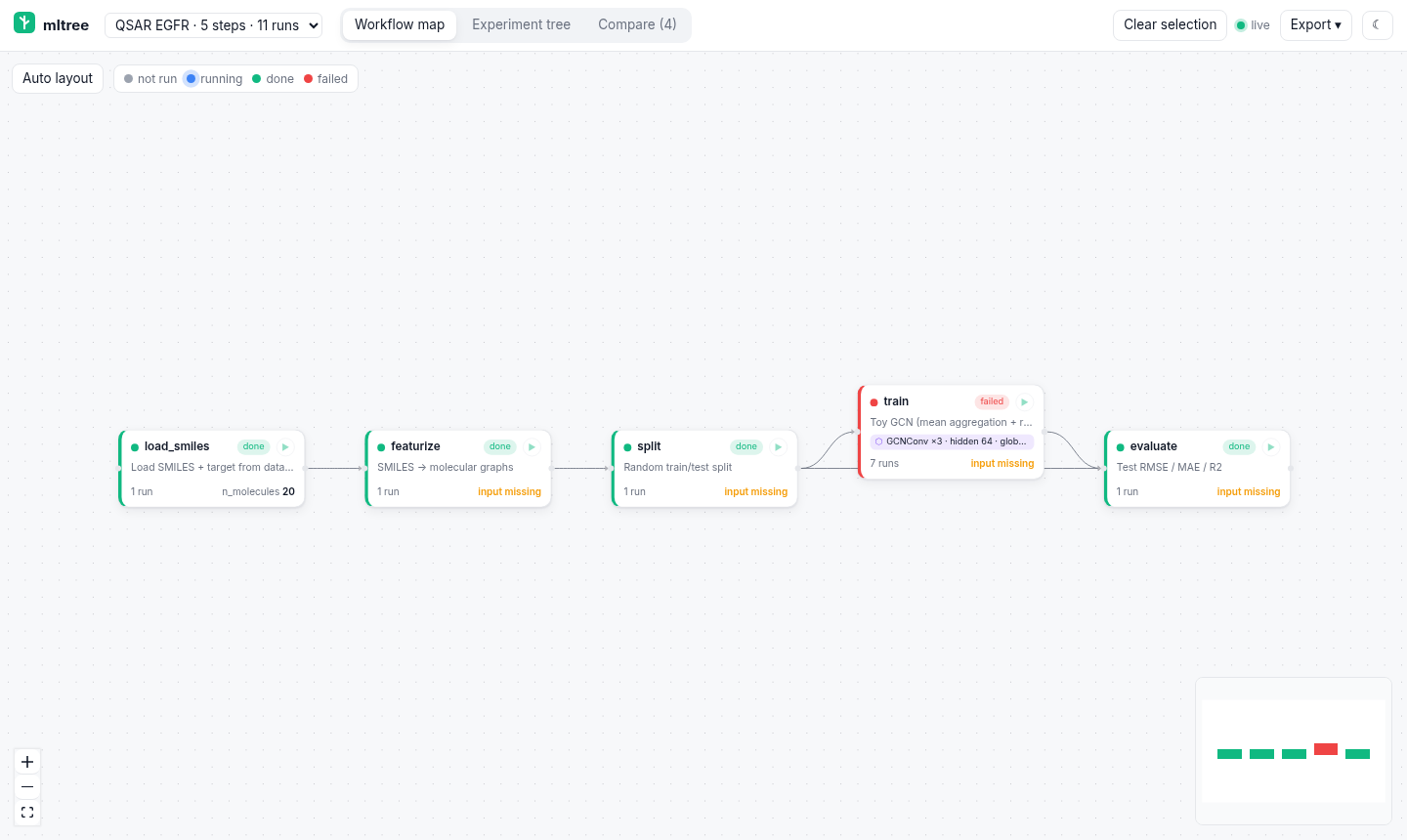
Several projects in one viewer
One viewer can serve several projects, with a switcher in the header. Each project gets its own URL prefix
(/p/<slug>/), API, live stream and run manager, so tabs on different projects work side by side.
mltree-mcp view --projects ~/projects/qsar-egfr ~/projects/tox21-gnn

# or register them once (stored in ~/.mltree/projects.json, or $MLTREE_HOME/projects.json)
mltree-mcp projects add ~/projects/qsar-egfr --name "QSAR EGFR"
mltree-mcp projects add ~/projects/tox21-gnn
mltree-mcp projects list
mltree-mcp projects remove tox21-gnn      # by folder or by name
mltree-mcp view --projects                # serves everything in the registry
http://localhost:8765/ redirects to the first project, GET /api/projects lists them all (name, steps, runs), and
every route in the HTTP API is available under /p/<slug>/. --allow-run and the edit guards apply
per project exactly as in single-project mode. When the assistant calls open_map and a multi-project viewer is
already running on the port, it links to that project's page (or warns if the project isn't in the viewer).
The registry file is plain JSON:
{"projects": [{"path": "/home/you/projects/qsar-egfr", "name": "QSAR EGFR"}, {"path": "/home/you/projects/tox21-gnn"}]}
Run steps from the map
Start the viewer with --allow-run and each node gets a ▶ button, and the step panel gets ▶ Run… and Grid sweep…:
mltree-mcp view --project ~/projects/qsar-gnn --allow-run           # Python: see "Which interpreter" below
mltree-mcp view --project ~/projects/qsar-gnn --allow-run --python ~/miniconda3/envs/gnn/bin/python
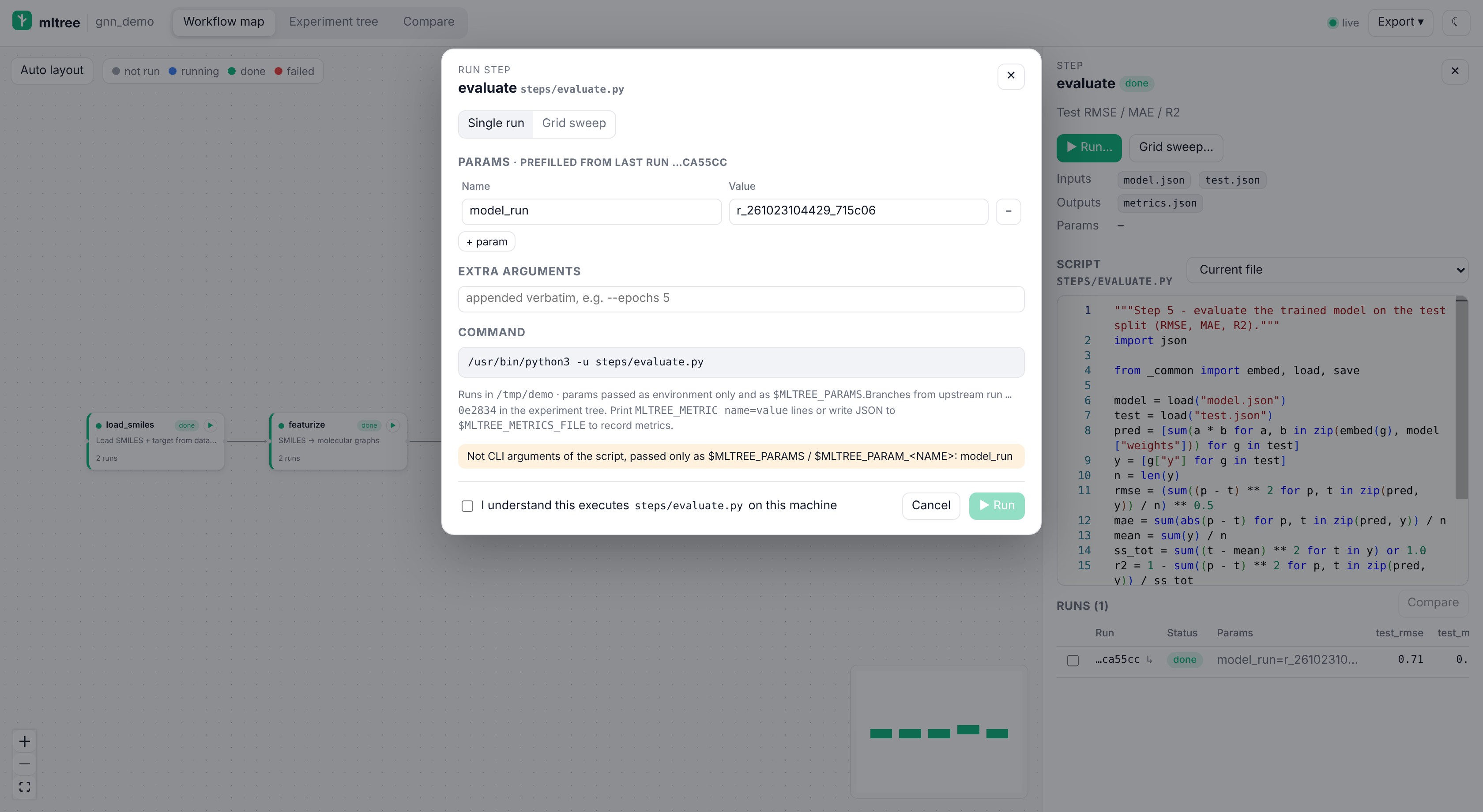
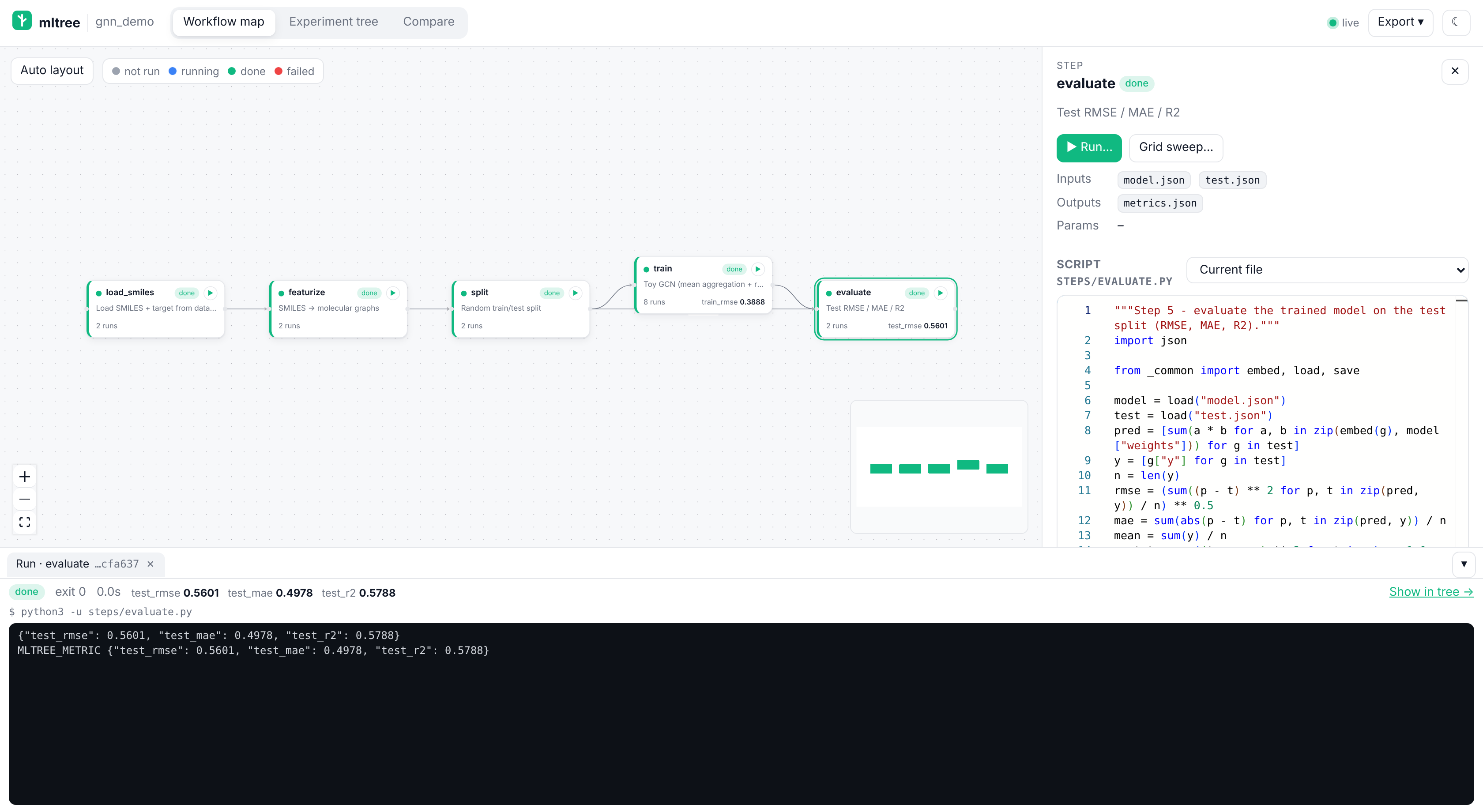
- Run dialog. The params are prefilled from the step's last run, or from its scanned / declared params. You can edit them, add extra CLI arguments and see the exact command before you launch. A checkbox confirms that you know it executes the script on this machine (remembered for the browser tab).
- Live log. stdout and stderr stream into a panel at the bottom, over Server-Sent Events, with stderr in red. Cancel sends SIGTERM, then SIGKILL after 5 s. Closing the page doesn't stop the run, and reopening it re-attaches.
- Automatic record. Every run is logged by itself: params, the script snapshot (SHA-256 and git commit), the exact
command, exit code, duration, the full log (
.mltree/runs/<id>/log.txt) and metrics. A failed exit code marks the run failed, and its last stderr lines go into the notes. A run branches in the experiment tree from the newest succeeded run of an upstream step, soevaluatehangs under thetrainrun that made its model.
How params reach your script. mltree reads the script (it doesn't run it) to choose a style:
| Script uses | Params passed as |
|---|---|
argparse / click options |
--alpha 0.5 --layers 2 (booleans as bare flags; only options the script declares) |
sys.argv[1], sys.argv[2] … |
positional values, in that order |
@hydra.main |
alpha=0.5 layers=2 overrides |
| none of these | environment only |
Every run also gets the following environment variables, so params the CLI doesn't declare still arrive and the dialog warns about them:
| Variable | Value |
|---|---|
MLTREE_PARAMS |
all params as JSON |
MLTREE_PARAM_<NAME> |
one param, with the name upper-cased |
MLTREE_RUN_ID, MLTREE_STEP, MLTREE_PROJECT |
the run, the step, the project root |
MLTREE_METRICS_FILE |
.mltree/runs/<id>/metrics.json; write a JSON dict here to record metrics |
Runs use the project root as the working directory, with python -u (unbuffered output).
Which interpreter. --python, else $MLTREE_PYTHON, else the project's .venv/ or venv/, else the active
$VIRTUAL_ENV / $CONDA_PREFIX, else python3 on PATH.
Reporting metrics. Print lines like these. Nested JSON is flattened to val.rmse.
print(f"MLTREE_METRIC epoch={epoch} train_loss={loss:.4f} val_rmse={rmse:.4f}")   # key=value pairs
print("MLTREE_METRIC " + json.dumps({"val": {"rmse": rmse, "r2": r2}}))           # or a JSON object
Alternatively, write a JSON dict to $MLTREE_METRICS_FILE (or to a metrics*.json file the step declares as an output).
The last value of each metric becomes the run's metric; a file overrides printed values. Every MLTREE_METRIC line is
also kept as one point of a step-wise history (.mltree/runs/<id>/metrics_history.jsonl, GET /api/runs/{id}/history),
which will feed the loss-curve overlays. Lines without the prefix are just log, so the script still works without mltree.
Sweeps
Grid sweep… takes comma-separated values per param (0.05, 0.2, 0.5), a metric to rank by, and lower or higher
is better. It shows how many runs the grid makes (64 at most by default) and then runs them one after another as
children of a sweep run. The log panel shows the progress, a child table with the best one starred, and each
child's log. Cancel stops the current child and skips the rest.
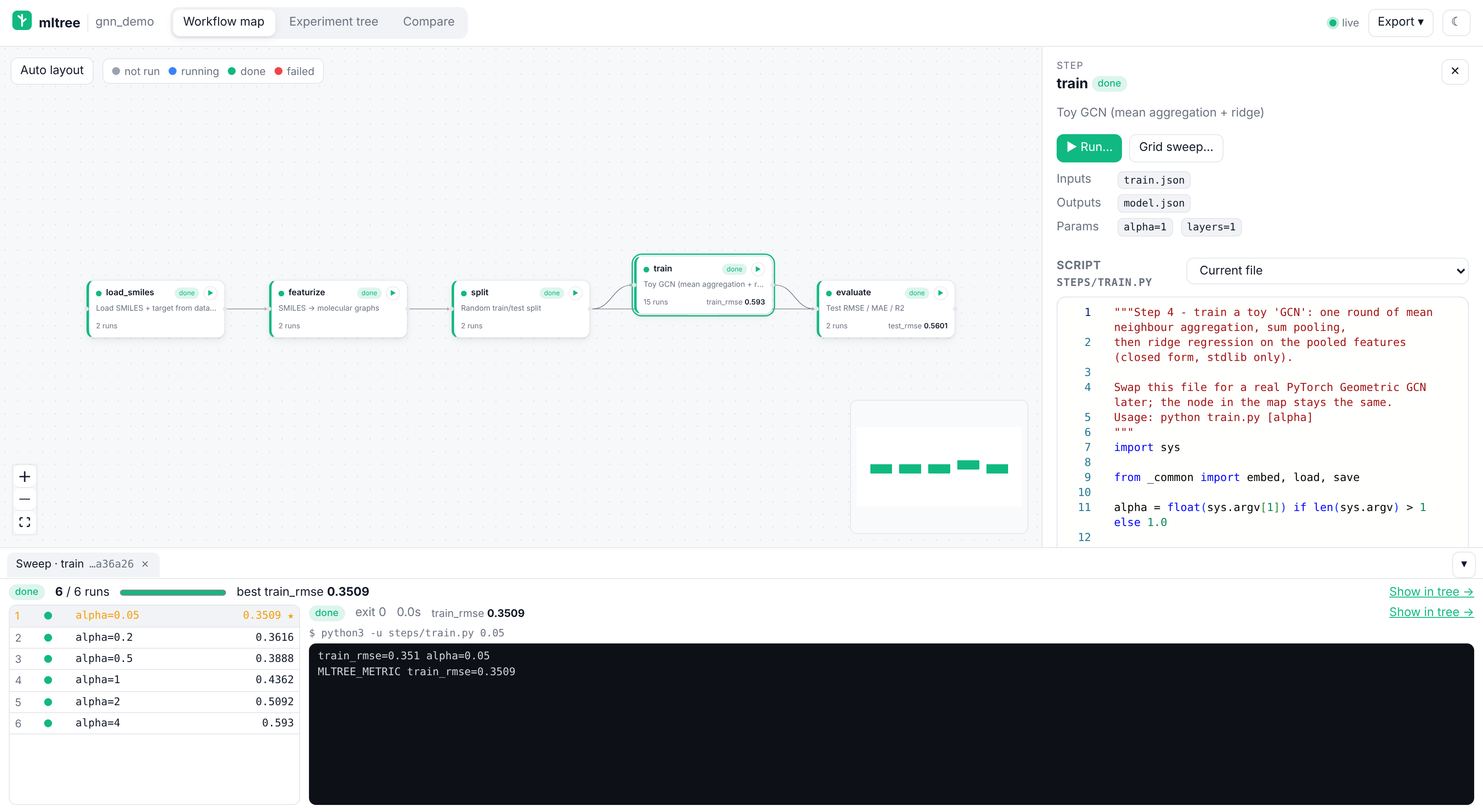
In the experiment tree a sweep is one card: its label, the number of runs, ✓/✗ counts and the best value. The children fan out below it with the best child highlighted (★ sweep best). Sweeps with more than 8 children start folded to the best one. ▸ unfold shows them all.
Sweeps also come from:
scan_project: an Optuna study becomes a sweep with its trials as children, ranked by the study's direction. A scikit-learnGridSearchCV/RandomizedSearchCVcv_results_CSV becomes a sweep over itsparam_*columns, ranked bymean_test_score.- The assistant:
run_sweepruns a grid for you. For trials it runs itself (Optuna, a manual loop), it callsstart_sweep, thenlog_run(..., sweep_id=...)per trial, thenfinish_sweep.
Safety model
Running code from a browser page is the one dangerous thing the viewer can do, so it takes several locks:
- Off by default. Without
--allow-runevery run/sweep/cancelPOSTreturns 403 and the buttons are greyed out. The shareable HTML export never has them. - Loopback only. With
--allow-runthe viewer won't bind anything but127.0.0.1. Use an SSH tunnel for remote machines. - No cross-site requests. Each
POSTneeds anX-MLTree: 1header, which a plain form or a cross-origin page can't send without a CORS preflight that mltree never approves. It also needs a loopbackHost(this defeats DNS rebinding) and, if anOriginheader is present, a loopbackOrigin. - Only the project's own scripts. A step's
.pyscript_pathmust resolve inside the project. Nothing is run through a shell, and params become separate argv entries. - An explicit confirm in the dialog for each tab session.
scan_project still never executes anything.
The MCP tools run_step / run_sweep are allowed by default, because the assistant can already run commands in your
shell. Set MLTREE_ALLOW_RUN=0 in the server's environment to turn them off, for example on a shared machine.
HTTP API
| Route | Returns |
|---|---|
GET /api/health |
project, root, revision (bumped on every store change) |
GET /api/pipeline |
nodes (params, script, position, latest run status), edges, order |
PUT /api/positions |
body {"positions": {"step": {"x": 0, "y": 0} | null}} |
GET /api/steps/{step} |
one node |
GET /api/steps/{step}/script[?run_id=] |
current script, or the snapshot stored with a run |
GET /api/steps/{step}/snapshots |
runs of the step that carry a script snapshot |
GET /api/runs[?step=&status=&parent_run_id=&limit=] |
runs, newest first |
GET /api/runs/{run_id} |
one run |
GET /api/tree[?metric=&mode=min|max&step=] |
run forest (runs, edges, roots) and the best run |
GET /api/compare?ids=a,b[,c] |
runs, param/metric keys and which ones differ |
GET /api/metrics |
numeric metric names |
GET /api/export[?scripts=0|1] |
the shareable single-file HTML (as a download) |
GET /api/events |
text/event-stream of revision events |
GET /api/steps/{step}/plan[?params=json&extra_args=] |
command preview, param-passing style, form defaults, warnings |
POST /api/steps/{step}/run |
{"params", "extra_args", "parent_run_id"} → {"run_id"} (needs --allow-run) |
POST /api/steps/{step}/sweep |
{"grid": {"p": [..]} | {"p": "1, 2"}, "params", "metric", "mode", "max_runs"} → {"sweep_id", "total"} |
POST /api/runs/{run_id}/cancel |
cancel a run or a whole sweep |
GET /api/active |
runs and sweeps in progress in this viewer |
GET /api/runs/{run_id}/log[?offset=&tail=] |
log lines {"s": "out"|"err", "line"} and done |
GET /api/runs/{run_id}/log/stream[?offset=] |
text/event-stream of lines events, then end |
GET /api/runs/{run_id}/history |
step-wise metrics (MLTREE_METRIC lines or log_run(history=)) |
GET /api/data[?step=] |
data versions of every step (or one): each input/output now vs the latest run, changed_inputs |
PUT /api/steps/{step}/notes / PUT /api/runs/{run_id}/notes |
{"notes": "..."} (loopback + X-MLTree) |
PUT /api/runs/{run_id}/tags |
{"add": [..], "remove": [..]} or {"tags": [..]} |
GET /api/steps/{step}/gnn |
static model summary, dataset candidates, cached stats |
POST /api/steps/{step}/gnn/introspect |
load the step's graph file(s) in a subprocess and cache stats (needs --allow-run) |
With view --projects, every route above lives under /p/<slug>/ and the root has GET /api/projects (slug, name,
root, url, steps, runs) and GET /api/health (multi: true, the project roots).
The POST and PUT routes need the X-MLTree: 1 header (see Safety model).
Share the map
Export ▾ in the viewer header gives you:
- Shareable HTML: one self-contained
<project>-mltree.htmlfile. It opens offline in any browser by double-click, with no server, no install and no network requests. It is read-only and includes the workflow map, the step panel with each script (current file and the snapshot stored with every run), the experiment tree and the compare view. It inlines a lighter build of the viewer: a small highlighted code view instead of Monaco and SVG bar charts instead of Plotly. The bundled demo exports to about 530 KB: ~500 KB of app and the rest data, with scripts deduplicated by SHA-256.docs/example-export.htmlis a sample. - Shareable HTML without scripts: the same file with the code left out.
- Map as PNG / SVG: an image of the current map view (pan and zoom first), for slides and papers.
From the shell or through the assistant:
mltree-mcp export --project /path/to/project                    # -> ./<project>-mltree.html
mltree-mcp export --project /path/to/project -o share/map.html --no-scripts
export_map(path=None, include_scripts=True) # MCP tool; returns {"path", "bytes", "size", ...}
The MCP tool writes to <project root>/<project>-mltree.html by default. On a remote server, copy the file to
your machine with scp you@server:/path/to/project/<project>-mltree.html .
Ways to send it
- Email or Slack. Attach the
.htmlfile. The recipient downloads it and opens it in a browser. (Previews inside Slack or a mail client won't run it; it has to be opened in a browser.) - GitHub Pages. Commit it as
docs/index.html(or any.htmlin a Pages-enabled repo) and share the URL. - Gist.
gh gist create --secret myproj-mltree.html, then open it through a raw-HTML viewer such ashttps://gist.githack.com/(gist.github.com itself shows HTML as source).
Warning: the export contains your scripts. The default file embeds the full source of every step script and every run's script snapshot, plus params, notes, tags and artifact paths. If any of that is private (unpublished methods, internal paths, credentials someone hard-coded), use Shareable HTML without scripts, or
--no-scripts/include_scripts=false, and don't publish the file on a public Pages site or a public gist. The absolute project path on the server is never included.*-mltree.htmlis in this repo's.gitignore; add it to yours too so an export isn't committed by accident.
Tools
| Tool | What the assistant uses it for |
|---|---|
export_map(path?, include_scripts=True) |
Write the single-file, offline, read-only HTML of the map and return its path and size. It includes the scripts unless include_scripts=false. See Share the map. |
scan_project(path=".", include?, exclude?, dry_run=False, notebook_sections=False, import_results=True) |
Build the map of an existing project by static analysis (never runs your code): steps, params, edges, utilities, and existing results imported as runs. Idempotent; dry_run previews. See above. |
init_project(name?) |
Create .mltree/ (pipeline.yaml, mltree.db, runs/) in the project. Idempotent. |
add_step(name, script_path?, inputs?, outputs?, params?, description?) |
Register a node, or update it if the name exists. Script paths are relative to the project and may not escape it. |
connect_steps(source, target, label?) |
Add an edge. Both steps must exist; self-loops and cycles are rejected; warns when outputs and inputs don't match. |
get_pipeline() |
Nodes (script, params, latest run status, run count), edges and a topological order. |
run_step(step, params?, extra_args?, parent_run_id?, wait=True, timeout_s=900) |
Execute the step's script and record the run by itself: params, snapshot, command, exit code, duration, log and metrics. Returns the run and the log tail. Off with MLTREE_ALLOW_RUN=0. |
run_sweep(step, grid, metric?, mode, params?, extra_args?, max_runs=64, wait=True) |
Run every grid combination one after another as children of a sweep run, and return the best one. |
run_log(run_id, tail=200) / cancel_run(run_id) |
Follow or stop a run or sweep started with run_step / run_sweep. |
start_sweep(step, metric?, mode, name?, search_space?, parent_run_id?) / finish_sweep(sweep_id, status) |
Group trials that the assistant runs itself: start_sweep, then log_run(..., sweep_id=...) per trial, then finish_sweep returns the best one. |
log_run(step, params?, metrics?, artifacts?, parent_run_id?, notes?, status?, tags?, sweep_id?, history?, record_data=True) |
Record a run. Metrics must be numbers. Artifacts ≤ 50 MB are copied into .mltree/runs/<run_id>/artifacts/; bigger ones are referenced. The step's script is snapshotted with its SHA-256 and the git commit, and the versions of its inputs/outputs are recorded. history is a list of step-wise points ({"epoch": 1, "val_loss": 0.8}) for the curves. |
data_status(step?) |
Data versions now vs each step's latest run: which inputs changed or are missing, so the assistant knows what to re-run. |
compare_runs(run_ids, code_diff=True) |
Param changes, differing metrics and data versions of 2+ runs, and a unified diff of the first two runs' scripts. |
list_runs(step?, status?, parent_run_id?, limit?) |
Runs, newest first. |
add_note(text, step? | run_id?, replace=False) |
Append to (or replace) the notes of a step or a run. |
tag_run(run_id, add?, remove?, tags?) |
Add / remove tags on a run, or set the whole list. |
gnn_summary(step?, introspect=False) |
GNN architecture summary (static) and dataset stats of one step or all; introspect=true loads the step's graph files in a subprocess (off with MLTREE_ALLOW_RUN=0). |
best_run(metric, mode="max"|"min", step?) |
Best succeeded run by a metric. |
open_map(start=True, port?, allow_run=False) |
URL of the map viewer. It starts mltree-mcp view in the background if the viewer isn't running, and includes the ssh -L tip for remote servers. |
Resource: mltree://pipeline — the same JSON as get_pipeline.
Errors come back as normal MCP tool errors with a message the assistant can act on (e.g. "Unknown step 'trian'. Known steps: split, train").
Project layout
your-project/
├── steps/                      # one script per node (your code)
│   ├── featurize.py
│   └── train_gcn.py
└── .mltree/
    ├── pipeline.yaml           # nodes, edges, default params — commit this
    ├── mltree.db               # SQLite: steps, edges, runs, file-hash cache
    └── runs/<run_id>/
        ├── run.json            # params, metrics, parent, status, timestamps
        ├── script.py           # snapshot of the step script for this run
        ├── log.txt             # stdout/stderr of runs started by mltree (stderr lines prefixed)
        ├── metrics.json        # $MLTREE_METRICS_FILE, if the script wrote it
        ├── metrics_history.jsonl  # one line per MLTREE_METRIC print (or log_run history point)
        └── artifacts/          # copied outputs (plots, small models…)
mltree.db is the source of truth; pipeline.yaml is rewritten on every change so it diffs well in git. If you commit only pipeline.yaml, a fresh clone rebuilds the steps and edges from it. Whether you commit mltree.db and runs/ is up to you.
Tell your assistant to use it (AGENTS.md / CLAUDE.md)
Codex reads AGENTS.md, Claude Code reads CLAUDE.md. Paste this into either:
## Experiment tracking with mltree (MCP)

This repo tracks its ML workflow with the `mltree` MCP server. Keep the map up to date as you work:

- At the start, call `get_pipeline`. If the project is not initialized and already has code, call `scan_project`
  (`dry_run=true` first to preview) and fix its proposals; for a brand-new project call `init_project`.
- Put each pipeline stage in its own script under `steps/` (e.g. `steps/split.py`, `steps/train_gcn.py`).
  Whenever you create or materially change one, call `add_step` with its name, `script_path`,
  `inputs`, `outputs`, default `params` and a one-line `description`.
- Call `connect_steps` for every data dependency (upstream → downstream).
- After every execution of a step, call `log_run` with the exact `params` used, numeric `metrics`,
  produced `artifacts` (plots, model files) and `status` ("failed" if it crashed, with the error in `notes`).
- When a run is a variation of an earlier one (HPO trial, new architecture, different split seed),
  pass that run's id as `parent_run_id` so the experiment tree branches correctly.
- Prefer `run_step` over running a step script yourself: it records the run (params, script, log, metrics) by
  itself. Make scripts print `MLTREE_METRIC name=value` lines. For a grid search use `run_sweep`. For trials you
  run yourself (Optuna), use `start_sweep`, then `log_run(..., sweep_id=...)`, then `finish_sweep`.
- Before re-running, call `data_status` to see which steps have changed inputs; to explain how two runs differ,
  call `compare_runs`.
- To answer "which model was best?" use `best_run` (mode "min" for losses/RMSE, "max" for AUC/R²)
  and `list_runs`; don't guess from memory.
- Record decisions with `add_note` (on the step or run) and label runs with `tag_run` ("baseline", "paper").
- When the user wants to see the workflow, call `open_map` and give them the URL. When they want to send it to
  someone, call `export_map` (warn them that it includes the scripts unless `include_scripts=false`).
Demo: a tiny GNN pipeline
examples/gnn_demo/ is a toy molecular-property pipeline: load SMILES → featurize to graphs → split → train a toy GCN (mean aggregation + ridge, stdlib only) → evaluate. It runs without torch; featurize.py uses RDKit if installed.
cd examples/gnn_demo
python steps/load_smiles.py && python steps/featurize.py && python steps/split.py 0.2 42 \
  && python steps/train.py 1.0 && python steps/evaluate.py

# register the steps and log a few FAKE runs (tagged "demo") to see the tree
python register_demo.py --reset
mltree-mcp view --project .            # http://localhost:8765
mltree-mcp view --project . --allow-run   # same, with Run / Grid sweep buttons (the demo needs only the stdlib)
With --allow-run, run load_smiles → featurize → split → train → evaluate from the map, then try Grid sweep…
on train with alpha = 0.05, 0.2, 0.5, 1, 2 and rank by train_rmse (lower is better).
The values in data/molecules.csv and the metrics logged by register_demo.py are illustrative demo data, not real measurements.
Development
uv venv && uv pip install -e ".[dev]"
pytest -q
The tests cover:
- the store, and every tool called in-process through the MCP server
- the
mltree://pipelineresource and the demo - a smoke test that launches the stdio server and talks to it with the MCP client SDK
- every viewer API route, the SPA fallback, the live event stream and
open_map - the runner (CLI detection, param passing, metric parsing, logs, cancel, grid sweeps, schema migration) and the
run safety guard (403 without
--allow-run, withoutX-MLTree, with a foreignOriginorHost) - data versions, compare/diffs, notes/tags, GNN summaries (static and introspected) and the HTML export (with a headless-Chrome render check when Playwright is installed)
- the multi-project registry,
/p/<slug>/routing, theprojectsCLI andopen_mapagainst a multi-project viewer
Frontend (React + TypeScript + Vite + React Flow + Monaco + Plotly) lives in frontend/:
cd frontend && npm install
npm run dev          # http://localhost:5173, proxies /api to a running `mltree-mcp view`
npm run build        # type-checks and writes the bundle into src/mltree_mcp/static/ (commit it)
CI (.github/workflows/test.yml) runs pytest on Python 3.11–3.13 (plus macOS and the 1.x MCP SDK), checks that the
committed static/ bundle matches npm run build, and builds the sdist and wheel, runs twine check and installs
the wheel in a clean venv.
Screenshots: pip install -e ".[screenshots]" && playwright install chromium, start the viewer on the demo, then python scripts/screenshots.py. For the run screenshots, start it on a fresh copy of the demo with --allow-run and run python scripts/screenshots_run.py (this really runs the demo scripts); for the data-version / curves / diff screenshots run python scripts/screenshots_data.py --project <copy> the same way; for the notes / GNN screenshots start it with --allow-run --python <python with torch_geometric> and run python scripts/screenshots_gnn.py; for the project switcher and docs/demo.gif, register two copies of the demo, start view --projects and run python scripts/screenshots_projects.py (needs ffmpeg). If you have a local Chrome, use --chrome /usr/bin/google-chrome instead of installing Playwright's browser.
Roadmap
- MCP core ✅
- Map viewer ✅ (map, script panel with run snapshots, experiment tree, compare, live refresh)
scan_project✅ (static import of existing projects and their MLflow / Optuna / Lightning / wandb results)- Run steps and sweeps ✅ (0.5.0: Run button, live logs, auto-recorded runs, grid sweeps, sweep fans,
run_step) - Data versioning and compare ✅ (0.6.0: input/output hashes per run, changed-input flags, param changes, code diff, metric curves)
- Notes, tags and GNN views ✅ (0.7.0: editable notes/tags, static architecture summary, opt-in dataset stats)
- PyPI packaging, CI, multi-project viewer ✅ (0.8.0)
Releasing
Releases go to PyPI from .github/workflows/release.yml with trusted publishing
(no API token). One-time setup:
- On PyPI, under Your projects → Publishing → Add a new pending publisher, enter: project
mltree-mcp, owneryboulaamane, repositorymltree-mcp, workflowrelease.yml, environmentpypi. (Optional: the same on TestPyPI with environmenttestpypi.) - On GitHub, Settings → Environments: create
pypi(andtestpypi); adding yourself as a required reviewer makes every upload wait for your click.
To release: bump version in pyproject.toml, src/mltree_mcp/__init__.py and frontend/package.json, rebuild the
frontend, commit, then publish a GitHub release with tag vX.Y.Z (gh release create v0.8.0 --generate-notes).
The workflow checks the tag matches the version, builds, runs twine check and uploads. Actions → release → Run
workflow uploads to TestPyPI instead. Locally: python -m build && twine check --strict dist/*.
Changelog
0.8.0
- Multi-project viewer:
mltree-mcp view --projects DIR ...or a registry (~/.mltree/projects.json, managed withmltree-mcp projects add|list|remove); each project under/p/<slug>/, a project switcher in the header,GET /api/projects;open_maplinks into a running multi-project viewer. - PyPI-ready packaging: classifiers, project URLs,
py.typed, a lean sdist; the wheel ships the viewer and export bundles.python -m build+twine check --strictpass. - CI: GitHub Actions test matrix (3.11–3.13, macOS, MCP SDK 1.x), frontend bundle freshness check, wheel smoke test; release workflow with PyPI trusted publishing.
- README: demo GIF, badges, refreshed screenshots.
0.7.0
- Notes on steps and runs and tags on runs, editable in the viewer (loopback +
X-MLTreeonly), shown on nodes, tree cards and the runs table, with a Tag filter in the experiment tree; MCP toolsadd_note,tag_run;get_pipelinereturns notes and tags; both are in the export. - GNN views: static
nn.Modulearchitecture summary for PyG / DGL models (layers, dims, repeats, pooling, forward order) and opt-in dataset / checkpoint stats loaded in a subprocess; MCP toolgnn_summary, CLImltree-mcp gnn,GET /api/steps/{step}/gnn,POST …/gnn/introspect. The demo gets a PyGMolGCNmodel file. - Store schema v4 (step
notes,gnn_statscache).
0.6.0
- Data versions: inputs/outputs are fingerprinted (SHA-256, cached by size + mtime) and recorded with each run; the step panel, the node badge (⚠ data changed / input missing), Compare and the export show them.
- Compare: param changes per run, a data-versions row group, overlaid step-wise curves (SVG, works offline) and a unified / side-by-side code diff of the script snapshots (computed in the browser, works in the export).
- MCP tools
data_statusandcompare_runs;log_run(history=, record_data=);GET /api/data. - Store schema v3 (run
data,file_hashescache); older databases migrate on open. - The viewer runs file hashing off the event loop, so live updates keep flowing on big data folders.
0.5.0
- Run steps from the map (
view --allow-run): Run dialog with prefilled params and a command preview, live stdout/stderr panel (SSE), Cancel, and automatic run records (params, snapshot, command, exit code, duration, log, metrics fromMLTREE_METRIClines or$MLTREE_METRICS_FILE, step-wise history). - Grid sweeps: sweep runs that group their children, a sweep launcher in the viewer, collapsible sweep fans with the best child highlighted in the tree, and sweep cards in the HTML export.
- MCP tools
run_step,run_sweep,run_log,cancel_run,start_sweep,finish_sweep, andlog_run(sweep_id=). scan_projectimports Optuna studies andGridSearchCVcv_results_CSVs as sweeps.- Store schema v2 (run
kind,sweep_id,sweep,command,exit_code); v1 databases migrate on open. - Export: commands are made portable (interpreter basename, project-relative paths).
0.4.0 shareable single-file HTML export · 0.3.0 scan_project · 0.2.0 map viewer · 0.1.0 MCP core
License
MIT © Yassir Boulaamane
1 maintainer

Metadata
1 maintainer
Release files for mltree-mcp 0.8.0
For a detailed explanation of source distributions (sdists) and built distributions (wheels), please see the package formats documentation.
Source distribution (sdist)
| File | Size | Uploaded | Provenance | |
|---|---|---|---|---|
| mltree_mcp-0.8.0.tar.gz | 1.6 MB | With provenance | Details |
Built distribution (wheel)
| File | Interpreter | ABI | Platform | Reset |
|---|---|---|---|---|
| mltree_mcp-0.8.0-py3-none-any.whl | Python 3 | none | any | Details |
Total release size: 3.1 MB
Release files / mltree_mcp-0.8.0.tar.gz
| Download URL | mltree_mcp-0.8.0.tar.gz |
|---|---|
| Size | 1.6 MB |
| Tags | Source |
|
SHA-256 checksum How to use checksums |
299f6f8af1e6276109eef0cfa1f028c816cc7742b09a0c52aa3086a1ee76c745
|
|
BLAKE2b-256 checksum How to use checksums |
f4a220572993b8e13ddd7d880e65f54c59e4928ef743d9d0f3ab42d6de058edf
|
| Upload date | |
|
Uploaded using Trusted Publishing? What is trusted publishing? |
Yes |
| Uploaded via |
twine/7.0.0 CPython/3.13.16
|
Provenance
Provenance describes where a file came from. On PyPI, provenance is shared via attestations, which provide a verifiable record of the build or publishing details. View details, limitations and caveats.


PyPI Publish Attestation
PyPI verified that this artifact, at this checksum, originated from the publisher listed below.
Signed by GitHub Actions, verified by PyPI on Oct 23, 2026.
Transparency logRelease files / mltree_mcp-0.8.0-py3-none-any.whl
| Download URL | mltree_mcp-0.8.0-py3-none-any.whl |
|---|---|
| Size | 1.5 MB |
| Tags | Python 3 |
|
SHA-256 checksum How to use checksums |
d5d674440a96e5368414a6f2465aff2931ece7ef88be1c1087702debb0289063
|
|
BLAKE2b-256 checksum How to use checksums |
f0fba59b6055a7654f520131236028d2b4ec548eae348df9cf5412bf4f9771a9
|
| Upload date | |
|
Uploaded using Trusted Publishing? What is trusted publishing? |
Yes |
| Uploaded via |
twine/7.0.0 CPython/3.13.16
|
Provenance
Provenance describes where a file came from. On PyPI, provenance is shared via attestations, which provide a verifiable record of the build or publishing details. View details, limitations and caveats.
PyPI Publish Attestation
PyPI verified that this artifact, at this checksum, originated from the publisher listed below.
Signed by GitHub Actions, verified by PyPI on Oct 23, 2026.
Transparency logSecurity for mltree-mcp 0.8.0
Provenance
Provenance describes where a file came from. On PyPI, provenance is shared via attestations, which provide a verifiable record of the build or publishing details. View details, limitations and caveats.
Full provenance
All 2 files in this release have been uploaded with provenance metadata.
Attestation for mltree_mcp-0.8.0.tar.gz
PyPI Publish Attestation
PyPI verified that this artifact, at this checksum, originated from the publisher listed below.
Signed by GitHub Actions, verified by PyPI on Oct 23, 2026.
Transparency logA note on package security
PyPI is a repository for distributing packages, not a service for auditing them. While third-party security researchers and our staff do their best to detect and remove malicious packages, PyPI cannot guarantee the quality, security or suitability of any given package.
To learn more about protecting yourself from malicious actors, visit our package security documentation.













