
Machine Learning Research Wizard

Project description

MLWiz
Machine Learning Research Wizard — reproducible experiments from YAML (model selection + risk assessment) for vectors, images, time-series, and graphs.





🔗 Quick Links
- 📘 Docs: https://mlwiz.readthedocs.io/en/stable/
- 🧪 Tutorial (recommended): https://mlwiz.readthedocs.io/en/stable/tutorial.html
- 📦 PyPI: https://pypi.org/project/mlwiz/
- 📝 Changelog:
CHANGELOG.md - 🤝 Contributing:
CONTRIBUTING.md
✨ What It Does
MLWiz helps you run end-to-end research experiments with minimal boilerplate:
- 🧱 Build/prepare datasets and generate splits (hold-out or nested CV)
- 🎛️ Expand a hyperparameter search space (grid or random search)
- ⚡ Run model selection + risk assessment in parallel with Ray (CPU/GPU or cluster)
- 📈 Log metrics, checkpoints, and TensorBoard traces in a consistent folder structure
Inspired by (and a generalized version of) PyDGN.
✅ Key Features
| Area | What you get |
|---|---|
| Research Oriented Framework | Anything is customizable, easy prototyping of models and setups |
| Reproducibility | Ensure your results are reproducible across multiple runs |
| Automatic Split Generation | Dataset preparation + .splits generation for hold-out / (nested) CV |
| Automatic and Robust Evaluation | Nested model selection (inner folds) + risk assessment (outer folds) |
| Parallelism | Ray-based execution across CPU/GPU (or a Ray cluster) |
🚀 Getting Started
📦 Installation
MLWiz supports Python 3.10+.
pip install mlwiz
Tip: for GPU / graph workloads, install PyTorch and PyG following their official instructions first, then pip install mlwiz.
⚡ Quickstart
| Step | Command | Notes |
|---|---|---|
| 1) Prepare dataset + splits | mlwiz-data --config-file examples/DATA_CONFIGS/config_MNIST.yml |
Creates processed data + a .splits file |
| 2) Run an experiment (grid search) | mlwiz-exp --config-file examples/MODEL_CONFIGS/config_MLP.yml |
Add --debug to run sequentially and print logs |
| 3) Inspect results | cat RESULTS/mlp_MNIST/MODEL_ASSESSMENT/assessment_results.json |
Aggregated results live under RESULTS/ |
| 4) Visualize in TensorBoard | tensorboard --logdir RESULTS/mlp_MNIST |
Per-run logs are written automatically |
| 5) Stop a running experiment | Press Ctrl-C |
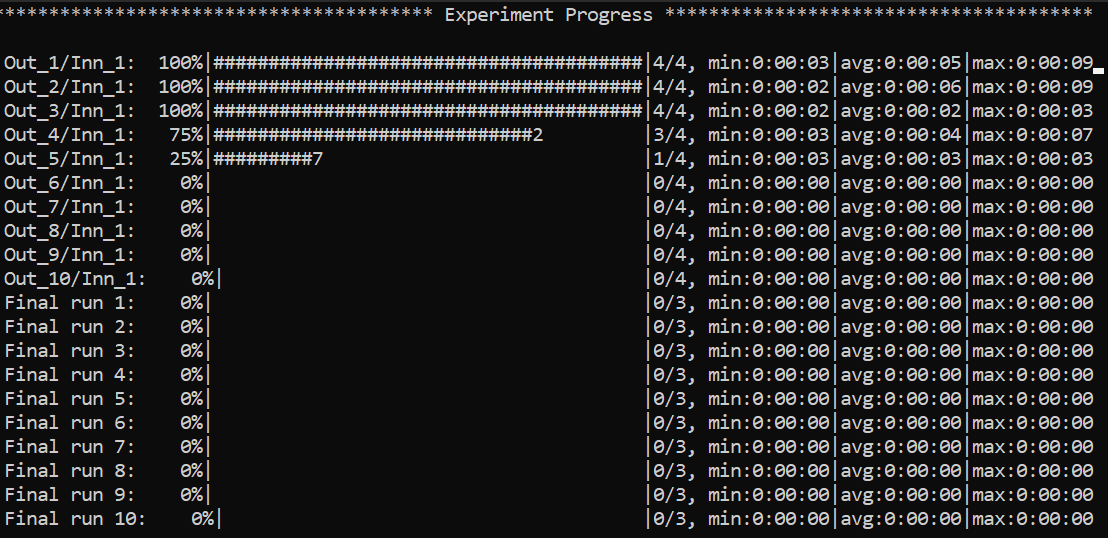
🧭 Navigating the CLI (non-debug mode)
Example of the global view CLI:
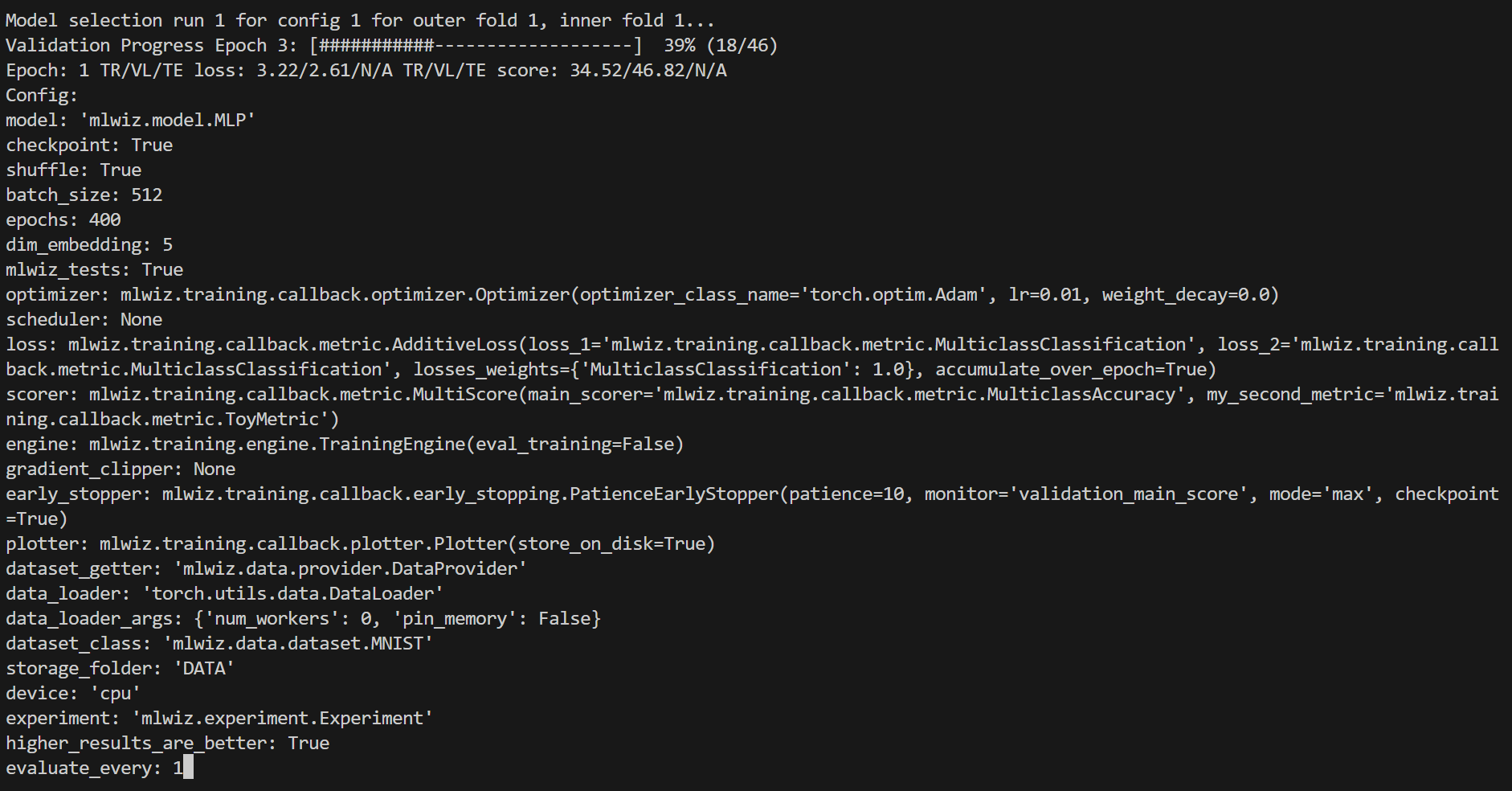
Specific views can be accessed, e.g. to visualize a specific model run:
:<outer_fold> <inner_fold> <config_id> <run_id>
…or, analogously, a risk assessment run:
:<outer_fold> <run_id>
Here is how it will look like
Handy commands:
:  # or :g or :global (back to global view)
:r # or :refresh (refresh the screen)
You can use left-right arrows to move across configurations, and up-down arrows to switch between model selection and risk assessment runs.
🧩 Architecture (High-Level)
MLWiz is built around two YAML files and a small set of composable components:
data.yml ──► mlwiz-data ──► processed dataset + .splits
exp.yml  ──► mlwiz-exp  ──► Ray workers
                      ├─ inner folds: model selection (best hyperparams)
                      └─ outer folds: risk assessment (final scores)
- 🧰 Data pipeline:
mlwiz-datainstantiates your dataset class and writes a.splitsfile for hold-out / (nested) CV. - 🧪 Search space:
grid:andrandom:sections expand into concrete hyperparameter configurations. - 🛰️ Orchestration: the evaluator schedules training runs with Ray across CPU/GPU (or a Ray cluster).
- 🏗️ Execution: each run builds a model + training engine from dotted paths, then logs artifacts and returns structured results.
⚙️ Configuration At A Glance
MLWiz expects:
- 🗂️ one YAML for data + splits
- 🧾 one YAML for experiment + search space
Minimal data config:
splitter:
  splits_folder: DATA_SPLITS/
  class_name: mlwiz.data.splitter.Splitter
  args:
    n_outer_folds: 3
    n_inner_folds: 2
    seed: 42

dataset:
  class_name: mlwiz.data.dataset.MNIST
  args:
    storage_folder: DATA/
Minimal experiment config (grid search):
storage_folder: DATA
dataset_class: mlwiz.data.dataset.MNIST
data_splits_file: DATA_SPLITS/MNIST/MNIST_outer3_inner2.splits

device: cpu
max_cpus: 8

dataset_getter: mlwiz.data.provider.DataProvider
data_loader:
  class_name: torch.utils.data.DataLoader
  args:
    num_workers : 0
    pin_memory: False

result_folder: RESULTS
exp_name: mlp
experiment: mlwiz.experiment.Experiment
higher_results_are_better: true
evaluate_every: 1
risk_assessment_training_runs: 3
model_selection_training_runs: 2

grid:
  model: mlwiz.model.MLP
  epochs: 400
  batch_size: 512
  dim_embedding: 5
  mlwiz_tests: True  # patch: allow reshaping of MNIST dataset
  optimizer:
    - class_name: mlwiz.training.callback.optimizer.Optimizer
      args:
        optimizer_class_name: torch.optim.Adam
        lr:
          - 0.01
          - 0.03
        weight_decay: 0.
  loss: mlwiz.training.callback.metric.MulticlassClassification
  scorer: mlwiz.training.callback.metric.MulticlassAccuracy
  engine: mlwiz.training.engine.TrainingEngine
See examples/ for complete configs (including random search, schedulers, early stopping, and more).
🧩 Custom Code Via Dotted Paths
Point YAML entries to your own classes (in your project). mlwiz-data and mlwiz-exp add the current working directory to sys.path, so this works out of the box:
grid:
  model: my_project.models.MyModel

dataset:
  class_name: my_project.data.MyDataset
📦 Outputs
Runs are written under RESULTS/:
| Output | Location |
|---|---|
| Aggregated outer-fold results | RESULTS/<exp_name>_<dataset>/MODEL_ASSESSMENT/assessment_results.json |
| Per-fold summaries | RESULTS/<exp_name>_<dataset>/MODEL_ASSESSMENT/OUTER_FOLD_k/outer_results.json |
| Model selection (inner folds + winner config) | .../MODEL_SELECTION/... |
| Final retrains with selected hyperparams | .../final_run*/ |
Each training run also writes TensorBoard logs under <run_dir>/tensorboard/.
🛠️ Utilities
🗂️ Config Management (CLI)
Duplicate a base experiment config across multiple datasets:
mlwiz-config-duplicator --base-exp-config base.yml --data-config-files data1.yml data2.yml
📊 Post-process Results (Python)
Filter configurations from a MODEL_SELECTION/ folder and convert them to a DataFrame:
from mlwiz.evaluation.util import retrieve_experiments, filter_experiments, create_dataframe

configs = retrieve_experiments(
    "RESULTS/mlp_MNIST/MODEL_ASSESSMENT/OUTER_FOLD_1/MODEL_SELECTION/"
)
filtered = filter_experiments(configs, logic="OR", parameters={"lr": 0.001})
df = create_dataframe(
    config_list=filtered,
    key_mappings=[("lr", float), ("avg_validation_score", float)],
)
Export aggregated assessment results to LaTeX:
from mlwiz.evaluation.util import create_latex_table_from_assessment_results

experiments = [
    ("RESULTS/mlp_MNIST", "MLP", "MNIST"),
    ("RESULTS/dgn_PROTEINS", "DGN", "PROTEINS"),
]

latex_table = create_latex_table_from_assessment_results(
    experiments,
    metric_key="main_score",
    no_decimals=3,
    model_as_row=True,
    use_single_outer_fold=False,
)
print(latex_table)
Compare statistical significance between models (Welch t-test):
from mlwiz.evaluation.util import statistical_significance

reference = ("RESULTS/mlp_MNIST", "MLP", "MNIST")
competitors = [
    ("RESULTS/baseline1_MNIST", "B1", "MNIST"),
    ("RESULTS/baseline2_MNIST", "B2", "MNIST"),
]

df = statistical_significance(
    highlighted_exp_metadata=reference,
    other_exp_metadata=competitors,
    metric_key="main_score",
    set_key="test",
    confidence_level=0.95,
)
print(df)
🔍 Load a Trained Model (Notebook-friendly)
Load the best configuration for a fold, instantiate dataset/model, and restore a checkpoint:
from mlwiz.evaluation.util import (
    retrieve_best_configuration,
    instantiate_dataset_from_config,
    instantiate_model_from_config,
    load_checkpoint,
)

config = retrieve_best_configuration(
    "RESULTS/mlp_MNIST/MODEL_ASSESSMENT/OUTER_FOLD_1/MODEL_SELECTION/"
)
dataset = instantiate_dataset_from_config(config)
model = instantiate_model_from_config(config, dataset)
load_checkpoint(
    "RESULTS/mlp_MNIST/MODEL_ASSESSMENT/OUTER_FOLD_1/final_run1/best_checkpoint.pth",
    model,
    device="cpu",
)
For more post-processing helpers, see the tutorial: https://mlwiz.readthedocs.io/en/stable/tutorial.html
🤝 Contributing
See CONTRIBUTING.md.
📄 License
BSD-3-Clause. See LICENSE.
Release history Release notifications | RSS feed


Download files
Download the file for your platform. If you're not sure which to choose, learn more about installing packages.
Source Distribution
Built Distribution
Filter files by name, interpreter, ABI, and platform.
If you're not sure about the file name format, learn more about wheel file names.
Copy a direct link to the current filters
File details
Details for the file mlwiz-1.4.2.tar.gz.
File metadata
- Download URL: mlwiz-1.4.2.tar.gz
- Upload date:
- Size: 111.2 kB
- Tags: Source
- Uploaded using Trusted Publishing? No
- Uploaded via: twine/6.1.0 CPython/3.13.7
File hashes
| Algorithm | Hash digest | |
|---|---|---|
| SHA256 |
4efca2ea404f9563faf88973c5bcbdc83e58445f92bdab8258b8cf38f47e7d42
|
|
| MD5 |
7e517dfacb515ade2f18d358f60dfefa
|
|
| BLAKE2b-256 |
903bc2d00cba41e70211dea883aa9fe74a60e66cfc49414bda1ac33db5b48c49
|
File details
Details for the file mlwiz-1.4.2-py3-none-any.whl.
File metadata
- Download URL: mlwiz-1.4.2-py3-none-any.whl
- Upload date:
- Size: 123.2 kB
- Tags: Python 3
- Uploaded using Trusted Publishing? No
- Uploaded via: twine/6.1.0 CPython/3.13.7
File hashes
| Algorithm | Hash digest | |
|---|---|---|
| SHA256 |
d53708fb163a9de1bcb62de4e5ed45c434c44ba0462a58893935338b124152ec
|
|
| MD5 |
01f9ed0f62a3547376431e3d53b795e2
|
|
| BLAKE2b-256 |
fef6e806f5274a9995eff39e2c764e9c84070d3323f7066edf0cd694b3182bf4
|






