
MLX-Gen



MLX-Gen is a local image and video generation runtime for Apple Silicon and MLX. It exposes
mlxgen for text-to-image, image-to-image, text-to-video, image-to-video, model download, model
preparation, SeedVR2 and SwiftVR image/video restoration and upscaling, optimized quantized model
variants, and application progress callbacks.
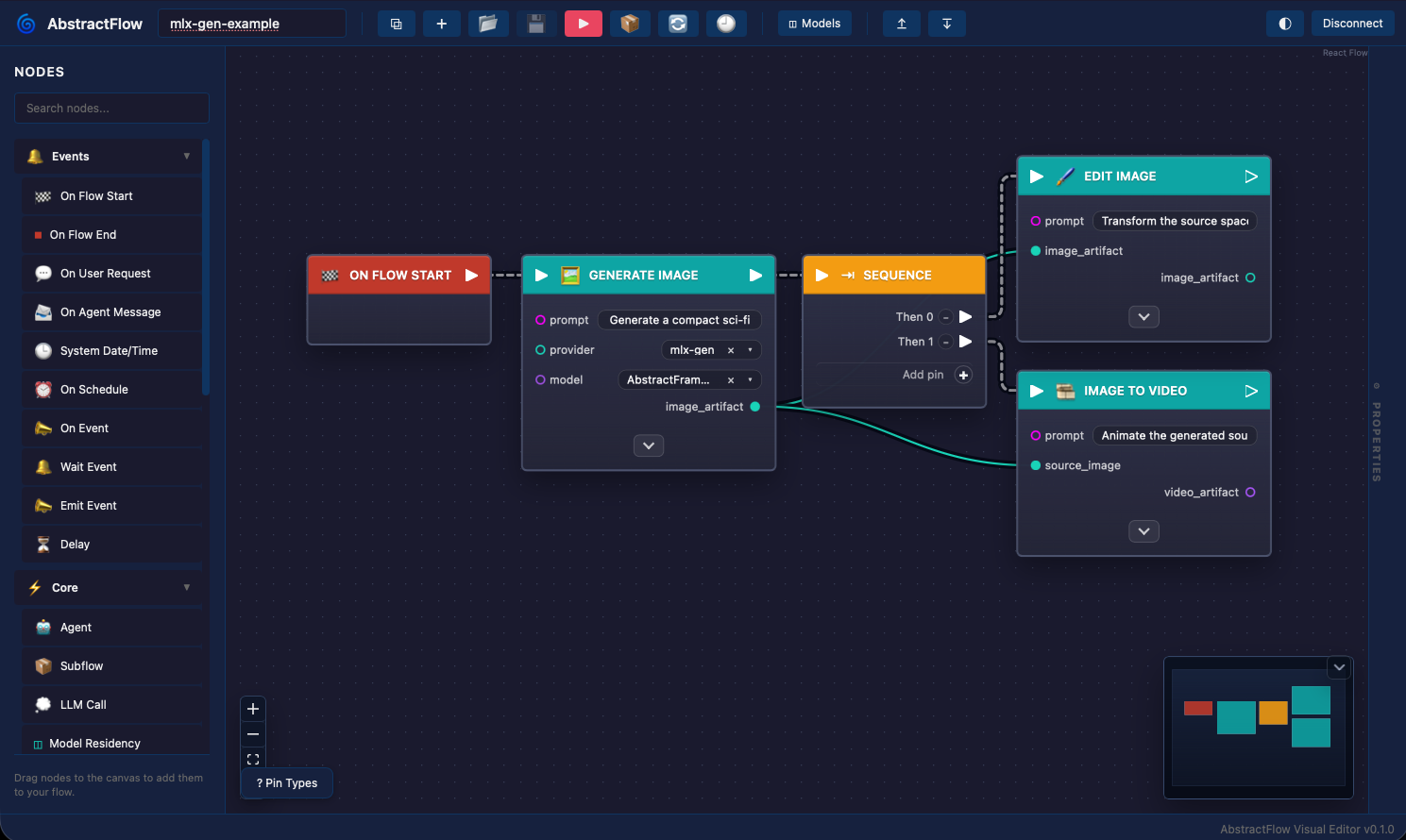
This screenshot shows AbstractFlow, a visual workflow authoring tool in the AbstractFramework ecosystem. AbstractFlow can orchestrate generative image/video capabilities exposed through AbstractVision and AbstractCore; the same MLX-Gen steps can also be run directly with the command-line examples below.
What It Does
MLX-Gen runs supported Hugging Face source models after you download them locally. It also runs quantized model variants that are published on Hugging Face for MLX-Gen. Some of those variants keep precision-sensitive layers at 8-bit or BF16 instead of blindly quantizing every layer, which is why they are published as MLX-Gen-specific repos. You explicitly download or prepare models first, then generation uses only files already on disk, which suits desktop apps, workflow engines, and long-running local jobs.
The main capabilities are:
- text-to-image generation with Qwen Image, FLUX.2 Klein, Z-Image, ERNIE Image Turbo, Bonsai Image, FIBO, and their optimized quantized variants where available;
- image-to-image modes, including latent img2img, instruction/reference edits, multi-reference
edits, masked edit/inpaint where the selected model supports
--mask-path(Qwen edit models, base Qwen models natively with a tunable--mask-strengthwarm start or through the validated control-inpaint sidecar row, Z-Image Turbo, and FLUX.2 Klein distilled and base models, with optional masked-area reference images on the Klein backend route — seedocs/masked-editing.md), Qwen structured control where the selected model supports--controlnet-image-path, and route-specific reframe/outpaint workflows where the selected model supports them, with per-side padding that extends a single side, both sides of an axis, or all four in one call, a selectable outpaint conditioning canvas (--outpaint-fill), an automatic two-pass split for deep two-axis requests (--outpaint-passes), and source-locked outpaint with the original crop restored on every FLUX.2 Klein model, distilled 4B/9B and base 4B/9B alike (distilled 4B q8 is the fastest measured route, at 54.6 s on an Apple M5 Max — seedocs/reframe-outpaint.md); - Wan2.2 text-to-video, image-to-video, and prompt-guided video-to-video (plain or masked via
--video-mask-path, which locks everything outside the mask to the source video), including TI2V-5B BF16/q8 packages plus A14B T2V/I2V BF16 and mixed q8/BF16 packages; video-to-video resamples the source onto the requested fps timeline (output keeps real-time speed) and copies source audio onto the output best-effort; the plain/masked video-to-video route is limited toWan2.2-T2V-A14B, uses one source video plus one prompt, and requires--solver unipc; Wan I2V resolves output size from the source image aspect ratio so inputs are not stretched into a mismatched canvas; - Wan2.1-VACE-1.3B native reference-and-mask conditioning (
wan-vace): inject a pictured object into a new scene from one or more--reference-imageinputs, or run learned masked source-video edits, verified stage-by-stage against the diffusers reference with an included proof bundle; - MiniMax-H3 text-to-video and image-to-video with synchronized stereo audio (
minimax-h3,minimax-h3-turbo,minimax-h3-turbo-544p): one prompt, optionally with a--image-pathkeyframe, produces a 24 fps clip and its soundtrack in a single MP4 (AAC track), 5 to 15 seconds long, with the lightx2v 8-step Turbo adapters attached automatically and community LoRA adapters (civitai, ai-toolkit, ComfyUI, kohya key layouts) stackable on them. The soundtrack covers ambient sound, a score, and spoken dialogue with the speaker's mouth animated to match. Run it with--quantize 8or from a prepared 75 GB q8 package (mlxgen prepare) on a 128 GB Mac (seedocs/minimax-h3.md); - ByteDance Bernini-R 1.3B renderer support (
bernini-r-1.3b): generate video from one to eight ordered ordinary reference images, edit one source video with those references, or run source-only prompt-guided video editing through the unified CLI and Python runtime. Download the recommended BF16 package (bernini-r-1.3b-bf16, ~15.6 GiB, bit-identical output) or the FP32 source package (~27 GiB); the route runs BF16 and does not support--quantize. Experimental: seven official public 1.3B example rows plusads2vat mid profile are qualitatively accepted with committed proof (full prompts and contact sheets indocs/assets/validation/bernini-r-1.3b-2026-08-11/), and tuned recipes for the remaining rows are documented indocs/bernini.md; - image and video restoration through
mlxgen upscale, which hosts two families selected with--modeland describes both in therestorationarray ofmlxgen capabilities:- SeedVR2 for images and video with scaling, covering official 3B/7B source support including the
dedicated
seedvr2-7b-sharproute, published q8/q4 packages, shortest-edge target sizing, explicit scale factors such as2xand3x, streamed restore for longer clips, preserved source FPS, a conservative host-safe default video profile, and published five-second1xand2xvalidation bundles for the 3B/7B video path; - SwiftVR for one-step video restoration at the source resolution on a Wan2.2-TI2V-5B backbone, measured at roughly 40x SeedVR2 throughput on the same clip at a fifth of the peak memory, with a published five-second three-way comparison bundle;
- SeedVR2 for images and video with scaling, covering official 3B/7B source support including the
dedicated
- explicit
downloadandprepareworkflows for local MLX-Gen model packages; - JSON model capability inspection before starting a heavy run;
- strict route-specific LoRA routing and adapter application checks, with model-card compatibility
preflight when cached adapter metadata is available and exact public proof rows for Qwen Image
Edit original/2509/2511, base Qwen Image text and latent, Qwen Image 2512 text, the base Qwen
Image q8 structured-control and control-inpaint rows, the exact
AbstractFramework/z-image-turbo-8bittext and latent img2img rows, FLUX.2 Klein 9B edit and multi-reference, FLUX.2 Klein base 4B outpaint, ERNIE Image Turbo text and latent img2img, and all supported Wan q8 video routes including Lightning fast video-to-video; the LoRA guide documents the exact validated adapters per route, strict scale matching, copy-pasteowner/repo:subdir/fileadapter forms, and the validation evidence behind each proof row (same-seed A/B sheets for the image and T2V/I2V rows, a bounded multi-seed matrix for the video-to-video row). Those Lightning examples are documented against MLX-Gen q8 packages, not arbitrary external FP8 checkpoints. Bonsai LoRA stays fail-closed; - shared progress events for applications embedding MLX-Gen;
- step-wise generation previews with published tiny autoencoders for the FLUX.1 and FLUX.2 latent spaces, making continuous live preview practical for interactive applications (see Generation Previews).
Use mlxgen capabilities --model ... before long image-edit runs. Capability output describes the
available route; validation reports and contact sheets describe whether an exact source handle or
MLX-Gen optimized package passed a visual release gate. Release evidence should use true handles such as
briaai/Fibo-Edit or AbstractFramework/flux.2-klein-9b-8bit, not short aliases.
Install
Install with uv:
uv tool install --upgrade mlx-gen
Or install into an environment:
python -m pip install -U mlx-gen
Check the command surface:
mlxgen --help
For application integration and shell-outs, use the mlxgen commands shown in
mlxgen --help. The package still installs some mflux-generate-* compatibility entry points
from the upstream codebase, but those are not the recommended integration surface for new tools.
First Commands
Download model files explicitly:
mlxgen download --model AbstractFramework/flux.2-klein-9b-8bit
Generate an image:
mlxgen generate \
  --model AbstractFramework/flux.2-klein-9b-8bit \
  --prompt "A cinematic wide shot of a compact sci-fi spaceship resting in deep snow on a frozen alien planet" \
  --width 768 \
  --height 432 \
  --steps 24 \
  --guidance 1.0 \
  --seed 6107 \
  --output spaceship.png
Generate several output images or videos in one run by passing more than one seed:
mlxgen generate \
  --model qwen-image \
  --prompt "A clean studio product photo" \
  --seed 101 202 303 \
  --output product.png
MLX-Gen saves one artifact per seed and appends the seed to the output stem automatically, for
example product_seed_101.png, product_seed_202.png, and product_seed_303.png.
mlxgen generate and mlxgen upscale also support --auto-seeds N when you want several random
variations from one command. Duplicate explicit seeds are rejected, --auto-seeds must be greater
than zero, --output supports {seed}, and SeedVR2 multi-source runs also support {input_name}
with legacy {image_name} accepted as a compatibility alias.
Upscale an image with SeedVR2:
mlxgen download --model AbstractFramework/seedvr2-3b-8bit

mlxgen upscale \
  --model AbstractFramework/seedvr2-3b-8bit \
  --image-path input.png \
  --resolution 2x \
  --softness 0.25 \
  --metadata \
  --output input_2x.png
For SeedVR2, an integer --resolution is the target shorter edge while values such as 2x and
3x are scale factors. Both modes preserve the source aspect ratio. Use --softness 0.25 to
0.5 when the source has visible grain in smooth areas. Small image outputs use the untiled VAE
path; large image outputs automatically use tiled VAE decode, and --vae-tiling forces tiled VAE
encode/decode for image runs only. See docs/upscaling.md for a reproducible
5x SeedVR2 image comparison plus the accepted five-second Eiffel 1x and 2x 3B / 7B
restore proof bundles.
Restore a real five-second validation clip with SeedVR2:
mlxgen upscale \
  --model ByteDance-Seed/SeedVR2-3B \
  --video-path input.mp4 \
  --start-seconds 70 \
  --max-frames 149 \
  --resolution 1x \
  --softness 0.0 \
  --color-correction wavelet \
  --temporal-chunk-size 29 \
  --temporal-chunk-overlap 8 \
  --low-ram \
  --mlx-cache-limit-gb 8 \
  --metadata \
  --output restored.mp4
For video inputs, SeedVR2 preserves the source FPS by default and preserves the matching source
audio segment by default as well. If MLX-Gen cannot prove that copied audio is still aligned
safely, the run fails instead of publishing a silent output unexpectedly. Use --drop-audio only
when you intentionally want a silent restored MP4. (This is deliberately stricter than Wan
video-to-video's best-effort audio copy: restoration is a fidelity contract, while a failed mux
on a generative run must not discard the finished video.) The safe public video profile defaults to 1x,
enables --low-ram automatically, and rejects enlarged video output unless you explicitly pass
--force-unsafe-video-memory. See
docs/upscaling.md for the accepted five-second Eiffel quality proof bundle and
the published Air France audio-copy proof bundle.
mlxgen upscale accepts one or more explicit seeds and --auto-seeds N on both image and video
restore runs. When you process several seeds, MLX-Gen appends _seed_<seed> automatically. When
one SeedVR2 invocation processes several source files, MLX-Gen also appends the source-file stem so
each saved artifact gets its own path. If two source files share the same basename, keep
--replace false or rename the inputs; overwrite-prone SeedVR2 batches are rejected when
--replace true.
Inspect model capabilities before a run:
mlxgen capabilities --model AbstractFramework/flux.2-klein-9b-8bit
Capabilities are route contracts: they show which tasks, I2I modes, image counts, and options the selected model can dispatch. For release QA evidence on exact packages, use:
mlxgen validation --model AbstractFramework/qwen-image-edit-2509-8bit
mlxgen validation --model bernini-r-1.3b
LoRA support is route-specific. For LoRA work, inspect supports_lora, lora_status, and
lora_validation_profile in mlxgen capabilities, download the adapter explicitly with
mlxgen download, and use an adapter trained for the selected model family and route. Current
exact proof rows cover original Qwen Image Edit, Qwen Image Edit 2509/2511, base Qwen Image text
and latent, Qwen Image 2512 text, the exact AbstractFramework/z-image-turbo-8bit text and latent rows, FLUX.2 Klein 9B edit and
multi-reference, FLUX.2 Klein base 4B outpaint, ERNIE Image Turbo text and latent, plus the
current Wan q8 public video routes. The LoRA guide also includes the current LightX2V 4-step
A14B timing comparison against the practical original Wan profiles, same-seed
no-LoRA-versus-Lightning A/B sheets, recommended 4-step Qwen 2512 and Qwen Edit 2511 Lightning
examples, a 240p-versus-480p T2V sweep, and copy-paste download and T2V/I2V commands for
lightx2v/Wan2.2-Lightning, including the stable repo:subdir/file.safetensors form and
equivalent absolute local-file usage after download.
For example, a FLUX.2-dev LoRA is not accepted for FLUX.2 Klein. See docs/lora.md
for the A/B validation method.
Create a local MLX-Gen model package, for example an 8-bit Qwen Image package:
mlxgen prepare \
  --model Qwen/Qwen-Image \
  --path ./models/qwen-image-8bit \
  --quantize 8
mlxgen generate does not download missing files. If something is not cached, MLX-Gen raises a
clear DownloadRequiredError with the command to run. A complete local MLX-Gen package at
./models/<repo-name> can also satisfy a matching Hugging Face handle such as
AbstractFramework/qwen-image-edit-2511-8bit.
Reproducible Example
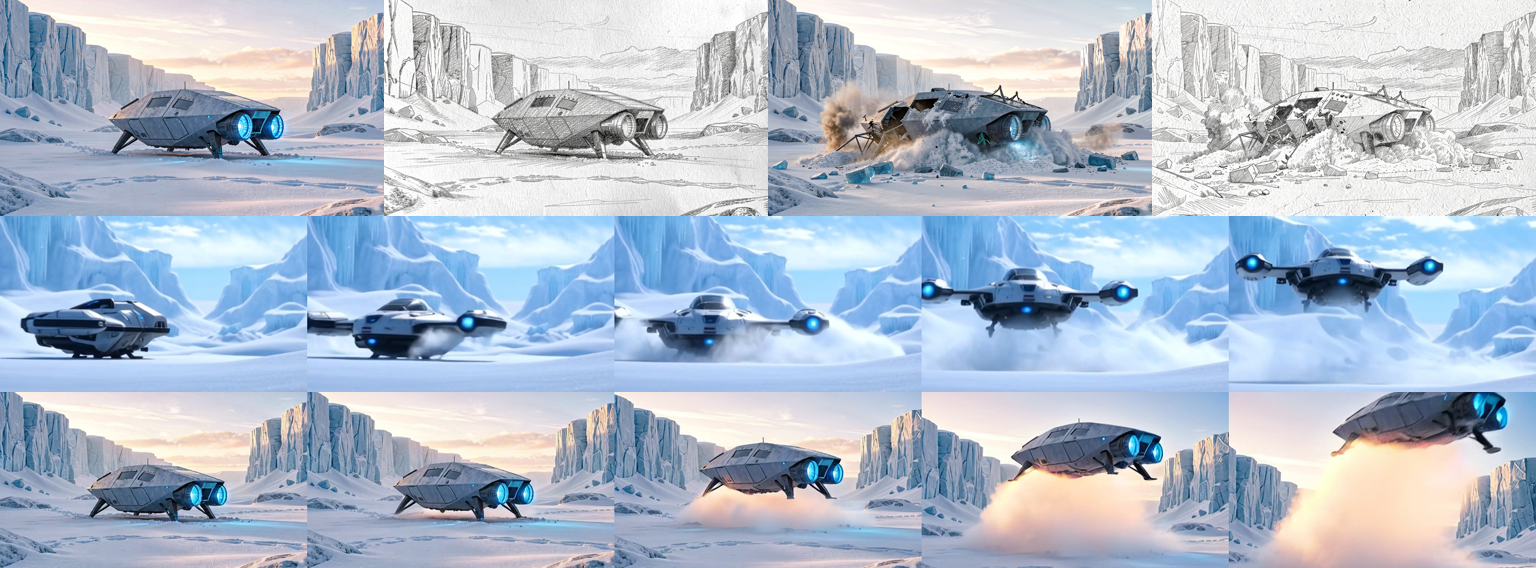
The docs include a complete model-backed spaceship workflow:
- T2I: generate a spaceship in the snow.
- I2I edit: turn it into a pencil sketch.
- I2I edit: crash the same spaceship in the snow.
- I2I multi-reference: combine the crash layout and pencil-sketch style.
- T2V A14B: generate a spaceship taking off from a snow planet.
- I2V A14B: animate the generated spaceship taking off from the source image.
See docs/examples/spaceship-snow.md for the exact commands and included assets.
For image-edit contact sheets, command logs, and model/package status across Qwen Image
Edit, Qwen Image Edit 2509/2511, FLUX.2 Klein, and latent I2I models, see
docs/edit-capabilities.md.
That guide also includes the exact base Qwen q8 structured-control proof route, the exact
base Qwen q8 control-inpaint proof route, and the exact Z-Image Turbo q8 native-inpaint proof
route.
For the full Qwen route map, including how mlxgen capability ids line up with upstream Diffusers
Qwen pipelines and where the published proof surfaces live, see
docs/qwen-route-matrix.md.
For a plain-language guide to latent img2img, instruction edit, masked edit/inpaint, multi-reference composition,
Qwen structured control, generative reframe, and outpaint, see
docs/image-edit-modes.md.
Published Models
Quantized and BF16 model variants optimized for MLX-Gen are published under the AbstractFramework organization on Hugging Face. Current published packages include:
FLUX.2 Klein:
AbstractFramework/flux.2-klein-4b-4bitAbstractFramework/flux.2-klein-4b-8bitAbstractFramework/flux.2-klein-9b-4bitAbstractFramework/flux.2-klein-9b-8bitAbstractFramework/flux.2-klein-base-4b-4bitAbstractFramework/flux.2-klein-base-4b-8bitAbstractFramework/flux.2-klein-base-9b-4bitAbstractFramework/flux.2-klein-base-9b-8bit
Qwen Image and Qwen Image Edit:
AbstractFramework/qwen-image-4bitAbstractFramework/qwen-image-8bitAbstractFramework/qwen-image-2512-4bitAbstractFramework/qwen-image-2512-8bitAbstractFramework/qwen-image-edit-4bitAbstractFramework/qwen-image-edit-8bitAbstractFramework/qwen-image-edit-2509-4bitAbstractFramework/qwen-image-edit-2509-8bitAbstractFramework/qwen-image-edit-2511-4bitAbstractFramework/qwen-image-edit-2511-8bit
Z-Image, ERNIE, and FIBO:
AbstractFramework/z-image-4bitAbstractFramework/z-image-8bitAbstractFramework/z-image-turbo-4bitAbstractFramework/z-image-turbo-8bitAbstractFramework/ernie-image-turbo-4bitAbstractFramework/ernie-image-turbo-8bitAbstractFramework/fibo-4bitAbstractFramework/fibo-8bit
SeedVR2 upscaling:
AbstractFramework/seedvr2-3b-4bitAbstractFramework/seedvr2-3b-8bitAbstractFramework/seedvr2-7b-4bitAbstractFramework/seedvr2-7b-8bit
SeedVR2 7B can also run from the official ByteDance-Seed/SeedVR2-7B source model, including the
seedvr2-7b-sharp checkpoint alias, or from the published q8/q4 package handles above. See
docs/upscaling.md and docs/quantization.md for the
validated 7B source/q8/q4 profile.
Wan2.2 video:
AbstractFramework/wan2.2-ti2v-5b-diffusers-bf16AbstractFramework/wan2.2-ti2v-5b-diffusers-8bitAbstractFramework/wan2.2-t2v-a14b-diffusers-bf16AbstractFramework/wan2.2-t2v-a14b-diffusers-8bitAbstractFramework/wan2.2-i2v-a14b-diffusers-bf16AbstractFramework/wan2.2-i2v-a14b-diffusers-8bit
Bernini-R uses the official ByteDance/Bernini-R-1.3B-Diffusers renderer together with pinned
Wan2.1 base components. It currently has no published MLX-Gen quantized package: use
mlxgen download --model bernini-r-1.3b, omit --quantize, and see
Bernini-R 1.3B.
Use mlxgen download --model <repo-id> to cache a published model, then pass the repository id to
the relevant command: mlxgen generate for image/video generation or mlxgen upscale for SeedVR2
upscaling. See
docs/quantization.md for the complete current package matrix with source
sizes, optimized package sizes, task coverage, and quantization notes.
For Wan2.2 TI2V-5B, the published BF16 MLX-Gen package is 21.2 GiB versus 31.9 GiB for the upstream source snapshot. It is mainly a smaller reusable source-equivalent package because MLX-Gen already loads Wan transformer/VAE weights at BF16 runtime precision. The published q8 package is 16.9 GiB. Since the 2026-06-12 runtime-precision fix, Wan q8 packages dequantize all transformer-block linears to BF16 at load, so q8 is a storage/download saving only and runtime memory matches the BF16 package. Wan TI2V-5B q4 or mixed q4/q8 is not published as a supported package. See the exact benchmark profile and the dated correction in docs/quantization.md.
Wan A14B Measurements
Wan A14B was measured on an Apple M5 Max with 128 GB unified memory. The published-card benchmark uses small, repeatable low-RAM runs and records full-process Darwin physical footprint, RSS, MLX allocator peak, and generation time. Use these values for the listed profiles; memory and runtime scale with resolution, frame count, step count, cache settings, and image-to-video conditioning.
Correction (2026-07-05): the q8 rows below predate the 2026-06-12 runtime-precision fix. Since that fix, Wan q8 packages dequantize all transformer-block linears to BF16 at load, so runtime memory matches the BF16 rows (re-measured: 27.8 GiB MLX peak at the same T2V profile). Plan memory as if running the BF16 package; q8 saves disk and download only.
| Model | Package | Disk | Physical Peak | Max RSS | MLX Peak | Time | Profile |
|---|---|---|---|---|---|---|---|
| Wan2.2 T2V-A14B | BF16 | 64.1 GiB | 33.0 GiB | 31.8 GiB | 27.7 GiB | 152.7 s | 384x224, 33 frames, 12 steps, 8 fps |
| Wan2.2 T2V-A14B | mixed q8/BF16 | 39.5 GiB | 20.7 GiB | 19.5 GiB | 15.5 GiB | 154.8 s | 384x224, 33 frames, 12 steps, 8 fps |
| Wan2.2 I2V-A14B | BF16 | 64.1 GiB | 33.7 GiB | 31.8 GiB | 28.2 GiB | 228.2 s | 384x384, 33 frames, 12 steps, 8 fps |
| Wan2.2 I2V-A14B | mixed q8/BF16 | 39.5 GiB | 21.5 GiB | 19.6 GiB | 15.9 GiB | 242.2 s | 384x384, 33 frames, 12 steps, 8 fps |
In these runs, mixed q8/BF16 reduces disk usage by about 38% versus BF16 MLX-Gen packages; since 2026-06-12 it is not a runtime-memory or speed improvement. See docs/quantization.md for model-family quantization details and metrics JSON. The 0.18.11 release also validates the published A14B q8 T2V/I2V handles on a 41-frame, 15-step, 480x240-target profile with saved MP4/contact-sheet evidence in the quantization docs.
Ecosystem
MLX-Gen is used as the local Apple Silicon generation backend for:
- AbstractVision, the direct integration layer for abstracting generative image and video capabilities across local and hosted providers;
- AbstractCore, which can expose OpenAI-compatible endpoints backed by AbstractVision providers, including image and video capabilities;
- AbstractFlow, a visual workflow authoring layer that can compose generative image/video nodes alongside other media, text, and agent workflows.
MLX-Gen remains useful as a standalone CLI package, and it is also designed for applications: jobs run from model files already on disk, apps can inspect supported modes before loading weights, and progress callbacks make long runs observable.
Documentation
- Getting started: installation, first runs, SeedVR2 upscaling, and Wan video.
- API and CLI: command surface, router behavior, image-to-image modes, generative reframe, backend-specific outpaint, SeedVR2 sizing, Wan video sizes, capabilities, and Python entry points.
- Image edit modes: what latent img2img, edit-reference, multi-reference, generative reframe, and outpaint mean in practice, with examples.
- Wan video: practical Wan2.2 T2V/I2V sizing, plain and masked prompt-guided A14B video-to-video with included proof artifacts, the natively ported Wan2.1-VACE-1.3B route (reference-image object injection and learned mask conditioning), a measured motion-fidelity ladder (strength vs gesture preservation), broader A14B target size families, and 5-second M5 Max comparison clips.
- Bernini-R 1.3B: ordered reference-to-video, reference-guided/source-only video editing, factored downloads, BF16-only memory guidance, and playable proof artifacts.
- Example workflow: reproducible image and video commands.
- Image upscaling: SeedVR2 sizing, published 3B/7B q8/q4 package usage, the host-safe video restore profile, published five-second Eiffel
1xand2x3B/7B validation bundles, readable tone-correction labels, and 5x source/output comparisons. - Image edit capabilities: image-edit contact sheets, exact model/package status, and command logs.
- Reframe and outpaint:
--reframe-paddingand--outpaint-paddingroutes, per-side padding across any single side or combination of sides, the--outpaint-fillconditioning-canvas modes and padding guidance, strict FLUX.2 Klein outpaint on distilled and base weights, and links to the exact Qwen and FLUX route proofs. - Model management: download, prepare, and run from local model files.
- Quantization: q8/q4/BF16 policies and measurements.
- Python integration: route-resolved runtime loading, serial multi-output reuse for unified
mlxgen generatefamilies, SeedVR2's direct-model boundary, progress callbacks, and AbstractVision/AbstractCore notes. - FAQ: recurring questions, image-to-image mode selection, SeedVR2 sizing, Qwen edit variants, negative prompts, reframe/outpaint, Wan resolutions, and usage limits.
- Troubleshooting: common setup and runtime failures.
- Acknowledgements: upstream mflux and model-community credits.
License
MLX-Gen is MIT licensed. Model weights remain governed by their original licenses and access terms.
1 maintainer

Metadata
1 maintainer
Release files for mlx-gen 0.38.0
For a detailed explanation of source distributions (sdists) and built distributions (wheels), please see the package formats documentation.
Source distribution (sdist)
| File | Size | Uploaded | |
|---|---|---|---|
| mlx_gen-0.38.0.tar.gz | 1.3 MB | Details |
Built distribution (wheel)
| File | Interpreter | ABI | Platform | Reset |
|---|---|---|---|---|
| mlx_gen-0.38.0-py3-none-any.whl | Python 3 | none | any | Details |
Total release size: 2.9 MB
Release files / mlx_gen-0.38.0.tar.gz
| Download URL | mlx_gen-0.38.0.tar.gz |
|---|---|
| Size | 1.3 MB |
| Tags | Source |
|
SHA-256 checksum How to use checksums |
db7489ce7218e6bca8f1bc87fa8640cee8b835865f67da4f0bc362f5f679c813
|
|
BLAKE2b-256 checksum How to use checksums |
5227750dad890a406a05375600ca629754792daeab6fd0b70b6dcde68619f160
|
| Upload date | |
|
Uploaded using Trusted Publishing? What is trusted publishing? |
Yes |
| Uploaded via |
twine/7.0.0 CPython/3.13.14
|
Provenance
Provenance describes where a file came from. On PyPI, provenance is shared via attestations, which provide a verifiable record of the build or publishing details. View details, limitations and caveats.


PyPI Publish Attestation
PyPI verified that this artifact, at this checksum, originated from the publisher listed below.
Signed by GitHub Actions, verified by PyPI on Sep 21, 2026.
Transparency logRelease files / mlx_gen-0.38.0-py3-none-any.whl
| Download URL | mlx_gen-0.38.0-py3-none-any.whl |
|---|---|
| Size | 1.6 MB |
| Tags | Python 3 |
|
SHA-256 checksum How to use checksums |
bfb5a50420b3ea29388510ea5eed9657c648162180d2a7f4860e98d53770619a
|
|
BLAKE2b-256 checksum How to use checksums |
b25dc1db0d3640957937a95a7acc10d43a4df8444c6959e0faf64d32da05ed28
|
| Upload date | |
|
Uploaded using Trusted Publishing? What is trusted publishing? |
Yes |
| Uploaded via |
twine/7.0.0 CPython/3.13.14
|
Provenance
Provenance describes where a file came from. On PyPI, provenance is shared via attestations, which provide a verifiable record of the build or publishing details. View details, limitations and caveats.
PyPI Publish Attestation
PyPI verified that this artifact, at this checksum, originated from the publisher listed below.
Signed by GitHub Actions, verified by PyPI on Sep 21, 2026.
Transparency log













