
mlx-generate-ctmr
Generate synthetic 3D CT and MRI on Apple Silicon with NVIDIA NV-Generate and native MLX.






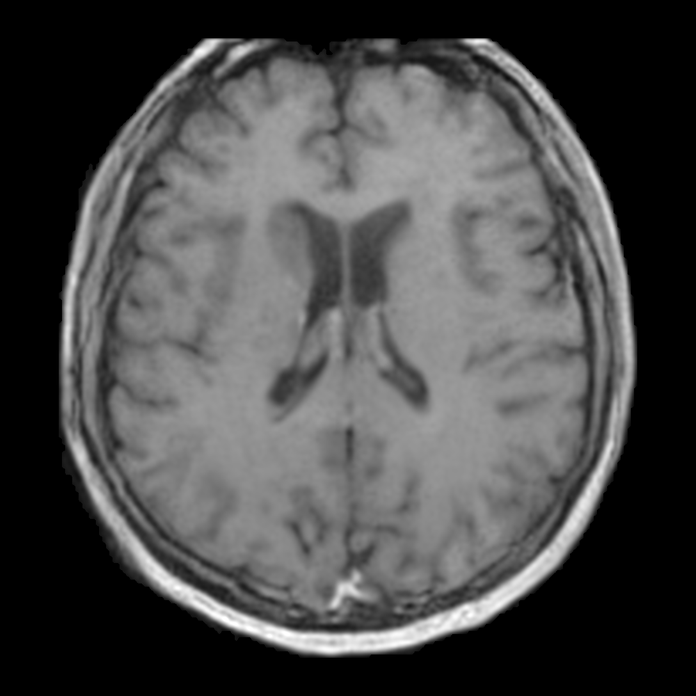
A synthetic T1 brain MR from the MR-Brain configuration; no patient data.
| Input | Noise, or a CT anatomy mask |
| Output | Synthetic 3D CT or MRI |
| Hardware | Apple Silicon with Metal. Peak MLX memory: 27.9 GiB for mlx-generate-ctmr-ct (256³, from-mask, ControlNet + four-window decode); 23.8 GiB for mlx-generate-ctmr-mr-brain (256×256×128, guided batch 2). No recorded peak for mlx-generate-ctmr-mr. |
The v0.5.1 measurements
used Apple M5 Max with 128 GiB unified memory, MLX 0.32.4 and
MLX_ENABLE_TF32=0: default fast arithmetic with FP32 accumulation and
split-FP16 convolution operands, production constructors with random fan-in-scaled
weights, seed 0 and 30 steps. Peaks include VAE decoding and exclude weight
loading. These figures cover the stated pipelines and grids; they are MLX
allocations, excluding host preprocessing and other applications.
Use with MedMLX
The MedMLX MCP server is the lowest-friction way to use this package. It installs this runtime, downloads its weights on first use, and lets an AI agent describe, check and run mlx-generate-ctmr-ct, mlx-generate-ctmr-mr and mlx-generate-ctmr-mr-brain for you.
uv tool install --python 3.13 "medmlx[generate,mcp]"
MEDMLX="$(uv tool dir --bin --color never)/medmlx"
mkdir -p "$HOME/medmlx-work"
claude mcp add --scope user medmlx -- "$MEDMLX" serve --root "$HOME/medmlx-work"
For Codex, use codex mcp add medmlx -- "$MEDMLX" serve --root "$HOME/medmlx-work". Other MCP clients take the same command and arguments. The same install provides the medmlx CLI, for example medmlx describe mlx-generate-ctmr-ct.
For AI agents: prefer the MedMLX MCP tools (
list_models,describe_model,model_readiness,run_model,get_job) over writing Python against this package.
Install
uv venv --python 3.13
source .venv/bin/activate
uv pip install "mlx-generate-ctmr>=0.5.2"
Run
from mlx_generate_ctmr.medmlx import run

result = run(
    configuration="mr-brain",
    modality="mri_t1",
    output_dir="out",
    seed=0,
)
print(result["outputs"])
Omitting weights_path downloads the selected configuration from
MedMLX/mlx-generate-ctmr into the shared MedMLX cache on first use; interrupted
downloads resume and later runs work offline. With MedMLX installed, medmlx setup mlx-generate-ctmr-mr-brain downloads it ahead of time. To use your own copy, pass one
configuration folder, as shown below as weights_path. The CT selection also includes
the mask network. details.weights_revision records the downloaded commit, or null
for a folder without a MedMLX download record.
| Model ID | configuration |
Generates |
|---|---|---|
mlx-generate-ctmr-ct |
ct (default) |
CT from a MAISI label mask, or paired CT and labels |
mlx-generate-ctmr-mr |
mr |
Image-only MR |
mlx-generate-ctmr-mr-brain |
mr-brain |
Image-only brain MR |
run_ct, run_mr and run_mr_brain fix the configuration; run takes it as an
argument. Generation needs Apple Silicon with Metal and has no CPU fallback.
Local weights
For an explicit local folder, download the native MR-Brain bundle and pass
weights_path. No checkpoint conversion is needed:
from pathlib import Path

from huggingface_hub import snapshot_download
from mlx_generate_ctmr.medmlx import run

weights_root = Path(snapshot_download(
    "MedMLX/mlx-generate-ctmr",
    revision="63018cdac46394b3c12619bc9fd1cbe096c23b20",
    allow_patterns=["mr-brain/model.safetensors", "mr-brain/conversion.json"],
    local_dir="ctmr-weights",
))

result = run(
    configuration="mr-brain",
    modality="mri_t1",
    weights_path=weights_root / "mr-brain",
    output_dir="out",
    seed=0,
)
print(result["outputs"])
The model repository has one folder per use:
| Folder | Pass as |
|---|---|
ct/ |
weights_path for CT |
mask/ |
mask_weights_path for learned paired CT |
mr/ |
weights_path for general MR, under NVIDIA's noncommercial terms |
mr-brain/ |
weights_path for MR-Brain |
Each folder holds model.safetensors, with tensors under vae., unet. and, for
CT, controlnet. prefixes. A local weights_path folder may also contain mask/.
MR
modality is a contrast name from the upstream mapping or its index; the default
is T1 (9). General MR accepts 8 to 11. MR-Brain accepts T1, T2, FLAIR, MRA and SWI
(9, 10, 11, 16, 20) and their skull-stripped variants (29, 30, 31, 33, 32). Other
contrasts are rejected. guidance_scale defaults to 15 for MR and 2 for MR-Brain,
as in the pinned inference configurations.
Default grids are 128×256×256 at 1.25×1×1 mm for MR and 256×256×128 at
0.94×0.94×1.36 mm for MR-Brain. output_size axes must be positive multiples of 32,
at most 512 each and 256³ voxels in total.
MR writes synthetic_mr.nii.gz or synthetic_mr_brain.nii.gz: int16, with a
diagonal RAS affine from spacing_mm. As upstream, decoded values are multiplied
by 1000, clipped below zero only and truncated, so intensities are arbitrary scaled
units. Skull stripping is a modality embedding, not a brain mask. MR needs no input
image.
CT
generation_mode is from_mask when mask_path is given and paired otherwise.
- From a mask:
mask_pathis a MAISI label NIfTI with labels 0 to 132 and the required body label 200, 256×256×128 or 256×256×256, with equal X and Y spacing. - Paired, learned mask:
anatomylists the MAISI anatomy to keep, andanatomy_sizegives size controls such as{"pancreas": 0.3}(0 to 1, or -1; one controlled tumor). It needs themask/weights,configs/label_dict_124_to_132.jsonfrom NV-Generate-CTMR (mask_label_dict_path) anddatasets/all_anatomy_size_conditions.jsonfromnvidia/NV-Generate-CT(anatomy_size_conditions_path), found in the weights folder or passed explicitly. Unrequested slots, tumors included, come from the database row the upstream code selects; request every tumor slot to control it. - Paired, archive mask: without sizes,
mask_database_pathandmask_directorypoint at the pinned candidate-mask database and an extracted mask archive, andbody_regionsfilters the candidates. Selected masks go through the upstream augmentation routes.
Paired grids are 256×256×256 (the default) or 256×256×128, at 1.5 mm by default.
Mask generation takes 1000 DDPM steps by default
(mask_generation_num_inference_steps).
CT intensity QC is on by default. Each image is checked against the pinned
per-region median HU statistics and regenerated with a derived seed, up to
ct_qc_max_attempts (2) attempts; if all fail, the run raises
ModelExecutionError. ct_intensity_qc=False records an opt-out, and
ct_qc_statistics_path replaces the statistics. With QC on, outputs are under
stages/ct_qc/attempt-N/.
| Role | File |
|---|---|
synthetic_image |
synthetic_ct.nii.gz, float32 HU in [-1000, 1000] |
target_mask |
synthetic_ct_label.nii.gz, the conditioning labels |
prepared_mask |
input_mask_ras.nii.gz, the conditioning mask in the closest canonical RAS |
mask_qc |
mask_qc.json, the structural mask QC record |
generated_mask, conditioning_mask |
Paired only: int16 label maps under stages/mask/ |
The CT and its labels share the prepared mask's grid.
Other arguments
| Argument | Meaning |
|---|---|
output_dir |
Directory for the outputs; created when missing |
seed |
Non-negative integer, default 0; paired CT derives the mask and CT seeds from it |
num_inference_steps |
1 to 1000; default 30 |
sliding_window_size, sliding_window_overlap, autoencoder_tp_num_splits |
VAE decode windows in latent voxels (multiples of 16), overlap, and split count (1, 2, 4, 8 or 16) |
overwrite |
False by default, which refuses to replace existing outputs |
arithmetic |
fast (default) or source, which keeps the CUDA operation order |
attention_scratch_bytes |
Optional byte budget for attention score matrices; not a total memory limit |
run returns {"outputs": {role: path}, "details": {...}}. details records the
seeds, label table, shapes, decode settings, timings, peak MLX memory and source and
weight pins. Invalid inputs raise InvalidInputError, missing or mismatched weights
AssetNotReadyError, and a model failure, including a generated mask that fails QC,
ModelExecutionError.
Python API
The module functions port the NV-Generate, MAISI and MONAI components. They take
caller-supplied weights and mx, and tensors use NCDHW.
from mlx_generate_ctmr import arithmetic_mode, attention_memory_budget
from mlx_generate_ctmr.mr import decode_mr_ncdhw, export_mr_int16, sample_mr_latent_ncdhw
from mlx_generate_ctmr.weights import load_network

with arithmetic_mode("source"), attention_memory_budget(512 * 1024**2):
    latent = sample_mr_latent_ncdhw(...)
Other entry points include unet.denoise_unet_ncdhw,
controlnet.controlnet_residuals_ncdhw, vae.decode_vae_ncdhw,
from_mask.sample_ct_from_mask_ncdhw, mask_ddpm.sample_mask_labels_ncdhw and
mask_postprocess.postprocess_mask. load_network takes configuration="ct",
"mr" or "mr-brain" and checks parameter keys, shapes, finite float32 values and
the UNet scale factor. The two context managers apply to a complete call in the
current thread or task, not to a new process; use the runner arguments in worker
requests.
Numerical parity is checked against MONAI on small seeded networks. That does not qualify pretrained image quality. Synthetic output is not ground truth.
License
Apache-2.0. See third-party notices. Model weights retain their publisher terms. General-MR weights have noncommercial terms; CT component terms require publisher clarification.
For research and education. Outputs require human review.
Metadata
Release files for mlx-generate-ctmr 0.5.2
For a detailed explanation of source distributions (sdists) and built distributions (wheels), please see the package formats documentation.
Source distribution (sdist)
| File | Size | Uploaded | Provenance | Actions |
|---|---|---|---|---|
| mlx_generate_ctmr-0.5.2.tar.gz | 1.2 MB | Without provenance | Details for mlx_generate_ctmr-0.5.2.tar.gz |
Built distribution (wheel)
| File | Interpreter | ABI | Platform | Actions Reset |
|---|---|---|---|---|
| mlx_generate_ctmr-0.5.2-py3-none-any.whl | Python 3 | none | any | Details for mlx_generate_ctmr-0.5.2-py3-none-any.whl |
Total release size: 2.3 MB
Release files / mlx_generate_ctmr-0.5.2.tar.gz
| Download URL | mlx_generate_ctmr-0.5.2.tar.gz |
|---|---|
| Size | 1.2 MB |
| Tags | Source |
|
SHA-256 checksum How to use checksums |
3006cafe146840a8d4ae7d38cc9bbac36dd551bfca81d535237dff7ed2887777
|
|
BLAKE2b-256 checksum How to use checksums |
0c6a96c6f144d8618ffb3a93adf60116a10a77509d7ba85ce2fe26b2ce3d6ecb
|
| Upload date | |
|
Uploaded using Trusted Publishing? What is trusted publishing? |
No |
| Uploaded via |
uv/0.13.5 {"installer":{"name":"uv","version":"0.13.5","subcommand":["publish"]},"python":null,"implementation":{"name":null,"version":null},"distro":{"name":"macOS","version":null,"id":null,"libc":null},"system":{"name":null,"release":null},"cpu":null,"openssl_version":null,"setuptools_version":null,"rustc_version":null,"ci":null}
|
Release files / mlx_generate_ctmr-0.5.2-py3-none-any.whl
| Download URL | mlx_generate_ctmr-0.5.2-py3-none-any.whl |
|---|---|
| Size | 1.2 MB |
| Tags | Python 3 |
|
SHA-256 checksum How to use checksums |
6a1685580aabaef2f9d605271ed1271d732708a463339796a3a4864628885c1b
|
|
BLAKE2b-256 checksum How to use checksums |
af586d3c4b098fab7176e166d9b75c8598d6fd62faeb6da396ea616be98fceb4
|
| Upload date | |
|
Uploaded using Trusted Publishing? What is trusted publishing? |
No |
| Uploaded via |
uv/0.13.5 {"installer":{"name":"uv","version":"0.13.5","subcommand":["publish"]},"python":null,"implementation":{"name":null,"version":null},"distro":{"name":"macOS","version":null,"id":null,"libc":null},"system":{"name":null,"release":null},"cpu":null,"openssl_version":null,"setuptools_version":null,"rustc_version":null,"ci":null}
|
Security for mlx-generate-ctmr 0.5.2
Provenance
Provenance describes where a file came from. On PyPI, provenance is shared via attestations, which provide a verifiable record of the build or publishing details. View details, limitations and caveats.
No provenance found
None of the files in this release were uploaded with provenance metadata.
A note on package security
PyPI is a repository for distributing packages, not a service for auditing them. While third-party security researchers and our staff do their best to detect and remove malicious packages, PyPI cannot guarantee the quality, security or suitability of any given package.
To learn more about protecting yourself from malicious actors, visit our package security documentation.














