

Fast graph neural networks on Apple Silicon






Documentation · Quickstart · Benchmarks · Examples · Discord
MLX-graphs is a library for Graph Neural Networks (GNNs) on Apple Silicon, built on Apple's MLX. It runs message passing on your Mac's GPU with fused sparse kernels, which PyTorch Geometric lacks on MPS.
On an M5 Pro, mlx-graphs trains GNNs 5.6× faster than PyTorch Geometric on MPS and 5.8× faster than on CPU, with the same accuracy (median of 35 benchmarks on 12 datasets, up to 58×).
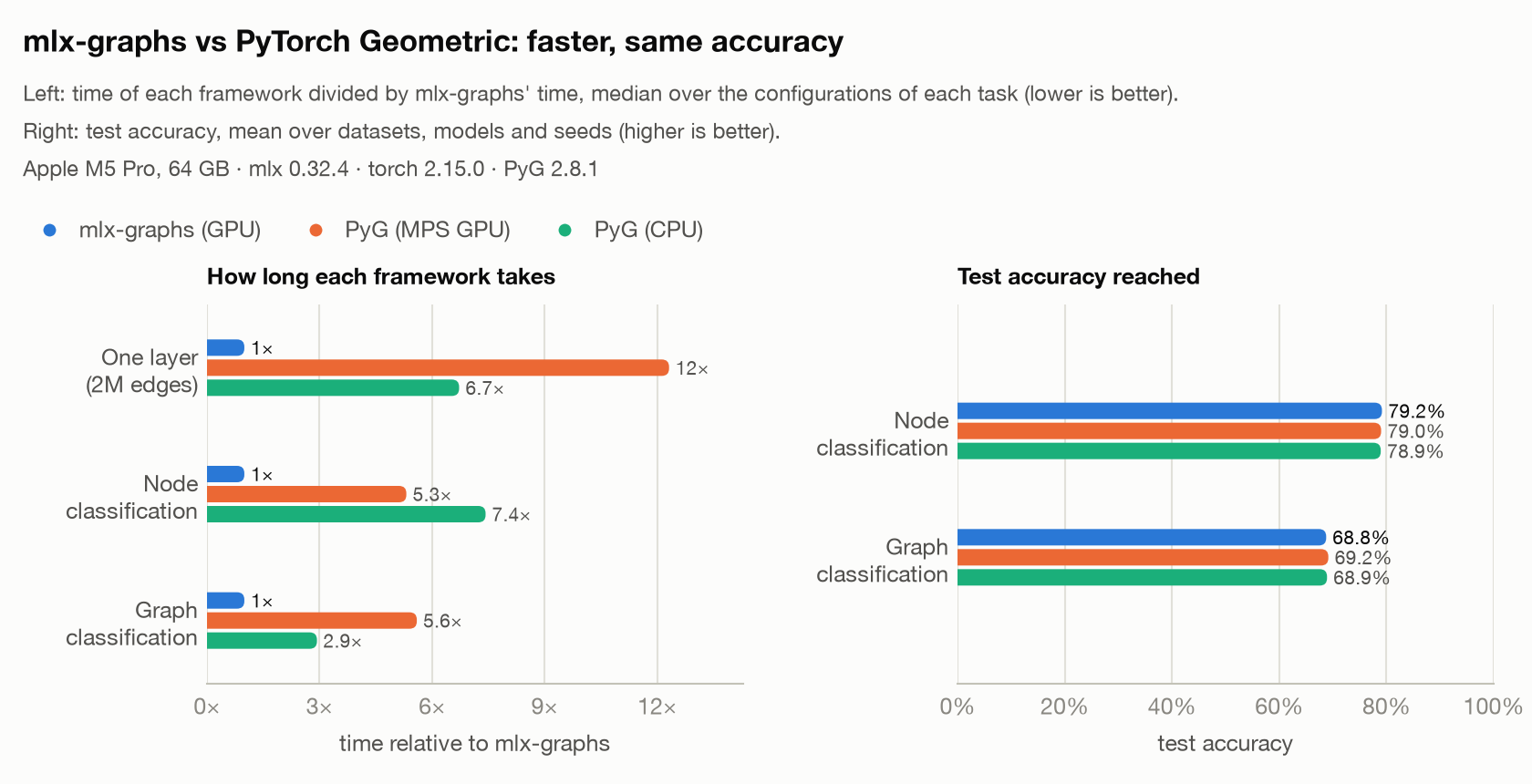
Apple M5 Pro, 64 GB · mlx 0.32.4 · PyTorch 2.15 · PyTorch Geometric 2.8.1 · same models, data and hyperparameters in every framework, 3 seeds. See benchmarks for the details.
Installation
pip install mlx-graphs
Features
- Fast GNN training and inference on Apple Silicon.
Message passing runs on the Mac's GPU through MLX and fused sparse
kernels: neighbours are aggregated with one sparse x dense matmul (SpMM)
instead of building a
[num_edges, features]message array, including for the attention layers (one SpMM per head): 5–6× faster training than PyTorch Geometric on the same Mac, see the benchmarks. - A PyG-style API.
MessagePassing,GraphData/ batching, datasets, transforms and utilities follow PyTorch Geometric's design, so porting a PyG model is mostly mechanical.from_pyg/to_pygconvert graphs both ways. - Scalability to large graphs. With unified memory, the whole memory of the Mac is available to the GPU, and fused message passing keeps the peak memory of a layer close to the size of its inputs and outputs.
What's included
Names and signatures follow PyTorch Geometric; see Coming from PyTorch Geometric.
| Convolutions | GCNConv, SAGEConv, GINConv, GINEConv, GATConv, GATv2Conv, TransformerConv, GraphConv, GeneralConv, SGConv, SSGConv, APPNP, ChebConv, TAGConv, ARMAConv, MixHopConv, GCN2Conv, FAConv, AGNNConv, LEConv, LGConv, MFConv, ClusterGCNConv, GENConv, PNAConv, CGConv, NNConv, ResGatedGraphConv, GatedGraphConv, FiLMConv, EdgeConv, DynamicEdgeConv, DirGNNConv, SimpleConv, GeneralizedRelationalConv |
| Heterogeneous | to_hetero, to_hetero_with_bases, HeteroConv, HANConv, HGTConv, RGCNConv, FastRGCNConv, RGATConv, HeteroDictLinear, HeteroGraphData |
| Graph transformers | GPSConv, SGFormer, Polynormer, MultiheadAttention, PerformerAttention; positional encodings AddRandomWalkPE, AddLaplacianEigenvectorPE, RWSEEncoder, LapPEEncoder |
| Temporal graphs | TemporalData, TemporalDataLoader, TGNMemory, LastNeighborLoader, TemporalEncoding, JODIEDataset |
| Models | GCN, GraphSAGE, GIN, GAT, PNA, EdgeCNN, MLP, DeepGCNLayer, LINKX, LightGCN, GAE / VGAE / ARGA / ARGVA, DeepGraphInfomax, RECT_L, LabelPropagation, CorrectAndSmooth, knowledge-graph embeddings (TransE, DistMult, ComplEx, RotatE), Node2Vec |
| Aggregations | aggr="sum", "mean", "max", ... or lists of them, and the modules SoftmaxAggregation, PowerMeanAggregation, MultiAggregation, DegreeScalerAggregation, QuantileAggregation, MedianAggregation, StdAggregation, VarAggregation, LSTMAggregation, GRUAggregation, SortAggregation, SetTransformerAggregation, GraphMultisetTransformer, DeepSetsAggregation, MLPAggregation, EquilibriumAggregation, LCMAggregation, ... |
| Pooling / readout | global_{add,mean,max,sort}_pool, TopKPooling, SAGPooling, AttentionalAggregation, Set2Set, JumpingKnowledge, knn_graph, radius_graph |
| Normalization | BatchNorm, LayerNorm, InstanceNorm, GraphNorm, PairNorm, DiffGroupNorm, MessageNorm, GraphSizeNorm, MeanSubtractionNorm, HeteroBatchNorm, HeteroLayerNorm |
| Loaders and samplers | Dataloader, NeighborLoader and LinkNeighborLoader (homogeneous and heterogeneous), HGTLoader, ClusterData / ClusterLoader, GraphSAINT samplers, ShaDowKHopSampler, RandomNodeLoader, ImbalancedSampler, DynamicBatchSampler, DataListLoader, DenseDataLoader |
| Datasets | Planetoid, CitationFull, Amazon, Coauthor, WikiCS, WebKB, WikipediaNetwork, Actor, HeterophilousGraphDataset, OGB (incl. OGBMAG), TU datasets, GNNBenchmarkDataset, LRGB, JODIE, QM7b, superpixels, Elliptic, MovieLens, IMDB, DBLP, FB15k-237, WordNet18, Karate Club, fake datasets |
| Transforms | Compose, ToUndirected, AddSelfLoops, NormalizeFeatures, RandomNodeSplit, RandomLinkSplit, GCNNorm, SIGN, VirtualNode, LineGraph, TwoHop, KNNGraph, LocalDegreeProfile, FeaturePropagation, SVDFeatureReduction, ToDense, ... (32 in all) |
| Metrics | LinkPredMRR, LinkPredHitRatio, LinkPredNDCG, LinkPredMAP, LinkPredPrecision, LinkPredRecall, LinkPredF1 and more, roc_auc_score, average_precision_score |
| Utilities | scatter, softmax, degree, subgraph, k_hop_subgraph, negative_sampling, dropout_edge, to_dense_batch, to_dense_adj, get_laplacian, get_ppr, homophily, assortativity, coalesce, to_undirected, graph generators, from_pyg / to_pyg, from_networkx / to_networkx, from_scipy_sparse_matrix, ... |
Every layer was checked against PyG with copied weights (outputs and gradients), and the models by training them in both frameworks on the same data: see Validation against PyG.
Benchmarks vs PyTorch Geometric
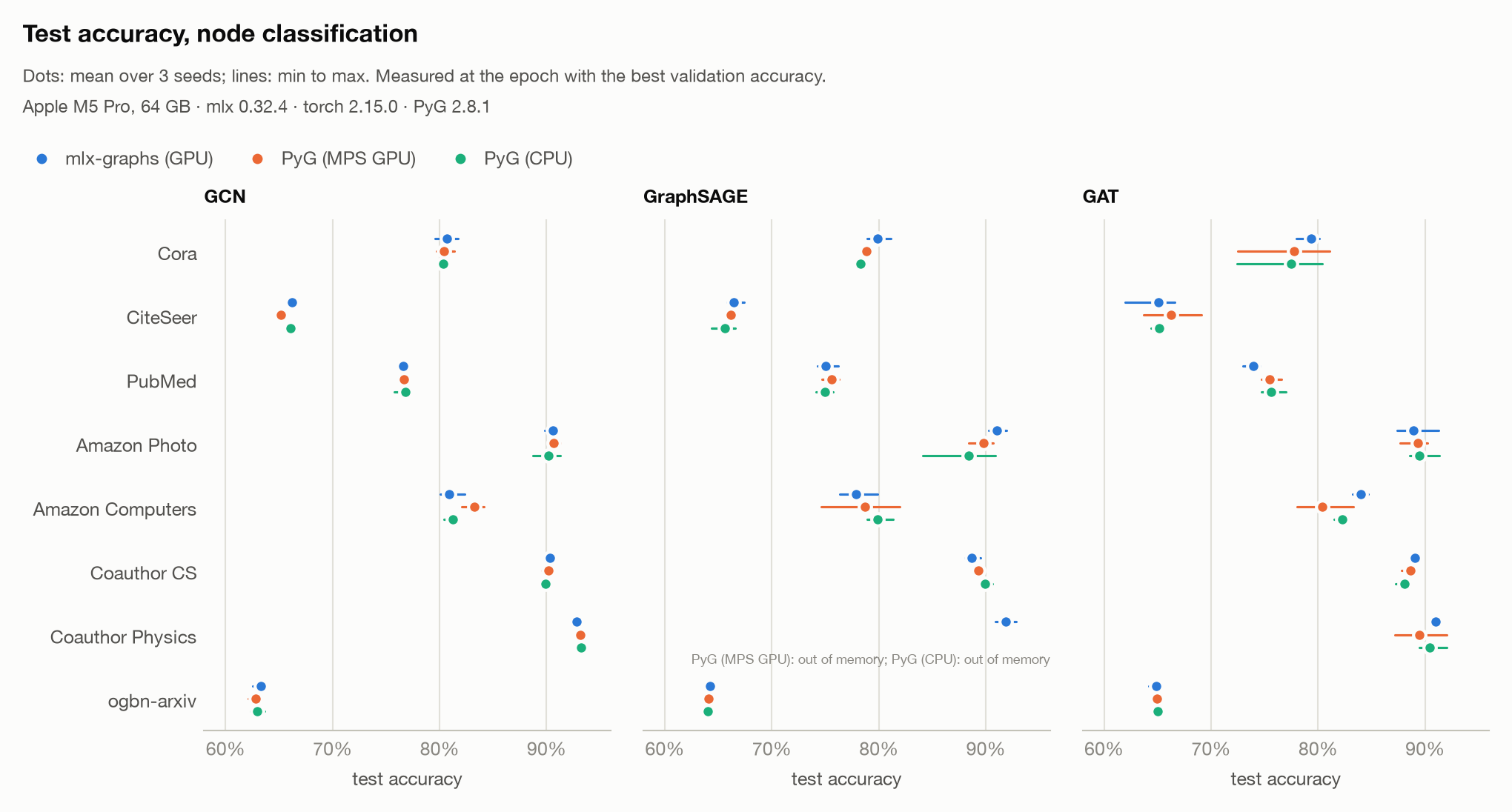
Apple M5 Pro (64 GB), PyG 2.8.1 / PyTorch 2.15 on MPS and CPU; same models, hyperparameters and data in every framework, 3 seeds.
Faster
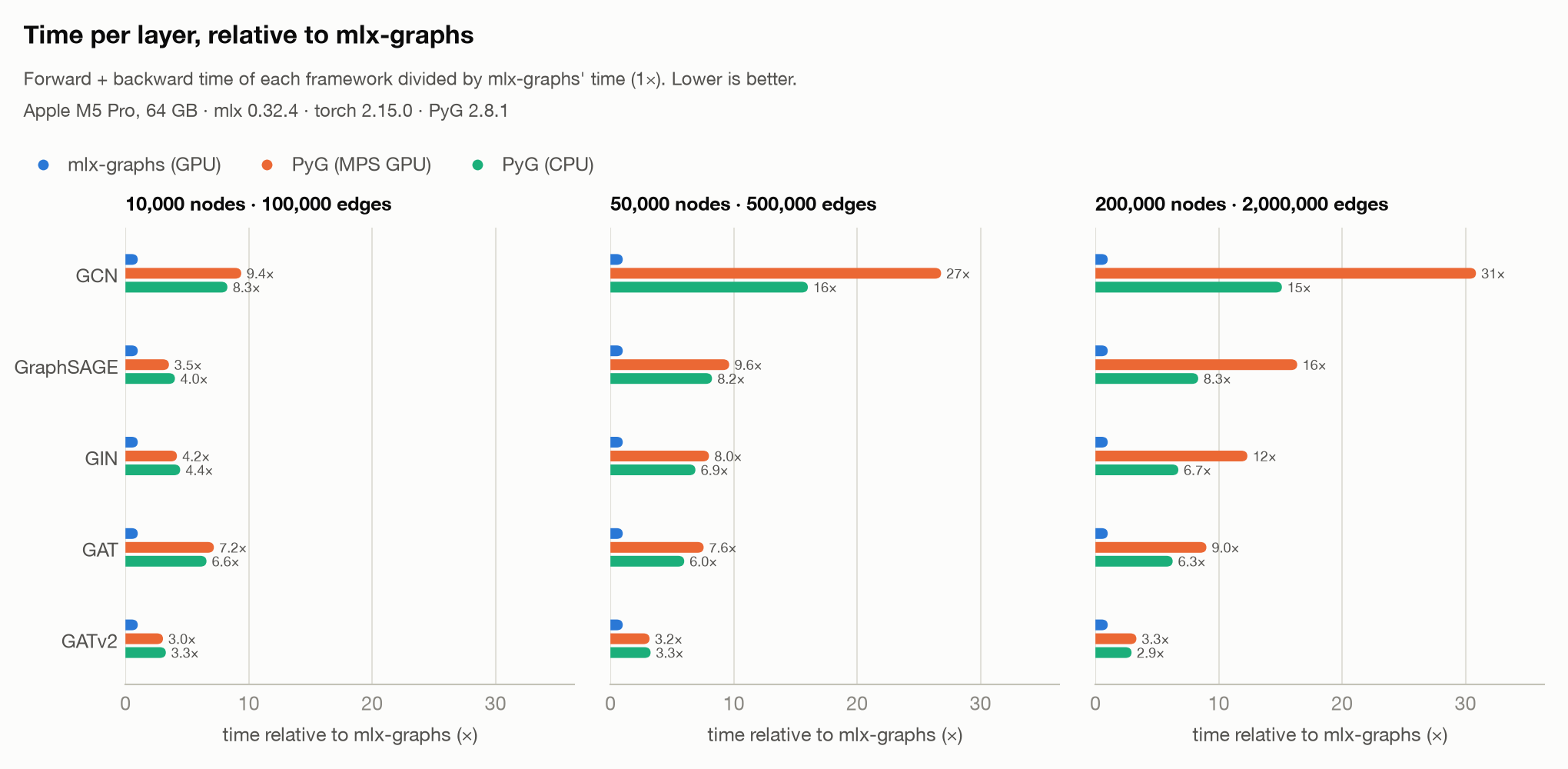
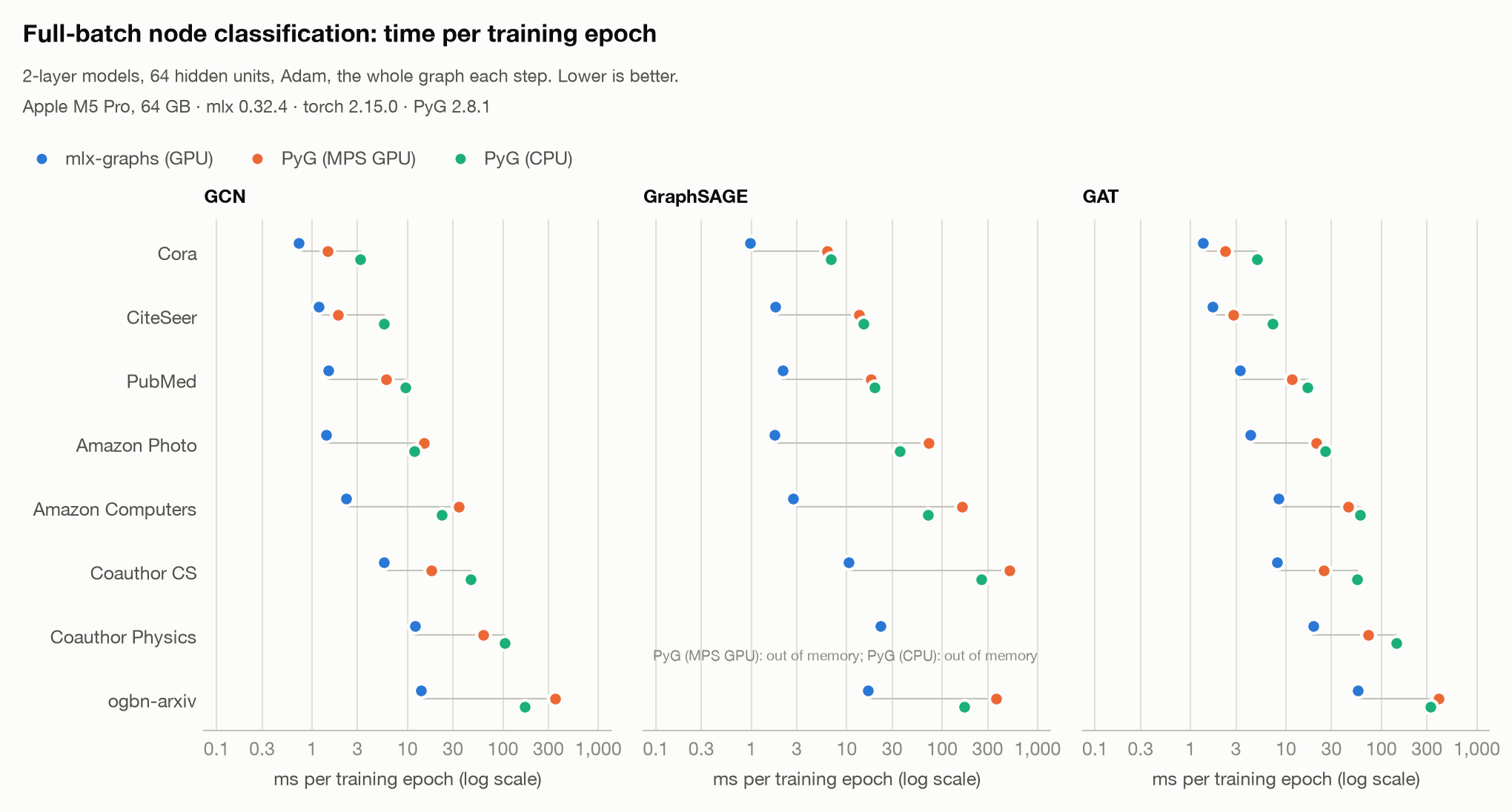
Speedups against PyG on MPS (the CPU numbers are in the figures):
- One layer (forward + backward, 2M edges): 9–31× faster for GCN, GraphSAGE, GIN and GAT, with up to 3.3× less memory; ~3× for GATv2.
- Node classification (8 datasets, Cora to ogbn-arxiv): 1.6–58× faster per epoch, median 5.3×. PyG's GraphSAGE runs out of memory (16 GB) on Coauthor Physics; mlx-graphs needs 4.7 GB.
- Graph classification (MUTAG, PROTEINS, NCI1, DD, batching included): 2.7–11× faster.
Same results
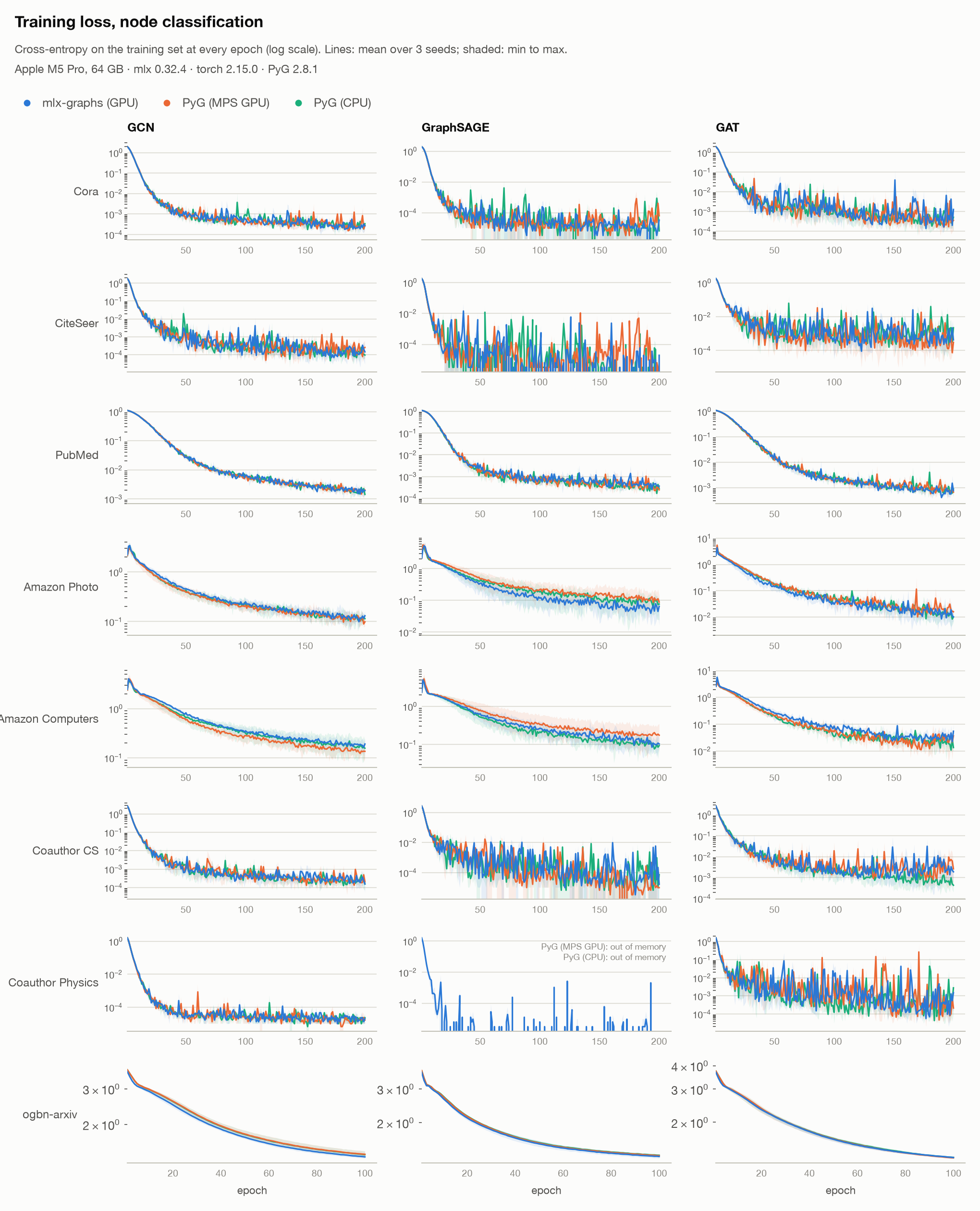
Speed only matters if the models learn the same thing. The training loss of mlx-graphs and PyG follows the same curve at every epoch, and the test accuracies match within the spread between seeds (mean over node classification: 79.2% for mlx-graphs, 79.0% / 78.9% for PyG on MPS / CPU).
The same figures for graph classification, peak memory and absolute
timings are on the benchmarks page of the docs
and in results.md, which also has every number as a
table. How the comparison is made is in
benchmarks/pyg_comparison. To reproduce
on your Mac:
pip install -e '.[benchmarks]'
python benchmarks/pyg_comparison/run.py && python benchmarks/pyg_comparison/plot.py
Usage
Tutorial guides
We provide some notebooks to practice mlx-graphs.
Runnable scripts are in examples/, e.g.
node_classification.py and
link_prediction.py.
Training a model
import mlx.core as mx
import mlx.nn as nn
import mlx.optimizers as optim
import numpy as np

from mlx_graphs.datasets import PlanetoidDataset
from mlx_graphs.nn import GCN

graph = PlanetoidDataset("cora")[0]
train = mx.array(np.nonzero(np.array(graph.train_mask))[0])
labels = graph.node_labels

model = GCN(graph.num_node_features, 64, num_layers=2, out_features_dim=7, dropout=0.5)
# bias_correction=True: the same update rule as torch.optim.Adam
optimizer = optim.Adam(learning_rate=0.01, bias_correction=True)


def loss_fn(model):
    logits = model(graph.edge_index, graph.node_features)
    return nn.losses.cross_entropy(logits[train], labels[train], reduction="mean")


loss_and_grad = nn.value_and_grad(model, loss_fn)
for epoch in range(200):
    loss, grads = loss_and_grad(model)
    optimizer.update(model, grads)
    mx.eval(model.parameters(), optimizer.state)
Writing a layer
Building new GNN layers is straightforward by implementing the MessagePassing class. This approach ensures that all operations related to message passing are properly handled and processed efficiently on your Mac's GPU. As a result, you can focus exclusively on the GNN logic, without worrying about the underlying message passing mechanics.
Here is an example of a custom GraphSAGE convolutional layer that considers edge weights:
import mlx.core as mx
from mlx_graphs.nn.linear import Linear
from mlx_graphs.nn.message_passing import MessagePassing, fused_message_passing


@fused_message_passing  # aggregate with one SpMM instead of gather-scatter
class SAGEConv(MessagePassing):
    def __init__(self, node_features_dim: int, out_features_dim: int, bias: bool = True):
        super().__init__(aggr="mean")
        self.neigh_proj = Linear(node_features_dim, out_features_dim, bias=False)
        self.self_proj = Linear(node_features_dim, out_features_dim, bias=bias)

    def __call__(self, edge_index: mx.array, node_features: mx.array, edge_weights: mx.array) -> mx.array:
        # Message passing directly on GPU. The default message is
        # edge_weights * source features, which the fused kernel computes.
        neigh_features = self.propagate(
            edge_index=edge_index,
            node_features=node_features,
            message_kwargs={"edge_weights": edge_weights},
        )
        return self.self_proj(node_features) + self.neigh_proj(neigh_features)
Layers that override message() with something other than a weighted sum
of neighbour features (e.g. attention computed per edge) simply drop the
decorator, and propagate gathers per-edge messages and scatters them.
Contributing
Why contributing?
We are at an early stage of the development of the lib, which means your contributions can have a large impact! Everyone is welcome to contribute, just open an issue 📝 with your idea 💡 and we'll work together on the implementation ✨.
Installing test, dev, benchmaks, docs dependencies
Extra dependencies are specified in the pyproject.toml.
To install those required for testing, development and building documentation, you can run any of the following
pip install -e '.[test]'
pip install -e '.[dev]'
pip install -e '.[benchmarks]'
pip install -e '.[docs]'
For dev purposes you may want to install the current version of mlx via pip install git+https://github.com/ml-explore/mlx.git
Testing
We encourage to write tests for all components.
Please run pytest to ensure breaking changes are not introduced.
Note: CI is in place to automatically run tests upon opening a PR.
Pre-commit hooks (optional)
To ensure code quality you can run pre-commit hooks. Simply install them by running
pre-commit install
and run via pre-commit run --all-files.
Note: CI is in place to verify code quality, so pull requests that don't meet those requirements won't pass CI tests.
Why running GNNs on my Mac?
Other frameworks like PyG and DGL also benefit from efficient GNN operations parallelized on GPU. However, they are not fully optimized to leverage the Mac's GPU capabilities, often defaulting to CPU execution.
In contrast, mlx-graphs is specifically designed to leverage the power of Mac's hardware, delivering optimal performance for Mac users. By taking advantage of Apple Silicon, mlx-graphs enables accelerated GPU computation and benefits from unified memory. This approach removes the need for data transfers between devices and allows for the use of the entire memory space available on the Mac's GPU. Consequently, users can manage large graphs directly on the GPU, enhancing performance and efficiency.
2 maintainers


Metadata
2 maintainers
Release files for mlx-graphs 0.5.2
For a detailed explanation of source distributions (sdists) and built distributions (wheels), please see the package formats documentation.
Source distribution (sdist)
| File | Size | Uploaded | Provenance | Actions |
|---|---|---|---|---|
| mlx_graphs-0.5.2.tar.gz | 546.0 kB | With provenance | Details for mlx_graphs-0.5.2.tar.gz |
Built distribution (wheel)
| File | Interpreter | ABI | Platform | Actions Reset |
|---|---|---|---|---|
| mlx_graphs-0.5.2-py3-none-any.whl | Python 3 | none | any | Details for mlx_graphs-0.5.2-py3-none-any.whl |
Total release size: 1.0 MB
Release files / mlx_graphs-0.5.2.tar.gz
| Download URL | mlx_graphs-0.5.2.tar.gz |
|---|---|
| Size | 546.0 kB |
| Tags | Source |
|
SHA-256 checksum How to use checksums |
06f6fc5e5ba76e464f1af25d377f80e92c89db9ebc6bc6c445fbe49189a65410
|
|
BLAKE2b-256 checksum How to use checksums |
8b1e311657db29fdf85582338de48e6fabf03a8baf427eeb416d6a2d828499a7
|
| Upload date | |
|
Uploaded using Trusted Publishing? What is trusted publishing? |
Yes |
| Uploaded via |
twine/7.0.0 CPython/3.13.16
|
Provenance
Provenance describes where a file came from. On PyPI, provenance is shared via attestations, which provide a verifiable record of the build or publishing details. View details, limitations and caveats.


PyPI Publish Attestation
PyPI verified that this artifact, at this checksum, originated from the publisher listed below.
Signed by GitHub Actions, verified by PyPI on Nov 23, 2026.
Transparency logRelease files / mlx_graphs-0.5.2-py3-none-any.whl
| Download URL | mlx_graphs-0.5.2-py3-none-any.whl |
|---|---|
| Size | 486.8 kB |
| Tags | Python 3 |
|
SHA-256 checksum How to use checksums |
034f038ffd0d72b9359492144900d30da688eb9cf45b648f95a757fd96b7831a
|
|
BLAKE2b-256 checksum How to use checksums |
8338e3aa7085b05391450ea92808f1c7af4d00a86ae24b8a79fdb86bf62f67b4
|
| Upload date | |
|
Uploaded using Trusted Publishing? What is trusted publishing? |
Yes |
| Uploaded via |
twine/7.0.0 CPython/3.13.16
|
Provenance
Provenance describes where a file came from. On PyPI, provenance is shared via attestations, which provide a verifiable record of the build or publishing details. View details, limitations and caveats.
PyPI Publish Attestation
PyPI verified that this artifact, at this checksum, originated from the publisher listed below.
Signed by GitHub Actions, verified by PyPI on Nov 23, 2026.
Transparency logSecurity for mlx-graphs 0.5.2
Provenance
Provenance describes where a file came from. On PyPI, provenance is shared via attestations, which provide a verifiable record of the build or publishing details. View details, limitations and caveats.
Full provenance
Both files in this release have been uploaded with provenance metadata.
Attestation for mlx_graphs-0.5.2.tar.gz
PyPI Publish Attestation
PyPI verified that this artifact, at this checksum, originated from the publisher listed below.
Signed by GitHub Actions, verified by PyPI on Nov 23, 2026.
Transparency logA note on package security
PyPI is a repository for distributing packages, not a service for auditing them. While third-party security researchers and our staff do their best to detect and remove malicious packages, PyPI cannot guarantee the quality, security or suitability of any given package.
To learn more about protecting yourself from malicious actors, visit our package security documentation.














