
MLX Omni Server is a server that provides OpenAI-compatible APIs using Apple's MLX framework.

Project description
MLX Omni Server
Local AI inference server optimized for Apple Silicon




MLX Omni Server provides dual API compatibility with both OpenAI and Anthropic APIs, enabling seamless local inference on Apple Silicon using the MLX framework.
✨ Features
- 🚀 Apple Silicon Optimized - Built on MLX framework for M1/M2/M3/M4 chips
- 🔌 Dual API Support - Compatible with both OpenAI and Anthropic APIs
- 🎯 Complete AI Suite - Chat, audio processing, image generation, embeddings
- ⚡ High Performance - Local inference with hardware acceleration
- 🔐 Privacy-First - All processing happens locally on your machine
- 🛠 Drop-in Replacement - Works with existing OpenAI and Anthropic SDKs
🚀 Installation
pip install mlx-omni-server
⚡ Quick Start
-
Start the server:
mlx-omni-server
-
Choose your preferred API:
OpenAI API (Click to expand)
from openai import OpenAI

client = OpenAI(
    base_url="http://localhost:10240/v1",
    api_key="not-needed"
)

response = client.chat.completions.create(
    model="mlx-community/gemma-3-1b-it-4bit-DWQ",
    messages=[{"role": "user", "content": "Hello!"}]
)
print(response.choices[0].message.content)
Anthropic API (Click to expand)
import anthropic

client = anthropic.Anthropic(
    base_url="http://localhost:10240/anthropic",
    api_key="not-needed"
)

message = client.messages.create(
    model="mlx-community/gemma-3-1b-it-4bit-DWQ",
    max_tokens=1000,
    messages=[{"role": "user", "content": "Hello!"}]
)
print(message.content[0].text)
🎉 That's it! You're now running AI locally on your Mac.
📋 API Support
OpenAI Compatible Endpoints (/v1/*)
| Endpoint | Feature | Status |
|---|---|---|
/v1/chat/completions |
Chat with tools, streaming, structured output | ✅ |
/v1/audio/speech |
Text-to-Speech | ✅ |
/v1/audio/transcriptions |
Speech-to-Text | ✅ |
/v1/images/generations |
Image Generation | ✅ |
/v1/embeddings |
Text Embeddings | ✅ |
/v1/models |
Model Management | ✅ |
Anthropic Compatible Endpoints (/anthropic/v1/*)
| Endpoint | Feature | Status |
|---|---|---|
/anthropic/v1/messages |
Messages with tools, streaming, thinking mode | ✅ |
/anthropic/v1/models |
Model listing with pagination | ✅ |
⚙️ Configuration
# Default (port 10240)
mlx-omni-server

# Custom options
mlx-omni-server --port 8000
MLX_OMNI_LOG_LEVEL=debug mlx-omni-server

# View all options
mlx-omni-server --help
🛠 Development
Development Setup
git clone https://github.com/madroidmaq/mlx-omni-server.git
cd mlx-omni-server
uv sync

# Start with hot-reload
uv run uvicorn mlx_omni_server.main:app --reload --host 0.0.0.0 --port 10240
Testing:
uv run pytest                    # All tests
uv run pytest tests/chat/openai/ # OpenAI tests
uv run pytest tests/chat/anthropic/ # Anthropic tests
Code Quality:
uv run black . && uv run isort . # Format code
uv run pre-commit run --all-files # Run hooks
🎯 Key Features
Model Management
- Auto-discovery of MLX models in HuggingFace cache
- On-demand loading and intelligent caching
- Automatic model downloading when needed
Advanced Capabilities
- Function calling with model-specific parsers
- Real-time streaming for both APIs
- JSON schema validation and structured output
- Extended reasoning (thinking mode) for supported models
📚 Documentation
| Resource | Description |
|---|---|
| OpenAI API Guide | Complete OpenAI API reference |
| Anthropic API Guide | Complete Anthropic API reference |
| Examples | Practical usage examples |
🔍 Troubleshooting
Common Issues
Requirements:
- Python 3.11+
- Apple Silicon Mac (M1/M2/M3/M4)
- MLX framework installed
Quick fixes:
# Check requirements
python --version  # Should be 3.11+
python -c "import mlx; print(mlx.__version__)"

# Pre-download models (if needed)
huggingface-cli download mlx-community/gemma-3-1b-it-4bit-DWQ

# Enable debug logging
MLX_OMNI_LOG_LEVEL=debug mlx-omni-server
🤝 Contributing
Quick contributor setup:
git clone https://github.com/madroidmaq/mlx-omni-server.git
cd mlx-omni-server
uv sync && uv run pytest
🙏 Acknowledgments
Built with MLX by Apple • FastAPI • MLX-LM
📄 License
MIT License • Not affiliated with OpenAI, Anthropic, or Apple
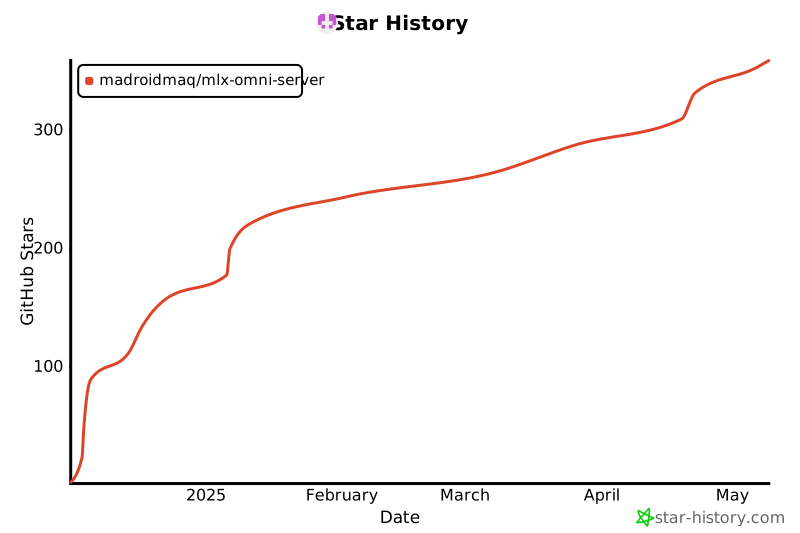
🌟 Star History
Release history Release notifications | RSS feed


Download files
Download the file for your platform. If you're not sure which to choose, learn more about installing packages.
Source Distribution
Built Distribution
Filter files by name, interpreter, ABI, and platform.
If you're not sure about the file name format, learn more about wheel file names.
Copy a direct link to the current filters
File details
Details for the file mlx_omni_server-0.5.1.tar.gz.
File metadata
- Download URL: mlx_omni_server-0.5.1.tar.gz
- Upload date:
- Size: 49.2 kB
- Tags: Source
- Uploaded using Trusted Publishing? No
- Uploaded via: uv/0.9.0
File hashes
| Algorithm | Hash digest | |
|---|---|---|
| SHA256 |
f3d3e3b936efa53a7587c849be74ae2acf728b09794e069589fae663209f2d03
|
|
| MD5 |
7523a920f378c6e597cb56055259696f
|
|
| BLAKE2b-256 |
e7c5effb0a94373a9975e33e12248a2208f9ea4f1f1f79b746446bf5c0754e1d
|
File details
Details for the file mlx_omni_server-0.5.1-py3-none-any.whl.
File metadata
- Download URL: mlx_omni_server-0.5.1-py3-none-any.whl
- Upload date:
- Size: 69.3 kB
- Tags: Python 3
- Uploaded using Trusted Publishing? No
- Uploaded via: uv/0.9.0
File hashes
| Algorithm | Hash digest | |
|---|---|---|
| SHA256 |
ca8b733b0364795604e6d026094708597f28542afb53bdaba5fa9260f6a3a1c7
|
|
| MD5 |
b851510a7dca713477e89fda274e62ec
|
|
| BLAKE2b-256 |
b0b28bb4c2b6465f78e37942cf60686a593b244d41c253e46d9b2c3070b9064c
|






