
mlx-reason-ct
Generate reports and ask questions about 3D chest and abdomen CT, locally on Apple Silicon.






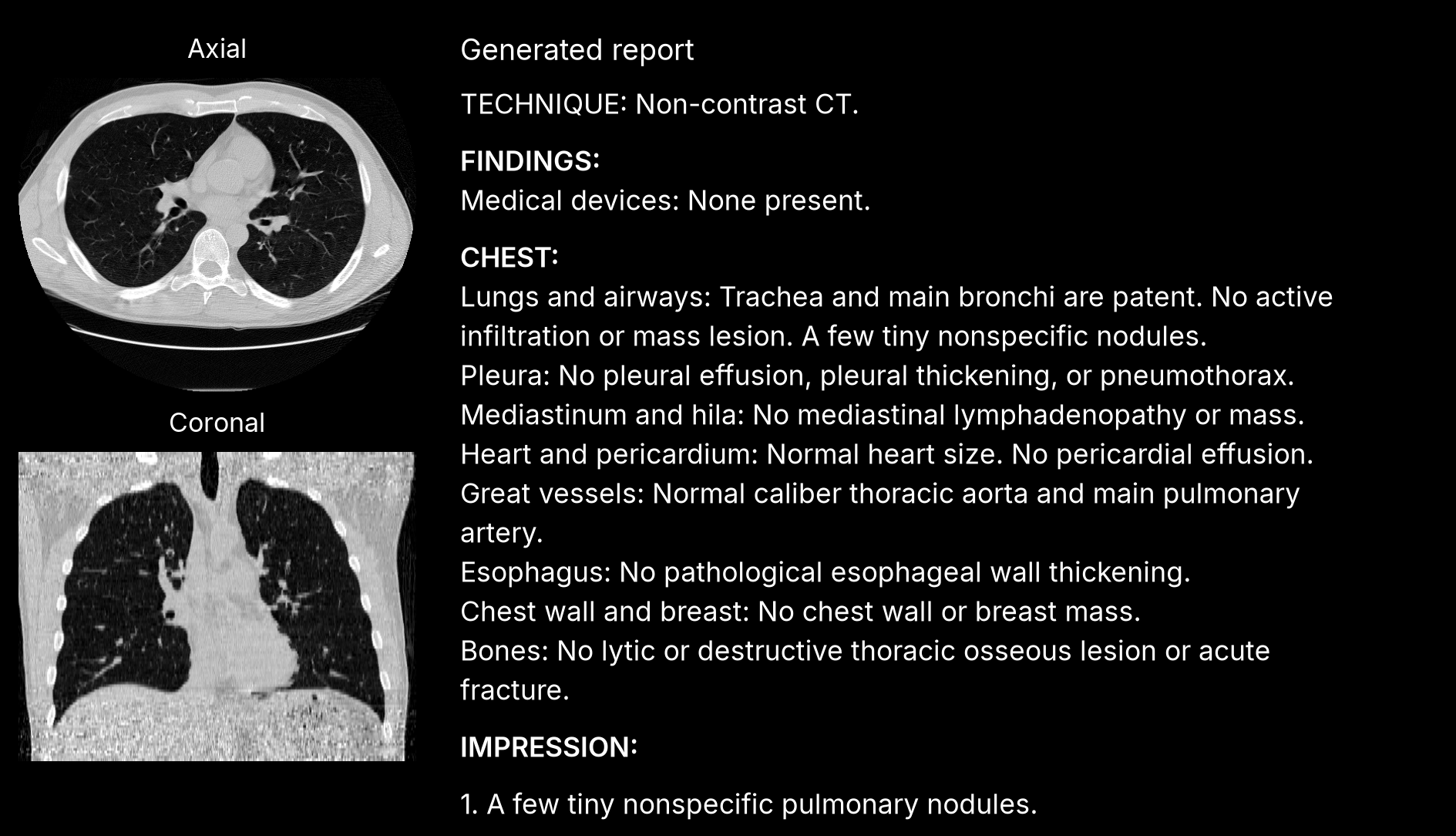
Report generated for a LUNA16 chest CT, CC BY 4.0.
| Input | Output |
|---|---|
| 3D CT · NIfTI | Reports and CT question answering |
| Model | Weights download | Peak MLX memory | Measured on |
|---|---|---|---|
mlx-reason-ct |
17.4 GB | 12.5 GB | A chest or abdomen report |
Install
uv venv --python 3.13
source .venv/bin/activate
uv pip install "mlx-reason-ct>=0.9.0"
Run
from mlx_reason_ct import run

result = run(image_path="ct.nii.gz", output_dir="outputs")
print(result["details"]["report"])
Set anatomy_region="abdomen" for abdominal CT, or use prompt to ask a question.
Weights download from MedMLX/MLX-Reason-CT on first use; medmlx setup mlx-reason-ct
downloads them ahead of time. For local weights, pass a folder with the converted
runtime files and the mlx/ shard layout as weights_path.
- The bundle stores the weights as FP32 (17.4 GB on disk); they are held in memory as their exact BF16 values.
- Allow memory beyond the MLX peak for preprocessing, macOS and other applications.
- Crop whole-body scans to the chest or abdomen before running.
Command line
mlx-reason-ct download --repo MedMLX/MLX-Reason-CT \
  --revision 5e5b5202fd04ac9f63ede203ebc9327aa676ae94 \
  --model-dir models
mlx-reason-ct verify --model-dir models
mlx-reason-ct report --input ct.nii.gz --model-dir models --output-dir outputs \
  --anatomy-region chest --prompt "What imaging modality is shown? Answer briefly."
mlx-reason-ct chat --input ct.nii.gz --model-dir models --output-dir conversation
verify checks the manifest metadata and that the runtime files and all 35 shards are
present; it does not read their contents. chat keeps the model loaded and answers each
line you type about the same CT, printing the answer as it is generated and passing the
earlier turns as history; turn N is written to turn-NNN under the output folder.
report prints the run.json record and writes the answer to report.txt in the output
folder; it takes:
| Option | Meaning |
|---|---|
--prompt |
A question; without it, report requests a structured report for --anatomy-region |
--anatomy-region |
chest (the default), abdomen, or none for the pinned processor's plain centered crop |
--enable-thinking |
Uses the template's thinking mode |
--history |
A JSON file of prior [question, answer] turns, oldest first, to ask a follow-up about the same CT |
--response-choice |
A complete permitted answer; repeat it to let the model choose among several |
--tools |
A JSON file of function schemas; see Tool conversations |
--tool-choice required |
Restricts the answer to one call of a tool from --tools |
--tool-history |
A JSON file of assistant and tool turns, ending in a tool result |
--max-new-tokens |
1–8192 (default 1024) |
--precision |
A profile from Precision |
--overwrite |
Replaces existing outputs |
chat takes --anatomy-region, --enable-thinking, --max-new-tokens, --precision,
--overwrite and --prefill-reuse (see Several questions about one CT).
Inputs and outputs
- Input: one finite, scalar 3D CT in NIfTI with Hounsfield units and a coded spatial transform. Conflicting qform and sform transforms are rejected. Spatial units are converted to millimeters; unknown units are assumed to be millimeters. HU cannot be verified from the header.
- Unsupported: DICOM, 2D images, video and multi-volume prompts.
- Crop fallback: a chest or abdomen request warns when it falls back to a
superior-edge crop;
run.jsonthen setsct_geometry.anatomy_fallback, which is also true foranatomy_region=None.
| Output role | File | Contents |
|---|---|---|
report |
report.txt |
The answer, without reasoning or a trailing empty <answer></answer> |
response |
model_response.json |
The answer, generation metrics and, when present, thinking, labels and tool_calls |
metadata |
run.json |
Geometry, source details, precision, runtime and completion status |
JSON records carry schema_version=1. run accepts keyword arguments only
and returns outputs by role as absolute paths, an artifacts entry for each, and the
run.json record as details, with the answer fields of model_response.json added:
details[...] |
Contents |
|---|---|
report |
The text of report.txt |
thinking |
The reasoning, with enable_thinking=True |
labels |
The finding labels a report or analysis ends with (<answer> Lung nodule, Emphysema </answer>), as a list |
tool_calls |
With tools: the requested calls as {"name", "arguments"}, empty for a prose answer |
Existing outputs need overwrite=True. An empty or truncated response keeps the partial
files with status: failed and raises; raise max_new_tokens and retry.
| Error | Raised when |
|---|---|
InvalidInputError |
Inputs are invalid |
AssetNotReadyError |
Weights are missing or mismatched |
MissingDependencyError |
Metal or a dependency is missing |
ModelExecutionError |
Generation fails |
Precision
precision |
Weights and arithmetic |
|---|---|
fast-bf16 (default) |
BF16 matmuls with FP32 accumulation for the CT and prompt; FP32 arithmetic for generated tokens, the LM head, norms, recurrence, attention and caches |
source-bf16 |
NVIDIA's BF16 casts and cache boundaries, reproduced step by step; much slower |
Both profiles use NVIDIA's BF16 weights unchanged. The published bundle stores them as FP32 without retraining. Decoding is greedy.
Several questions about one CT
from mlx_reason_ct import load_model

with load_model(image_path="ct.nii.gz", anatomy_region="abdomen") as session:
    first = session.run(output_dir="out/first")
    question = "Describe the liver findings."
    followup = session.run(
        output_dir="out/followup",
        prompt=question,
        history=[("Write a structured abdominal CT report.", first["details"]["report"])],
    )
load_model loads the model and encodes the CT on the first call, then releases the
visual weights, so a session serves one CT at the one-shot peak memory. Its
run takes the per-call options (prompt, history, tools, tool_choice,
tool_history, response_choices, enable_thinking, max_new_tokens, overwrite);
history is a sequence of already-answered (question, answer) pairs, oldest first.
- A changed CT file is rejected; a new CT, model or precision needs a new session.
on_text=callbackon a session'srunstreams the response: the callback receives each new piece of text as it is generated. The pieces are the raw response, before the cleanup that givesdetails["report"], so with thinking enabled they include the reasoning and</think>.- After its first call, a session decodes only the end of each prompt and reuses the
decoder state of the CT tokens before it, so later questions return much sooner.
prefill_reuse="exact"(the default) reproduces the logits of a whole prefill.prefill_reuse="fast"decodes less again, with logits that differ at rounding level: use it for yes/no questions and tool calls, where it changed no answer in testing, rather than for free-text reports, whose wording can change. The technical notes give the measurements. Changingtoolsbetween calls rebuilds that state once. - KV caches grow in 256-token chunks (
cache_chunk_size=0concatenates).
Choosing among fixed answers. response_choices restricts the answer to one of the
strings you pass (install the tools extra: uv pip install "mlx-reason-ct[tools]"). The
model still chooses with its own logits, and the result reports how it weighed them:
answer = session.run(
    output_dir="out/effusion",
    prompt="Is a pleural effusion present in this CT? Answer only Yes or No.",
    response_choices=["Yes", "No"],
)
answer["details"]["report"]  # "No"
answer["details"]["generation"]["choice_probabilities"]  # {"Yes": 0.0004, "No": 0.9996}
choice_probabilities is present when the model's first decision settles the choice, as it
does for Yes/No; choice_probability, the probability of the selected choice, always is.
Tool conversations
Declare your tools as function schemas, let the model pick the call, run it yourself and hand the result back. This package never executes a tool.
import json

from mlx_reason_ct import load_model

tools = [
    {
        "type": "function",
        "function": {
            "name": "segment_organ",
            "description": "Segment one organ and measure its volume in milliliters.",
            "parameters": {
                "type": "object",
                "properties": {"organ": {"type": "string", "enum": ["liver", "spleen"]}},
                "required": ["organ"],
            },
        },
    },
    {
        "type": "function",
        "function": {
            "name": "measure_liver_lesions",
            "description": "Detect focal liver lesions and measure their largest diameter.",
            "parameters": {"type": "object", "properties": {}},
        },
    },
]
question = "What is the volume of the liver?"

with load_model(image_path="ct.nii.gz", anatomy_region="abdomen") as session:
    request = session.run(
        output_dir="out/request", prompt=question, tools=tools, tool_choice="required"
    )
    call = request["details"]["tool_calls"][0]
    # {"name": "segment_organ", "arguments": {"organ": "liver"}}
    result = my_tools[call["name"]](**call["arguments"])  # your code runs the tool
    answer = session.run(
        output_dir="out/answer",
        prompt=question,
        tools=tools,
        tool_history=[
            {"role": "assistant", "content": request["details"]["report"]},
            {"role": "tool", "content": json.dumps(result)},
        ],
    )
print(answer["details"]["report"])  # "The liver volume is 1452.9 ml."
| Argument | Meaning |
|---|---|
tools |
Function schemas, rendered by the checkpoint's own chat template |
tool_choice |
"required" restricts the answer to one call of a declared tool. Required parameters need an enum (or the boolean type); optional parameters are left out |
response_choices |
Complete permitted responses, for calls tool_choice cannot enumerate, such as one call per candidate a tool returned. mlx_reason_ct.tool_calls.render_tool_call(name, arguments) writes a call in the checkpoint's syntax |
tool_history |
Alternating assistant and tool turns, each {"role", "content"}, ending in a tool result; cannot be combined with history |
- The checkpoint answers in prose unless a call is required, so use
tool_choiceorresponse_choicesfor the turn that should request a tool. Both need thetoolsextra andenable_thinking=False. details["tool_calls"]is checked against your schemas: the tool and its parameters are declared, required ones are present, and values match theirtypeandenum. Markup that fails leaves the list empty and setsdetails["tool_call_error"].- The model picks the right tool most reliably when the question names what the tool
measures ("What is the volume of the spleen?" rather than "Is the spleen enlarged?") and
when only one tool of a kind is declared: of two lesion detectors, the one declared first
also takes questions meant for the other.
choice_probabilitydoes not reliably flag a wrong call. The technical notes have the counts. - Leave thinking off in the turn that reads a tool result, and show the tool's own numbers next to the answer: the model can restate a measurement in words, such as "moderate-sized", in place of the value.
Use with MedMLX
Use the MedMLX MCP server to run mlx-reason-ct from an MCP client. Weights download on first use.
uv tool install --python 3.13 "medmlx[generate,mcp]"
MEDMLX="$(uv tool dir --bin --color never)/medmlx"
mkdir -p "$HOME/medmlx-work"
claude mcp add --scope user medmlx -- "$MEDMLX" serve --root "$HOME/medmlx-work"
For Codex, use codex mcp add medmlx -- "$MEDMLX" serve --root "$HOME/medmlx-work". Other MCP clients take the same command and arguments. The same install provides the medmlx CLI, for example medmlx describe mlx-reason-ct.
For AI agents: prefer the MedMLX MCP tools (
list_models,describe_model,model_readiness,run_model,get_job) over writing Python against this package.
License
Port contributions: Apache-2.0. NVIDIA model materials and weights: OpenMDW-1.1. See third-party notices.
1 maintainer

Metadata
1 maintainer
Release files for mlx-reason-ct 0.9.0
For a detailed explanation of source distributions (sdists) and built distributions (wheels), please see the package formats documentation.
Source distribution (sdist)
| File | Size | Uploaded | Provenance | Actions |
|---|---|---|---|---|
| mlx_reason_ct-0.9.0.tar.gz | 3.8 MB | Without provenance | Details for mlx_reason_ct-0.9.0.tar.gz |
Built distribution (wheel)
| File | Interpreter | ABI | Platform | Actions Reset |
|---|---|---|---|---|
| mlx_reason_ct-0.9.0-py3-none-any.whl | Python 3 | none | any | Details for mlx_reason_ct-0.9.0-py3-none-any.whl |
Total release size: 7.6 MB
Release files / mlx_reason_ct-0.9.0.tar.gz
| Download URL | mlx_reason_ct-0.9.0.tar.gz |
|---|---|
| Size | 3.8 MB |
| Tags | Source |
|
SHA-256 checksum How to use checksums |
caa84a51c6d18a3c14188c08dda2f3391d947b801bd5d3728a3c747d682e84e0
|
|
BLAKE2b-256 checksum How to use checksums |
0fb1af429f4fe0a47d0895a179a682a62e5531803f4cf477f50650185182e449
|
| Upload date | |
|
Uploaded using Trusted Publishing? What is trusted publishing? |
No |
| Uploaded via |
uv/0.13.7 {"installer":{"name":"uv","version":"0.13.7","subcommand":["publish"]},"python":null,"implementation":{"name":null,"version":null},"distro":{"name":"macOS","version":null,"id":null,"libc":null},"system":{"name":null,"release":null},"cpu":null,"openssl_version":null,"setuptools_version":null,"rustc_version":null,"ci":null}
|
Release files / mlx_reason_ct-0.9.0-py3-none-any.whl
| Download URL | mlx_reason_ct-0.9.0-py3-none-any.whl |
|---|---|
| Size | 3.8 MB |
| Tags | Python 3 |
|
SHA-256 checksum How to use checksums |
bee9a34afe559c0d83aa93fc3ddc1413a6c2cde8c2915a2e6f24f4e568fac1b2
|
|
BLAKE2b-256 checksum How to use checksums |
7cfb7fb5eef1b20a745ceb767bc55f0a3e100925b2613df067341e5e0b22e609
|
| Upload date | |
|
Uploaded using Trusted Publishing? What is trusted publishing? |
No |
| Uploaded via |
uv/0.13.7 {"installer":{"name":"uv","version":"0.13.7","subcommand":["publish"]},"python":null,"implementation":{"name":null,"version":null},"distro":{"name":"macOS","version":null,"id":null,"libc":null},"system":{"name":null,"release":null},"cpu":null,"openssl_version":null,"setuptools_version":null,"rustc_version":null,"ci":null}
|
Security for mlx-reason-ct 0.9.0
Provenance
Provenance describes where a file came from. On PyPI, provenance is shared via attestations, which provide a verifiable record of the build or publishing details. View details, limitations and caveats.
No provenance found
None of the files in this release were uploaded with provenance metadata.
A note on package security
PyPI is a repository for distributing packages, not a service for auditing them. While third-party security researchers and our staff do their best to detect and remove malicious packages, PyPI cannot guarantee the quality, security or suitability of any given package.
To learn more about protecting yourself from malicious actors, visit our package security documentation.














