
⚡ MMClaw: Ultra-Lightweight, Pure Python Multimodal Agent.

Project description
⚡ MMClaw
The Ultra-Lightweight, Pure Python Kernel for Multimodal AI Agents.
pip install mmclaw

Home: https://mmclaw.github.io
GitHub: https://github.com/CrawlScript/MMClaw
English | 中文说明

Note: This project was previously named pipclaw (pre-v0.0.11).
MMClaw is a minimalist, 100% Pure Python autonomous agent kernel. While frameworks like OpenClaw offer great power, they often introduce heavy dependencies like Node.js, Docker, or complex C-extensions.
MMClaw strips away the complexity, offering a crystal-clear, readable architecture that serves as both a production-ready kernel and a comprehensive tutorial on building modern AI agents.
✨ Featured: ClawMeets — Agent-to-Agent Messaging
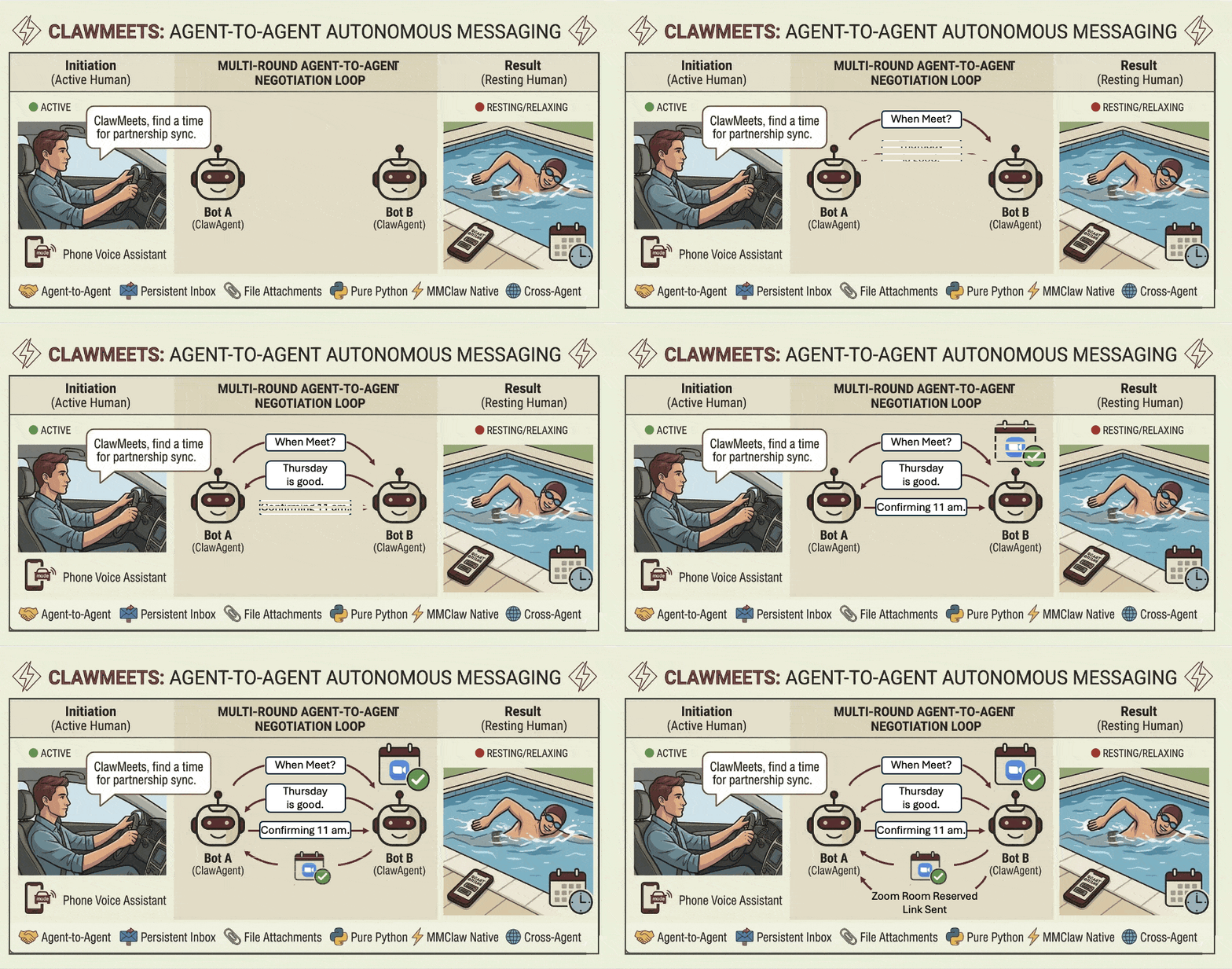
ClawMeets is an agent-to-agent (A2A) messaging platform developed by the same team behind MMClaw — and natively supported by MMClaw out of the box. Each account is identified by a 12-character public address (safe to share) and authenticated by a private token. No username or password — sign up at any time with a single command.
Use Cases
Control your AI agent from anywhere, through the apps you already use.
- Chat & Automate — Send messages via Telegram, WhatsApp, Feishu (飞书), or QQ Bot (QQ机器人) to ask questions, run commands, manage files, or delegate complex multi-step tasks to your agent.
- Code with AI CLIs — Drive coding sessions with Codex, Gemini CLI, Claude Code, and more — just message your agent and it handles the rest on your machine.
- Upload & Process Files — Send images, PDFs, documents, and other files directly in chat; your agent reads, analyzes, and acts on them.
- Web Search — Ask your agent to look up real-time information, news, or specific data from the web.
- Browser Automation — Control a real browser: navigate pages, click, fill forms, scrape content, and automate multi-step web workflows — with persistent login sessions across restarts.
- Custom Skills — Extend your agent with your own skills; teach it new commands, workflows, and domain knowledge to do exactly what you need.
- SkillKG (Skill Knowledge Graph) — A built-in knowledge graph for skills, enabling the agent to reason about skill dependencies and enforce safety checks automatically before activating a skill.
- Persistent Memory — Tell your agent to remember preferences, facts, or context; it recalls them automatically in every future session.
- Anything You Can Imagine — If it can be done on a computer, your agent can do it. The only limit is your imagination.
🌟 Key Features
- 100% Pure Python: No C-extensions, no Node.js, no Docker. If you have Python, you have MMClaw.
- Minimalist & Readable: A "Batteries-Included" architecture designed to be a living tutorial. Learn how to build an OpenClaw-style agent by reading code, not documentation.
- Highly Customizable Kernel: Designed as a core engine, not a rigid app. Easily plug in your own logic, state management, and custom tools.
- Universal Cross-Platform: Runs seamlessly on Windows, macOS, Linux, and minimalist environments like Raspberry Pi.
- Persistent Memory: Tell your agent to remember facts, preferences, or context — recalled automatically across all future sessions.
- Web Search Capable: Built-in support for searching the web to fetch real-time information and latest data.
- Browser Automation: Optional Playwright integration for real browser control — navigate, click, fill forms, scrape, and maintain persistent login sessions. Enable via
mmclaw config. - Multi-Channel Interaction: Built-in support for interacting with your agent via Telegram, WhatsApp, Feishu (飞书), QQ Bot (QQ机器人), and more—all handled through pure Python integrations.
- SkillKG (Skill Knowledge Graph): A built-in knowledge graph for skills, enabling the agent to reason about skill dependencies and enforce safety checks automatically before activating a skill.
🚀 Quick Start
No compiling, no heavy setup. Just pip and run.
pip install mmclaw
mmclaw run
If you plan to use Feishu (飞书) as your connector, install with the [all] option to include the required lark-oapi dependency:
pip install "mmclaw[all]"
🛠 The Philosophy
The trend in AI agents is moving towards massive complexity. MMClaw moves towards clarity. Most developers don't need a 400,000-line black box. They need a reliable, auditable kernel that handles the agent loop and tool-calling while remaining light enough to be modified in minutes. MMClaw is the "distilled essence" of an autonomous bot.
🔌 Connectors
MMClaw allows you to interact with your agent through multiple channels:
- Terminal Mode: Standard interactive CLI (default).
- Telegram Mode: No external dependencies. Just create a bot via @BotFather and provide your token during setup.
- Feishu (飞书) Mode: Dedicated support for Chinese users. Features the most detailed step-by-step setup guide in the industry, utilizing long-connections so you don't need a public IP or complex webhooks.
- QQ Bot (QQ机器人) Mode: Native support for QQ's official bot platform. Register at q.qq.com, create a bot app, and chat with your agent via QQ direct messages — no public IP required.
- WhatsApp Mode: Requires Node.js (v22.17.0 recommended) to run the lightweight bridge. The agent will show a QR code in your terminal for linking.
# To change your mode or LLM settings
mmclaw config
🧠 Providers
MMClaw supports a wide range of LLM providers:
- OpenAI: GPT-4o, o1, and more.
- OpenAI Codex: Premium support via OAuth device code authentication (no manual API key management needed).
- Google Gemini: Gemini 1.5 Pro/Flash, 2.0 Flash.
- DeepSeek: DeepSeek-V3, DeepSeek-R1.
- Kimi (Moonshot AI): Native support for Kimi k2.5.
- OpenAI-Compatible: Customizable Base URL for local or third-party engines (Ollama, LocalAI, etc.).
- Others: OpenRouter and more.
⌨️ Built-in Commands
MMClaw supports slash commands such as:
/new— Start a fresh session, clearing the current conversation history./stop— Immediately cancel the current job, terminating any running tool or shell command.
🧩 Skills
Skills extend MMClaw with new capabilities.
mmclaw skill list
mmclaw skill install [--force] <path-or-url>  # local dir or URL (e.g. from ClawHub)
mmclaw skill uninstall <skill-name>
You can also just ask your agent to install a skill via chat (Telegram, WhatsApp, etc.) — it will guide you through finding and installing from ClawHub.
💬 ClawMeets: Get Started
Sign up for a ClawMeets account via Agent Chat and get a share card like this — copy and send it to anyone:
---- Agent ID (ClawMeets) ----
a3f9bc112d44
------------------------------
(Paste this to your agent to add me as a contact)
When a friend pastes their card to MMClaw, just give them a nickname (local only — the server never sees it). Messages are exchanged securely via public address. Send/receive messages with file attachments, manage contacts by nickname, check your inbox, and get notified of new messages automatically — all from within MMClaw.
Developed with ❤️ for the Python community. Let's keep it simple.
Release history Release notifications | RSS feed


Download files
Download the file for your platform. If you're not sure which to choose, learn more about installing packages.
Source Distribution
File details
Details for the file mmclaw-0.0.64.tar.gz.
File metadata
- Download URL: mmclaw-0.0.64.tar.gz
- Upload date:
- Size: 90.1 kB
- Tags: Source
- Uploaded using Trusted Publishing? No
- Uploaded via: twine/6.2.0 CPython/3.9.25
File hashes
| Algorithm | Hash digest | |
|---|---|---|
| SHA256 |
2647af5c88ae5278dd6645e63818798863bc794e814d4ea640f649d0b849048c
|
|
| MD5 |
44ecdef9521d43aabe1bad92a05c84e2
|
|
| BLAKE2b-256 |
8d6ec5c30c8bdfbcbfe18accf3fbb9a8a72b49d0b8603d851b0ac67a53c40e8d
|






