
Command client for MMDok used to store documents and metadata.
MMDok is a modern, minimal, simple and scalable DMS that is designed to be able to handle hundreds of millions of documents. It can run serverless, in a container or locally with the same code base. MMCli is a command line client to MMDok.Getting started with the cli
With Python3 installed:
$ python -c "from mmcli import mmcli; mmcli.run()"
(Cmd) help
Commands:
| audit | print audit logs for a document |
| count | count documents |
| download | download and show a document in the webbrowser |
| delete | deletes a document |
| login | used to log in to the server |
| metadata | prints metadata for a document |
| register | register a user |
| search | search documents |
| server | change target server from the default |
| types | lists available document types |
| update | updates a document's metadata |
| upload | upload either a new document or a new version |
For detailed help for a command type: 'help '
Example session
Note that if you at registration below answer that you don't belong to a group, you will be able to login and use the system immediately. You will be able to use a set of predefined document types and attributes, and you will only handle your own documents.However, if you belong to a group, your group administrator has to give you permissions before you can start. You will then be able to share documents within the group.
$ python3 -c "from mmcli import mmcli; mmcli.run()"
(Cmd) register
Email:magnus@foo.bar
Password:
Do you belong to a group[Y|N]:Y

Registration succeded.
An email will be sent to you for confirmation.
Please ask your group administration to give you permissions.

(Cmd) login
Email:magnus@foo.bar
Password:

Login succeded
Group: edok

(Cmd) types
{'Faktura': {'_id': '611c18862271d9e4a5dae511',
'customer': 'edok',
'fields': {'Fakturanr': {'displayname': 'Invoice number',
'displayname_sv': 'Fakturanummer',
'format': '\d+',
'general': False,
'index': True,
'mandatory': True,
'name': 'Fakturanr',
'order': 1,
'placeholder': '123456',
'search': True,
'type': 'text',
'update': True,
'values': None}},
'id': 1,
'name': 'Faktura',
'order': 1}}

(Cmd) search
Filter: {"Fakturanr":123459}
Sort:
From:
Number:
[{'_id': '611c2032d444ac00094333b5',
'creator': 'gustav@foo.bar',
'metadata': {'Fakturanr': '123459', 'type': 'Faktura'},
'ts': '2021-08-17T20:46:42.853Z',
'type': 'Faktura',
'updated_by': 'gustav@foo.bar'}]

(Cmd) metadata
Documentid: 611c2032d444ac00094333b5
{'Fakturanr': '123459', 'type': 'Faktura'}

(Cmd) count

{'count': 14}

(Cmd) audit
Documentid: 611c2032d444ac00094333b5
[{'op': 'create', 'ts': '2021-08-17T20:46:42.853Z', 'user': 'gustav@foo.bar'},
{'op': 'view', 'ts': '2021-08-17T21:24:33.977Z', 'user': 'gustav@foo.bar'},
{'op': 'view', 'ts': '2021-08-19T21:27:01.185Z', 'user': 'sture@foo.bar'}]
(Cmd) upload
Provide a document id if it is a new version, leave empty for new document
Docid:
Chose document type: Faktura
Metadata: {"Fakturanr":123}
Path to files: /tmp/dummy.pdf

True
612404f1c0c7380008f019ad

(Cmd) count

{'count': 15}
Permissions
All commands except register and login need permissions. One can either register as a standalone user or as belonging to a group. In the first case the user has full permission but only the documents created by the user. In the latter case permissions have to be set up by a group administrator.Document types
For standalone users available document types and attributes are a set of standand and common for all. For group users those are defined in an admin gui. See below. In a future release admin operations will be available via an api and cli.Notifications
Notifications can be received upon document creation or deletion. For an example this can be look at this link: notification client The client takes the url parameter ?group=group_name, where the group_name is the name of your group.Server side
The default server is a serverless lambda located on AWS, which also is the default server for this CLI. However, the client can be set to connect to a server anywhere, for example locally while testing, or againt a server running in a Docker container.Other clients
MMDok can be accessed via a REST API. MMCli contains a Python client using this api.There is a gui client available at gui client. The same login will work.
Administration
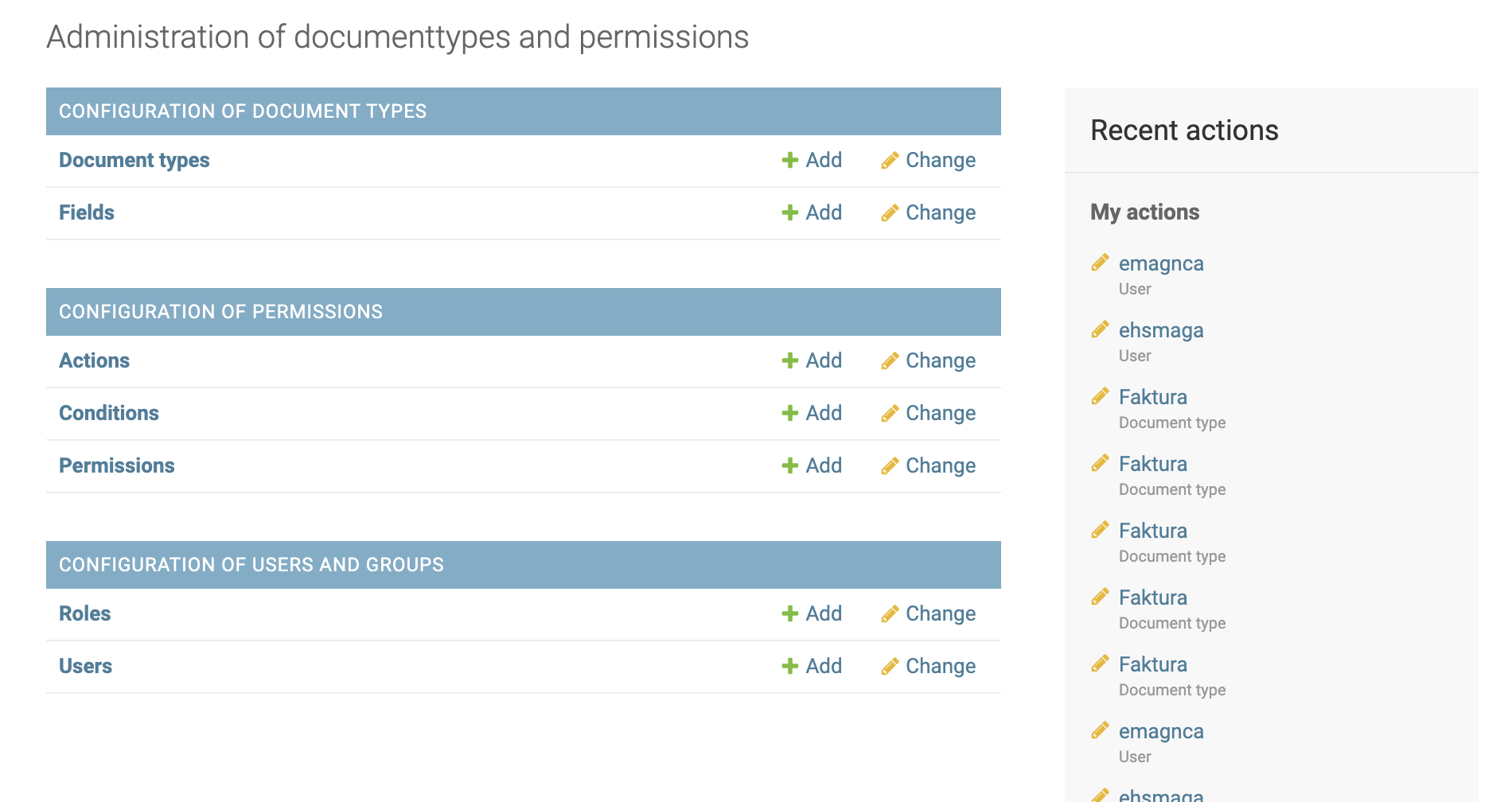
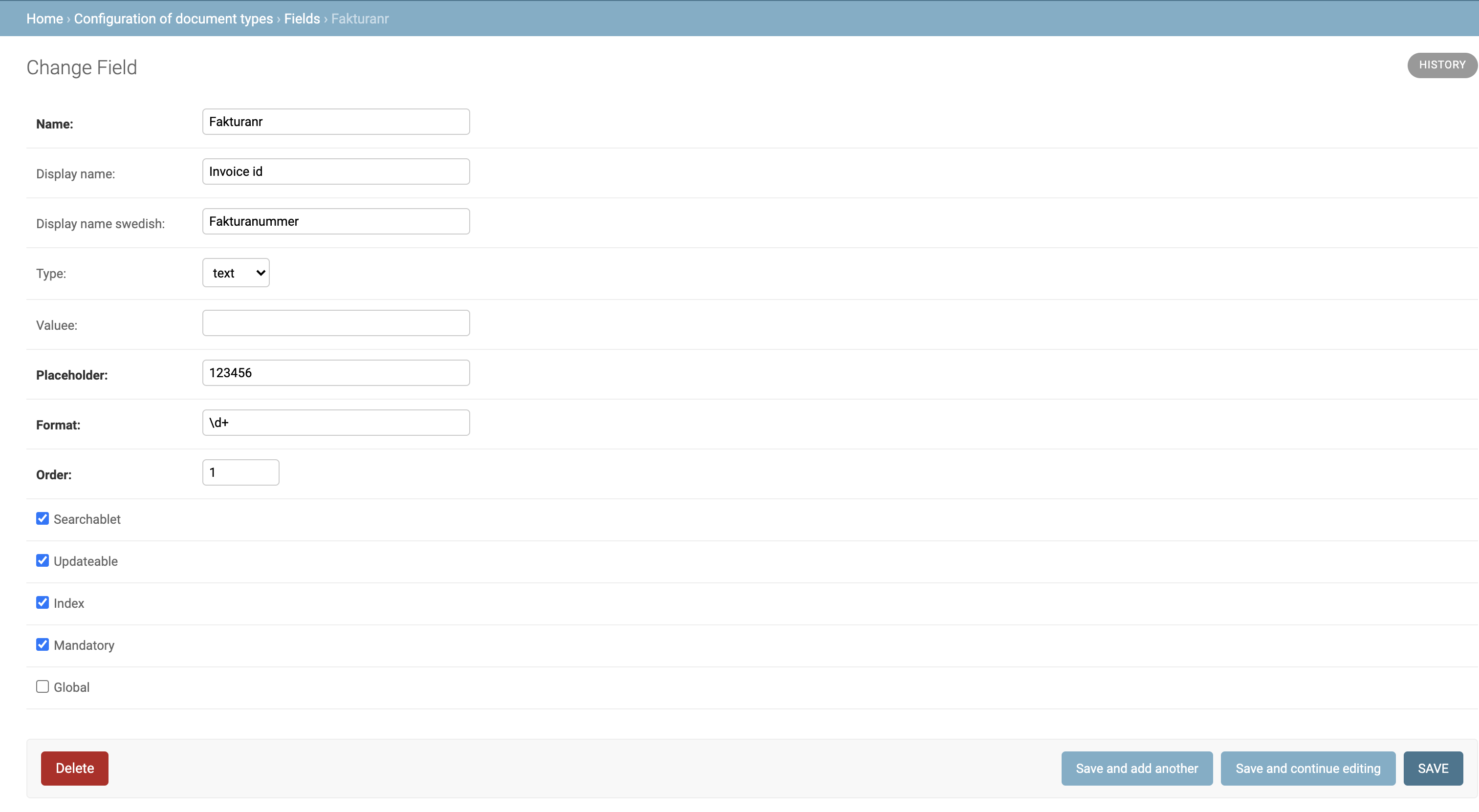
Administrations of documenttypes, users and their permissions can be done via an admin gui (a proper api will come). Two screens from the gui is show below. Please contact us if you want to create a group.The main screen
Screen for defining fields
1 maintainer

Metadata
1 maintainer
Release files for mmcli 1.1
For a detailed explanation of source distributions (sdists) and built distributions (wheels), please see the package formats documentation.
Source distribution (sdist)
| File | Size | Uploaded | |
|---|---|---|---|
| mmcli-1.1.tar.gz | 7.6 kB | Details |
Built distribution (wheel)
| File | Interpreter | ABI | Platform | Reset |
|---|---|---|---|---|
| mmcli-1.1-py2-none-any.whl | Python 2 | none | any | Details |
Total release size: 15.8 kB
Release files / mmcli-1.1.tar.gz
| Download URL | mmcli-1.1.tar.gz |
|---|---|
| Size | 7.6 kB |
| Tags | Source |
|
SHA-256 checksum How to use checksums |
38c5803dca6a576c30ab8fd56292f799e643b079a7f04134970dd6df608f371d
|
|
BLAKE2b-256 checksum How to use checksums |
1b8ab6e52e24f19285f3eb6f44c04eb075d1b88915185b9387827d132badc73f
|
| Upload date | |
|
Uploaded using Trusted Publishing? What is trusted publishing? |
No |
| Uploaded via |
twine/3.4.2 importlib_metadata/4.6.4 pkginfo/1.7.1 requests/2.25.0 requests-toolbelt/0.9.1 tqdm/4.62.1 CPython/3.9.0
|
Release files / mmcli-1.1-py2-none-any.whl
| Download URL | mmcli-1.1-py2-none-any.whl |
|---|---|
| Size | 8.2 kB |
| Tags | Python 2 |
|
SHA-256 checksum How to use checksums |
f5f3967653750d83b9f83593df4bb27bfe133b9c9dd596798a007bf8ffc07fcc
|
|
BLAKE2b-256 checksum How to use checksums |
8e3dc76b8b586e56ecffce98bec6fb24c0fa34374491b5b16bfbc87696a6facf
|
| Upload date | |
|
Uploaded using Trusted Publishing? What is trusted publishing? |
No |
| Uploaded via |
twine/3.4.2 importlib_metadata/4.6.4 pkginfo/1.7.1 requests/2.25.0 requests-toolbelt/0.9.1 tqdm/4.62.1 CPython/3.9.0
|













